

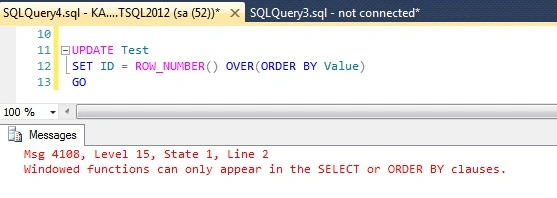
Hi friends. I was working on a scenario in which I needed to assign a unique value to a column. I was trying to update the column using window ranking function ROW_NUMBER() but I got an error that ‘Windowed function can only appear in SELECT or ORDER BY clause’:

Then I did some workaround and used the Windows function indirectly using a CTE (Common Table Expression) for this. I will show you step by step how I accomplished this using CTE.
Let’s first create a table with some test data,
- CREATE TABLE Test
- (
- ID INT,
- Value VARCHAR(10) NOT NULL
- )
- GO
- INSERT INTO Test (Value) VALUES('Sunday'),('Monday'),('Tuesday'),('Wednesday'),('Thursday'),('Friday'),('Saturday')
- GO
As we can see that in column ID NULL values get inserted as we didn’t specify any values for this column during INSERT statement. So, when I tried this UPDATE statement using ROW_NUMBER() with SET I got the following error,
- UPDATE Test
- SET ID = ROW_NUMBER() OVER(ORDER BY Value)
- GO
Then I used CTE to update the ID values in table test in this manner,
- ;WITH CTE AS
- (
- SELECT Value, ROW_NUMBER() OVER(ORDER BY Value) as RN
- FROM Test
- )
- UPDATE T
- SET ID = RN
- FROM CTE C JOIN Test T ON T.value = C.Value
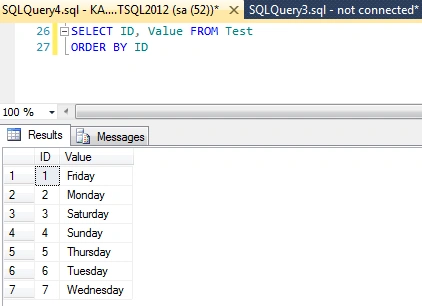
When I ran this SQL code I didn’t get any error and ID column values to get updated with unique values.
That’s all folks. I hope you like this post.
Kingston DhasianPosted Jul 15, 2018, 6:38 AM
You don’t need a JOIN in the UPDATE statement. You can update the CTE directly. UPDATE CTE SET ID =RN
Viknaraj ManogararajahPosted Jul 14, 2018, 10:43 PM
Nice Article, Thank you for sharing.........
James SchwassPosted Jul 14, 2018, 6:31 PM
This only works when the value field contains distinct values - otherwise you'll get collisions in the update
Kapil Singh KumawatPosted Jul 14, 2018, 3:33 PM
Glad you like it.
Hadshana KamalanathanPosted Jul 14, 2018, 9:57 AM
Thanks for sharing.
Christian AshishPosted Jul 13, 2018, 2:06 PM
Nice article. It's really useful for me. Thanks.
Ravishankar NPosted Jul 13, 2018, 1:05 PM
Nice article