Introduction
Serialization is the process of converting an object into a stream of bytes so that the object can be stored to memory, a database or a file. Its main purpose is to save the state of an object in order to be able to recreate it as needed. [MSDN].
The reverse process is called deserialization.
Whereas serialization is mostly known for data transmission, usually to web services, there are situations where serialized objects needs to be passed to SQL Server to be processed and saved.
In this article, 2 scenarios where XML Serialization can be used together with SQL Server shall be demonstrated.
XML Serialization
XML serialization serializes the public fields and properties of an object, or the parameters and return values of methods, into an XML stream that conforms to a specific XML Schema Definition Language (XSD) document. [MSDN].
Serialization
The first step is to define a custom class decorated with the Serializable attribute.
- [Serializable]
- public class person
- {
- public string name { get; set; }
- public string surname { get; set; }
- public string country { get; set; }
- }
Next is a generic method that serializes an object to a XML string.
The method takes an object of type <T> and returns a serialized XML string.
- public static String ObjectToXMLGeneric<T>(T filter)
- {
-
- string xml = null;
- using (StringWriter sw = new StringWriter())
- {
-
- XmlSerializer xs = new XmlSerializer(typeof(T));
- xs.Serialize(sw, filter);
- try
- {
- xml = sw.ToString();
-
- }
- catch (Exception e)
- {
- throw e;
- }
- }
- return xml;
- }
-
- person p = new person();
- p.name = "Chervine";
- p.surname = "Bhiwoo";
- p.country = "Mauritius";
-
- var xmlperson = Utils.ObjectToXMLGeneric<person>(p);
Moreover, complex types can also be serialized as shown below:
- person p = new person { name = "Chervine", surname = "Bhiwoo", country = "Mauritius" };
- person p1 = new person { name = "a", surname = "a", country = "Mauritius" };
-
- List<person> persons = new List<person>();
- persons.Add(p);
- persons.Add(p1);
-
- var xmlperson = Utils.ObjectToXMLGeneric<List<person>>(persons);
The preceding operation will return an XML as in the following:
- <?xml version="1.0" encoding="utf-16"?>
- <ArrayOfPerson xmlns:xsi="http://www.w3.org/2001/XMLSchema-instance " xmlns:xsd="http://www.w3.org/2001/XMLSchema ">
- <person>
- <name>Chervine</name>
- <surname>Bhiwoo</surname>
- <country>Mauritius</country>
- </person>
- <person>
- <name>a</name>
- <surname>a</surname>
- <country>Mauritius</country>
- </person>
- </ArrayOfPerson>
Deserialization
Just like for Serialization, the following is a generic method that takes an XML string as parameter and returns its corresponding object.
- public static T XMLToObject<T>(string xml)
- {
-
- var serializer = new XmlSerializer(typeof(T));
-
- using (var textReader = new StringReader(xml))
- {
- using (var xmlReader = XmlReader.Create(textReader))
- {
- return (T)serializer.Deserialize(xmlReader);
- }
- }
- }
-
- persons = Utils.XMLToObject < List<person>>(xmlperson);
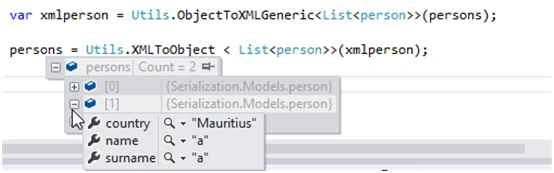 Scenario 1: Saving serialized XML as an XML Object in SQL Server
In this scenario, the user could create a custom filter based on several parameters. Please find some background about the problem below.
The requirements was to allow the user to save the custom filters, so that he just selects the filter from a list to filter information throughout the application.
Applying the filter was easily done using LINQ. The challenge was to save the filter since each user could save multiple filters, each having several conditions.
To save the filter, one of the solutions was to serialize the filter object and save it directly into the database. When needed, the filter is extracted from the database, deserialized and applied using LINQ.
The example below is a fictitious representation of the actual problem encountered.
The
goal is to serialize an object to XML and save it in the database.
Defining the table and Stored Procedure
In the table below, the serialized XML will be stored in the column "filters" that is of type "XML".
- CREATE TABLE [dbo].[tbl_filters](
- [FilterId] [int] IDENTITY(1,1) NOT NULL,
- [UserID] [varchar](20) NULL,
- [FilterDescription] [varchar](50) NULL,
- [Filters] [xml] NULL,
- PRIMARY KEY CLUSTERED
- (
- [FilterId] ASC
- )WITH (PAD_INDEX = OFF, STATISTICS_NORECOMPUTE = OFF, IGNORE_DUP_KEY = OFF, ALLOW_ROW_LOCKS = ON, ALLOW_PAGE_LOCKS =ON)
- )
-
- GO
A Stored Procedure has been used to do the insert. Here also, the parameter "filters" is of type "XML".
- CREATE PROCEDURE [dbo].[add_filter]
-
- @user_id varchar(20),
- @filter_description varchar(50),
- @filters XML
-
- AS
- BEGIN
-
-
- SET NOCOUNT ON;
- INSERT INTO [dbo].[tbl_filters]
- (
- [UserID]
- ,[FilterDescription]
- ,[Filters]
- )
- VALUES
- (@user_id,@filter_description ,@filters);
-
- END
- GO
The CustomFilter class has some descriptions about a filter and also several filters that could be applied in the application.
- [Serializable]
- public class CustomFilter
- {
- public int FilterID { get; set; }
- public string UserID { get; set; }
- public string Description { get; set; }
-
- public List<String> Type { get; set; }
- public List<String> Category { get; set; }
- public List<String> Region { get; set; }
- public List<String> Branch { get; set; }
-
-
- public override bool Equals(object obj)
- {
- if (obj == null)
- return false;
- var t = obj as CustomFilter;
- if (t == null)
- return false;
- if (FilterID == t.FilterID)
- return true;
- return false;
- }
-
- public override int GetHashCode()
- {
- int hash = 13;
- hash += (hash * 31) + FilterID.GetHashCode();
-
- return hash;
- }
- }
Create a method to pass XML parameters to the Stored Procedure
To pass XML parameters using SqlCommand, the parameter should be of type "SqlDbType.Xml".
The CreateFilter method serializes the object and passes it to the Stored Procedure.
- public void CreateFilter(CustomFilter filter)
- {
- var FilterXML = Utils.ObjectToXMLGeneric<CustomFilter>(filter);
-
- DBUtil db = new DBUtil();
-
- SqlCommand cmd = new SqlCommand("add_filter");
- cmd.Parameters.Add("@user_id", SqlDbType.VarChar).Value = filter.UserID;
- cmd.Parameters.Add("@filter_description", SqlDbType.VarChar).Value = filter.Description;
- cmd.Parameters.Add("@filters", SqlDbType.Xml).Value = FilterXML;
-
- db.DBConnect();
-
- var result = db.XmlInsertUpdate(cmd);
-
- db.DBDisconnect();
- }
The XmlInsertUpdate method takes the SqlCommand and executes the Stored Procedure.
- public Boolean XmlInsertUpdate(SqlCommand cmd)
- {
- try
- {
- using (SqlConnection con = SQlConn)
- {
-
- cmd.Connection = con;
- cmd.CommandType = CommandType.StoredProcedure;
- cmd.ExecuteNonQuery();
- }
- }
- catch (Exception e)
- {
- throw e;
- }
- return true;
- }
Create a filter
The codes below creates a new CustomFilter object and pass it to the CreateFilter method discussed previously.
- CustomFilter f1 = new CustomFilter();
-
- f1.UserID = "Chervine";
- f1.Description = " Testing ";
- f1.Branch = new List<string> { "Rose Belle", "Mahebourg" };
- f1.Category = new List<string> { "Small", "Medium" };
- f1.Region = new List<string> { "South" };
- f1.Type = new List<string> { "Mass" };
-
- CreateFilter(f1);
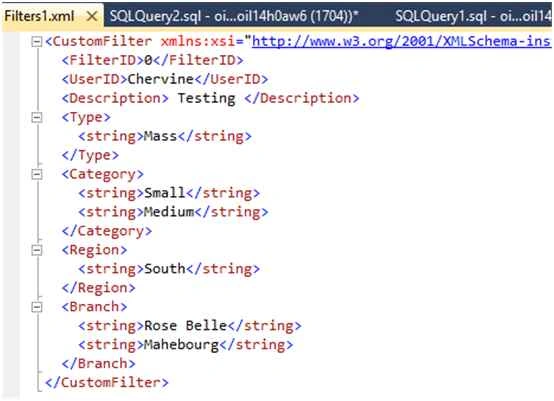
The following shows how the object is saved in the database.
 Retrieving all the filters from the database
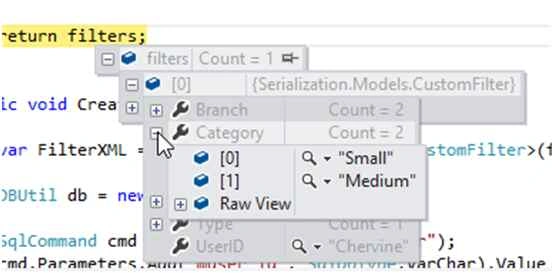
The "GetAllFilters()" method selects the records from the table, converts the serialized XML to objects again and returns a list of CustomFilters.
- public List<CustomFilter> GetAllFilters()
- {
- string sql = "select FilterId,UserID,FilterDescription,Filters from tbl_filters";
-
- DBUtil db = new DBUtil();
- List<CustomFilter> filters = new List<CustomFilter>();
-
- db.DBConnect();
-
- SqlDataReader myReader = db.FetchData(sql);
-
-
- while (myReader.Read())
- {
- var sFilter = myReader["filters"].ToString();
- CustomFilter filter = Utils.XMLToObject<CustomFilter>(sFilter);
- filters.Add(filter);
- }
-
- db.DBDisconnect();
-
- return filters;
- }
 Scenario 2: Passing serialized XML to SQL Server and selecting from XML Object in Stored Procedure
In this scenario, the user has a timesheet containing several tasks.
Instead of making several database calls to save each task, the complete timesheet object was serialized and passed to a Stored Procedure where the insert was done.
In the Stored Procedure, a select is made in the XML object to get the required information that is saved in a specific table based on its type.
The model
A timesheet has a list of tasks for each day.
- [Serializable]
- public class Timesheet
- {
- public DateTime TimesheetDate { get; set; }
- public List<Task> Tasks;
-
- public Timesheet()
- {
- Tasks = new List<Task>();
- }
-
-
- public override bool Equals(object obj)
- {
- if (obj == null)
- return false;
- var t = obj as Timesheet;
- if (t == null)
- return false;
- if (TimesheetDate == t.TimesheetDate)
- return true;
- return false;
- }
-
- public override int GetHashCode()
- {
- int hash = 13;
- hash += (hash * 31) + TimesheetDate.GetHashCode();
-
- return hash;
-
- }
- }
-
- [Serializable]
- public class Task
- {
- public int TaskID { get; set; }
- public string TaskDescription { get; set; }
- public string TaskType { get; set; }
- public DateTime StartTime { get; set; }
- public DateTime EndTime { get; set; }
-
-
- public override bool Equals(object obj)
- {
- if (obj == null)
- return false;
- var t = obj as Task;
- if (t == null)
- return false;
- if (TaskID == t.TaskID)
- return true;
- return false;
- }
-
- public override int GetHashCode()
- {
- int hash = 13;
- hash += (hash * 31) + Task.GetHashCode();
- return hash;
- }
- }
Creating and saving a timesheet
- List<Task> tasks = new List<Task>();
- tasks.Add(new Task { TaskType="Software Development", TaskDescription = "Analysis", StartTime = DateTime.Parse("23-10-2014 10:00:00"), EndTime = DateTime.Parse("23-10-2014 11:00:00") });
- tasks.Add(new Task { TaskType = "Software Development", TaskDescription = "Coding", StartTime = DateTime.Parse("23-10-2014 11:00:00"), EndTime = DateTime.Parse("23-10-2014 13:00:00") });
- tasks.Add(new Task { TaskType = "Software Development", TaskDescription = "Unit Test", StartTime = DateTime.Parse("23-10-2014 13:00:00"), EndTime = DateTime.Parse("23-10-2014 14:00:00") });
- tasks.Add(new Task { TaskType = "Administrative", TaskDescription = "Meeting", StartTime = DateTime.Parse("23-10-2014 14:00:00"), EndTime = DateTime.Parse("23-10-2014 15:00:00") });
-
- Timesheet DailyTimesheet = new Timesheet { TimesheetDate = DateTime.Today, Tasks = tasks };
-
-
- CreateTimesheet(DailyTimesheet);
The CreateTimesheet method takes a timesheet object as parameter, serializes the object and passes it to the procedure "feed_timesheet".
- public void CreateTimesheet(Timesheet timesheet)
- {
- var TimesheetXML = Utils.ObjectToXMLGeneric<Timesheet>(timesheet);
-
- DBUtil db = new DBUtil();
-
- SqlCommand cmd = new SqlCommand("feed_timesheet");
- cmd.Parameters.Add("@Timesheet", SqlDbType.Xml).Value = TimesheetXML;
-
- db.DBConnect();
-
- var result = db.XmlInsertUpdate(cmd);
-
- db.DBDisconnect();
-
- }
Selecting from the XML and performing insert from Stored Procedure in SQL Server
From the procedure, the information must be filtered into "productive" and "non-productive" that goes into various tables.
The information is then inserted into the tables by selecting directly from the XML Object.
- CREATE PROCEDURE [dbo].[feed_timesheet]
- @Timesheet XML
-
- AS
- BEGIN
-
-
- SET NOCOUNT ON;
-
- DECLARE @TimesheetDate varchar(10);
-
- SET @TimesheetDate = cast(@Timesheet.query('data(Timesheet/TimesheetDate)') as varchar);
-
- INSERT INTO [dbo].[tbl_timesheet_productive]
- (
- [TimesheetDate],
- [TaskDescription],
- [StartTime],
- [EndTime]
- )
- SELECT
- @TimesheetDate,
- cast(colx.query('data(TaskDescription) ') as varchar) as description,
- cast(colx.query('data(StartTime) ') as varchar) as starttime,
- cast(colx.query('data(EndTime) ') as varchar) as endtime
-
- FROM @Timesheet.nodes('Timesheet/Tasks/Task') AS Tabx(Colx)
- WHERE cast(colx.query('data(TaskType) ') as varchar ) = 'Software Development';
-
-
- INSERT INTO [dbo].[tbl_timesheet_nonproductive]
- (
- [TimesheetDate],
- [TaskDescription],
- [StartTime],
- [EndTime]
- )
- SELECT
- @TimesheetDate,
- cast(colx.query('data(TaskDescription) ') as varchar) as description,
- cast(colx.query('data(StartTime) ') as varchar) as starttime,
- cast(colx.query('data(EndTime) ') as varchar) as endtime
-
- FROM @Timesheet.nodes('Timesheet/Tasks/Task') AS Tabx(Colx)
- WHERE cast(colx.query('data(TaskType) ') as varchar ) = 'Administrative';
-
- END
-
- GO


Rudra NarayanPosted Aug 30, 2023, 6:57 AM
Confused, not clearly elaborated
Sr KarthigaPosted Mar 29, 2016, 8:53 AM
good one
Sr KarthigaPosted Mar 29, 2016, 8:53 AM
nice explanation
Chervine BhiwooPosted Aug 22, 2015, 3:10 PM
Thanks for your comments and also thanks to C# Corner members for tweaking the article!
RakeshPosted Aug 22, 2015, 1:34 PM
Good one
Gopi ChandPosted Aug 22, 2015, 1:31 PM
Excellent work
Gowtham KPosted Aug 22, 2015, 11:48 AM
Good one
Yashwant VishwakarmaPosted Aug 22, 2015, 11:07 AM
Nice one :)
Rajeesh MenothPosted Aug 22, 2015, 9:49 AM
Good One
Yashwanth MuthineniPosted Aug 22, 2015, 7:08 AM
Nice share
Santhakumar MunuswamyPosted Aug 22, 2015, 6:07 AM
Good Article. Thanks for sharing
Amol JadhaoPosted Aug 22, 2015, 4:44 AM
Thanks for Share..
Karthikeyan KPosted Aug 22, 2015, 4:40 AM
Good one sir...
Vaikesh K PPosted Aug 22, 2015, 4:02 AM
Nice Share :)