

Introduction
The main use of JavaScript is to reduce unnecessary round trips between the client and the server. It means the application will be more responsive because the load on the server is reduced. JavaScript uses the client machine processing power.
Open Visual Studio




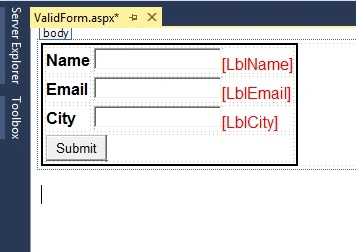
Design the form
Now design the form and code for the validation using JavaScript as described in the following:
- <%@ Page Language="C#" AutoEventWireup="true" CodeBehind="ValidForm.aspx.cs" Inherits="DemoApplication.ValidForm" %>
- <!DOCTYPE html>
- <html xmlns="http://www.w3.org/1999/xhtml">
- <head runat="server">
- <title>Valid Form</title>
- <script type="text/javascript">
- function ValidateForm()
- {
- var ret = true;
- if(document.getElementById("TxtName").value=="")
- {
- document.getElementById("LblName").innerText = "Name is Required";
- ret = false;
- }
- else
- {
- document.getElementById("LblName").innerText = "";
- }
- if (document.getElementById("TxtEmail").value == "")
- {
- document.getElementById("LblEmail").innerText = "Email is Required";
- ret = false;
- }
- else
- {
- document.getElementById("LblEmail").innerText = "";
- }
- if (document.getElementById("TxtCity").value == "") {
- document.getElementById("LblCity").innerText = "City is Required";
- ret = false;
- }
- else {
- document.getElementById("LblCity").innerText = "";
- }
- return ret;
- }
- </script>
- </head>
- <body>
- <form id="form1" runat="server">
- <table style="border:2px solid black; font-family:Arial">
- <tr>
- <td>
- <b>Name</b>
- </td>
- <td>
- <asp:TextBox ID="TxtName" runat="server"></asp:TextBox>
- <asp:Label ID="LblName" runat="server" ForeColor="Red"></asp:Label>
- </td>
- </tr>
- <tr>
- <td>
- <b>Email</b>
- </td>
- <td>
- <asp:TextBox ID="TxtEmail" runat="server"></asp:TextBox>
- <asp:Label ID="LblEmail" runat="server" ForeColor="Red"></asp:Label>
- </td>
- </tr>
- <tr>
- <td>
- <b>City</b>
- </td>
- <td>
- <asp:TextBox ID="TxtCity" runat="server"></asp:TextBox>
- <asp:Label ID="LblCity" runat="server" ForeColor="Red"></asp:Label>
- </td>
- </tr>
- <tr>
- <td colspan="2">
- <asp:Button ID="BtnSubmit" runat="server" Text="Submit" OnClientClick="return ValidateForm()" />
- </td>
- </tr>
- </table>
- </form>
- </body>
- </html>
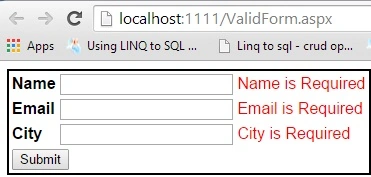
After doing that, let's run the application and input some invalid inputs (for example, submit with blank Text Box), then we will see that the form will not post-back because the function we defined in the <script> will return false and the ASP.NET form will not postback.
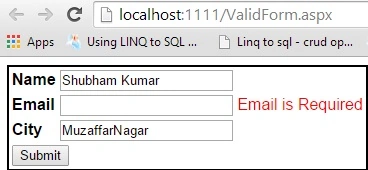
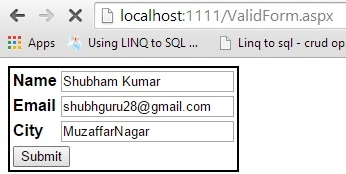
The form will now postback but then we will provide inputs for all the TextBox validated by our JavaScript function.
Summary
This article is for beginners who want to use JavaScript to validate ASP.NET forms.
Gopi ChandPosted Jun 17, 2015, 2:00 PM
It only validate required fields...right..?..good
Rama KrishnanPosted Jun 17, 2015, 6:22 AM
Does it Validate Email ID ?
Pankaj Kumar ChoudharyPosted Jun 17, 2015, 1:54 AM
Nice Work
Dominique CejaPosted Jun 16, 2015, 9:28 PM
Excellent Sir!
Edrick LomibaoPosted Jun 16, 2015, 8:09 PM
Good Article
Santhakumar MunuswamyPosted Jun 16, 2015, 2:45 PM
Thanks for nice article:)
Former memberPosted Jun 16, 2015, 10:10 AM
Nice article
NitinPosted Jun 16, 2015, 4:52 AM
nice