

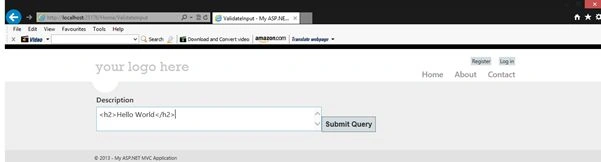
When you develop an app, sometimes your requirements could be you want to send HTML values (for example <h2>Hello World</h2>) from the view to the controller. Sometimes we use HTML Editors, to save some info into the database. By default ASP.NET MVC doesn't allow a user to submit the HTML content.
So let's see how to submit your form with HTML content.
- Open Visual Studio then select "New Project" then select "ASP.NET MVC 4 Application".
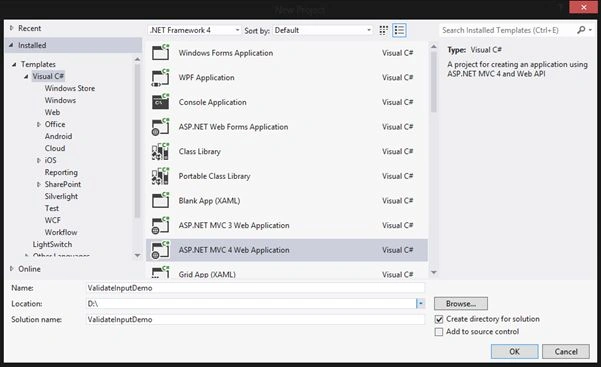
- Provide a project name then click "OK".
- Select "Internet Application" then click "OK"
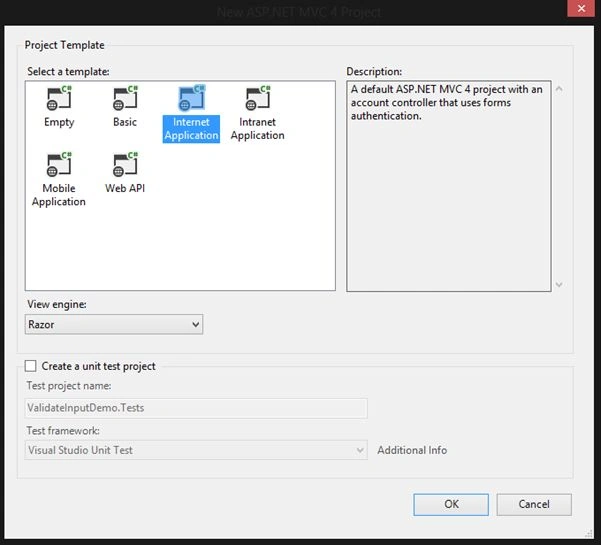
- Create a New Model.
ValidateModel.cs
- using System;
- using System.Collections.Generic;
- using System.Linq;
- using System.Web;
- using System.Web.Mvc;
- namespace ValidateInputDemo.Models
- {
- public class ValidateModel
- {
- public string description { get; set; }
- }
- }
- Add a new method to your Controller.
HomeController.cs- public ActionResult ValidateInput()
- {
- return View();
- }
- [HttpPost]
- public ActionResult ValidateInput(string description)
- {
- ValidateModel validateInputModel = new ValidateModel();
- validateInputModel.description = description;
- return View(validateInputModel);
- }
ValidateInput.cshtml
- @model ValidateInputDemo.Models.ValidateModel
- @{
- ViewBag.Title = "ValidateInput";
- }
- @using (@Html.BeginForm("ValidateInput","Home", FormMethod.Post, new { @id = "form1", @enctype = "multipart/form-data" }))
- {
- <label id="lblDescription">Description</label>
- @Html.TextAreaFor(m=>m.description, new {@id="txtDescription",@name="description" })
- <input type="submit" id="bttn_Submit" />
- }


Nhân NguyễnPosted May 3, 2023, 1:24 PM
It's good for submit html in to db but this will error xss.
Sridhar YelagandhulaPosted Mar 5, 2020, 7:07 AM
Nice example
Manav PandyaPosted Oct 3, 2016, 10:04 AM
Can i get your Web-api related article collection for beginner ?
Manav PandyaPosted Oct 3, 2016, 10:03 AM
Great post sir ...
Sourabh MishraPosted Apr 2, 2014, 1:20 AM
Thanks
Mukesh Kumar TiwariPosted Apr 1, 2014, 4:09 AM
good one.........