

Introduction
There are various options for validating input fields in Silverlight 4 such as Data Annotations, IDataErrorInfo interface, INotifyDataErrorInfo interface, property validation, and Context Validation. In this article we will discuss how we can validate any user input using IDataErrorInfo interface.
Setting Up a Silverlight Project
Open Visual Studio 2010 and create a new Silverlight application. In my case, I name the application ValidationIUsingINotifyDataError. We are following MVVM structure so place three new folder named View, Model, and ViewModel.
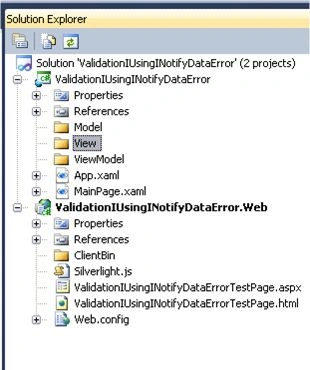
Lets Follow step wise procedure to implement validation using IDataErrorInfo
1. Add a new item SilverlightUserControl to the view folder and named it as OrganizerView.
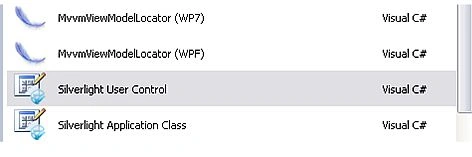
2.
Lets add
some label and input fields to the OrganizerView. The final UI looks like the following:
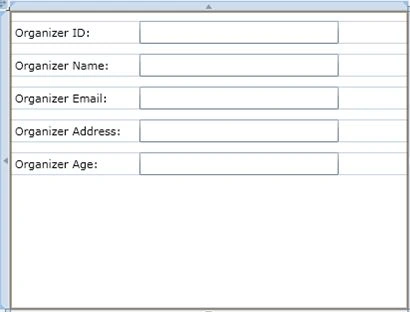
And the xaml will be
<UserControl
xmlns:sdk="http://schemas.microsoft.com/winfx/2006/xaml/presentation/sdk"
x:Class="ValidationIUsingINotifyDataError.View.OrganizerView"
xmlns="http://schemas.microsoft.com/winfx/2006/xaml/presentation"
xmlns:x="http://schemas.microsoft.com/winfx/2006/xaml"
xmlns:d="http://schemas.microsoft.com/expression/blend/2008"
xmlns:mc="http://schemas.openxmlformats.org/markup-compatibility/2006"
mc:Ignorable="d"
d:DesignHeight="300"
d:DesignWidth="400">
<Grid
x:Name="LayoutRoot"
Background="White">
<StackPanel>
<StackPanel
Orientation="Horizontal"
Margin="0,10,0,0"
>
<sdk:Label
x:Name="organizerIDLabel"
Content="Organizer
ID:"
Width="120"
Margin="5,0,0,0,"
/>
<TextBox
Width="200"
Height="23"
Margin="5,0,0,0,"
/>
</StackPanel>
<StackPanel
Orientation="Horizontal"
Margin="0,10,0,0">
<sdk:Label
x:Name="organizerNameLabel"
Content="Organizer
Name:"
Width="120"
Margin="5,0,0,0,"
/>
<TextBox
Width="200"
Height="23"
Margin="5,0,0,0,"
/>
</StackPanel>
<StackPanel
Orientation="Horizontal"
Margin="0,10,0,0">
<sdk:Label
x:Name="organizerEmailLabel"
Content="Organizer
Email:"
Width="120"
Margin="5,0,0,0,"
/>
<TextBox
Width="200"
Height="23"
Margin="5,0,0,0,"
/>
</StackPanel>
<StackPanel
Orientation="Horizontal"
Margin="0,10,0,0">
<sdk:Label
x:Name="organizerAddressLable"
Content="Organizer
Address:"
Width="120"
Margin="5,0,0,0,"
/>
<TextBox
Width="200"
Height="23"
Margin="5,0,0,0,"
/>
</StackPanel>
<StackPanel
Orientation="Horizontal"
Margin="0,10,0,0">
<sdk:Label
x:Name="organizerAgeLable"
Content="Organizer
Age:"
Width="120"
Margin="5,0,0,0,"/>
<TextBox
Width="200"
Height="23"
Margin="5,0,0,0,"
/>
</StackPanel>
</StackPanel>
</Grid>
</UserControl>
3. Third step
will be adding a class, we can name it "OrganizerViewModel.cs" inside
ViewModel.
4.
Lastly will add a class
"Organizer.cs" to model folder. So finally the folder structure will look
something like this:
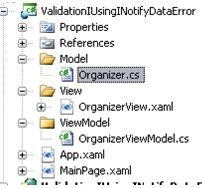
Here inside the Organizer.cs, this class has to implement IDataErrorInfo interface, after implementing the class will have some auto generated interface code resembling to.
public
class Organizer
: IDataErrorInfo
{
public string
Error
{
get { throw
new
NotImplementedException(); }
}
public string
this[string
columnName]
{
get { throw
new
NotImplementedException(); }
}
}
We
need to have some property of this class so lets say the properties are
OrganizerID , OrganizerName ,OrganizerEmail,OrganizerAddress and OrganizerAge. So
now the new class looks like the following:
public
class Organizer
: IDataErrorInfo
{
#region
Property
private int
_organizerID;
public int
OrganizerID
{
get
{
return _organizerID;
}
set
{
_organizerID = value;
}
}
private string
_organizerName;
public string
OrganizerName
{
get
{
return _organizerName;
}
set
{
_organizerName = value;
}
}
private string
_organizerEmail;
public string
OrganizerEmail
{
get
{
return _organizerEmail;
}
set
{
_organizerEmail = value;
}
}
private string
_organizerAddress;
public string
OrganizerAddress
{
get
{
return _organizerAddress;
}
set
{
_organizerAddress = value;
}
}
private int
_organizerAge;
public int
OrganizerAge
{
get
{
return _organizerAge;
}
set
{
_organizerAge = value;
}
}
#endregion
#region
IDataErrorInfo Implementation
public string
Error
{
get { throw
new
NotImplementedException(); }
}
public string
this[string
columnName]
{
get { throw
new
NotImplementedException(); }
}
#endregion
}
}
private
string organizerError =
string.Empty;
private
Dictionary<string,
string> organizerErrorDictionary =
new Dictionary<string,
string>();
and
lets change the implementation of IDataErrorInfo Part after changing we will
end up doing the following.
#region
IDataErrorInfo Implementation
private string
organizerError = string.Empty;
private
Dictionary<string,
string> organizerErrorDictionary =
new Dictionary<string,
string>();
public string
Error
{
get {
return organizerError; }
}
public string
this[string
columnName]
{
get
{
return ((organizerErrorDictionary.ContainsKey(columnName))
? organizerErrorDictionary[columnName] : null);
}
}
#endregion
Now we have to validate the properties of this class with our logic. For example we want the OrganizerName field to be required and we can't leave it empty or we want the OrganizerEmail Property to match the email format etc.So lets move to that and change the property logic
#region
Property
private int
_organizerID;
public int
OrganizerID
{
get
{
return _organizerID;
}
set
{
if (value
<= 0)
{
organizerErrorDictionary["OrganizerID"]
= "Invalid ID";
}
else if
(organizerErrorDictionary.ContainsKey("OrganizerID"))
{
organizerErrorDictionary.Remove("OrganizerID");
}
_organizerID = value;
}
}
private string
_organizerName;
public string
OrganizerName
{
get
{
return _organizerName;
}
set
{
if (string.IsNullOrEmpty(value))
{
//For Null And Empty
organizerErrorDictionary["OrganizerName"]
= "Organizer Name is required";
}
else if(organizerErrorDictionary.ContainsKey("OrganizerName"))
{
organizerErrorDictionary.Remove("OrganizerName");
}
_organizerName = value;
}
}
private static
string EmailPattern =
@"^([\w-\.]+)@((\[[0-9]{1,3}\.[0-9]{1,3}\.[0-9]{1,3}\.)|(([\w-]+\.)+)[a-zA-Z]{2,4}|[0-9]{1,3})(\]?)$";
private string
_organizerEmail;
public string
OrganizerEmail
{
get
{
return _organizerEmail;
}
set
{
if (!Regex.IsMatch(value.Trim(),
EmailPattern, RegexOptions.IgnoreCase))
{
organizerErrorDictionary["OrganizerEmail"]
= "Inputted Email is not in correct format";
}
else if
(organizerErrorDictionary.ContainsKey("OrganizerEmail"))
{
organizerErrorDictionary.Remove("OrganizerEmail");
}
_organizerEmail = value;
}
}
private string
_organizerAddress;
public string
OrganizerAddress
{
get
{
return _organizerAddress;
}
set
{
if (string.IsNullOrEmpty(value))
{
organizerErrorDictionary["OrganizerAddress"]
= "Address is Required";
}
else if(value.Trim().Length
< 10)
{ organizerErrorDictionary["OrganizerAddress"]
= "Length of address should be greater than 10 ";
}
else if
(organizerErrorDictionary.ContainsKey("OrganizerAddress"))
{
organizerErrorDictionary.Remove("OrganizerAddress");
}
_organizerAddress = value;
}
}
private int
_organizerAge; public
int OrganizerAge
{
get
{
return _organizerAge;
}
set
{
if (value
<= 0 || value > 120)
{
organizerErrorDictionary["OrganizerAge"]
= "Invalid Age";
}
else if
(organizerErrorDictionary.ContainsKey("OrganizerAge"))
{
organizerErrorDictionary.Remove("OrganizerAge");
}
_organizerAge = value;
}
}
#endregion
Ok
we are done with the putting validation into the properties.
Now let's create an
object of Organizer in OrganizerViewModel.cs and lets bind it to the UI.
We have to follow following steps :-
a.
Create an object of the OrganizerViewModel inside the constructor of
OrganizerView and bind its datacontext like following:
OrganizerViewModel
organizerViewModel = new
OrganizerViewModel();
this.DataContext = organizerViewModel;
b. Than finally use the binding process in the OrganizerView.xaml
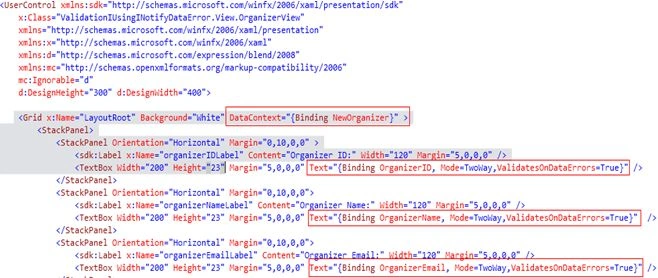
In very first red block I am binding NewOrganizer(object of Organizer Class) to whole grid. And than in subsequent red block I am binding the property of NewOrganizer to textbox. Here in binding inside textbox I have kept the mode to be two way and used ValidatesOnDataErrors as true .
c. Change following line in App.xaml.cs
//this.RootVisual
= new MainPage();
this.RootVisual
= new OrganizerView();
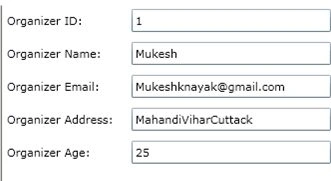
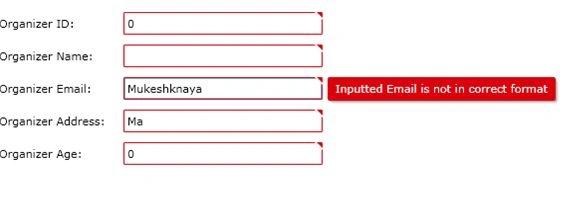
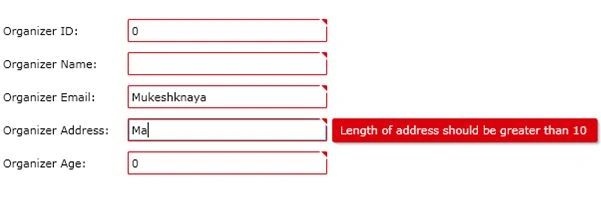
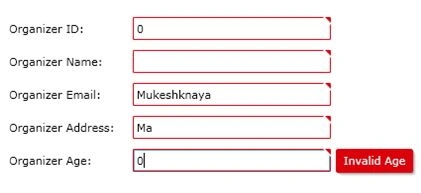
Down below is the sequence of screen you will come across.
Change the Organizer ID to 0 and move to other field you will get following screen.
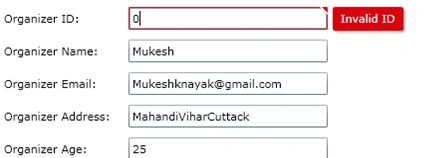
Here in the above screen ID should be Valid as mentioned in the property for Organizer class.
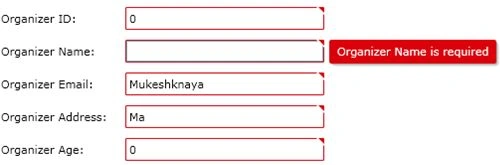
Similarly for others properties we will get respective validation.
Vj MehtaPosted Dec 3, 2014, 6:50 AM
nice work. please provide vedios
Santosh YadavPosted Feb 24, 2013, 7:51 AM
Can you provide input validation inside datagrid code in silverlight 4 with datagrid binding by wcf.
hamendra TyagiPosted Jan 1, 2012, 1:30 PM
Do we have some process to validate Combobox.
Aaron CronjePosted Dec 22, 2011, 1:07 AM
Good Work..... Can i use Validating input fields in AJAX with Silverlight.
Alten ChingumbraPosted Dec 22, 2011, 1:07 AM
Give the world the best you have, and the best will come to you!
Akash AhlawatPosted Dec 22, 2011, 12:59 AM
Hi Mukesh..U really provided a great article
Arjun PanwarPosted Dec 22, 2011, 12:56 AM
Really very Good analysis
Monika AroraPosted Dec 22, 2011, 12:50 AM
Good article.
Dinesh BeniwalPosted Dec 22, 2011, 12:12 AM
Good start, Welcome to the Mindcracker Community.
Boris JonesPosted Dec 22, 2011, 12:10 AM
Nice Article.
Sonakshi SinghPosted Dec 22, 2011, 12:07 AM
Nice presentation