

Previous part: Creating a WebApi Project in .NET 9 [GamesCatalog] 18
Step 1. Let's work on user creation. To start, we'll create the user repository.
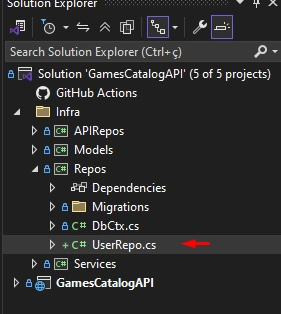
Step 1.1. Create the CreateAsync and GetByEmailAsync functions and generate the interface:
using Microsoft.EntityFrameworkCore;
using Models.DTOs;

namespace Repos;

public class UserRepo(IDbContextFactory<DbCtx> DbCtx) : IUserRepo
{
    public async Task CreateAsync(UserDTO user)
    {
        using var context = DbCtx.CreateDbContext();

        await context.User.AddAsync(user);

        await context.SaveChangesAsync();
    }

    public async Task<UserDTO?> GetByEmailAsync(string email)
    {
        using var context = DbCtx.CreateDbContext();
        return await context.User.FirstOrDefaultAsync(x => x.Email.Equals(email));
    }
}
Step 2. Let's create the models that we'll use for user creation.
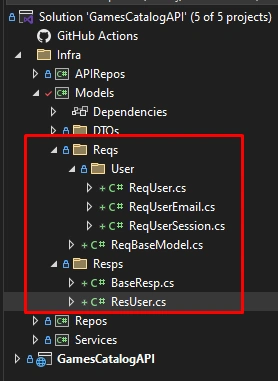
We'll have two folders: Requests and Responses. Inside Requests, we'll create a folder for the user models. The user models will be divided into separate parts that can eventually be used individually:
Step 2.1. ReqBaseModel.cs will contain the function responsible for validating the model fields:
Code for ReqBaseModel.cs
using System.ComponentModel.DataAnnotations;

namespace Models.Reqs;

public record ReqBaseModel
{
    public string? Validate()
    {
        List<ValidationResult> validationResult = [];

        Validator.TryValidateObject(this, new ValidationContext(this), validationResult, true);

        if (validationResult.Count > 0) return validationResult.First().ErrorMessage;
        else return null;
    }
}
Step 2.2. Inside the User folder, ReqUserEmail.cs will contain the validation Annotations for the email field:
using System.ComponentModel.DataAnnotations;

namespace Models.Reqs.User;

public record ReqUserEmail : ReqBaseModel
{
    [Display(Name = "Email")]
    [DataType(DataType.EmailAddress)]
    [Required(ErrorMessage = "Email is required")]
    [RegularExpression(@"^[a-zA-Z0-9._%+-]+@[a-zA-Z0-9.-]+\.[a-zA-Z]{2,4}$", ErrorMessage = "Invalid Email")]
    [StringLength(250, MinimumLength = 4)]
    public required string Email { get; init; }
}
Step 2.3. ReqUserSession.cs will contain the password validation and inherit from ReqUserEmail.
using System.ComponentModel.DataAnnotations;

namespace Models.Reqs.User;

public record ReqUserSession : ReqUserEmail
{
    [Display(Name = "Password")]
    [DataType(DataType.Password)]
    [Required(ErrorMessage = "Password is required")]
    [StringLength(30, MinimumLength = 4)]
    public required string Password { get; init; }
}
Step 2.4. ReqUser.cs will inherit from ReqUserSession.cs and include the validation for the name field, which will be optional.
using System.ComponentModel.DataAnnotations;

namespace Models.Reqs.User;

public record ReqUser : ReqUserSession
{
    [StringLength(150)]
    public string? Name { get; init; } = null;
}
Step 2.5. In the Responses folder, we'll create BaseResp.cs to handle the service responses:
namespace Models.Resps;

public record BaseResp
{
    public bool Success { get; set; } = true;

    public object? Content { get; init; }

    public Error? Error { get; init; } = null;

    public BaseResp(object? content, string? errorMessage = null)
    {
        if (!string.IsNullOrEmpty(errorMessage))
        {
            Success = false;
            Content = null;

            if (!string.IsNullOrEmpty(errorMessage))
                Error = new Error { Message = errorMessage };
        }
        else Content = content;
    }
}

public record Error
{
    public required string Message { get; init; }
}
Join the conversation! Your thoughts help the community grow.