Introduction
There are various ways to pass data from a Controller to a View. I'm going to discuss how Controllers interact with Views and specifically cover ways you can pass data from a Controller to a View to render a response back to a client. So, let's get started.
ViewBag in MVC
ViewBag is a very well-known way to pass the data from Controller to View & even View to View. ViewBag uses the dynamic feature that was added in C# 4.0. We can say ViewBag=ViewData + Dynamic wrapper around the ViewData dictionary. Let's see how it is used.
Pass Data Between the Controller and View
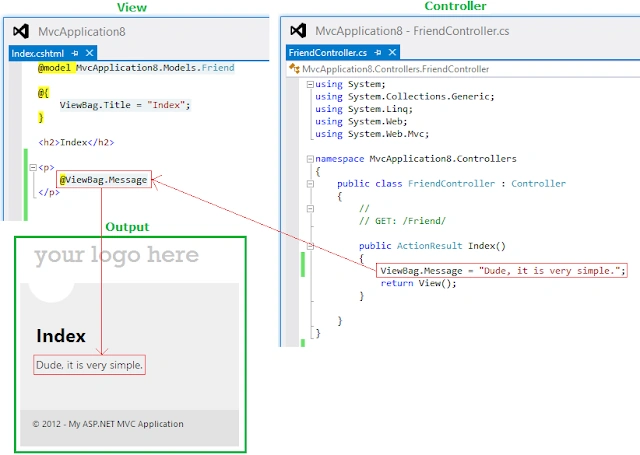
In the above image, you can see how data flows from the "Controller" to the "View" and how it looks in the browser.
Pass Data Between View to View
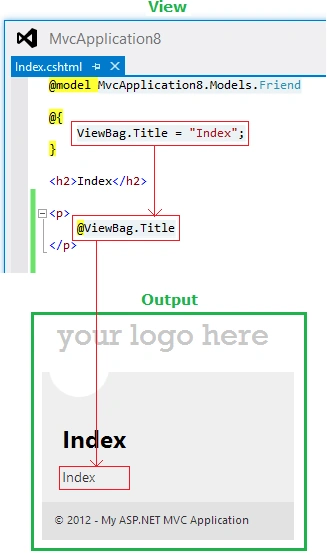
In the above image, you see how data is initialized on the "View" page itself using 'ViewBag.Title = "Index"' and then how it is getting rendered using '@ViewBag.Title'. What is "Title"? It is nothing more than a key, which has very limited availability and can be used on the same page only. So, the key naming is up to you; use any name which makes you happy.
Look at one more case, where I will take advantage of "Model".
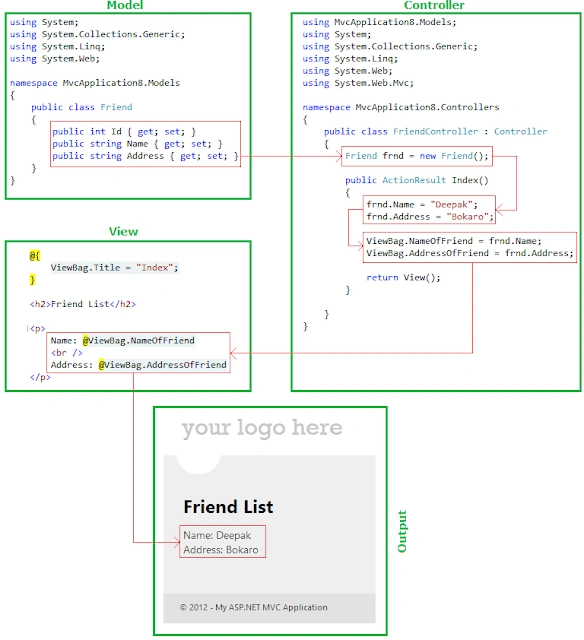
In the above case, we have a "Model" defined by the name "Friend" that has three properties "Id", "Name," and "Address". On the "Controller", we have an object of the "Friend" class named "find," and then, using the dot (.) operation, properties are assigned then attached to these properties of the ViewBag.
Look at one more example in which a list of students is passed using ViewBag.
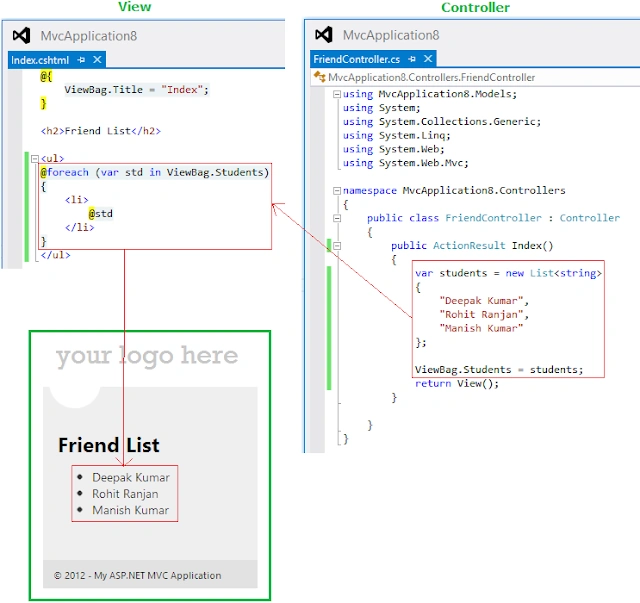
So, in this way, we can pass the list of students. I hope this is clear to you.
ViewData in MVC
ViewBag and ViewData serve the same purpose in allowing developers to pass data from controllers to views. When you put objects in either one, those objects become accessible in the view. Let's look at one example:
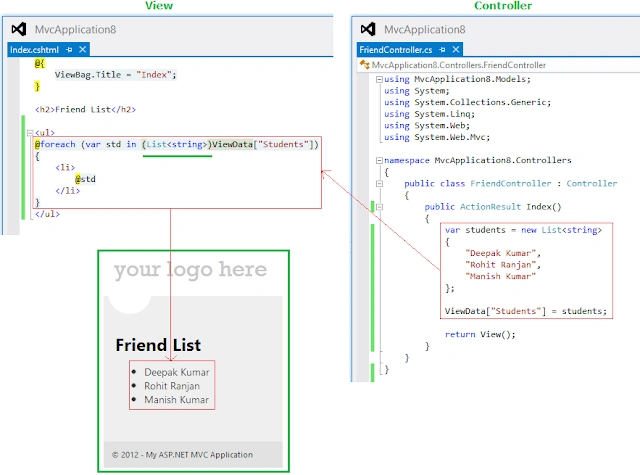
In the above image, everything is normal instead of something in a foreach loop. ViewData is typed as a dictionary containing "objects"; we need to cast ViewData["Students"] to a List<string> or an IEnumerable<string> in order to use the foreach statement on it. Such as in.
@foreach (var std in (List<string>)ViewData["Students"])
//OR
@foreach (var std in (IEnumerable<string>)ViewData["Students"])
Now look at one more beauty of MVC, you can put data into the ViewBag and access it from ViewData or put data in the ViewData and access it from the ViewBag. You have all the freedom.
Pass Data ViewData to ViewBag
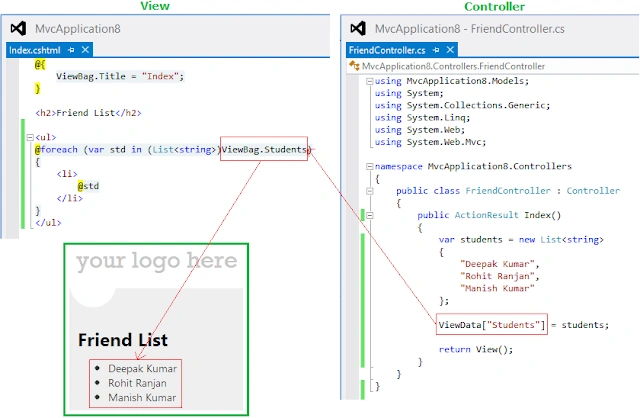
Pass Data ViewBag to ViewData
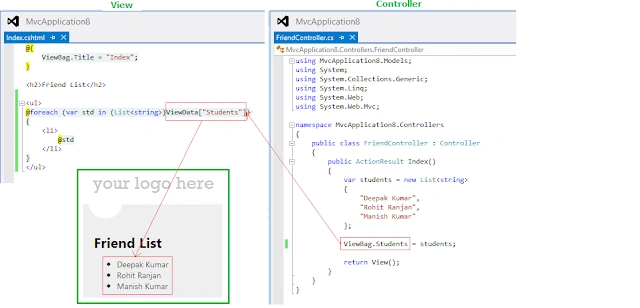
So these two (ViewBag and ViewData) things seem to work almost exactly the same. Then, what's the difference? The difference is only how you access the data. ViewBag is actually just a wrapper around the ViewData object, and its whole purpose is to let you access the data dynamically instead of using magic <strings> conversion; you can realize it by the above examples. Some people prefer one style over the other. You can pick whichever makes you happy. In fact, because they're the same data just with two different ways of accessing it, you can use them interchangeably, like ViewData to ViewBag or ViewBag to ViewData. It is not recommended, however, that you actually use them interchangeably since it will confuse others.
Now, so far, we have looked into some ViewBag and ViewData, which are really very useful, but we can pass the data using a model also, and this will provide you with full intellisense features.
ViewModel in MVC
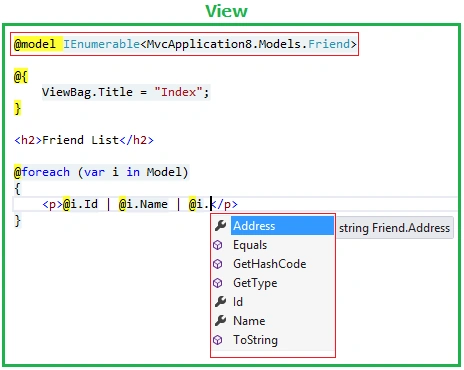
Using ViewModel, we can also pass the data from the Controller to View; let's look at the image.
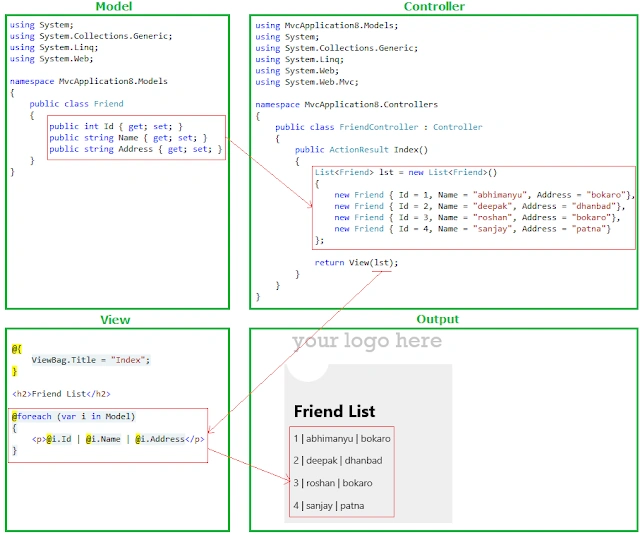
In the above image, we have multiple people in a list form being passed as a View, simple. I will add one more thing here, you are not going to get IntelliSense support or a strongly typed view page here. To get it do it this way. Just add a reference of the model by using the IEnumerable interface, and you are done.
TempData in MVC
TempData is meant to be a very short-lived instance, and you should only use it during the current and the subsequent requests only. Since TempData works this way, you need to know for sure what the next request will be, and redirecting to another view is the only time you can guarantee this. You can use TempData to pass error messages or something similar.
Example 1. Using TempData like a ViewData and ViewBag.
public class FriendController : Controller
{
    // GET: /Friend/
    public ActionResult Index()
    {
        ViewData["VDFriend"] = "Deepak K Gupta";
        ViewBag.VBFriend = "Deepak K Gupta";
        TempData["TDFriend"] = "Deepak K Gupta";
        return View();
    }
}
And on "View",
<p>Using ViewData: @ViewData["VDFriend"]</p>
<p>Using ViewBag: @ViewBag.VBFriend</p>
<p>Using TempData: @TempData["TDFriend"]</p>
This is a simple example, but we are not using the real advantage of TempData. Let's look at one more example.
Example 2. Using TempData to get data after redirect also.
public class FriendController : Controller
{
    // GET: /Friend/
    public ActionResult Index()
    {
        ViewData["VDFriend"] = "Deepak K Gupta";
        ViewBag.VBFriend = "Deepak K Gupta";
        TempData["TDFriend"] = "Deepak K Gupta";

        // Redirect to AnotherPage action
        return RedirectToAction("AnotherPage");
    }

    public ActionResult AnotherPage()
    {
        return View();
    }
}
And on "View".
<p>Using ViewData: @ViewData["VDFriend"]</p>
<p>Using ViewBag: @ViewBag.VBFriend</p>
<p>Using TempData: @TempData["TDFriend"]</p>
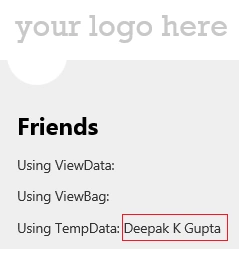
As in the above "FriendController", I'm redirecting the view. In other words, the Index() view will be redirected to the AnotherPage() view instantly, and now on another view, after one redirect, we won't be able to get data from ViewData or ViewBag, but TempData will work here.


Max PlayPosted Jul 31, 2021, 5:35 PM
Hi, How can i pass 2 models from Controller to View? I have the Models Students and Locations, how can i pass them both to the View
IMAD AYOUBPosted Nov 27, 2020, 11:45 AM
Best explanation ever. Appreciate it. Thanks a million.
Praneet RanePosted Feb 9, 2020, 7:54 PM
Very nice and Helpful
Scott FraleyPosted May 3, 2019, 5:02 PM
It's interesting to me that there is never any mention of the fact that all the data passed from controller to view is going to get splashed all up in the Url (Even when using ViewData, apparently!) so that anyone who wants to can just totally F with it at their leisure. And of course due to that, we get nothing on how to HIDE it all so as to prevent the latter. :sigh: :facePalm:
praveen prathiPosted Apr 25, 2019, 12:46 AM
Please provide me a an example on Session , it is also used to pass the data from controller to the view.
Jairo MillanPosted Jan 2, 2018, 9:33 PM
Marvelous explanation with all those pictures, thank you, thank you.
Udit SharmaPosted Jun 15, 2017, 4:21 AM
Very nicely composed and explained .. thanks
Former memberPosted May 26, 2017, 5:55 AM
Sorry to say that people do not expect a article on very basic and easy subject from you. write article on challenging area may be like elastic search, angular 2 etc
Mansur AkbasPosted Apr 16, 2017, 6:24 PM
Very very thanks. It can't be explained better than that
Bhavin BhaskaranPosted Apr 10, 2017, 5:35 AM
I must say this is one of the best article i have ever seen in dot net... sooooo specific and accurate.. and easy understandable for any beginner
veera muthuPosted Mar 27, 2017, 7:44 AM
Thank you. how to pass value div id view to controller in mvc5. please help me.
Saurabh BorodePosted Dec 19, 2016, 9:13 AM
Explained very nicely thank you.
Nadeem SiddiquiPosted Dec 1, 2016, 5:19 PM
Nice article, i have a question, i have a boolean in a Model, and i set the value of that boolean in my controller. I have a function in a view to enable or disable the button based on that boolean, can you please tell me how can i use the boolean in the function which is in the view.Thanks
kalu singh raoPosted Jul 11, 2016, 8:53 AM
Nice...
ChocksPosted Mar 31, 2016, 8:58 PM
Thanks, will be very useful for beginners.
Gowtham KPosted Dec 14, 2015, 11:55 AM
Nice One
Raja TPosted Dec 14, 2015, 7:51 AM
Nice, Thanks for sharing
Naveed AhmedPosted Dec 14, 2015, 1:56 AM
thanks very useful
Humayun Kabir MamunPosted Dec 14, 2015, 1:11 AM
Nice...
Upendra Pratap ShahiPosted Dec 14, 2015, 1:06 AM
very nice sir..
SUJIT DASPosted Nov 8, 2015, 10:26 AM
thanks it is very simple
Ramchandra MagarPosted Oct 14, 2015, 3:38 AM
Nice very nice.....Its simple and easy thanks ...
Vishwajeet VPosted Sep 1, 2015, 8:25 AM
very usefull Article.....
Vaikesh K PPosted Aug 17, 2015, 1:26 AM
Good article :)
koko ddaaaPosted May 27, 2015, 5:21 AM
ahmed
Prakash TripathiPosted Feb 2, 2015, 8:23 AM
Just to add, we can also put TempData.Keep(); in view, in order to retain TempData values during subsiquent refresh/postback.
Prakash TripathiPosted Feb 2, 2015, 8:20 AM
good article
dipti prasadPosted Dec 8, 2014, 6:15 AM
i need coding for jqgrid add ,edit delete temporary data without database????please help me!
dipti prasadPosted Dec 8, 2014, 6:13 AM
how to add temporary data in jqgrid???
dipti prasadPosted Dec 8, 2014, 6:13 AM
Please help me ....
Syed ShakeerPosted Oct 23, 2014, 11:27 AM
Good one
Suyeb MohammadPosted Oct 14, 2014, 7:54 AM
nice article..simple and understanding.
soundappan arumugamPosted Oct 6, 2014, 6:58 AM
Thanks for ur tutorial. which is very useful for me.
sanjay guptaPosted Sep 28, 2014, 2:56 AM
Awesome Article sirji :)
Sandeep VemulaPosted Aug 12, 2014, 3:30 AM
good information...
Gourishetti SudheerPosted Jul 21, 2014, 7:14 AM
very good explanation
Jeetendra GundPosted Mar 18, 2014, 5:26 AM
I learn lot from this article Thanx Sir....
Dhiraj KumarPosted Feb 7, 2014, 7:10 AM
Thank u very much.. nice article.
Jaima JosephPosted Dec 27, 2013, 6:51 AM
Hi Abhimanyu, very helpful article..I have gone through many of your post and its really very helpful for people like me...I have a doubt,can we add a webgrid in a create.cshtml(default) file?can we customize it?
Pradeep KumarPosted Aug 20, 2013, 8:14 AM
The same I have tried for Partial view but its not working can u suggest us y..
Ravikumar GPosted May 28, 2013, 2:06 AM
Abhi, Great job ................... i love this article...
kabinad teshagerPosted Feb 4, 2013, 5:05 AM
it is well understandable artile.thanks
Mahesh AllePosted Jan 22, 2013, 1:23 AM
I am new to MVC and its a very good start up for me. Its very easy to ready and understand. Thank you Abhimanyu.
Gaurav GuptaPosted Oct 22, 2012, 1:24 AM
Nice Explanation. Is ViewBag has properties like you use Students or NameOfFriends?
Deepak MiddhaPosted Oct 22, 2012, 1:13 AM
Nice article Abhimanyu
Tina GargPosted Oct 22, 2012, 12:22 AM
vry nice article and explanation.....
Shekhar ChauhanPosted Oct 21, 2012, 11:01 PM
Nice info, it helps a lot.
Nishant RoyPosted Oct 21, 2012, 10:57 PM
Very good article, thanks for sharing.