

Introduction
- frmDataDisplay.cs: Containing the main application and most of the code.
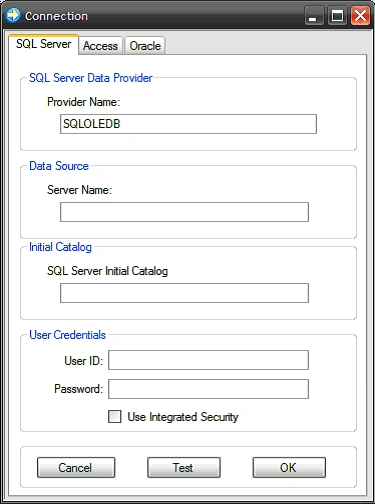
- frmConnect.cs: Containing a dialog used to connect to a database.
- using System;
- using System.Collections;
- using System.Configuration;
- using System.ComponentModel;
- using System.Data;
- using System.Data.OleDb;
- using System.Drawing;
- using System.Text;
- using System.Windows.Forms;
- namespace DBSpy {
- public partial class frmConnect: Form {
- /// <summary>
- /// Default constructor
- /// </summary>
- public frmConnect() {
- InitializeComponent();
- }
- /// <summary>
- /// Store the Oracle settings and test the connection
- /// string
- /// </summary>
- /// <param name="sender"></param>
- /// <param name="e"></param>
- private void btnOracleOK_Click(object sender, EventArgs e) {
- // Future use; if a current data model and database
- // type need to be identified and saved with the connect
- // string to identify its purpose
- Properties.Settings.Default.CurrentDataModel = "MyOracle";
- Properties.Settings.Default.CurrentDatabaseType = "Oracle";
- // Set the actual connection string properties into
- // the application settings
- Properties.Settings.Default.ProviderString = txtOracleProvider.Text;
- Properties.Settings.Default.Password = txtOraclePassword.Text;
- Properties.Settings.Default.UserID = txtOracleUserID.Text;
- Properties.Settings.Default.ServerName = txtOracleDBname.Text;
- // Set the connection string
- Properties.Settings.Default.ConnString = "Provider=" + Properties.Settings.Default.ProviderString + ";Password=" +
- Settings.Default.Password + ";User ID=" + Properties.Settings.Default.UserID + ";Data Source=" + Properties.Settings
- .Default.ServerName;
- // Save the property settings
- Properties.Settings.Default.Save();
- //Test Connection
- if (Properties.Settings.Default.ConnString != string.Empty) {
- using(OleDbConnection conn = new OleDbConnection(Properties.Settings.Default.ConnString)) {
- try {
- // test with an open attempt
- conn.Open();
- this.Dispose();
- } catch (Exception ex) {
- // if the connection fails, inform the user
- // so they can fix the properties
- MessageBox.Show(ex.Message, "Connection Error");
- }
- }
- }
- }
The next section of the code is used to handle the Oracle connection string test; even though attempts to save the connection properties also tests the connection, this method is made available to allow the user to test a connection and view whether or not the connection string passes. Again, the code is annotated to describe each section of the code.
- /// <summary>
- /// Test the Oracle Connection String
- /// </summary>
- /// <param name="sender"></param>
- /// <param name="e"></param>
- private void btnOracleTest_Click(object sender, EventArgs e) {
- try {
- // Future use; if a current data model and database
- // type need to be identified and saved with the connect\
- // string to identify its purpose
- Properties.Settings.Default.CurrentDataModel = "MyOracle";
- Properties.Settings.Default.CurrentDatabaseType = "Oracle";
- // Set the actual connection string properties into
- // the application settings
- Properties.Settings.Default.ProviderString = txtOracleProvider.Text;
- Properties.Settings.Default.Password = txtOraclePassword.Text;
- Properties.Settings.Default.UserID = txtOracleUserID.Text;
- Properties.Settings.Default.ServerName = txtOracleDBname.Text;
- // Set the connection string
- Properties.Settings.Default.ConnString = "Provider=" + Properties.Settings.Default.ProviderString + ";Password=" +
- Properties.Settings.Default.Password + ";User ID=" + Properties.Settings.Default.UserID + ";Data Source=" +
- Properties.Settings.Default.ServerName;
- // Save the property settings
- Properties.Settings.Default.Save();
- } catch (Exception ex) {
- MessageBox.Show(ex.Message, "Error saving connection informaiton");
- }
- //Test Connection
- if (Properties.Settings.Default.ConnString != string.Empty) {
- using(OleDbConnection conn = new OleDbConnection(Properties.Settings.Default.ConnString)) {
- try {
- // test the connection with an open attempt
- conn.Open();
- MessageBox.Show("Connection attempt successful.", "Connection Test");
- } catch (Exception ex) {
- // inform the user if the connection fails
- MessageBox.Show(ex.Message, "Connection Error");
- }
- }
- }
- }
The next method is merely used to close the form if the user decides to cancel the operation.
- /// <summary>
- /// Close the form
- /// </summary>
- /// <param name="sender"></param>
- /// <param name="e"></param>
- private void btnOracleCancel_Click(object sender, EventArgs e) {
- this.Dispose();
- }
The next bit of code handles the check changed event for the integrated security check box control found on the SQL Server tab. If the control is checked, the user name and password are not used and the connection string will be formatted to use integrated security.
The next event handler closes the form if the user decides to cancel the operation.
- /// <summary>
- /// Close the form
- /// </summary>
- /// <param name="sender"></param>
- /// <param name="e"></param>
- private void btnSQLserverCancel_Click(object sender, EventArgs e) {
- this.Dispose();
- }
The next section of code is used to test the SQL Server connection string; it functions much the same as does the Oracle connection test with the only exception being that it formats the connection string differently based upon the user's selection of the Use Integrated Security check box control.
- /// <summary>
- /// Test the SQL Server connection string
- /// based upon the user supplied settings
- /// </summary>
- /// <param name="sender"></param>
- /// <param name="e"></param>
- private void btnSqlServerTest_Click(object sender, EventArgs e) {
- try {
- // Future use; if a current data model and database
- // type need to be identified and saved with the connect
- // string to identify its purpose
- Properties.Settings.Default.CurrentDataModel = "MySqlServer";
- Properties.Settings.Default.CurrentDatabaseType = "SqlServer";
- // Set the properties for the connection string
- Properties.Settings.Default.ProviderString = txtSqlServerProvider.Text;
- Properties.Settings.Default.Password = txtSqlServerPassword.Text;
- Properties.Settings.Default.UserID = txtSqlServerUserID.Text;
- Properties.Settings.Default.ServerName = txtSqlServerDBName.Text;
- Properties.Settings.Default.InitialCatalog = txtSqlServerInitialCat.Text;
- // configure the connection string based upon the use
- // of integrated security
- if (cbxIntegratedSecurity.Checked == true) {
- Properties.Settings.Default.ConnString = "Provider=" + Properties.Settings.Default.ProviderString + ";DataSource = " + Properties.Settings.Default.ServerName + ";Initial Catalog = " + Properties.Settings.Default.InitialCatalog + ";Integrated Security=SSPI;";
- } else {
- Properties.Settings.Default.ConnString = "Provider=" + Properties.Settings.Default.ProviderString +
- ";Password=" + Properties.Settings.Default.Password + ";User ID=" + Properties.Settings.Default.UserID +
- ";Data Source=" + Properties.Settings.Default.ServerName + ";Initial Catalog=" +
- Properties.Settings.Default.InitialCatalog;
- }
- // Save the property settings
- Properties.Settings.Default.Save();
- } catch (Exception ex) {
- // inform the user if the connection was not saved
- MessageBox.Show(ex.Message, "Error saving connection information");
- }
- //Test Connection
- if (Properties.Settings.Default.ConnString != string.Empty) {
- using(OleDbConnection conn = new OleDbConnectionProperties.Settings.Default.ConnString) {
- try {
- // test the connection with an open attempt
- conn.Open();
- MessageBox.Show("Connection Attempt Successful.", "Connection Test");
- } catch (Exception ex) {
- // inform the user if the connection test failed
- MessageBox.Show(ex.Message, "Connection Test");
- }
- }
- }
- }
The following event handler sets the connection string and tests the SQL Server connection as defined by the user's entries into the form.
- private void btnSqlServerOK_Click(object sender, EventArgs e) {
- try {
- // Future use; if a current data model and database
- // type need to be identified and saved with the connect
- // string to identify its purpose
- Properties.Settings.Default.CurrentDataModel = "MySqlServer";
- Properties.Settings.Default.CurrentDatabaseType = "SqlServer";
- // Set the properties for the connection
- Properties.Settings.Default.ProviderString = txtSqlServerProvider.Text;
- Properties.Settings.Default.Password = txtSqlServerPassword.Text;
- Properties.Settings.Default.UserID = txtSqlServerUserID.Text;
- Properties.Settings.Default.ServerName = txtSqlServerDBName.Text;
- Properties.Settings.Default.InitialCatalog = txtSqlServerInitialCat.Text;
- // configure the connection string based upon
- // the use of integrated security
- if (cbxIntegratedSecurity.Checked == true) {
- Properties.Settings.Default.ConnString = "Provider=" + Properties.Settings.Default.ProviderString + ";Data Source=" + Properties.Settings.Default.ServerName + ";Initial Catalog=" + Properties.Settings.Default.InitialCatalog + "; Integrated Security=SSPI;";
- } else {
- Properties.Settings.Default.ConnString = "Provider=" + Properties.Settings.Default.ProviderString Password = "+ Properties.Settings.Default.Password + ";
- User ID = " + Properties.Settings.Default.UserID +";
- Data Source = " + Properties.Settings.Default.ServerName + ";
- Initial Catalog = " +Properties.Settings.Default.InitialCatalog;
- }
- // Save the property settings
- Properties.Settings.Default.Save();
- } catch (Exception ex) {
- // inform the user if the connection information was not
- // saved
- MessageBox.Show(ex.Message, "Error saving connection information.");
- }
- //Test Connection
- if (Properties.Settings.Default.ConnString != string.Empty) {
- using(OleDbConnection conn = new OleDbConnection(Properties.Settings.Default.ConnString)) {
- try {
- // test the connection with an open attempt
- conn.Open();
- this.Dispose();
- } catch (Exception ex) {
- // inform the user if the connection was not saved
- MessageBox.Show(ex.Message, "Connection Test");
- }
- }
- }
- }
The next event handler closes the form if the user decides to cancel the operation.
- /// <summary>
- /// Close the form
- /// </summary>
- /// <param name="sender"></param>
- /// <param name="e"></param>
- private void btnAccessCancel_Click(object sender, EventArgs e) {
- this.Dispose();
- }
This event handler is used to open an open file dialog used to allow the user to navigate to and select an Access database.
- /// <summary>
- /// Browse for an access database
- /// </summary>
- /// <param name="sender"></param>
- /// <param name="e"></param>
- private void btnBrowse_Click(object sender, EventArgs e) {
- OpenFileDialog openFile = new OpenFileDialog();
- openFile.Title = "MS Access Database";
- openFile.DefaultExt = "mdb";
- openFile.Filter = "Access Database (*.mdb)|*mdb";
- openFile.ShowDialog();
- txtAccessDBname.Text = openFile.FileName;
- }
The next bit of code is used to test a connection to an Access database.
- /// <summary>
- /// Test an MS Access database connection
- /// </summary>
- /// <param name="sender"></param>
- /// <param name="e"></param>
- private void btnAccessTest_Click(object sender, EventArgs e) {
- try {
- // Future use; if a current data model and database
- // type need to be identified and saved with the connect
- // string to identify its purpose
- Properties.Settings.Default.CurrentDataModel = "MyAccess";
- Properties.Settings.Default.CurrentDatabaseType = "Access";
- // Set the access database connection properties
- Properties.Settings.Default.ProviderString = txtAccessProvider.Text;
- Properties.Settings.Default.Password = txtAccessPassword.Text;
- Properties.Settings.Default.UserID = txtAccessUserID.Text;
- Properties.Settings.Default.ServerName = txtAccessDBname.Text;
- // Set the access database connection string
- Properties.Settings.Default.ConnString = "Provider=" + Properties.Settings.Default.ProviderString + ";Password=" +
- Properties.Settings.Default.Password + ";User ID=" + Properties.Settings.Default.UserID + ";Data Source=" +
- Properties.Settings.Default.ServerName;
- // Save the properties
- Properties.Settings.Default.Save();
- } catch (Exception ex) {
- // inform the user if the connection could not be saved
- MessageBox.Show(ex.Message, "Error saving connection information.");
- }
- //Test Connection
- if (Properties.Settings.Default.ConnString != string.Empty) {
- using(OleDbConnection conn = new OleDbConnection(Properties.Settings.Default.ConnString)) {
- try {
- // test the connection with an open attempt
- conn.Open();
- MessageBox.Show("Access connection test successful", "Connection Test");
- } catch (Exception ex) {
- // inform the user if the connection failed
- MessageBox.Show(ex.Message, "Connection Error");
- }
- }
- }
- }
The next event handler is used to persist and test a connection string for an MS Access database.
The Data Display Form
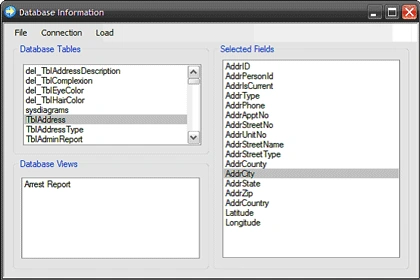
The main application is contained in the frmDataDisplay.cs class. This form is used to gain access to the connection dialog, and to load the database information into the form's controls. The form is structured with a menu at the top; this menu contains the options to exit the application, to create a new connection, to view the current connection, and to load the schema information for the current database associated with the connection.
In the main area of the form, there are three group boxes, one contains a list box control used to display the tables contained in the current database, one contains a list box control used to display the views contained in the current database, and one contains a list box used to display the columns contained in any view or table selected from the table or view list box controls.
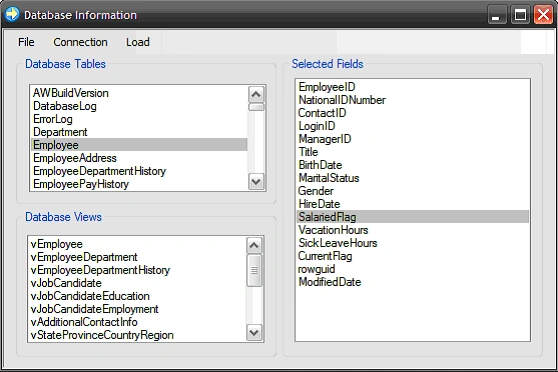 Figure 5: The Main Form with an SQL Server Connection Active
The class starts out with the following code used to import the required libraries:
Figure 5: The Main Form with an SQL Server Connection Active
The class starts out with the following code used to import the required libraries:
- /// <summary>
- /// Persist and test an Access database connection
- /// </summary>
- /// <param name="sender"></param>
- /// <param name="e"></param>
- private void btnAccessOK_Click(object sender, EventArgs e) {
- try {
- // Future use; if a current data model and database
- // type need to be identified and saved with the connect
- // string to identify its purpose
- Properties.Settings.Default.CurrentDataModel = "MyAccess";
- Properties.Settings.Default.CurrentDatabaseType = "Access";
- // Set the access database connection properties
- Properties.Settings.Default.ProviderString = txtAccessProvider.Text;
- Properties.Settings.Default.Password = txtAccessPassword.Text;
- Properties.Settings.Default.UserID = txtAccessUserID.Text;
- Properties.Settings.Default.ServerName = txtAccessDBname.Text;
- // Set the access database connection string
- Properties.Settings.Default.ConnString = "Provider=" + Properties.Settings.Default.ProviderString + ";Password=
- "+Properties.Settings.Default.Password+";
- User ID = " + Properties.Settings.Default.UserID + ";
- Data Source = " + Properties.Settings.Default.ServerName;
- // Save the properties
- Properties.Settings.Default.Save();
- } catch (Exception ex) {
- // Inform the user if the connection was not saved
- MessageBox.Show(ex.Message, "Error saving connection information.");
- }
- //Test Connection
- if (Properties.Settings.Default.ConnString != string.Empty) {
- using(OleDbConnection conn = new OleDbConnection(Properties.Settings.Default.ConnString)) {
- try {
- // test the database connection string with an open
- // attempt
- conn.Open();
- this.Dispose();
- } catch (Exception ex) {
- // inform the user if the connection failed
- MessageBox.Show(ex.Message, "Connection Error");
- }
- }
- }
- }
- }
- }
- using System;
- using System.Collections;
- using System.Configuration;
- using System.ComponentModel;
- using System.Data;
- using System.Data.OleDb;
- using System.Drawing;
- using System.Text;
- using System.Windows.Forms;
The next section of code declares the namespace, some local variables, and the default constructor. The array lists are used to contain the views and tables displayed on this form.
- namespace DBSpy {
- public partial class frmDataDisplay: Form {
- #region Declarations
- public string mSelectedTable;
- private bool mTableSelected;
- ArrayList arrViews;
- ArrayList arrTables;
- #endregion
- /// <summary>
- /// default constructor
- /// </summary>
- public frmDataDisplay() {
- InitializeComponent();
- }
The next section of code defines a method used to capture and store the table and view names for the database identified by the connection string. The schema is stored in a data table populated with the results of calling the connection's GetOleDbSchemaTable method. This method is called twice; once to obtain the list of views and once to obtain the list of tables; these items are then added to new instances of the array lists used to hold the view and table lists. The code is annotated and should be pretty straight forward.
- /// <summary>
- /// Populate to arrays with list of all of the tables and views used
- /// in the database defined by the current connection string
- /// </summary>
- public void StoreTableAndViewNames() {
- // temporary holder for the schema information for the current
- // database connection
- DataTable SchemaTable;
- // used to hold a list of views and tables
- arrViews = new ArrayList();
- arrTables = new ArrayList();
- // clean up the menu so the menu item does not
- // hang while this function executes
- this.Refresh();
- // make sure we have a connection
- if (Properties.Settings.Default.ConnString != string.Empty) {
- // start up the connection using the current connection
- // string
- using(OleDbConnection conn = new OleDbConnection(Properties.Settings.Default.ConnString)) {
- try {
- // open the connection to the database
- conn.Open();
- // Get the Tables
- SchemaTable = conn.GetOleDbSchemaTable(OleDbSchemaGuid.Tables, new Object[] { null, null, null, TABLE }
- // Store the table names in the class scoped array
- // list of table names
- for (int i = 0; i < SchemaTable.Rows.Count; i++) {
- arrTables.Add(SchemaTable.Rows[i].ItemArray[2].ToString());
- }
- // Get the Views
- SchemaTable = conn.GetOleDbSchemaTable(OleDbSchemaGuid.Tables, new Object[] { null, null, null, "VIEW" });
- // Store the view names in the class scoped array
- // list of view names
- for (int i = 0; i < SchemaTable.Rows.Count; i++) {
- arrViews.Add(SchemaTable.Rows[i].ItemArray[2].ToString());
- }
- }
- catch (Exception ex) {
- // break and notify if the connection fails
- MessageBox.Show(ex.Message, "Connection Error");
- }
- }
- }
- }
The next method is used to close the main form and terminate the application.
The next method is used to create an instance of the connection form. Once displayed, the user may define a new connection string.
- /// <summary>
- /// Close the form
- /// </summary>
- /// <param name="sender"></param>
- /// <param name="e"></param>
- private void CloseToolStripMenuItem_Click(object sender, EventArgs e) {
- // dispose of this form
- this.Dispose();
- }
- /// <summary>
- /// Open a new connection to a database - present the connection
- /// string builder
- /// form so the user can define a connection
- /// </summary>
- /// <param name="sender"></param>
- /// <param name="e"></param>
- private void OpenANewConnectionToolStripMenuItem_Click(object sender, EventArgs e) {
- // open an instance the connect form so the user
- // can define a new connection
- frmConnect f = new frmConnect();
- f.Show();
- }
This method is used to display the value stored for the connection string in the application's settings
- /// <summary>
- /// Display the current connection string to the user
- /// </summary>
- /// <param name="sender"></param>
- /// <param name="e"></param>
- private void ViewCurrentConnectionToolStripMenuItem_Click(object sender, EventArgs e) {
- // display the current connection string
- MessageBox.Show(Properties.Settings.Default.ConnString, "Current Connection");
- }
Based upon the current connection string, this method will recover the tables and views for the current database connection and will display those items in the form's table and view list view controls.
- /// <summary>
- /// Get and display the current tables and views contained in the
- /// database
- /// pointed to by the connection string
- /// </summary>
- /// <param name="sender"></param>
- /// <param name="e"></param>
- private void LoadDataForCurrentConnectionToolStripMenuItem_Click(object sender, EventArgs e) {
- // get tables and views
- StoreTableAndViewNames();
- // clear internal lists
- lstTables.Items.Clear();
- lstViews.Items.Clear();
- // update the lists from the arrays holding the
- // tables and views
- lstTables.Items.AddRange(arrTables.ToArray());
- lstViews.Items.AddRange(arrViews.ToArray());
- }
The next method will display the list of columns displayed for the last selected table
- private void lstTables_SelectedIndexChanged(object sender, EventArgs e) {
- mTableSelected = true;
- string tblName;
- try {
- tblName = lstTables.SelectedItem.ToString();
- } catch {
- return;
- }
- // make sure we have a connection
- if (Properties.Settings.Default.ConnString != string.Empty) {
- // start up the connection using the current connection
- // string
- using(OleDbConnection conn = new OleDbConnection(Properties.Settings.Default.ConnString)) {
- try {
- // open the connection to the database
- conn.Open();
- lstFields.Items.Clear();
- DataTable dtField = conn.GetOleDbSchemaTable(OleDbSchemaGuid.Columns, new object[] { null, null, blName });
- foreach(DataRow dr in dtField.Rows) {
- lstFields.Items.Add(dr["COLUMN_NAME"].ToString());
- }
- } catch (Exception ex) {
- MessageBox.Show(ex.Message, "Connection Error");
- }
- }
- } else {
- MessageBox.Show("There is no connection string current defined.", "Connection String");
- }
- }
The next method will display the list of columns displayed for the last selected view.
- private void lstViews_SelectedIndexChanged(object sender, EventArgs e) {
- mTableSelected = false;
- string tblName;
- try {
- tblName = lstViews.SelectedItem.ToString();
- } catch {
- return;
- }
- // make sure we have a connection
- if (Properties.Settings.Default.ConnString != string.Empty) {
- // start up the connection using the current connection
- // string
- using(OleDbConnection conn = new OleDbConnection(Properties.Settings.Default.ConnString)) {
- try {
- // open the connection to the database
- conn.Open();
- lstFields.Items.Clear();
- // get the schema table
- DataTable dtField = conn.GetOleDbSchemaTable(OleDbSchemaGuid.Columns, new object[] { null, null, tblName });
- // read the column names into the fields list
- foreach(DataRow dr in dtField.Rows) {
- lstFields.Items.Add(dr["COLUMN_NAME"].ToString());
- }
- } catch (Exception ex) {
- MessageBox.Show(ex.Message, "Connection Error");
- }
- }
- } else {
- MessageBox.Show("There is no connection string current defined.", "Connection String");
- }
- }
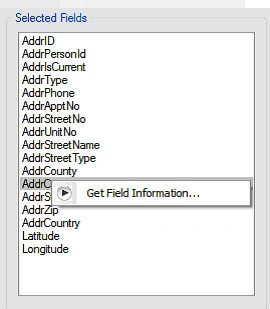
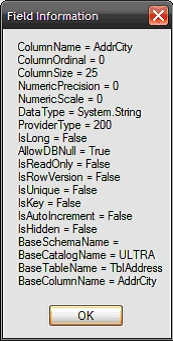
This method will display the field information associated with the last selected column for the last selected view or table.
- /// <summary>
- /// Collect and display the field information for a selected column
- /// name
- /// </summary>
- /// <param name="sender"></param>
- /// <param name="e"></param>
- private void GetFieldInformationToolStripMenuItem_Click(object sender, EventArgs e)
- {
- try
- {
- using (OleDbConnection conn = new OleDbConnection(Properties.Settings.Default.ConnString))
- {
- string sSql = string.Empty;
- if (mTableSelected == true)
- {
- sSql = "SELECT [" + lstFields.SelectedItem.ToString().Trim() + "] FROM ["+ lstTables.SelectedItem.ToString
- ().Trim()+ "]";
- }
- else
- {
- sSql = "SELECT [" + lstFields.SelectedItem.ToString().Trim() + "] FROM [" + lstViews.SelectedItem.ToString.Trim
- () + "]";
- }
- OleDbCommand cmd = new OleDbCommand(sSql, conn);
- conn.Open();
- OleDbDataReader rdr = cmd.ExecuteReader(CommandBehavior.KeyInfo);
- DataTable schemaTable = rdr.GetSchemaTable();
- StringBuilder sb = new StringBuilder();
- foreach (DataRow myField in schemaTable.Rows)
- {
- foreach (DataColumn myProperty in schemaTable.Columns)
- {
- sb.Append(myProperty.ColumnName + " = " + myField[myProperty].ToString()+Environment.NewLine);
- }
- // report
- MessageBox.Show(sb.ToString(), "Field Information");
- // burn the reader
- rdr.Close();
- // exit
- return;
- }
- }
- }
- catch
- {
- MessageBox.Show("Unable to attach to this table with current user; check database security permissions.",
- "Field information");
- }
- }
- }
- }
SharadPosted Jul 22, 2015, 12:41 AM
Really cool..
Mahesh ChandPosted Dec 30, 2010, 11:18 AM
Good article Scott.
Jesus PeregrinaPosted Oct 3, 2008, 11:26 AM
Is it posible to obatin a list of the stored procedures of the database and obtain its parameters to?