

Introduction
Web application Processing
- namespace Test
- {
- public partial class _Default : Page
- {
- int counter = 0;
- protected void Page_Load(object sender, EventArgs e)
- {
- if(!IsPostBack)
- {
- TextBox1.Text = "0";
- }
- }
- protected void Button1_Click(object sender, EventArgs e)
- {
- counter = counter + 1;
- TextBox1.Text =counter.ToString();
- }
- }
- }
Various state management techniques
- View State
- Hidden Field
- Cookies
- Control State
B. Server-side State Management:
- Session
- Application Object
- Caching
We can see a number of ways of doing state management as listed above. But I am going to explain View state, Session State and application state in this article.
View State is a technique to maintain the state of controls during page post-back, meaning it stores the page value at the time of post-back (sending and receiving information from the server) of your page and the view state data can be used when the page is posted back to the server and a new instance of the page is created.
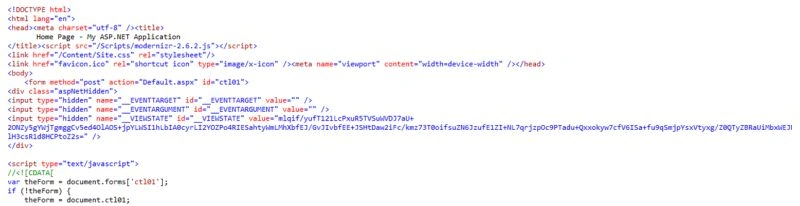
View state data is nothing but a serialized base-64 encoded string stored in a hidden input field on the page and it travels between the browser and the server on every user request and response.
View State
- ViewState["VarName"]= store any thing
- <input type="hidden" name="__VIEWSTATE" id="__VIEWSTATE" value="mlqif/yufT121LcPxuR5TVSuWVDJ7aU+2ONZy5gYWjTgmggCv5ed4OlAOS+jpYLWSI1hLbIA0cyrLI2YOZPo4RIESahtyWmLMhXbfEJ/GvJIvbfEE+JSHtDaw2iFc/kmz73T0oifsuZN6JzufE1ZI+NL7qrjzpOc9PTadu+Qxxokyw7cfV6ISa+fu9qSmjpYsxVtyxg/Z0QTyZBRaUiMbxWEJNlH3csR1d8HCPtoZ2s=" />
- namespace Test
- {
- public partial class _Default : Page
- {
- int TestCounter = 0;
- protected void Page_Load(object sender, EventArgs e)
- {
- if(!IsPostBack)
- {
- TextBox1.Text = "0";
- TextBox2.Text = "0";
- }
- }
- protected void Button1_Click(object sender, EventArgs e)
- {
- //With out View State
- TestCounter = TestCounter + 1;
- TextBox1.Text = TestCounter.ToString();
- if (ViewState["counter"] != null)
- {
- TestCounter = (int)ViewState["counter"] + 1;
- TextBox2.Text = TestCounter.ToString();
- }
- ViewState["counter"] = TestCounter;
- }
- }
- }
- Very easy to implement.
- Stored on the client browser in a hidden field as a form of Base64 Encoding String not encrypted and can be decoded easily.
- Good with HTTP data transfer
View State disadvantages:
- The performance overhead for the page is larger data stored in the view state.
- Stored as encoded and not very safe to use with sensitive information.
Where to Use
View state should be used when the user needs to store a small amount of data at the client browser with faster retrieval. The developer should not use this technique to retain state with larger data since it will create a performance overhead for the webpage. It should be used for sending data from one page to another. Not very secure to store sensitive information.
Session State is another state management technique to store state, meaning it helps in storing and using values from previous requests. Whenever the user requests a web form from a web application it will get treated as a new request. an ASP.NET session will be used to store the previous requests for a specified time period.
ASP.NET Session State
- //Stored Textbox value
- Session["Counter"] = TextBox3.Text;
- //Stored Dataset
- Session["ds"] = dsData;
- Session variables are stored in a SessionStateItemCollection object that is exposed through the HttpContext.Session property.
- namespace Test
- {
- public partial class SessionTest : System.Web.UI.Page
- {
- protected void Page_Load(object sender, EventArgs e)
- {
- if (!IsPostBack)
- {
- if (Session["Counter"] == null)
- {
- Session["Counter"] = 0;
- }
- TextBox1.Text = Session["Counter"].ToString();
- }
- }
- protected void Button1_Click(object sender, EventArgs e)
- {
- if (Session["Counter"] != null)
- {
- int SessionCounter = (int)Session["Counter"] + 1;
- TextBox1.Text = SessionCounter.ToString();
- Session["Counter"] = SessionCounter;
- }
- }
- protected void Button2_Click(object sender, EventArgs e)
- {
- Response.Redirect("MysessionPage.aspx");
- }
- }
- }
- After navigating to the page mysessionpage.aspx and retrieving value from session.
- namespace Test
- {
- public partial class MysessionPage : System.Web.UI.Page
- {
- protected void Page_Load(object sender, EventArgs e)
- {
- if (Session["Counter"] != null)
- {
- Label1.Text = Session["Counter"].ToString();
- }
- }
- }
- }


- <sessionState mode="InProc" cookieless="true" customProvider="DefaultSessionProvider" >


- Off
- InProc
- StateServer
- SQLServer
- Custom
Each mode has a different behavior in a web application. They have their own advantages and disadvantages.
Guys, It is very important to understand about the session modes when you are working with an ASP.NET application with session variables as state management techniques. The session modes selected as mode in webconfig enables the ways session variable are stored and it will be then responsible for the application behavior.
Off
If an application has no requirement or need for session state then it's very important to use the off mode. By using this application performance will be better.
InProc Mode
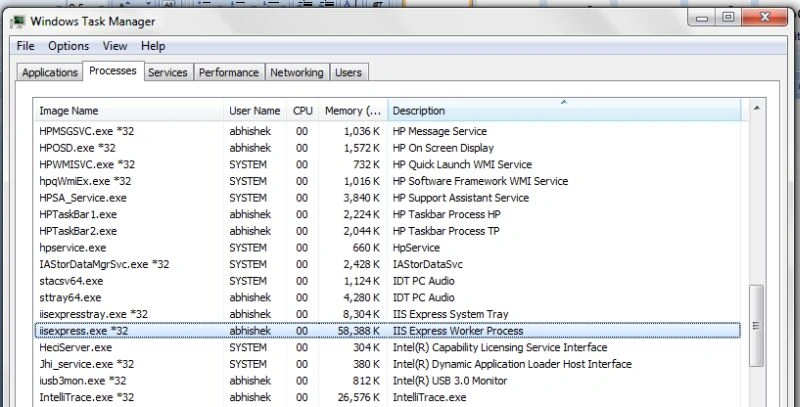
InProc mode can be done in an ASP.NET web application using a configuration file by setting the mode attribute in the element SessionState.
- <sessionState mode="InProc" customProvider="DefaultSessionProvider">
- Easy to Implement.
- Complex Objects can be added without serialization.
- Best in performance compared to out-of-process modes.
Disadvantages of InProc :
- Not able to sustain the session values when the worker process/IIS is restarted. In that case data loss will happen witch make the application break.
- Scalability is a major problem.
- Not good for applications with a large user base.
Where to Use
In Proc mode is best suited for the application that is hosted on a single server and mid size use base or the session variable used is not big, to avoid data loss and scalability issues. When there is a requirement for a web farm or web garden deployments the “out of process “modes like state server or SQL Server modes are the best option.
The disadvantage of session data loss is due to the worker process recycle that can be reduced using another mode, the state server mode.
Reference MSDN Definition
StateServer mode, that stores session state in a separate process called the ASP.NET state service. This ensures that session state is preserved if the web application is restarted and also makes session state available to multiple Web servers in a Web farm.
ASP.NET is a Windows services that stores the session variable data in their process.
Procedure to set up state server mode
Go to Run then enter "Services.msc" then Start ASP.NET State Service.
By default ASP.NET state service is in manual mode.
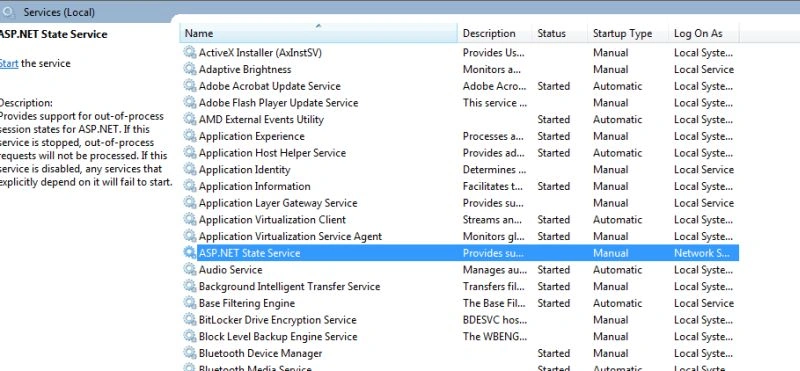
State Server Session Mode
- <sessionState mode="StateServer" customProvider="DefaultSessionProvider" stateConnectionString="tcpip=localhost:42424">
- stateConnectionString="tcpip=localhost : 42424"
- Worker process recycling does not impact session variable data
- Can be stored on the same web server or different dedicated machine
Disadvantage of State Server Mode:
- Restart of sate service could lead to session data loss.
- Slower than in proc mode
SQL Server Session Mode
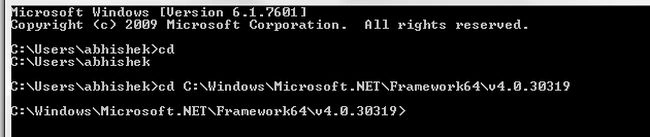
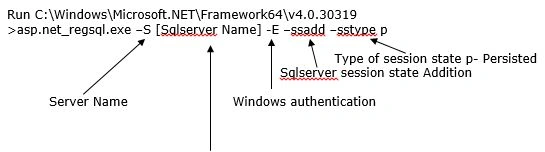
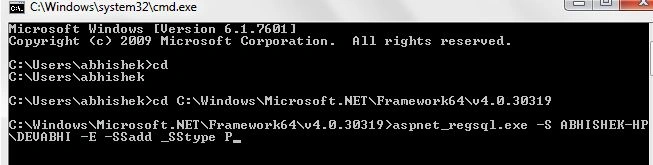
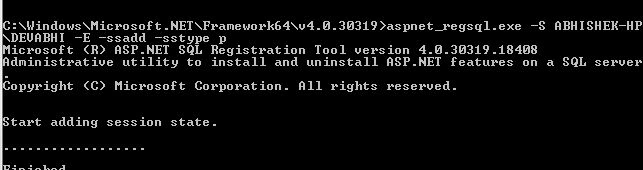
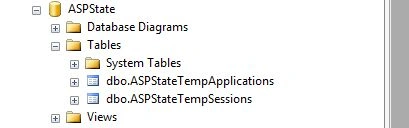
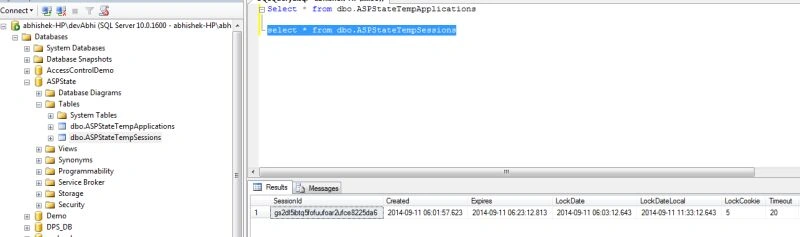
- <sessionState mode="SQLServer" customProvider="DefaultSessionProvider"
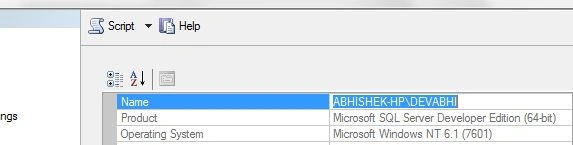
- sqlConnectionString="Data Source=abhishek-HP\devAbhi;integrated security=SSPI">
- Very secure and most reliable option for the session management.
- Session data will be able to survive after worker process restart or state window service restart.
- Most scalable compared to the other modes.
- Most suited for web garden or web farm type deployments and able to handle larger data in the session.
Disadvantages of SQL Server mode
- Slow performance
- Overhead for serialization and deserialization of complex data.
Where to Use
Here we have learned about session state and various modes to store data in session variables. Every mode has some advantages and disadvantages for use in web applications. Basically it depends on the application behavior, use base and kind of deployment which session should be used. Guys, be careful when choosing the session modes since it leads to performance issues and data loss that hamper the web application.
The MSDN Definition says: Application state is a data repository available to all classes in an ASP.NET application. Application state is stored in memory on the server and is faster than storing and retrieving information in a database. Unlike session state, which is specific to a single user session, application state applies to all users and sessions.
Application state is stored in an instance of the HttpApplicationState class. This class exposes a key-value dictionary of objects.
Application state variables are also used to store data when navigatiing from one page to another. It's multi-user Global data meaning it will be accessible across all pages and all sessions. Application state variables are stored on the web server in ASP.NET worker process memory.
Sample Code
Addition of data in application variables.
Application State
- namespace Test
- {
- public partial class applicationState : System.Web.UI.Page
- {
- protected void Page_Load(object sender, EventArgs e)
- {
- if (!IsPostBack)
- {
- if (Application["Counter"] == null)
- {
- Application["Counter"] = 0;
- }
- TextBox1.Text = Application["Counter"].ToString();
- }
- }
- protected void Button1_Click(object sender, EventArgs e)
- {
- if (Application["Counter"] != null)
- {
- int ApplicationCounter = (int)Application["Counter"] + 1;
- TextBox1.Text = ApplicationCounter.ToString();
- Application["Counter"] = ApplicationCounter;
- }
- }
- protected void Button2_Click(object sender, EventArgs e)
- {
- Response.Redirect("ApplicationStateTest.aspx");
- }
- }
- }
- namespace Test
- {
- public partial class ApplicationStateTest : System.Web.UI.Page
- {
- protected void Page_Load(object sender, EventArgs e)
- {
- if (Application["Counter"] != null)
- {
- Label1.Text = Application["Counter"].ToString();
- }
- }
- }
- }
- Application variable data is multi-user global data stored in memory.
- Easy to access.
- Fast retrieval.
Disadvantages of application state:
- Application variable data is not able to survive the IIS restart and worker process recycling.
- Not suited for web farm and web garden like deployment situation.
Where to Use
An application variable is used only when the variable needs to have global access and when you need them for the entire time, during the lifetime of an application.
Guys, in the preceding explanation of view state, the session state and application state management techniques all have some advantages and disadvantages in web applications. We should very intelligently pick the technique analyzing our application usage and functionality used in the application.
Conclusion
ASP.NET Application State Overview
Rohan RaoPosted Jun 20, 2019, 11:44 AM
Query String is also a Client Side State Management Technique which you missed in this article.
sandeep KumarPosted Jun 5, 2018, 5:13 AM
Very helpful article.. thanks for knowledge sharing
Andy SmithPosted Feb 13, 2018, 5:14 AM
Nice article Abhishek. I know it's a few years old but the contents is still relevant today. Very helpful.
Syed MokarramPosted May 24, 2017, 4:01 AM
Bht aaala, nice article yara.
Siyaapa QueenPosted May 17, 2017, 3:17 AM
How to work start and end session what is meant.?
Pandurang PailvanPosted Feb 24, 2017, 8:21 AM
Nice Article Abhishek...Realy helpful to beginner and experienced professional.
Abhishek KumarPosted Feb 4, 2017, 11:07 AM
Thanks for reading it.....
Parth MehtaPosted Jan 31, 2017, 6:25 AM
Amazing and very helpful article.
Shivnath MardiPosted Apr 27, 2016, 7:17 AM
Nice Article grt.......
krishna veniPosted Feb 8, 2016, 4:05 AM
Good Article.very useful for beginners
DipakPosted Jan 18, 2016, 7:31 AM
Excellent and simple explanation. Very handy to polish the known stuff.
Zeeshan AzimPosted Dec 4, 2015, 1:19 PM
Very nice Abhi.
Abhishek KumarPosted Sep 24, 2015, 12:19 AM
Thanks for feedback irfan..keep learning :)
irfan khanPosted Sep 22, 2015, 4:31 AM
many thanks to such wonderful insights and simple explaination of state management. am sure many folks got there way out of problems by reading ur article. thanks again
Jean PaulPosted Sep 18, 2015, 11:43 AM
Good One. Thanks for sharing.
anand raoPosted Sep 4, 2015, 5:00 AM
beautifully explained ,, helps alot for beginners like me .
Navneeth KrishnaPosted Jul 22, 2015, 8:45 AM
thanks for the info sir
Abhishek KumarPosted May 26, 2015, 7:57 AM
Thanks Pankaj
Pankaj Kumar ChoudharyPosted May 25, 2015, 8:24 PM
Really Great Article ..........
Santhakumar MunuswamyPosted May 25, 2015, 2:39 PM
Thanks for good work
Ganesh SarafPosted Mar 13, 2015, 2:17 AM
nice explained
Humayun Kabir MamunPosted Mar 9, 2015, 3:10 AM
Nice...
Dinesh BeniwalPosted Sep 18, 2014, 1:02 AM
Nicely Explained Abhishek.
K P Singh ChundawatPosted Sep 17, 2014, 5:32 AM
Nice Article ...........finally my doubts clear regarding Sessions type......Thank you Abhishek Singh
Former memberPosted Sep 16, 2014, 3:03 AM
Nice article sir, very useful.:-)
Mahesh ChandPosted Sep 14, 2014, 11:27 PM
Good once Abhishek singh . I see developers confused with these states.