

In this article, we will learn about Views in MVC 5 and types of Views in ASP.NET MVC 5 with examples. Also, we will learn to create Views in ASP.NET MVC 5 using MVC 5 view template.

In this article, you will learn the following points about Views in MVC 5.
- What is View in MVC 5?
- How to create View in ASP.NET MVC 5
- How to write C# code on Razor View.
- Type of View in ASP.NET MVC 5
- Why View is required in ASP.NET MVC
- How to call View from the browser
- View Hierarchical in ASP.NET MVC 5
What is View in ASP.NET MVC 5?
- A view is responsible for the UI (user interface).
- The view displays the data coming from the model.
- A view is an HTML template which will be binding and displaying HTML controls with data.
- The “.cshtml” file use the Razor view engine. And .cshtml views are use C# programming.
- A view can contain “HTML” and “C#” code. It is a combination of c# and Html (.cshtml)
- The return type of view is “ViewResult” or “ActionResult” .
The view contains the following extension depends on languages.
- .aspx
- .asp
- .html
- .cshtml
- .vbhtml
Steps to create one ASP.NET MVC application using Visual Studio 2017,
Step 1
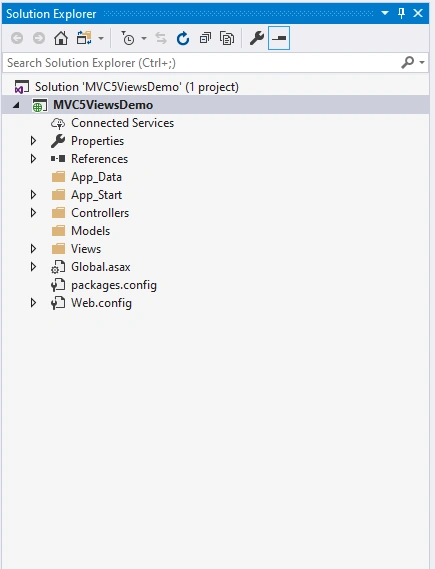
First, create an ASP.NET MVC application using Visual Studio 2017 and provide the name “MVC5ViewsDemo”.
Step 2
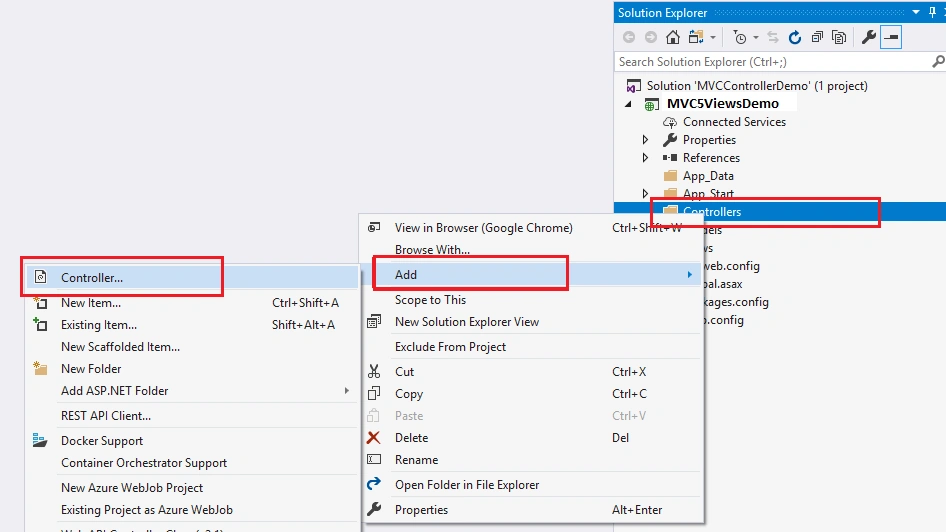
Go to solution explorer Right-click on “Controller” Folder >> Click on [Add] >> click on “Controller” as follow.
Step 3
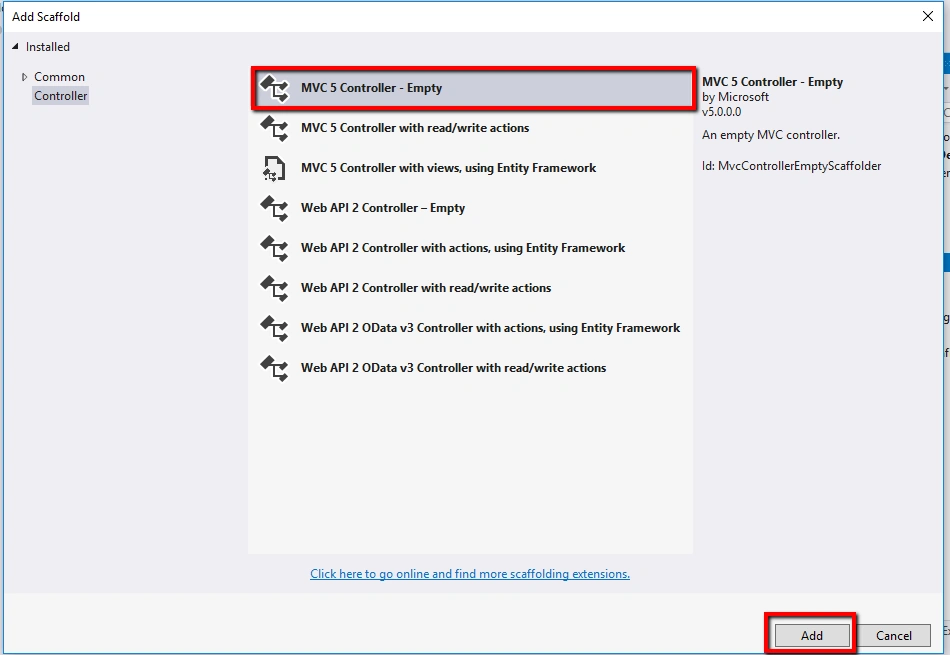
Select “MVC 5 Empty Controller” from the window and click on “Add” button.
Step 4
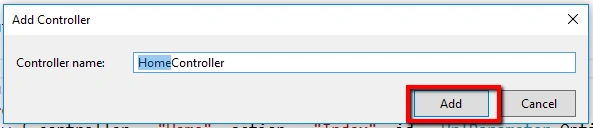
Provide a meaningful name like “HomeController” and Click on "Add" button.
How to create View in ASP.NET MVC 5?
Steps to create the view in MVC 5 as follow.
Step 1
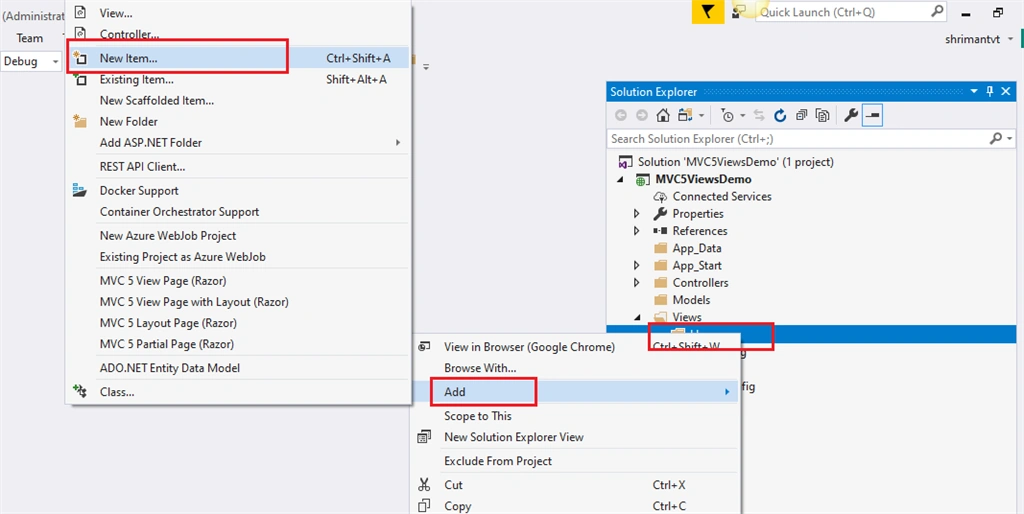
Go to solution explorer => Views Folder => Right-click on “Home” Folder >> go to “Add” >> Click on [New Item] as follow.
Step 2
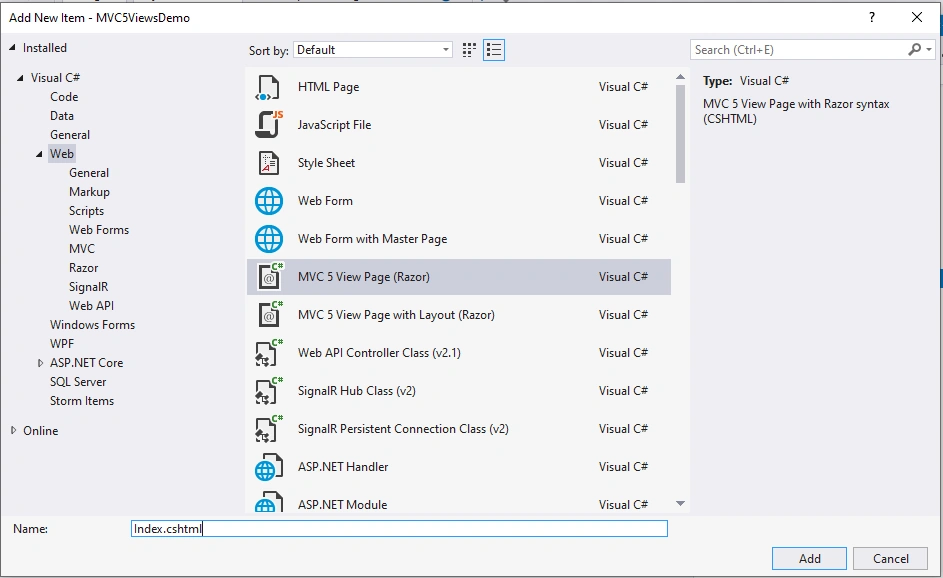
MVC 5 View Page(Razor) template from "Add New Item" window and provide the required name like "Index.cshtml" click on "Add" button.
Sample default index.cshtml code without layout in MVC 5 View as follows.
- @{
- Layout = null;
- }
- <!DOCTYPE html>
- <html>
- <head>
- <meta name="viewport" content="width=device-width" />
- <title></title>
- </head>
- <body>
- <div>
- </div>
- </body>
- </html>
Design the Html table using bootstrap CSS as follow.
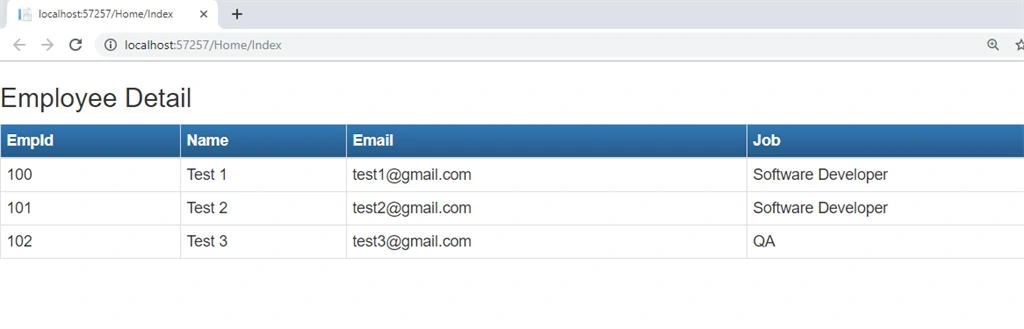
Html code to create Html table in View using bootstrap as follows.
- <!DOCTYPE html>
- <html>
- <head>
- <meta name="viewport" content="width=device-width" />
- <title></title>
- <link href="~/Content/bootstrap.min.css" rel="stylesheet" />
- <link href="~/Content/bootstrap-theme.min.css" rel="stylesheet" />
- <script src="~/Scripts/jquery-3.3.1.min.js"></script>
- <script src="~/Scripts/bootstrap.min.js"></script>
- </head>
- <body>
- <div>
- <h3>Employee Detail</h3>
- <table class="table table-bordered table-responsive table-condensed">
- <thead>
- <tr class="btn-primary">
- <th>EmpId</th>
- <th>Name</th>
- <th>Email</th>
- <th>Job</th>
- </tr>
- </thead>
- <tbody>
- <tr>
- <td>100</td>
- <td>Test 1</td>
- <td>[email protected]</td>
- <td>Software Developer</td>
- </tr>
- <tr>
- <td>101</td>
- <td>Test 2</td>
- <td>[email protected]</td>
- <td>Software Developer</td>
- </tr>
- <tr>
- <td>102</td>
- <td>Test 3</td>
- <td>[email protected]</td>
- <td>QA</td>
- </tr>
- </tbody>
- </table>
- </div>
- </body>
- </html>
How to create a view using layout page in ASP.NET MVC 5
Steps to create a view using layout page in ASP.NET MVC 5 default template.
Step 1
Go to solution explorer => Views Folder => Right-click on “Home” Folder >> go to “Add” >> Click on [New Item] as follow.
Step 2
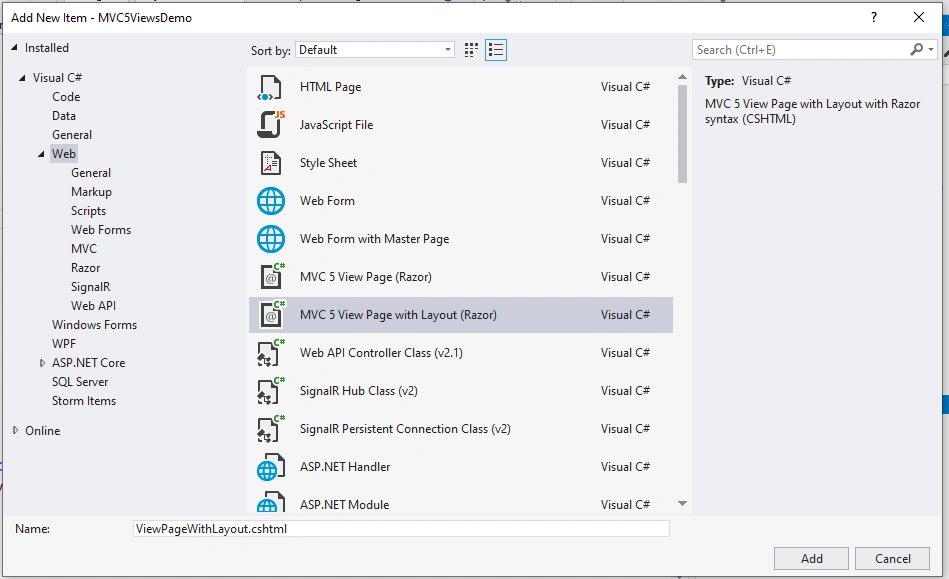
Select MVC 5 View Page with Layout(Razor) from "Add New Item" window and provide the required name like "ViewPageWithLayout.cshtml" click on "Add" button as follow.
Step 3
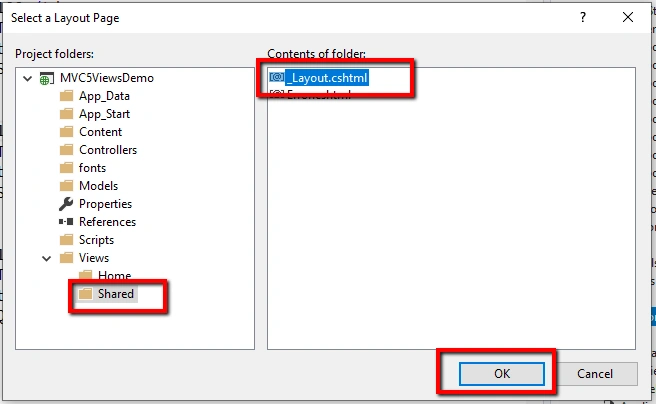
Select the "Shared" folder from views folder and select "_Layout.cshtml" page click on the "Ok" button as follows.
Create sample Html table which contains some dummy information.
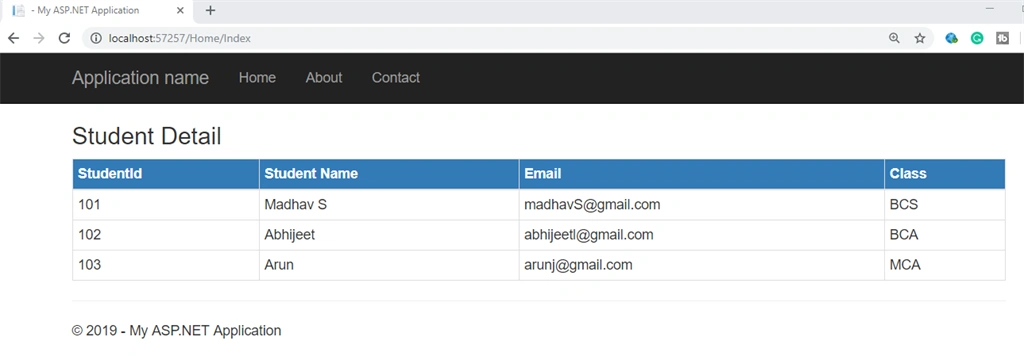
Add code for HomeController as follows.
- namespace MVC5ViewsDemo.Controllers
- {
- public class HomeController : Controller
- {
- public ActionResult Index()
- {
- return View("ViewPageWithLayout");
- }
- }
- }
The View “ViewPageWithLayout” html Code as follow,
- @{
- Layout = "~/Views/Shared/_Layout.cshtml";
- }
- <h3>Student Detail </h3>
- <table class="table table-bordered table-responsive table-condensed">
- <thead>
- <tr class="btn-primary">
- <th>StudentId</th>
- <th>Student Name</th>
- <th>Email</th>
- <th>Class</th>
- </tr>
- </thead>
- <tbody>
- <tr>
- <td>101</td>
- <td>Madhav S</td>
- <td>[email protected]</td>
- <td>BCS</td>
- </tr>
- <tr>
- <td>102</td>
- <td>Abhijeet </td>
- <td>[email protected]</td>
- <td>BCA</td>
- </tr>
- <tr>
- <td>103</td>
- <td>Arun</td>
- <td>[email protected]</td>
- <td>MCA</td>
- </tr>
- </tbody>
- </table>
Create view from controller In MVC 5
Step 1
Open the “HomeController” >> Set cursor inside the Action Method >> Right click on inside the action method >> click on [Add View] as follow.
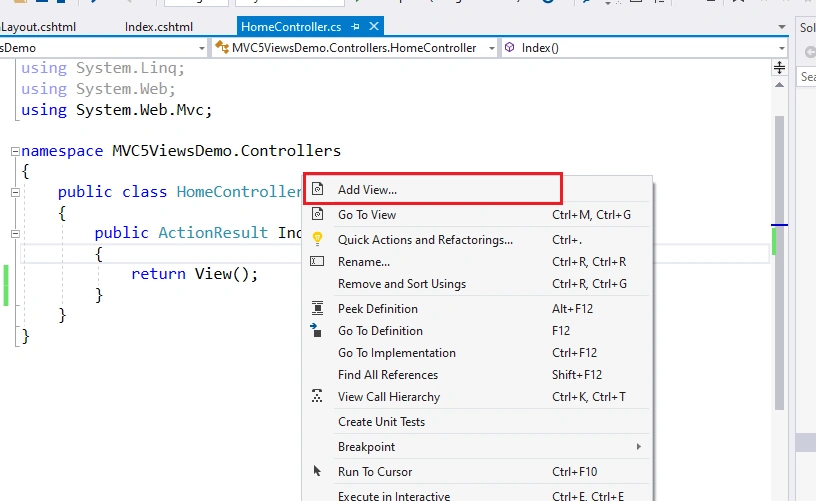
Step 2
Provide the view name and select the appropriate layout and click on the “Add” button as follows.
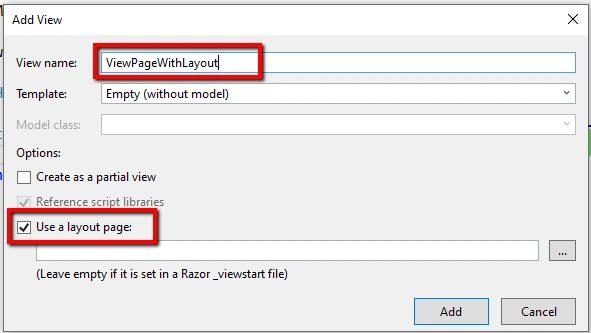
Add the same above Html code for this view and run the application you will get the same result as above.
How to write C# code on Razor View
Example 1
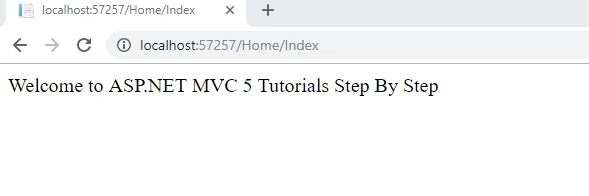
Print a simple message on View using C# code.
Index.cshtm page code
- @{
- string strMessage = "Welcome to ASP.NET MVC 5 Tutorials Step By Step";
- }
- <label>@strMessage</label>
Output 1
Example 2
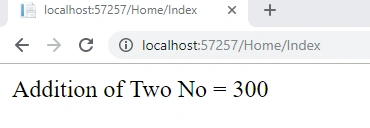
Addition of two number on View using C# code.
- @{
- var num1 = 100;
- var num2 = 200;
- }
- <label>Addition of Two No = @(num1 + num2)</label>
Output 2
Type of View in ASP.NET MVC 5
- Normal view
It's the same as web page in asp.net web form
- Partial view
It's the same as user control in asp.net web form.
- Layout View
It's the same as a master page in asp.net web form.
Why View is required in ASP.NET MVC?
- The view is required to display the UI on the browser.
- It is required to make your application interactive and user-friendly.
- To use a client-side framework like AngularJs, ReactJs, etc.
How to call View from the browser?
Syntax
DomainName/ConttrollerName/viewName
Example
localhost/Home/Index
View Hierarchical in ASP.NET MVC 5
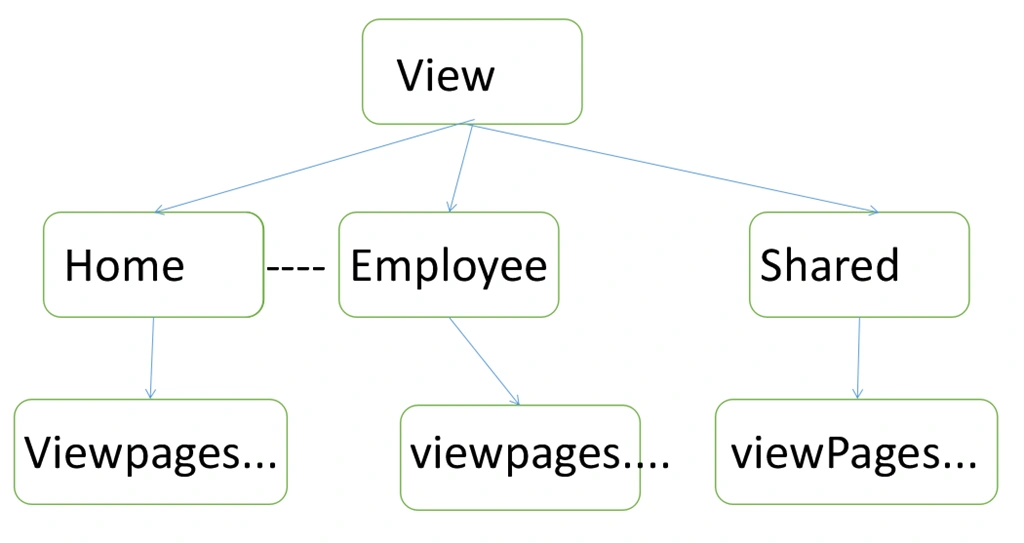
In view, hierarchical “View” is a base folder of all subfolders in MVC structure. If you create a controller then automatically a respective folder is created inside the view folder like “Home”, "Student", "Employee", etc. In the above diagram it says that we have created HomeController the "Home" folder is created automatically and same for Employee folder. Each respective controller's view folder can contain any number of view pages inside the view folder.
References
- View In ASP.NET MVC 5
- View In ASP.NET MVC 5(Video)
- Getting started with view In MVC 5
- ASP.NET MVC 5 Tutorials for Beginners Step By Step
I hope you understand the concepts of view in ASP.NET MVC 5.
Thanks for reading.
Join the conversation! Your thoughts help the community grow.