

Introduction
Java's traditional threading model has been based on platform threads, which directly map to operating system threads. These threads are heavyweight, requiring significant memory and resources for each thread. Java Virtual Threads, introduced as part of Project Loom in the newer versions of JDK, provide a lightweight alternative to platform threads. They enable handling large numbers of concurrent tasks without the performance limitations of traditional threads.
What are Virtual Threads?
Virtual Threads are lightweight threads managed by the Java Virtual Machine (JVM) rather than the underlying operating system. They allow Java developers to write concurrent applications with many threads without worrying about resource overhead, as each virtual thread requires significantly less memory and processing power compared to traditional platform threads.
When to Use Virtual Threads?
Virtual threads are useful in scenarios where you need to handle thousands or even millions of concurrent tasks. They are particularly suited for.
- I/O-bound applications: Such as web servers or microservices that handle many requests simultaneously.
- Asynchronous tasks: Where traditional threads would be inefficient due to resource overhead.
- High-concurrency applications: Such as real-time systems, financial applications, and data streaming services.
- Improved scalability: Systems that need better scaling with minimal memory and CPU footprint.
How to Use Virtual Threads?
Using virtual threads is quite simple in Java JDK 19 or later. The syntax is similar to using traditional threads, but virtual threads can be created in much larger numbers without affecting performance.
Java Code Example
Let's look at an example of how virtual threads can be used in practice.
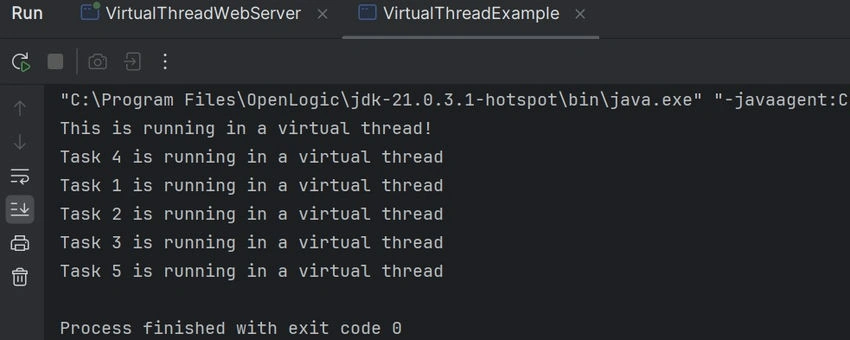
Code Example. Basic Virtual Thread Usage
public class VirtualThreadExample {
    public static void main(String[] args) throws InterruptedException {
        // Create and start a virtual thread
        Thread virtualThread = Thread.ofVirtual().start(() -> {
            System.out.println("This is running in a virtual thread!");
        });

        // Wait for the virtual thread to complete execution
        virtualThread.join();

        // Creating multiple virtual threads to showcase concurrency
        for (int i = 1; i <= 5; i++) {
            int taskId = i; // Effectively final variable for the lambda expression
            Thread.ofVirtual().start(() -> {
                System.out.println("Task " + taskId + " is running in a virtual thread");
            });
        }

        // Adding sleep to ensure all virtual threads finish before main thread ends
        Thread.sleep(1000); // Delay to allow all threads to finish
    }
}
Code Explanation
- Thread.ofVirtual(): This method creates a new virtual thread.
- vThread.start(): Starts the virtual thread, executing the provided lambda function.
- vThread.join(): Waits for the virtual thread to finish execution.
Join the conversation! Your thoughts help the community grow.