

Rules of VocEnhancer
- It is a single-player game.
- There are three levels in the game, Beginner, Average, and Expert. The players would choose from these levels depending on their vocabulary.
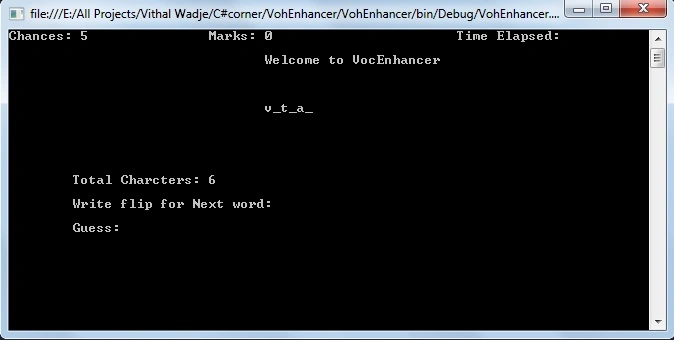
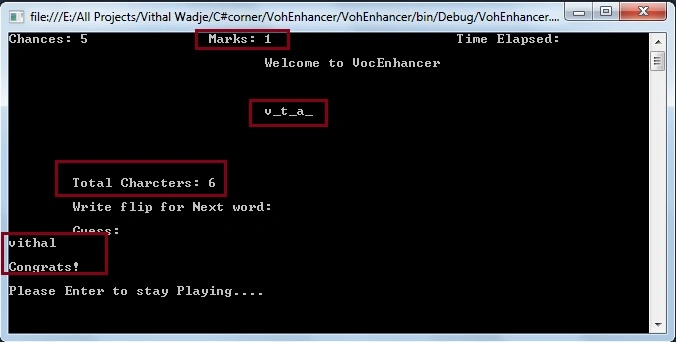
- Depending upon the level, a few characters from an English word appear on the screen. The total number of characters in the word, the number of chances to guess the word, the marks scored by the player, and the seconds elapsed also appear on the screen.
- The marks, number of chances to guess the word, and the time elapsed is to be updated on the screen.
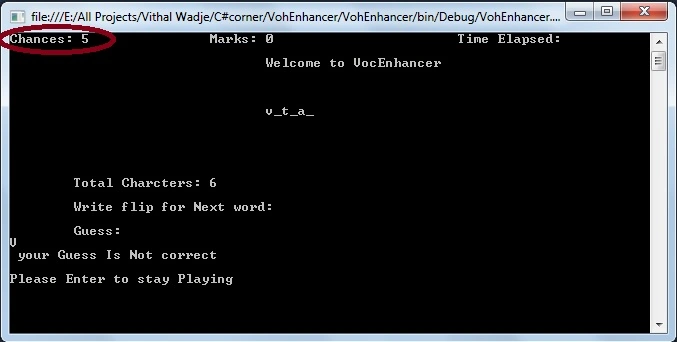
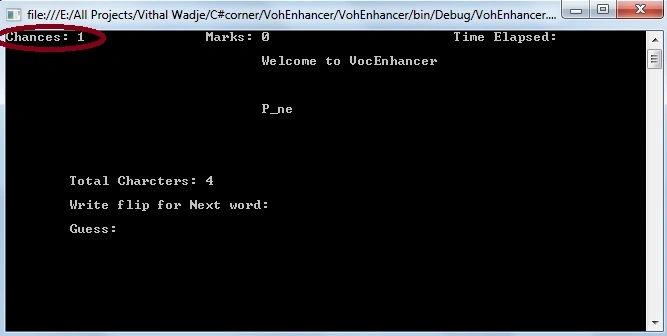
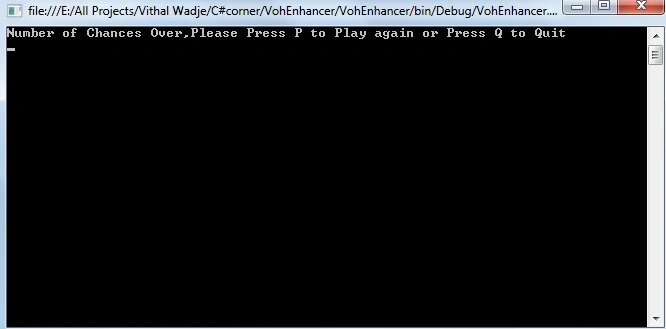
- The player must guess each word within the given chances. If a player is unable to guess any five words in the given number of chances, the game should be over.
Design Specifications
The design of the game should be as per the following specifications:
- When the game starts, a menu should be displayed with the following options:
- Level 2: Average.
- Level 3: Expert .
- The player can choose any level. As the player selects the level, details of the highest score for that level should be displayed on the screen and then the game should start.
-
Each level has a different sets of words.
-
A few characters of a word are displayed on the screen each time. These characters are chosen randomly and are placed at the position where they occur in the word. The missing characters are indicated by blanks or underlines.
-
The number of characters displayed on the screen depends upon the length of the word to be guessed. If the word is long then the characters displayed should be more and vice versa.
-
The sequence of the words displayed should be random.
-
The number of chances to guess each word should be five more than the number of missing characters in the word.
-
The player gets one mark for guessing the correct word.
-
The total marks scored by the user should be displayed on the screen and the score needs to be updated with each word guessed correctly.
- Open Visual Studio from Start -> All programs -> Microsoft Visual Studio.
- Then go to to "File" -> "New" -> "Project..." then select "Visual C#" -> "Windows" -> "Console application".
- After that specify the name such as VocEnhancer or whatever name you wish and the location of the project and click on the "OK" button. The new project is created.
- "C:\\Users\\vithal\\Desktop\\Level1words.txt";
- "C:\\Users\\vithal\\Desktop\\guess.txt";
In the same way you can create files for Level1 and Level2.
- There is a need to create separate files for guessing words you can dynamically create them using C# string functions but to make it understandable for the student I have created separate files.
The words of these text files will look such as follows.
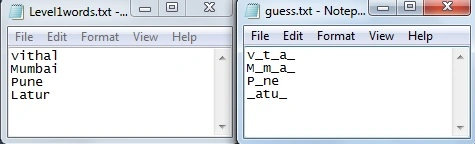
- Keep the guess words sequence the same as the answer words file.
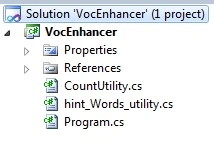
Now right-click on VocEnhancer Solution Explorer and add the following class files.
- hint_Words_utility.cs: for reading hint or guess words from text files.
- CountUtility.cs: for counting the marks, chances and time.
Now the VocEnhancer application Solution Explorer will look such as follows.
- using System;
- using System.IO;
- namespace VohEnhancer
- {
- public class hint_Words_utility
- {
- public static int ReadWordsFromHintFile(string[] Hintwords)
- {
- //geting file path from system desktop location which i have created
- string guessfilename = "C:\\Users\\vithal\\Desktop\\guess.txt";
- if (File.Exists(guessfilename) == false)
- return -1;
- //reading the text file words
- StreamReader guessRead = new StreamReader(guessfilename);
- int cguessount = 0;
- for (int i = 0; i < 50; i++)
- {
- if (guessRead.EndOfStream == true)
- break;
- Hintwords[cguessount++] = guessRead.ReadLine();
- }
- guessRead.Close();
- return cguessount;
- }
- public static string GetHints()
- {
- string[] Hintwords = new string[50];
- int count = ReadWordsFromHintFile(Hintwords);
- Random r = new Random();//for getting the random words from text files
- int guessX = (int)(r.Next(count));
- String secretWord = Hintwords[guessX];
- return secretWord; //returning the random words
- }
- }
- }
- namespace VohEnhancer
- {
- public static class CountUtility
- {
- private static int _SetChances = 5, _Setmarks=0;
- public static int Setmarks
- {
- get { return _Setmarks; }
- set { _Setmarks = value; }
- }
- public static int SetChances
- {
- get { return _SetChances; }
- set { _SetChances = value; }
- }
- }
- }
- using System;
- using System.Collections.Generic;
- using System.Linq;
- using System.Text;
- using System.IO;
- using System.Timers;
- namespace VohEnhancer
- {
- public class Program
- {
- public static string NewLine = Environment.NewLine;
- public static string Space = "\t"+"\t"+"\t"+"\t";
- public static int Chances,Marks;
- static int ReadWordsFromFile(string[] words)
- {
- //getting path of Level1 words from the following location
- string filename = "C:\\Users\\vithal\\Desktop\\Level1words.txt";
- if (File.Exists(filename) == false)
- return -1;
- //reading the words from file
- StreamReader s = new StreamReader(filename);
- int count = 0;
- for (int i = 0; i < 50; i++)
- {
- if (s.EndOfStream == true)
- break;
- words[count++] = s.ReadLine();
-
- }
- s.Close();
- return count;
- }
- static void Main(string[] args)
- {
- GameMode();
- }
- private static void Level1Mode()
- {
- //level1 game mode logic or as same you can do it for Level2 and Level3
- Chances = CountUtility.SetChances;
- Marks = CountUtility.Setmarks; ;
- Console.WriteLine("Chances:" + " " + Chances + "\t" + "\t" + " Marks:" + " " + Marks+"\t"+"\t"+"\t"+"Time Elapsed:");
- Console.WriteLine(NewLine + Space + "Welcome to VocEnhancer" + NewLine + NewLine + NewLine);
- if (Chances == 0)
- {
- Console.Clear();
- Console.WriteLine("Number of Chances Over,Please Press P to Play again or Press Q to Quit");
- string Option = Console.ReadLine();
- if (Option == "P" || Option == "p")
- {
- Console.Clear();
- GameMode();
- }
-
- }
- string[] words = new string[50];
- int count = ReadWordsFromFile(words);
- Random r = new Random();
- string hint = hint_Words_utility.GetHints();
- int guessX = (int)(r.Next(count));
- //getting guess words
- String secretWord = words[guessX];
- //getting the length of guess word
- int numChars = secretWord.Length;
- Console.Write(Space + hint + NewLine + NewLine + NewLine + NewLine + NewLine + NewLine);
- Console.Write("\t" + "Total Charcters:" + " " + numChars + NewLine);
- Console.WriteLine();
- bool bGuessedCorrectly = false;
- Console.WriteLine("\t" + "Write flip for Next word: " + NewLine + NewLine + "\t" + "Guess:");
- while (true & Chances > 0)
- {
- //for changing word by wrtting flip
- string choice = Console.ReadLine();
- if (choice == "flip")
- {
- Console.Clear();
- Level1Mode();
- }
- if (choice == secretWord)
- {
- bGuessedCorrectly = true;
- break;
- }
- else
- {
- bGuessedCorrectly = false;
- break;
- }
- }
- if (bGuessedCorrectly == false)
- {
- Chances--; //decreasing chances on every wrong attempt
- CountUtility.SetChances = Chances;
- Console.WriteLine(" your Guess Is Not correct"+NewLine);
- Console.WriteLine("Please Enter to stay Playing");
- }
- else
- {
- Marks++; //counting marks for each correct answer
- CountUtility.Setmarks = Marks;
- Console.WriteLine(NewLine + "Congrats!" + NewLine);
- Console.WriteLine("Please Enter to stay Playing....");
- }
- Console.ReadLine();
- Console.Clear();
- Level1Mode();
- }
- public static void GameMode()
- {
- Console.WriteLine(Space + "Welcome to VocEnhancer" + NewLine + NewLine + NewLine);
- Console.WriteLine("Please Select Game Mode" + NewLine);
- Console.WriteLine("\t" + "1) Press 1 for Level 1- Beginner" + NewLine);
- Console.WriteLine("\t" + "2) Press 2 for Level 2-Average" + NewLine);
- Console.WriteLine("\t" + "3) Press 3 for Level 3-Expert" + NewLine);
- int Mode = int.Parse(Console.ReadLine());
- //for selecting the modes
- switch (Mode)
- {
- case 1:
- Console.Clear();
- // Level1 Mode
- Level1Mode();
- break;
- case 2:
- Console.Clear();
- // Level2 Mode,please write separate function as same Level1 with different file
- Level1Mode();
- break;
- case 3:
- Console.Clear();
- // Level3 Mode,please write separate function as same Level1 with different file
- Level1Mode();
- break;
- default:
- Console.WriteLine("Please Select Game Mode between 1 to 3");
- Console.ReadLine();
- Console.Clear();
- GameMode();
- break;
- }
- }
-
- //end of class
- }
- }
Now in the preceding class file we have written all the logic required to create the VocEnhancer application.
- I have used the same function for all three modes, please use the same logic as level one but provide a different word file path for each function, I hope you will do that since you are smart enough for that.
We are now done with the code, now run the console application in any of the following ways:
- Press F5
- Directly clicking on the .exe file from the bin folder of the VocEnhancer application.
- Using any option you wish to and that you know
After running the VocEnhancer application the following Level selection console screen will be as:
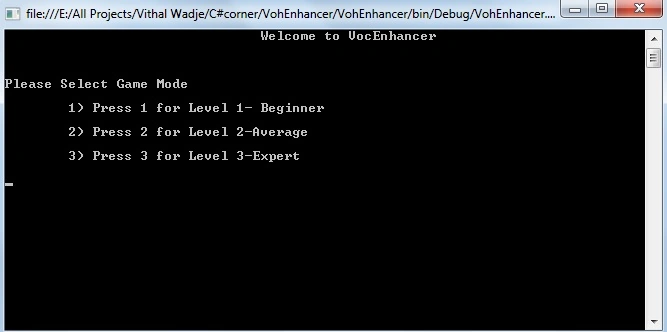
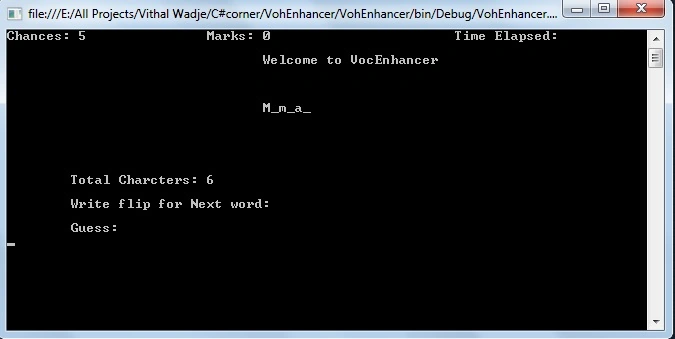
Note:
- For detailed code please download the Zip file attached above.
- Don't forget to create Text Files for words.
- Please don't use the code as is, use the example above as a guide and try improve it so in the future and for your career it's useful for you.
- Don't buy any project from an outsider, do it as your own skill, it will definitely be useful for getting a job quickly and easily.
- Invest your time and money in technical skill improvement instead of investing money for buying projects and if possible choose Microsoft technology for your career.
- For free guidance for any college project, you can contact with me or refer to the C# Corner site but don't buy any project in your final year.
Summary
I hope this application is useful for students. If you have any suggestion related to this article or if you want any additional requirements in the above application then please contact me.
Vithal WadjePosted Dec 18, 2014, 2:27 PM
Dhanashree Rawte madam,can u send me your sample code
Dhanashree RawtePosted Jul 30, 2014, 10:48 AM
int guessX = (int)(r.Next(count)); while running the program a error is creating from this
Vithal WadjePosted Mar 30, 2014, 6:52 AM
its working fine,plz follow the process ,as i have given
Eqbal shaikhPosted Mar 28, 2014, 2:45 AM
i also want the the voc enchancer project
Eqbal shaikhPosted Mar 28, 2014, 2:41 AM
mail me on [email protected]
Debalina DasPosted Mar 22, 2014, 1:17 AM
plz its not working..i want a voc enhancer using c#..plz send me the complete project sir i need it urget my email id is [email protected] help me sir
Debalina DasPosted Mar 22, 2014, 1:13 AM
its not working..the zip file is also nt working..plzz send me a voc enhancer using c# in my email id [email protected]. i need it urgent plzzzz
Vithal WadjePosted Feb 26, 2014, 12:33 PM
Debalina sir i will try
Debalina DasPosted Feb 26, 2014, 11:19 AM
upload a video..its really difficult
Vithal WadjePosted Feb 23, 2014, 12:54 PM
animesh sir after quiting.,application is not running thats why marks are not showing
animeshPosted Feb 22, 2014, 1:35 PM
time elapsed is not working and total marks is not showing after quiting.
Rohit AggarwalPosted Feb 6, 2014, 12:36 PM
In this code time elapsed is not working, and there is no code to store the highest marks can you tell that
Vithal WadjePosted Jan 24, 2014, 12:57 PM
thanks Honey mdm
Honey JagyasiPosted Jan 23, 2014, 11:50 PM
Good One.....
Vithal WadjePosted Jan 17, 2014, 10:03 PM
thanks santosh dalal sir
santosh dalalPosted Jan 16, 2014, 10:47 PM
thanx a lot sir
Vithal WadjePosted Jan 13, 2014, 10:02 AM
thanks Jaganathan Bantheswaran sir
Vithal WadjePosted Jan 13, 2014, 10:02 AM
thanks Keyur patel sir
Jaganathan BantheswaranPosted Jan 13, 2014, 5:17 AM
Nice effort :)
Keyur PatelPosted Jan 13, 2014, 5:08 AM
Nice thought!
Vithal WadjePosted Jan 12, 2014, 6:42 AM
thanks Sunny sir
Sunny SharmaPosted Jan 12, 2014, 6:06 AM
nice
Ravi ShekharPosted Jan 12, 2014, 4:10 AM
awsome...:)