Background
In today's increasing technology demands, many tools have come onto the market and there have been reviews of specific products (or other specific things) from customers to improve the product quality or to get opinions of them, so we will make a voting control application using ASP.Net C#.
Use the following procedure to create the sample application "Empsys":
- "Start" - "All Programs" - "Microsoft Visual Studio 2010".
- "File" - "New Project" - "C#" - "Empty Web Application" (to avoid adding a master page).
- Provide the web site a name such as "VotingApp" or another as you wish and specify the location.
- Then right-click on Solution Explorer - "Add New Item" - "Default.aspx page".
- Drag and drop two buttons, three labels and one Radio Button list
The Default.aspx page source will be as follows:
- <%@ Page Language="C#" AutoEventWireup="true" CodeFile="Default.aspx.cs" Inherits="_Default" %>
-
- <!DOCTYPE html PUBLIC "-//W3C//DTD XHTML 1.0 Transitional//EN" "http://www.w3.org/TR/xhtml1/DTD/xhtml1-transitional.dtd">
- <html xmlns="http://www.w3.org/1999/xhtml">
- <head runat="server">
- <title>article by vithal wadje</title>
- </head>
- <body bgcolor="black" style="color: #808000; margin-left: 30px; width: 475px;">
- <form id="form1" runat="server">
- <br />
- <div>
- <p style="font-family: 'Times New Roman', Times, serif; font-size: large; color: #808000;
- font-weight: bold; position: inherit">
- Is Vithal Wadje is Next MLA from Latur ?</p>
- <asp:RadioButtonList ID="RadioButtonList1" runat="server">
- <asp:ListItem>Yes</asp:ListItem>
- </asp:RadioButtonList>
- <asp:RadioButtonList ID="RadioButtonList2" runat="server" Font-Bold="True">
- <asp:ListItem>No</asp:ListItem>
- </asp:RadioButtonList>
- <br />
- <asp:Button ID="Button1" runat="server" OnClick="Vote_Click" Text="Vote" />
-
- <asp:Button ID="Button2" runat="server" Text="View Votes" OnClick="ViewVotes_Click" />
- <br />
- <br />
- <br />
- <asp:Label ID="Label1" runat="server" Text="Label" Font-Bold="True" Font-Size="X-Large"></asp:Label><br />
- <asp:Label ID="Label2" runat="server" Text="Label" Font-Bold="True" Font-Size="X-Large"></asp:Label><br />
- <asp:Label ID="Label3" runat="server" Text="Label" Font-Bold="True" Font-Size="X-Large"></asp:Label>
- </div>
- </form>
- </body>
- </html>
Now the UI will will look such as follows.
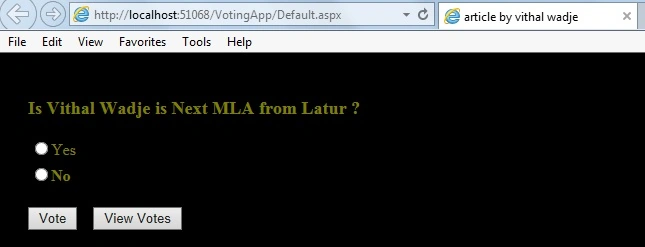
In the preceding sample UI I have added one question (it's just an example; I love coding, not MLA post) and on that there are two buttons of a Radio Button List that are "Yes" and "No" and after checking one of the Radio Buttons and clicking on the above Vote button, the vote will be registered and then on the View Votes button click it shows the results of all votes in one label, so let us start coding to fulfill our application requirements.
Vote Button click Logic
- protected void Vote_Click(object sender, EventArgs e)
- {
- if (Request.Cookies["State"] == null)
- {
- foreach (ListItem item in RadioButtonList1.Items)
- {
- if (item.Selected == true)
- {
-
- FileStream fs1 = new FileStream("C:\\Users\\vithal\\Desktop\\vote\\Result.txt", FileMode.Append, FileAccess.Write);
- StreamWriter sw1 = new StreamWriter(fs1);
- sw1.WriteLine(item.Value);
- sw1.Flush();
- sw1.Close();
- sw1.Close();
- HttpCookie HC = new HttpCookie("State");
- HC.Values["State"] = "Set";
- HC.Expires = DateTime.Now.AddDays(2);
- Response.Cookies.Add(HC);
- Label3.Visible = true;
- Label3.ForeColor = Color.Green;
- Label3.Text = "You Have voted Sucessfully";
- }
- }
- }
- else
- {
- Label3.Visible = true;
- Label3.ForeColor = Color.Red;
- Label3.Text = "You are already Voted";
- }
- }
In the code above, when the vote button is clicked, it first checks the cookies for null, if null then it is a successful vote, if the cookies are not null then that means the user has already voted.
Note
The Important point of this application is that we are not using a database to store the votes, we are using a text file for that so you need to create the same text file that I created, a Result text file at the location:
C:\\Users\\vithal\\Desktop\\vote\\Result.txt
I hope you have created the same. Now to move towards the view Votes button code logic is as in the following:
- protected void ViewVotes_Click(object sender, EventArgs e)
- {
- int yes = 0;
- int no = 0;
- FileStream fs2 = new FileStream("C:\\Users\\vithal\\Desktop\\vote\\Result.txt", FileMode.Open, FileAccess.Read);
- StreamReader sr2 = new StreamReader(fs2);
-
- sr2.BaseStream.Seek(0, SeekOrigin.Begin);
- string str = sr2.ReadLine();
- while (str != null)
- {
-
- if (str == "Yes")
- {
- yes = yes + 1;
-
- }
- if (str == "No")
- {
- no = no + 1;
-
- }
- str = sr2.ReadLine();
- }
- sr2.Close();
- fs2.Close();
- float a=(float)yes/(yes+no)*100;
- int aresult = (int)a;
- int bresult = 100 - aresult;
- Label1.Visible = true;
- Label1.ForeColor = Color.Brown;
- Label1.Text ="Yes :"+" "+" "+ Convert.ToString(aresult) + " " + "%";
- Label2.Visible = true;
- Label2.ForeColor = Color.Brown;
- Label2.Text = "No :"+" "+" "+Convert.ToString(bresult) + " " + "%";
-
- }
In the code above, we are reading the results from a text file using StreamReader, then in one float variable we are counting the percentage of votes and showing that on a label.
We are done with the code, now it's time to run the application and Vote. Now run the application to vote for Vithal Wadje as in the following:
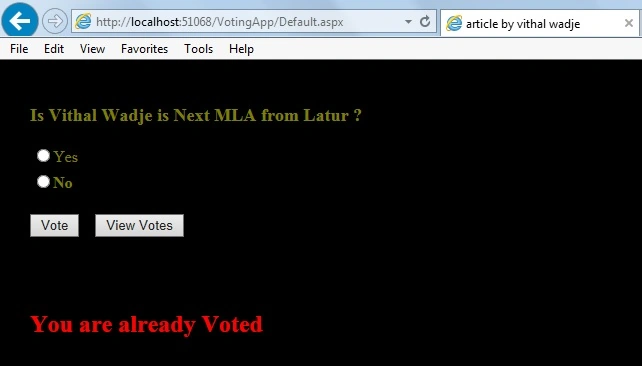
Now, suppose four users have voted, out of the 4, three have voted yes and one of them is No and I have voted from my browser, then if I try to vote again, it shows the following message:
In other words, I have already voted and using cookies we are detecting duplicate votes. For further explanations please see the code.
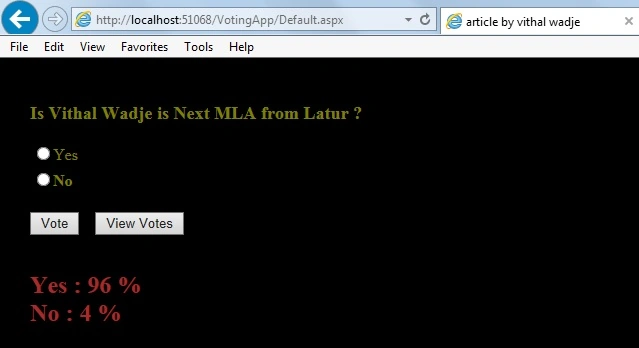
Now click on the View votes button, the result will be as in the following:
Now in the preceding result, you can see that 96 % of the people voted yes Vithal Wadje is the next MLA from Latur and 4% are unhappy peoples saying No Vithal Wadje is not the next MLA from Latur, in other words before election, I need to make them happy!
Now from all the preceding examples, we have learned how to create a voting application. I hope you have enjoyed this article as you read it.
Note:
- For detailed code please download the Zip file attached above.
- Don't forget to create the text file for storing votes.
Summary
Now from all the preceding examples, we have learned how to create a voting application in ASP.Net C# and depending on your requirements you can change the logic. I hope you have enjoyed reading this article. If you have any suggestion regarding this article then please contact me.


Vithal WadjePosted Jul 19, 2014, 1:50 PM
thanks Chien sir
chien nguyenPosted Jul 18, 2014, 12:17 PM
One simple and beautiful snippet, Thank for your post