

The common way to develop new functionality or custom functionality for Outlook, Word or Excel is to develop COM addins. There are many different technologies for making these types of addins such as Visual Basic 6.0, Delphi, C++ and .Net etc.
If we talk ABOUT .NET Then there are two main ways for developing an addin:
With the help of IDTExtensibility interface and others
With the help of VSTO (Visual Studio Tools for Office) technology.
VSTO supports both languages VB.Net and C# and Office 2003 and later versions.
This article demonstrates how to make a Word addin for Word 2010 by using VSTO 2010.
Objective:
Showing Welcome message on Word application start up
Start project:
Start vsto project File -- > New project -- > installed Template -- > Visual C# -- > office -- > 2010
Select Word 2010 add-in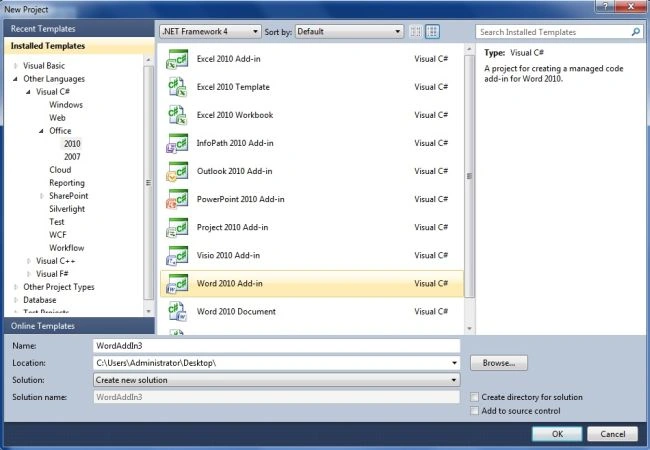
Visual Studio automatically generates an Addin.vb class (thisaddin.vb in vb.net and thisaddin.cs in C#.). We can see this class in our project. We can use this class to perform various tasks such as customizing the user interface of the Word application, accessing the object model of the Office host application (in this project Microsoft is the host application) etc. This type of addin is also called an "application label addin".
There are two default event handlers in this class one is ThisAddin_Startup and other is ThisAddin_ShutDown.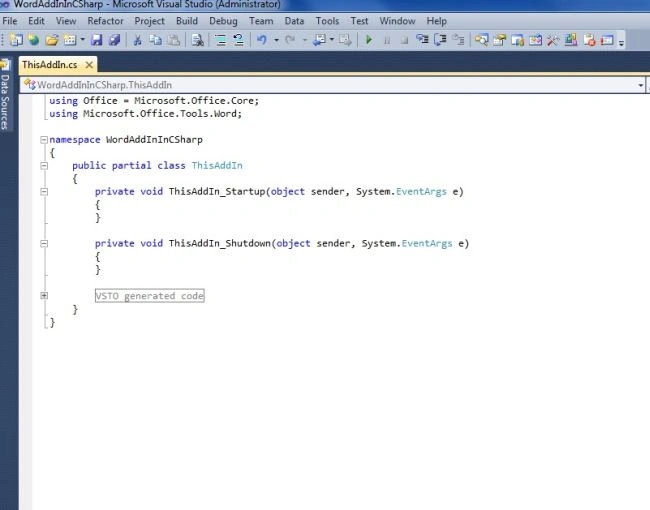
A VSTO addin uses the object model of the host application, which means that if we are working for an Outlook addin in VSTO then the addin will use the Outlook object model or if we are working with a Word addin project then the addin application will use the Word object model so our addin application will use Word Object Model.
So right now I am explaining some important things about the Word object model.
The Word object model consists of classes and interfaces that are provided in the primary interop assembly for Word, and are defined in the Microsoft.Office.Interop.Word namespace.
The following sections briefly describe the top-level objects of the Word object model and how they interact with each other. These objects include the following five:
Join the conversation! Your thoughts help the community grow.