This paper especially pinpoints the poor practice of cryptography in a URL that is typically implemented to encrypt sensitive data in a website URL in the form of a query string that is transmited across networks. A website usually can be compromised or such subtle information (Query String) can be disclosed by exploiting this vulnerability. This article demonstrates with a real time scenario where the developers are committing mistakes by practicing weak cryptographic methods inadvertently, to protect sensitive data in the URL using public key cryptography and salts. Finally, this article is addressing the various issues in terms of disadvantages that occurr when applying weak cryptography algorithm, moreover suggesting various alternative methods to secure URL data properly.
Introduction
Securing a URL is the process of concealing or encrypting a parameterized Query String based URL such as www.xyz.com/login.aspx?uid=ajay&pawd=09876 by applying complex C# cryptography. The moment a URL is requested from the server, internally we determine the required parameters, then encrypt Query String values where the sensitive information is typically located and redirect them to another source for further processing and then decrypt the encrypted Query-String values there, if it is required. In this entire process, the URL always shows some bizarre values in the Query String and is intact from the malicious hacker eyes because it is very hard for him to determine exactly what is travelling across the network via query string. The idea of Query String encryption protects a web page from MITM or session hijacking attacks at some extent. This mechanism is somewhat similar to URL rewriting where a verbose URL is flashing in the address in spite of an actual web page address where the Query String parameters are still located. The hacker never anticipates that the requested URL would contain Query String values.
Susceptible URL
The following ASP.NET page, that simply authenticates users on behalf of the correct user id and password, is created to demonstrate the real concept behind the disclosing “sensitive data via URL” incident. This page stipulates both facilities to log-in, either plain text or secure sign-in.
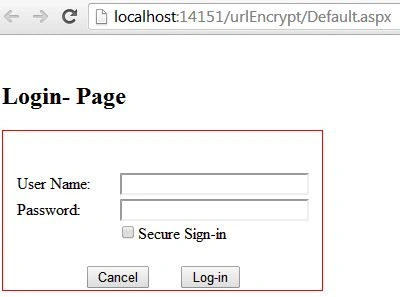
When the user enters his credentials and proceeds with the simple plan text mechanism (without checking Secure Sign-in), its login information's user name and password travelled through the Query String to the redirected page and is literally displayed in the URL address bar as below:
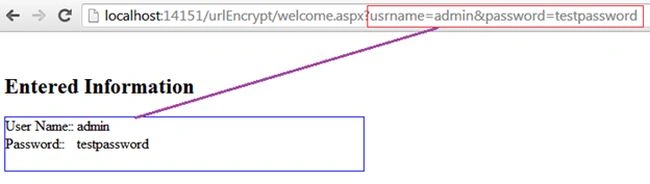
Though optionally, we are showing user credential information on the redirected Welcome.aspx page but here is a catch in the address bar. There might be a possibility that a malicious hacker could intercept the traffic and can easily use the user information since such data is travelling or located in the query string in clear text. Hence, this is the crucial vulnerability that we will pinpoint in this paper.
Securing Sensitive Data
This section describes the process of encrypting the data residing in the query string. The Login form interface is designed such that if the user enables the Secure Sign-in check box, the encryption algorithm would be activated behind the scenes and it is hard to anticipate the ciphered data that travels across the webpages in the query string.
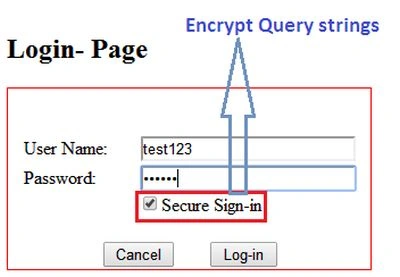
As the user proceeds by enabling the Secure Sign-in option, the following piece of code is activated and encrypts the sensitive portion of the URL. Here, the Encryt() method takes the user name and password from the login form and implements the ciphering. Later, the user will be redirected to the welcome page via the query string mechanism as in the following:
- string usr = HttpUtility.UrlEncode(Encrypt(txtUser.Text.Trim()));
- string pwd = HttpUtility.UrlEncode(Encrypt(txtPwd.Text.Trim()));
-
- Response.Redirect(string.Format("~/welcome.aspx?usrname={0}&password={1}",
- usr, pwd));
Developers usually protect the query string by invoking the UrlEncode method, that typically converts the plain text into a base64 format. But such encoding is not sufficient and is still vulnerable. Hence, we apply double protection here in the form of invoking a custom algorithm and UrlEncode method.
Query String Encryption
Here in this code segment, the real encryption of the query string parameters will happen in the Encrypt() method implementation that is called when the user clicks the Sign-In button. Here, the Query String values will be first encrypted using the AES Symmetric key algorithm encoding and then will be sent to the welcome page where the Query String values will be first deciphered and then decrypted using the AES Algorithm again using the Symmetric key that was used for encryption earlier on the Login page.
As we know, the hashing algorithm can be implemented either by Symmetric key or Asymmetric key. In Asymmetric key cryptography, two keys are employed for encryption and decryption but in this tutorial we are relying on a Symmetric key where a single key is sufficient for both ciphering and deciphering the sensitive data.
Generating Secure Key (Symmetric)The symmetric key could be anything, it just depends on the developer's discretion. Symmetric key algorithms are very effective for processing extensive amounts of data and is less intensive than asymmetric encryption algorithms computationally. Hence, we hardcoded the Symmetric key as “ajaykumar007” that does both of the functions as in the following:
- string password = "ajaykumar007";
It is recommended that the symmetric key must be strong with full of Alphanumeric keys so that it is hard to assume. Because a simple combination of words is always considered to be a weak key and susceptible to dictionary attacks. Though there are plenty of methods for generating a secure key, such as the following code that generates a symmetric key programmatically.
- static String CreateKey(int numBytes)
- {
- RNGCryptoServiceProvider rnd = new RNGCryptoServiceProvider();
- byte[] b = new byte[numBytes];
-
- rnd.GetBytes(b);
- return BytesToHexString(b);
- }
-
- static String BytesToHexString(byte[] bytes)
- {
- StringBuilder hexString = new StringBuilder(64);
-
- for (int counter = 0; counter < bytes.Length; counter++)
- {
- hexString.Append(String.Format("{0:X2}", bytes[counter]));
- }
- return hexString.ToString();
- }
We can also use that previous code for generating asymmetric key programmatically but we move ahead with “ajaykumar007”.
Generating Salt
A salt typically is random data that is used as a supplementary input to a one-way function that hashes a passphrase or sensitive data. The salt and the password are concatenated and processed with a cryptographic hash function and the resulting output (but not the original password) is stored with the salt in a database. The key purpose of a salt is to protect against a pre-computed rainbow table and dictionary attacks.
It is not necessary to keep the salt value secret. An attacker never ever assumes in advance what the salt will be, so they can't use the rainbow table or pre-compute the lookup table because a salt value is generated at random and each time the hashed value would be different. Generally, we can create a salt with a random value using the following code:
- private static string CreateSalt(int size)
- {
-
- RNGCryptoServiceProvider rnd = new RNGCryptoServiceProvider();
- byte[] b = new byte[size];
- rnd.GetBytes(b);
-
-
- return Convert.ToBase64String(b);
- }
Although the previous code could be a best fit when generating a raw salt value but it is a bit complicated. Hence, we can generate a random salt value by ASCII Convertor too. The salt value could be anything as we explained earlier. So, just put any value in the plain-text box for example “keyencrypt” and convert it into a hexadecimal format. Simply, we have generated the salt value that will be merged with the secret to encrypt the plain text as in the following:

As we can observe from the previous figure, the salt value is in hex form, now prefix the 0X to each hex byte and place them into a sequence and finally assign this value to an Array of Byte data type that would be referenced in the Rfc2898DeriveBytes later with the secret key. Just remember one thing; the salt value must be the same during both encryption and decryption.
- byte[] salt = new byte[]
- { 0x6B, 0x65, 0x79, 0x65, 0x6E, 0x63, 0x72, 0x79, 0x70, 0x74 };
Hashing Algorithm
We shall encrypt the Query String parameters by employing the Advanced Encryption Standard (AES) algorithm, which is a variant of Rijandael algorithm and of course, provides virtuous security and performance. AES reduces the amount of parameters you need to configure and allows you to work at a very high level of abstraction. The AES algorithm is a symmetric-key block cipher that can use keys of 128, 192 and 256 bits and encrypts and decrypts data in blocks of 128 bits. The following image depicts the entire life cycle of encrypting the Query string as well as decrypting at the receiving site as in the following:
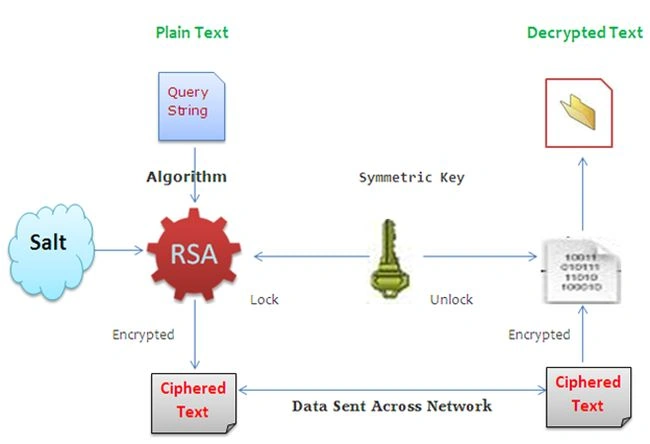
Ok, we now have all the ingredients for hashing, like query string, secret key and salt value. In the Encrypt() method, the key derivation method Rfc2898DeriveBytes in the AES implementation repeatedly hashes the password along with a salt and padding and a block size configuration.
- string password = "ajaykumar007";
- ..
- using (Aes encryptor = Aes.Create())
- {
- byte[] salt = new byte[]
- { 0x6B, 0x65, 0x79, 0x65, 0x6E, 0x63, 0x72, 0x79, 0x70, 0x74 };
-
- Rfc2898DeriveBytes pdb = new Rfc2898DeriveBytes(password, salt);
- ..
- encryptor.Key = pdb.GetBytes(32);
- encryptor.IV = pdb.GetBytes(16);
- ..
- }
Testing
Everything is now in place for the Encrypt() method. Now run the project and enter some login information in the page along with enabling the Secure Sign-in check box. As decided, the user would be redirected to the Welcome.aspx page but notice the query string parameter value. They are encrypted and totally fool-proof from hacking. For our convenience, we are also displaying the query string value (login data) over the welcome.aspx as in the following:
Query String Decryption
As you have seen in the previous figure, the query string is also displayed over the page in encrypted form and that form also provides the facility to decrypt these ciphered values. This section shows that mechanism with the Decrypt() method that would be called when the user clicks over the Decrypt button. Here, we need two things; the key to encrypt the query string parameters and the salt. Both of these must not be tempered with, otherwise the decryption won't happen.
- private string Decrypt(string cipherText)
- {
- string password = "ajaykumar007";
- byte[] cipherBytes = Convert.FromBase64String(cipherText);
- using (Aes encryptor = Aes.Create())
- {
-
- byte[] salt = new byte[]
- { 0x6B, 0x65, 0x79, 0x65, 0x6E, 0x63, 0x72, 0x79, 0x70, 0x74 };
-
- Rfc2898DeriveBytes pdb = new Rfc2898DeriveBytes(password, salt);
- encryptor.Key = pdb.GetBytes(32);
- encryptor.IV = pdb.GetBytes(16);
-
- using (MemoryStream ms = new MemoryStream())
- {
- ..
- }
- }
- ..
- }
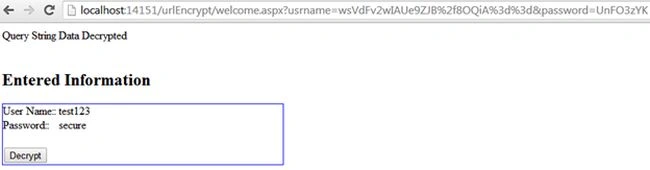
This time click over the Decrypt button and the web page will display the deciphered value that was entered in the login form and passed through the query string as in the following:
 Vulnerability and Redemption
This paper demonstrates the generation of a persistent a symmetric key using the AES algorithm to encrypt and decrypt sensitive URL data. However, data in the query string is successfully encoded but this approach is still vulnerable to Replay attack, MITM attack and Brute Force attack. Sensitive credentials are still passed in clear text form even if encrypted using the AES algorithm. A smart hacker can easily hack the user name and password via session hijacking since HTTPS is not applied. The real problem here is that the user name and password are still being transmitted in plain text at least once to the server and then the encrypted strings are being returned to the client. Those strings can be picked up off the wire and used in a replay attack. Here, the following methods should be used to fix the aforesaid problem in this article for redemption:
- HTTPS: We shall need to install a digital certificate on the server for sensitive data manipulation to protect the traffic communication between the client and server.
- Post Method: Data that travelled across the server via query string (GET method) is always vulnerable to sniffing or hijacking. Hence, it is a good idea to use the POST method rather than GET method in such a scenario.
- Secure Session Management: It is suggested to apply a proper session management to foil a man-in-the-middle or session hijacking attack.
- Encrypt XML Data: Data residing in a XML file is always in clear text form, so it is not recommended to store crucial data in XML files.
Final word
In this article, we have pinpointed the vulnerability in query string parameters while encoding them by practicing weak cryptography methods where the data is sent across the network in clear text and is susceptible to MITM attack. We have explained the scenario or glitches often done by programmers and developers during encryption and decryption of sensitive URL data using symmetric key encryption and the AES algorithm. Finally, we have seen the actual problem of applying weak cryptography methods as well as redemption methods.


Poornima MPosted Nov 4, 2017, 1:38 AM
Sir how to see the password using GET method but it is not shown in url
Kuppurasu NagarajPosted Apr 11, 2016, 1:53 PM
Nice Sharing
Sonu ChaudharyPosted Mar 7, 2016, 11:58 AM
good article
Ajay YadavPosted Nov 24, 2014, 3:53 AM
Thank you all
Manish Kumar ChoudharyPosted Nov 24, 2014, 2:36 AM
great Ajay Yadav sir..
Vipin TyagiPosted Nov 23, 2014, 11:10 PM
Awesome Sir Awesome
Gaurav Kumar AroraPosted Nov 23, 2014, 9:43 AM
an awesome description on secrurity