
Introduction: In this article we will discuss how to add or create a watermark effect by using jQuery to the ASP.NET control. As we know, a water mark effect means having some fade color of the text in the textbox. By taking a textbox we will add that effect of the water mark to that. Let see how to get a water mark effect by using jQuery. In this article if we will click to the textbox to write something in it then we will see that the water mark color effect will disappear and if we click on the other textbox to write something then the water mark effect will be appeared automatically with in the textbox. Similarly when the user moves focus to a different control without entering a value in the textbox, we add the watermark css again. There are some steps how to make a water mark effect using jQuery then you will have to follow these steps.
Let's start the application project to make a web service.
Step 1: Firstly we have to create a web Application
- Go to Visual Studio 2010
- Create the web Application
- Click OK.
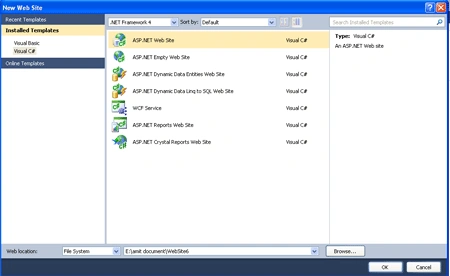
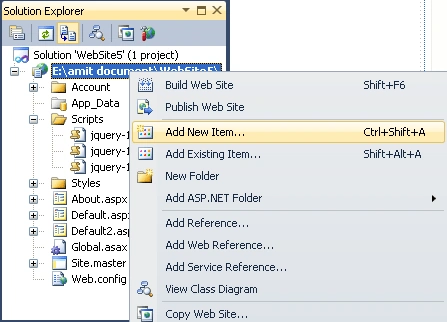
Step 2: Secondly you have to add a new page to the website.
- Go to the Solution Explorer.
- Right Click on Project name.
- Select add new item.
- Add new web page and give it a name.
- Click OK.

Step 3: From where you have to add the reference to the head section

Step 4: Now we have to build a style sheet which is shown below it should be added to the Head section of the default.aspx page.
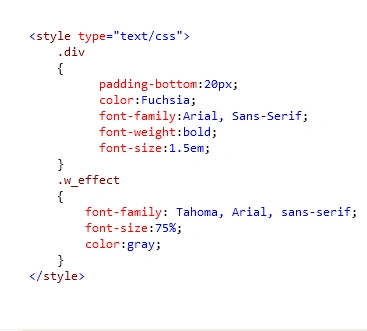
Description: In the above code we are
just set the style in which we are making two classes by adding dot sign before
the class name which is as div and w_effect which is used to add the water effect to the textbox.
Step 5: Now we will write the jQuery code which will allow that it may focus on that textbox
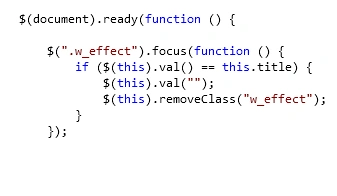
Description: In the above code we are using the focus() method which will allow you that if you will click on the textbox then it will remove the css class and you are able to write anything inside the textbox.
Step 6: Now again in this step we will write the code for jQuery to blur the text on the textbox.
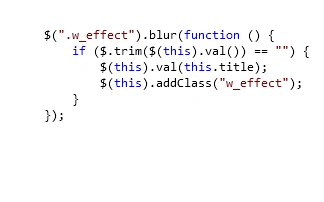
Description: In the above code we are using the blur() method which will allow to Similarly when the user moves focus to a different control without entering a value in the textbox, we add the watermark css again. it will add the css class if you are not writing anything inside the textbox it will added css class again to the textbox.
Step 7: Now in this step we have to combined both the jQuery code inside the script which is given below it can placed in head or body section both.
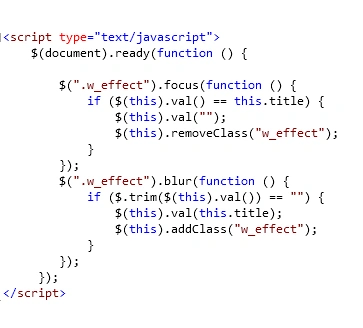
Step 8: In this step we have to combined all the code inside the source code of the default.aspx page.
Code:
<%@
Page Language="C#"
AutoEventWireup="true"
CodeFile="Default2.aspx.cs"
Inherits="Default2"
%>
<!DOCTYPE
html PUBLIC
"-//W3C//DTD XHTML 1.0 Transitional//EN"
"http://www.w3.org/TR/xhtml1/DTD/xhtml1-transitional.dtd">
<html
xmlns="http://www.w3.org/1999/xhtml">
<head
runat="server">
<title>Watermark
textbox</title>
<script
type="text/javascript"
src="Scripts/jquery-1.4.1-vsdoc.js"></script>
<script
type="text/javascript"
src="Scripts/jquery-1.4.1.js"></script>
<script
type="text/javascript"
src="Scripts/jquery-1.4.1.min.js"></script>
<script
type="text/javascript">
$(document).ready(function () {
$(".w_effect").focus(function
() {
if ($(this).val()
== this.title) {
$(this).val("");
$(this).removeClass("w_effect");
}
});
$(".w_effect").blur(function () {
if ($.trim($(this).val())
== "") {
$(this).val(this.title);
$(this).addClass("w_effect");
}
});
});
</script>
<style
type="text/css">
.div
{
padding-bottom:20px;
color:Fuchsia;
font-family:Arial,
Sans-Serif;
font-weight:bold;
font-size:1.5em;
}
.w_effect
{
font-family:
Tahoma, Arial,
sans-serif;
font-size:75%;
color:gray;
}
</style>
</head>
<body>
<form
id="form1"
runat="server">
<div
class="div">Watermark
Effect Using jQuery</div>
<asp:Label
ID="lbl1"
runat="server"
Text="Email ID:"
Font-Names="Comic Sans
MS"></asp:Label>
<asp:TextBox
ID="txt1"
class="w_effect"
Text="Type your Email
Id" runat="server"
Tooltip="Type your Email
Id"></asp:TextBox><br
/>
<asp:Label
ID="lbl2"
runat="server"
Text="Password: "
Font-Names="Comic Sans
MS"></asp:Label>
<asp:TextBox
ID="txt2"
class="w_effect"
Text="Type your
Password" runat="server"
Tooltip="Type your
Password" ></asp:TextBox>
</form>
</body>
</html>
Step 9: Here we will see the
design page which is a design before run default2.aspx page
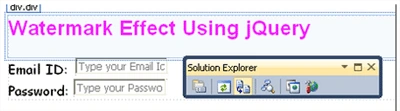
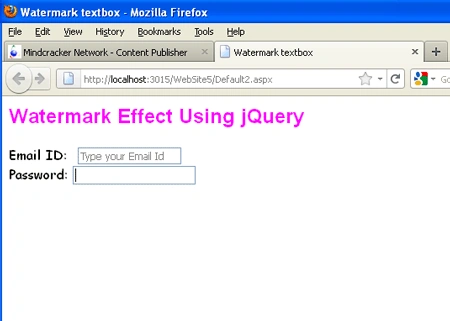
Step 10: In this step we have to run the default2.aspx page by pressing F5.
Output 1: In this output we will see that the water mark effect will be disappeared whenever we click on the textbox.

Output 2: In this output we will see that the water mark effect has been enabled if we are clicking on next textbox and disappeared in the current textbox.
Sagar Pandurang KapPosted Nov 29, 2017, 4:21 AM
Then just call this function on onblur and onfocus event of textboxes.
Sagar Pandurang KapPosted Nov 29, 2017, 4:20 AM
For Normal Textboxes Easy Way is as Follows : function WaterMark(objtxt, event) { var defaultText = "Enter Username Here"; var defaultpwdText = "Enter Password Here"; // Condition to check textbox length and event type if (objtxt.id == "txtusrname" || objtxt.id == "txtpasswd") { if (objtxt.value.length == 0 & event.type == "blur") { //if condition true then setting text color and default text in textbox if (objtxt.id == "txtusrname") { objtxt.style.color = "Gray"; objtxt.value = defaultText; } if (objtxt.id == "txtpasswd") { objtxt.style.color = "Gray"; objtxt.value = defaultpwdText; } } } // Condition to check textbox value and event type if ((objtxt.value == defaultText || objtxt.value == defaultpwdText) & event.type == "focus") { if (objtxt.id == "txtusrname") { objtxt.style.color = "black"; objtxt.value = ""; } if (objtxt.id == "txtpasswd") { objtxt.value = ""; } } }
Sagar Pandurang KapPosted Nov 29, 2017, 4:18 AM
I have same question rushal
Rushal AroraPosted Jun 28, 2012, 6:34 AM
For Password Field, Textmode should be Password rather than single line. Please correct it and give me the correct version.
Sivaraman DhamodaranPosted Nov 22, 2011, 5:08 AM
You had written a useful article. One more use of water mark is to avoid unauthorized usage of something. An image having a water mark in it (Or) even your sample having more controls having single water mark all over the control in diagonal way etc.