This article explains the Web API best practices for architecture and Dependency Injection, using Unity and other options available for Dependency Injection.
From last few years, Web API is becoming very popular and these days, a lot of projects are going on with Web API. Thousands of projects have been developed using Web API.
If someone is working on Web API, then its architecture and best practices are the most important things, which enable the developer to create one of the best applications. There are more than a hundred rules and recommendations for Web API best practices but in this article, I am going to explain only about the architecture and Dependency Injection.
Web API Architecture
Hence, before discussing about Dependency Injection, it would be better to discuss Web API architecture best practices because Dependency Injection is based on the architecture. Here, I am going to refer to one of my previous articles.
It is recommended to go through my previous article because I will be using source code and concepts of my previous article. You can download the source from the attachment section of my previous article.
Step 1
Create Layered Architecture
Generally, Web API has 3 layers, which are given below.
- Web API Layer
- Business Layer (Business Logic Layer)
- Repository Layer (Data Access Layer)
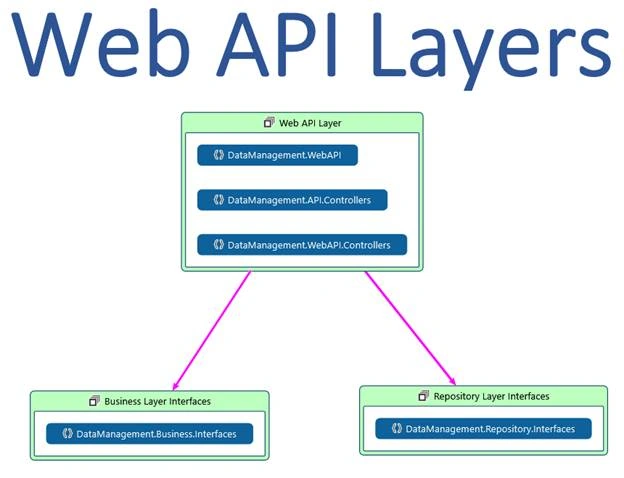
You can see that Business Layer interfaces do not have any dependency on repository layer interfaces. Thus, the repository layer interface will be referenced only in the classes of business layer.
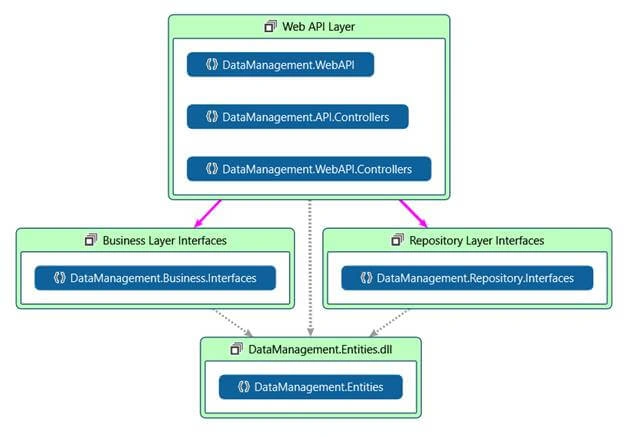
Step 2
Add POCO (Plain Old CLR Object).
Step 3
Add repository layer project to implement Repository layer interfaces and Business layer project to implement Business layer interfaces.
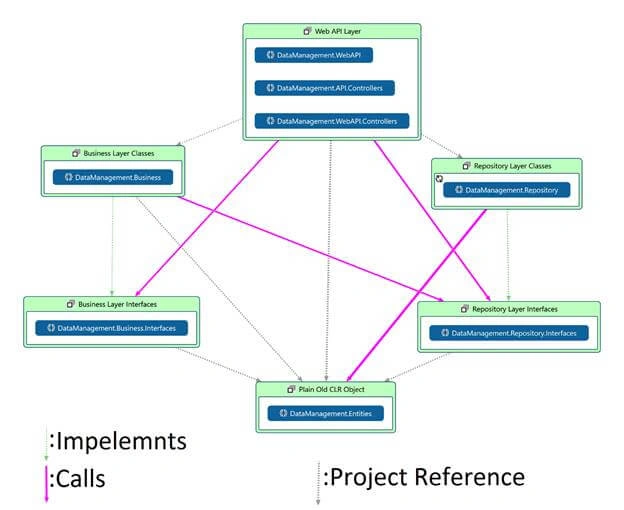
In the Solution Explorer, it will look, as shown below.
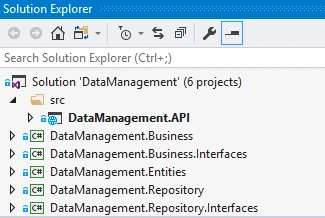
Now, I am going to implement Dependency Injection, using Unity. Right click on API project and open NuGet Package Manager and search for unity.
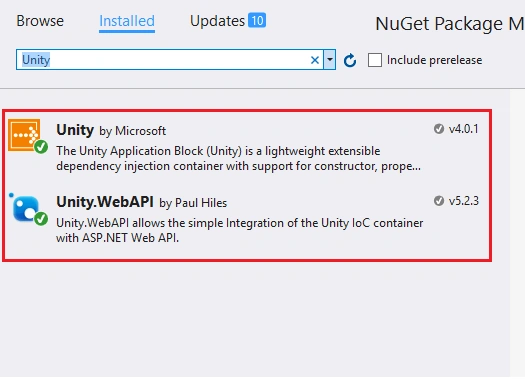
Install the two packages, as shown in the preceding screenshot.
After installing Unity at Web API layer, it will add some files and codes, which are shown below.
UnityConfig.cs
- public static class UnityConfig {
- public static void RegisterComponents() {
- var container = new UnityContainer();
- GlobalConfiguration.Configuration.DependencyResolver = new UnityDependencyResolver(container);
- }
- }
UnityResolver.cs
- public class UnityResolver: IDependencyResolver
- {
- protected IUnityContainer container;
- public UnityResolver(IUnityContainer container) {…………………………}
- public IDependencyScope BeginScope() {…………………………}
- public void Dispose() {…………………………}
- public object GetService(Type serviceType) {…………………………}
- public IEnumerable < object > GetServices(Type serviceType) {…………………………}
- }
Add the code given below to the file.
WebApiConfig.cs
- public static void Register(HttpConfiguration config)
- {
- var container = new UnityContainer();
- container.RegisterType < IUserRepository, UserRepository > (new HierarchicalLifetimeManager());
- container.RegisterType < IUserBusiness, UserBusiness > (new HierarchicalLifetimeManager());
- container.RegisterType < IBaseRepository < User > , BaseRepository < User >> (new HierarchicalLifetimeManager());
- config.DependencyResolver = new UnityResolver(container);
- }
I have seen many people add unity at 2 layers i.e. at Business layer and API layer. Write the codes given below.
API Layer
- container.RegisterType<IUserBusiness, UserBusiness>(new HierarchicalLifetimeManager());
Business Layer
- container.RegisterType<IUserRepository, UserRepository>(new HierarchicalLifetimeManager());container.RegisterType<IBaseRepository<User>, BaseRepository<User>>(new HierarchicalLifetimeManager());
I do not endorse the preceding approach due to multiple reasons. Now, I am going to compare pros and cons of 2 approaches.
Approach 1
API Layer
- container.RegisterType<IUserBusiness, UserBusiness>(new HierarchicalLifetimeManager());container.RegisterType<IUserRepository, UserRepository>(new HierarchicalLifetimeManager());container.RegisterType<IBaseRepository<User>, BaseRepository<User>>(new HierarchicalLifetimeManager());
Approach 2
API Layer
- container.RegisterType<IUserBusiness, UserBusiness>(new HierarchicalLifetimeManager());
Business Layer
- container.RegisterType<IUserRepository, UserRepository>(new HierarchicalLifetimeManager());container.RegisterType<IBaseRepository<User>, BaseRepository<User>>(new HierarchicalLifetimeManager());
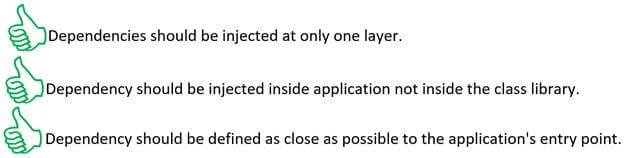
The screenshot given below explains why the first approach is a better approach,
Injecting Dependencies without any third-party framework
It is not necessary to use any other framework for injecting the dependencies. We can inject dependencies without Unity or any other third party framework.
Go to the class startup.cs and inside the method “ConfigureServices(IServiceCollection services)”, add 2 lines of code given below.
- services.AddTransient<IUserManager, UserManager>();
- services.AddTransient<IUserRepository, UserRepository>();
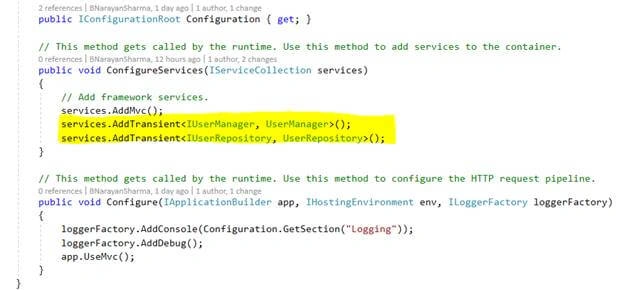
You can also inject those dependencies from web.config file or from appsettings.json files.


mohd. nadeemshaikhPosted Jul 28, 2020, 10:20 AM
Hi Banketeshvar Narayan, I have tried to implement the same way as per your suggestion and also followed some articles for implementation of UnityResolver class(like this --> https://stackoverflow.com/a/38770689/3698716 and this --> https://docs.microsoft.com/en-us/aspnet/web-api/overview/advanced/dependency-injection). but getting error which is "Resolution failed with error: No public constructor is available for type System.Web.Http.Metadata.ModelMetadataProvider.", you any idea about that?
Chittaranjan SwainPosted Dec 13, 2019, 2:51 AM
Very useful article.
Pravin LawaniyanPosted Dec 8, 2019, 10:35 AM
Very excellent article sir. Can you send me code on email [email protected]
Banketeshvar NarayanPosted Jul 25, 2019, 12:12 PM
Coming to 2nd option of business layer. If we put it inside a config file at business then we need to supply to separate config file. so why should I have a different config file ? We know that the class library is not executable and it can only be called by an executable app and we need to tell the executable app you have to read two different config files means indirectly the Web API Controller Layer have all the information at the end and that's why it's better to keep in a single place.
Banketeshvar NarayanPosted Jul 25, 2019, 12:05 PM
As already mentioned in the article if you are providing dependency injection info at business layer then you have two options Option 1: Provide in C# class 2. in a configuration file. If we provide dependency injection info in a class at business layer then that class will also get compiled and will be part of same business class library. So you have decided the dependency and kept it in a dll file. so everything decided at compile time. so there is no need to implement any dependency injection when we have decided everything at compile time. What is the use of dependency injection in this case ?
Banketeshvar NarayanPosted Jul 25, 2019, 11:58 AM
Business layer is responsible for calling the method of repository layer. API layer is just providing the information object creation. So there are two different tasks Task 1.Calling the method passing parameters and handling & processing returned data and so on. Task 2: Providing the instance creating option or dependency injection information.
Banketeshvar NarayanPosted Jul 25, 2019, 11:53 AM
Now I am coming to Jim J 2nd question.Also, if the controller directly uses the Repository layer then what is the benefit of having the Business layer? The business layer is doing its own task and Controller is doing its own task. nowhere controller is directly communicating with repository layer. All decisions for calling repository like which method has to be called, parameters return type etc is being taken by business layer
Banketeshvar NarayanPosted Jul 25, 2019, 11:43 AM
I have just provided the reference of an earlier article so that the reader who is very new to ASP.NET Web API or ASP.NET Core Web API they can refer that article and can have the basic understanding how web API works and on top of that they can change the code as per this article to understand the best practices of dependency injection.
Banketeshvar NarayanPosted Jul 25, 2019, 11:39 AM
Jim J, Coming to you query one by one. you are right that the source code is not exactly the same as there are no source code attached with this article. I have just given a reference of another article and on top of that I have written this article. I am sorry but this article do not have any attached source code.
Jim JPosted Jul 24, 2019, 12:04 AM
In your example code 'UserController', the web api layer only uses or depends on the business layer and the business layer uses the repository layer. But in the diagram, it is mentioned as web api depends on both business and repository layers. The dependency of repository layer in business layer is not mentioned at all. May I know why it is given like this? Also, if the controller directly uses the Repository layer then what is the benefit of having the Business layer?
Banketeshvar NarayanPosted Jul 23, 2019, 9:07 PM
I would request all the readers that please provide your opinion in comment section and if think there is anything wrong in this design. We can discuss and make concept clearer. I have put already 6 points in the comment section in favor of this pattern.
Banketeshvar NarayanPosted Jul 23, 2019, 9:01 PM
You can read more about Composition Root from the below link https://blog.ploeh.dk/2011/07/28/CompositionRoot/
Banketeshvar NarayanPosted Jul 23, 2019, 8:59 PM
Many developers asked in the comment section that why am I configuring in API project to create object of repository class. Following are the reasons for doing that.1. IF you are proving class instance creation info in a class at business level. Then that class will also compile and will be part of the same binary. So no longer your binaries are independent. 2. If at business level you configure in a configuration file then at run time you will have 2 config files one will be used by your web API and another one will be used by your business level binary to get info and create instances of repository class. 3. It is good to have 2 different config? 4. Why a class library should have a config? Only the executable application e.g. Web API should have a config. 5. Only the main application has a composition root. 6. Why Class library should have a composition root? Class library should not have composition root because you can’t use a class library with an application.
BennyPosted Apr 30, 2018, 6:02 AM
Hi, this might be a year too late, but i just wanted to know what you think about my dilemma. Currently i use the same approach as what you just described in your tutorial, but other people tell me its not a good practice since it violates some principles as it allows the repository to be called directly from the API. Thanks in advance!
Dhirender SinghPosted Dec 13, 2017, 3:26 AM
One confusion that is it good practice to give reference of repository in our api application?
raef daoodPosted Nov 27, 2017, 9:24 AM
Great article , please can you send me the source solution for learn more about this
Banketeshvar NarayanPosted Mar 15, 2017, 12:12 AM
Thank to all the readers and I am glad to say that this article has been selected as article of the day on asp.net website.
Yaduveer SainiPosted Feb 7, 2017, 2:31 AM
Nice article for me....Nice Banke sir...
Humayun Kabir MamunPosted Feb 6, 2017, 10:39 PM
Thanks for this article...