

Introduction to Web API
Web API is a programming interface/application type that provides communication or interaction between software applications. Web API is often used to provide an interface for websites and client applications to have data access. Web APIs can be used to access data from a database and save data back to the database.
ASP.NET Web API is a framework that make it easy to build HTTP web service that reaches a bored range of clients, including browser, mobile applications, Desktop application and IOTs.
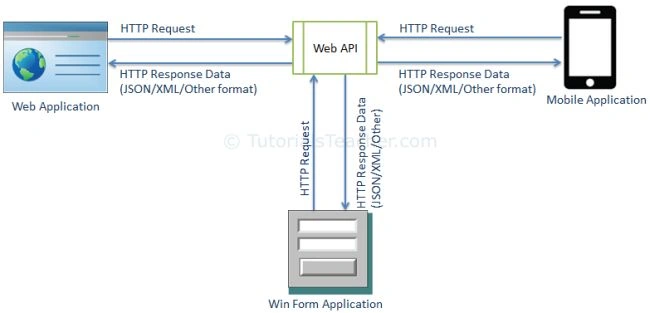
What is IOTs
Its internet thinks that have a IP address and communicate with other internet enable devices and objects for example Security System, electronic appliances, desktop, laptop, mobile etc.
What is Restful Services
Rest Stands for Representational state transfer. It is introduced in 2000 by Roy Fielding. In REST architecture, a REST Server simply provides access to resources and the REST client accesses and presents the resources. Here each resource is identified by URIs/ Global IDs. REST uses various representations to represent a resource like Text, JSON and XML. JSON is now the most popular format being used in Web Services.
HTTP Methods
The following HTTP methods are most commonly used in a REST based architecture.
- GET − Provides a read only access to a resource.
- PUT − Used to create a new resource.
- DELETE − Used to remove a resource.
- POST − Used to update an existing resource or create a new resource.
REST Constraints
REST constraints are design rules that are applied to establish the distinct characteristics of the REST architectural style.
The formal REST constraints are,
- Client-Server
- Stateless
- Cache
- Interface / Uniform Contract
- Layered System
- Code-On-Demand
Let's Start working in Asp.Net Web API Project.
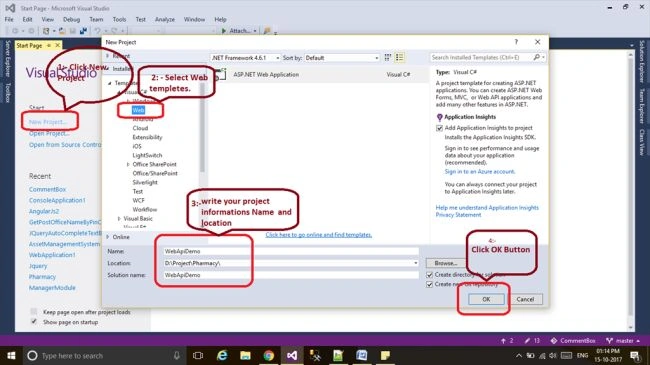
Step 1 Add New Project
Open VS 2015 -> Click Add Project -> Select web Template -> fill required details.
Step 2
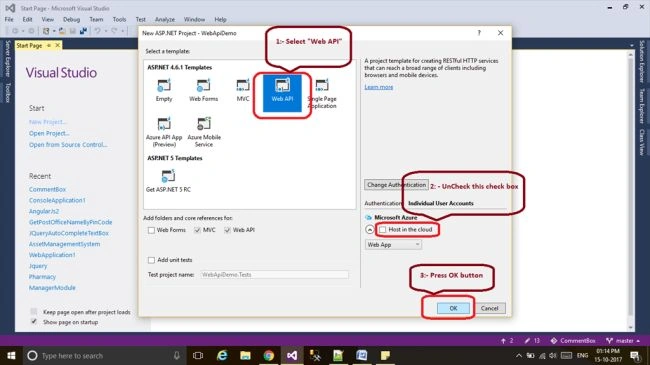
Select Web API Template and uncheck host checkBox.
Step 3
Vs gives some Auto generated code.
Add One Class LIbrary project follow few Steps
Right Click in project Solution -> Add Project -> select visual C# templet -> select Class library

Step 4
Create “Employee” table in sql server.
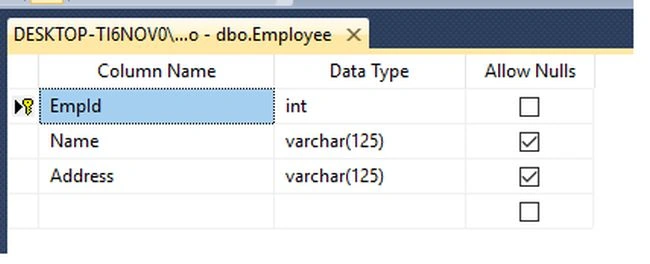
Table Script
Create database Demo
go
Use Demo;
go
CREATE TABLE [dbo].[Employee](
    [EmpId] [int] IDENTITY(1,1) NOT NULL PRIMARY KEY,
    [Name] [varchar](125) NULL,
    [Address] [varchar](125) NULL
    )
GO
Step 5
Select class library project and add Data Entity Model in your project.
Right Click Class Library project ->Add->New Item->Select Data template (Left Side)->Ado.Net Entity data model.
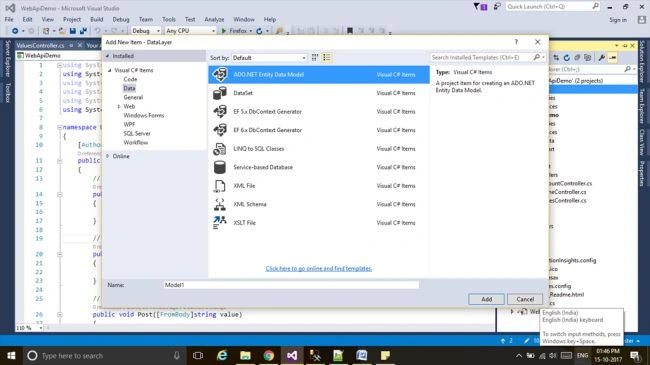
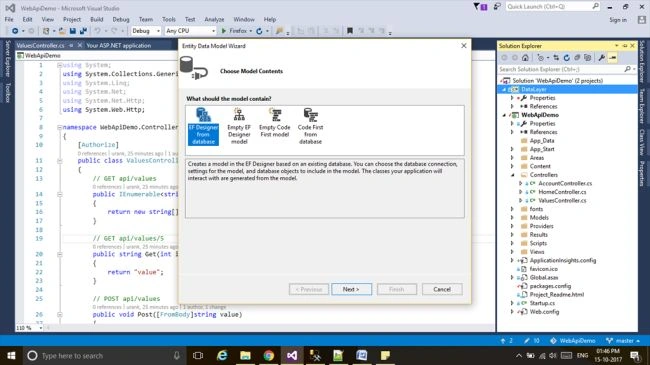
Select "Entity Framework Designer From DataBase" And click Next
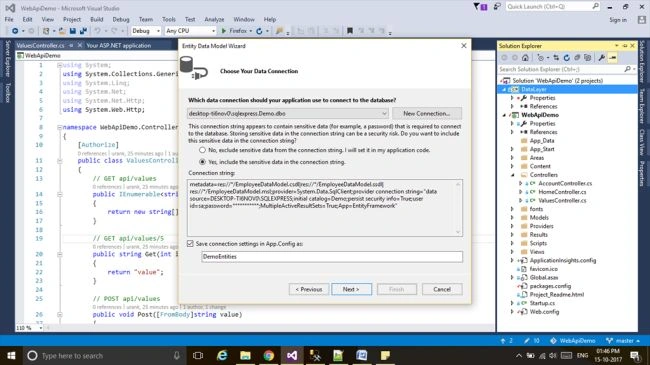
Select Any Radio Button Based on your requirement and Also change Connection String Name and click Next Button.
Note
If Connection String Drop Down Showing null then click "New Connection" Button And follow some instruction
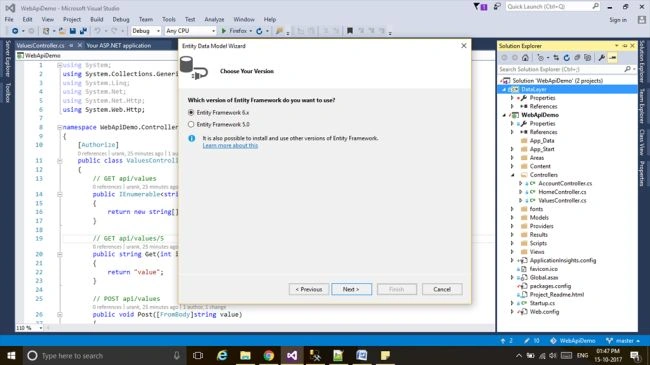
Select Any EF version.
Hare choose your table and click Finish Button. It will take some time for adding EF in your project.
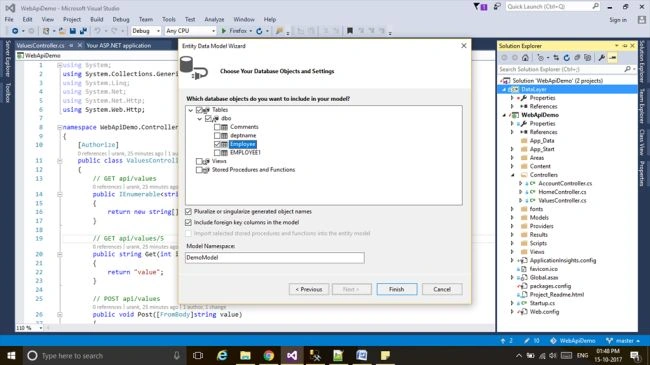
Step 6
Select Api Project (Main Project) -> And add Class library reference.
Select Referance -> right Click -> Add Referance
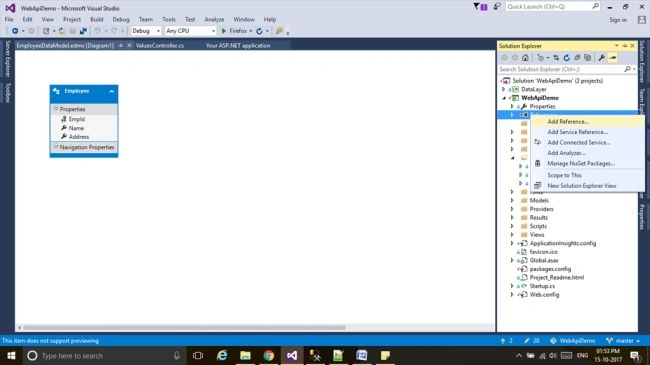
Select Your Class Library Project And click OK.
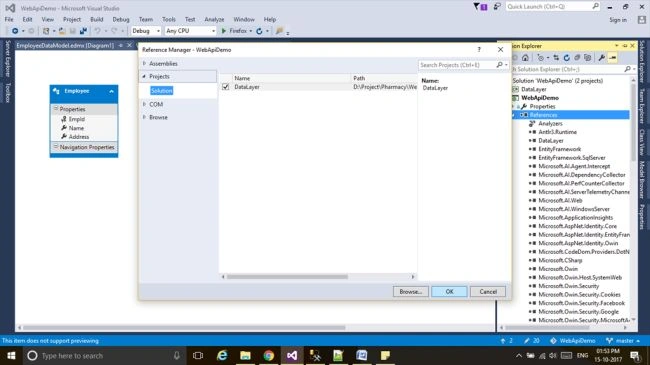
Now Reference Added Successfully.
Step 7
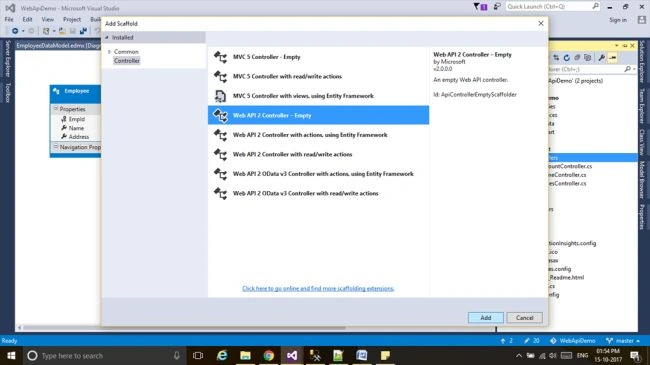
Select Controller Folder And add New Controller.
Right click "Controller" -> Add ->Controller
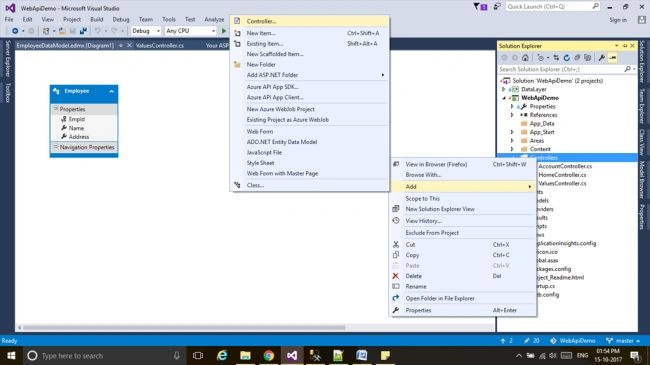
Select Web API 2 Controller Empty Click OK.
Step 8
Write Web API Get Method.
"DemoEntities" is a Entity framework class name.
public IEnumerable<Employee> Get()  // It's return All Employee List
{
    using (DemoEntities context = new DemoEntities())
    {
        return context.Employees.ToList();
    }
}

public Employee Get(int Id)   // It's return Employee Base on Employee Id
{
    using (DemoEntities context = new DemoEntities())
    {
        return context.Employees.FirstOrDefault(e => e.EmpId == Id);
    }
}
Step 9
Run Your project.
Note Before running your project just check "Route Name"
Select App_Start folder -> Open "WebApiConfig.cs"
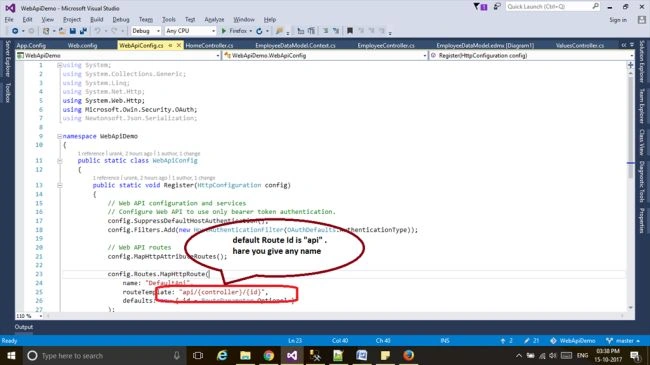
your Routes name is "api"
Step 10
Run It. find your web Api Method base URL is application Url(current URL) +api(route name)+Employee(controller name) hare my application URL is http://localhost:49296 so my API URL is http://localhost:49296/api/Employee
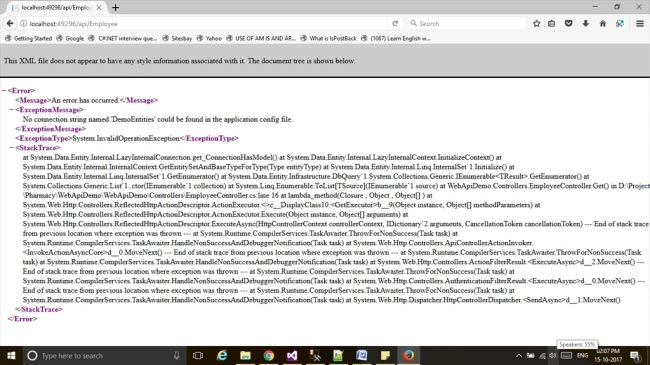
once you hit this URL got some Error like this because Entity framework connection string is not exist in WebConfig file .
So Go to AppConfig file and copy connection string and past in WebConfig file inside connectionStrings tab copy from AppConfig file.
<connectionStrings>
    <add name="DemoEntities" connectionString="metadata=res://*/EmployeeDataModel.csdl|res://*/EmployeeDataModel.ssdl|res://*/EmployeeDataModel.msl;provider=System.Data.SqlClient;provider connection string="data source=DESKTOP-TI6NOV0\SQLEXPRESS;initial catalog=Demo;persist security info=True;user id=sa;password=ankit;MultipleActiveResultSets=True;App=EntityFramework"" providerName="System.Data.EntityClient" />
</connectionStrings>
past in WebConfig File
<connectionStrings>
    <add name="DemoEntities" connectionString="metadata=res://*/EmployeeDataModel.csdl|res://*/EmployeeDataModel.ssdl|res://*/EmployeeDataModel.msl;provider=System.Data.SqlClient;provider connection string="data source=DESKTOP-TI6NOV0\SQLEXPRESS;initial catalog=Demo;persist security info=True;user id=sa;password=ankit;MultipleActiveResultSets=True;App=EntityFramework"" providerName="System.Data.EntityClient" />
    <add name="DefaultConnection" connectionString="Data Source=(LocalDb)\MSSQLLocalDB;AttachDbFilename=|DataDirectory|\aspnet-WebApiDemo-20171015011614.mdf;Initial Catalog=aspnet-WebApiDemo-20171015011614;Integrated Security=True" providerName="System.Data.SqlClient" />
</connectionStrings>
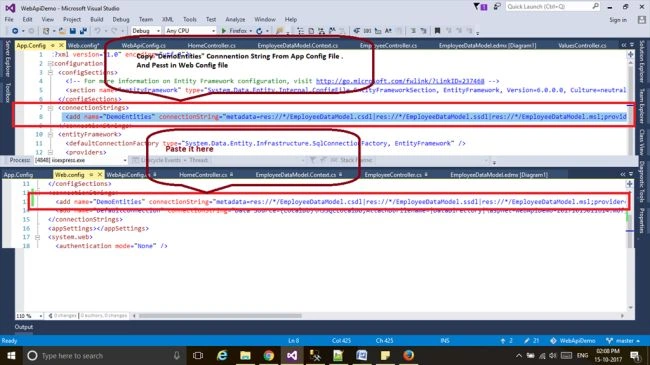
And Run Again Now I will work.
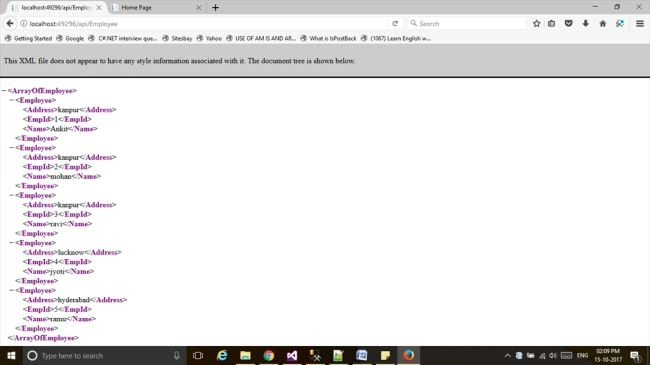
I hope it's helpful
Note
I can't upload my project due to project size begin more than 25MB. If you want a project, then give me your mail Id by commenting. I will Send.
Arman KhokharPosted Oct 6, 2025, 5:53 AM
[email protected]
Arman KhokharPosted Oct 6, 2025, 5:52 AM
Hello Sir Please Give Me A Project
Gauri WaklekarPosted Oct 4, 2025, 4:05 PM
Put is used to update existing records and post to create new records
Joe dinuPosted Aug 29, 2025, 5:29 AM
[email protected]
HayyumPosted Apr 22, 2024, 12:01 PM
I need the project please. mail id: [email protected]
Pawan DubeyPosted Aug 2, 2023, 6:34 AM
Hi, Can you please send me the source code to my mail id. [email protected]
Ashok RajaPosted Jul 26, 2023, 1:08 PM
Hi, Can you please send me the source code to my mail id. [email protected]
Gajula MeghanaPosted Nov 6, 2022, 7:08 PM
Hi, Can you please send me the source code to my mail id. [email protected]
Brahmaiah ChPosted Oct 26, 2022, 9:42 AM
Project please => [email protected]
jay singhPosted Sep 5, 2022, 6:28 AM
Thank you for giving us a valuable things, plz share the source code on [email protected]. thanks in advance.
Port RestPosted Mar 24, 2022, 6:27 AM
Hi, Please send the Source code to my Email Id : [email protected]
Shailesh SalunkhePosted Mar 22, 2022, 7:00 AM
Hi ,Please send me the code to my Email Id : [email protected]
sateesh bandaruPosted Sep 21, 2021, 7:15 AM
Hi, Please send me the code to my mail id: [email protected]
sateesh bandaruPosted Sep 21, 2021, 7:14 AM
Hi, Please send me the code to my mail id: [email protected]
Uday KrishnaPosted Jun 28, 2021, 4:18 AM
Can you please send source code to [email protected]
poloju anilkumarPosted Jun 26, 2021, 5:52 PM
Please share the sample project on this email:[email protected]
Prashant SinghPosted May 26, 2021, 11:55 AM
Please share the sample project on this email : [email protected]
Pankajkumar PatelPosted Sep 15, 2019, 11:30 PM
Nice article
umakant potdarPosted Apr 4, 2019, 11:16 AM
You have provided POST description for PUT and PUT description for POST....Otherwise it's good.
srinivas varadaPosted Mar 25, 2019, 2:42 AM
[email protected] please send to this email
Nishat AlifPosted Oct 14, 2018, 7:18 AM
[email protected]
DILIP ReddyPosted Oct 13, 2018, 9:38 PM
Hi please send the code to [email protected]
Bhavesh JadavPosted Sep 13, 2018, 8:14 AM
Nice article, thanks for sharing it.
Raju SPosted Sep 11, 2018, 2:03 AM
Hi Please send me the code to my mail id : [email protected]
Princes APosted Jul 3, 2018, 2:42 AM
Hi Please Send me the code to [email protected]
Surendiran SPosted Jun 30, 2018, 2:00 AM
Hi Ankit, Please send code to [email protected]
Kushagra DasPosted Jun 27, 2018, 6:05 AM
Under introduction section second paragraph please make a change "HTTP web service that reaches a <'bored'> range of clients".Nice article.
vidit tyagiPosted Apr 3, 2018, 5:09 AM
Hi Ankit, please send code on [email protected]
vidit tyagiPosted Apr 3, 2018, 5:08 AM
Hi Ankit,can you please send code on [email protected]
GurpreetSingh AroraPosted Mar 22, 2018, 2:56 AM
Hey ankit sahu can u plz send your project on [email protected].