

In my previous article, we discussed Web API self-hosting using a console application. This time, we will use a Windows Service to do the self-hosting of the Web API. So let's start by creating a new Windows Service project type. We call it WindowsService_HostAPI.
In order to perform the self-hosting of the Web API, we need to add references to the self-hosting libraries. For this, we use the Nuget Package Manager and install the references.
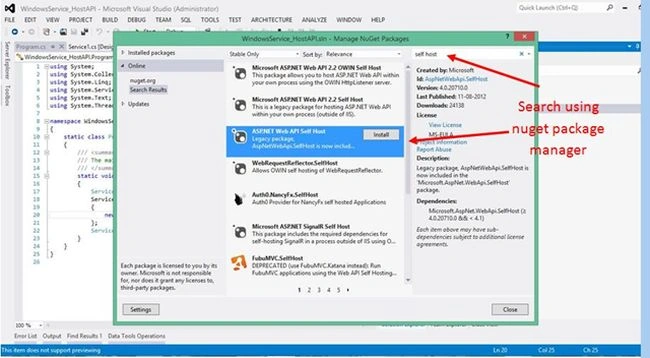
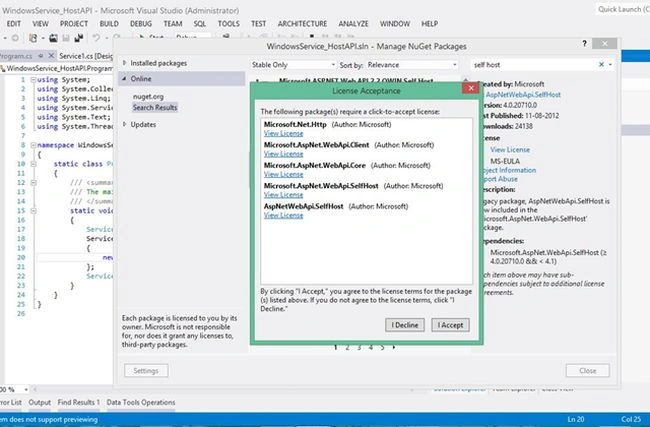
Next, we select the project in which we need to add the references and the following libraries need to be added to the project.
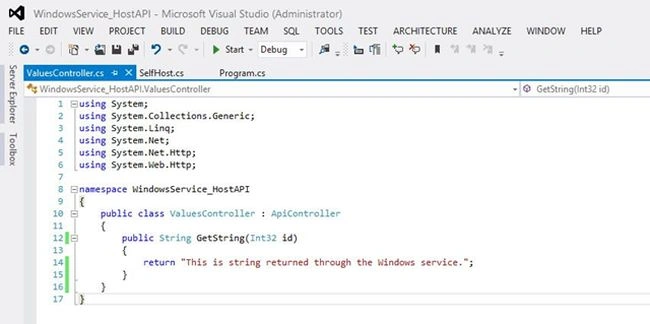
Next, we add a new item of the type Web API controller class and name it ValuesController that inherits from APIController. Be sure that the suffix of the class is "Controller". This is required for the routing process to handle the incoming requests. We remove all the default methods and add a simple method named GetString that returns a string value.
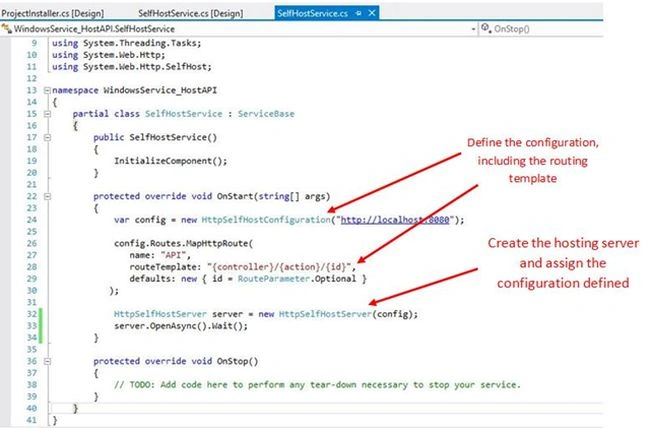
Next, we will add a class file that will be act as the Windows Service to be hosted. We name it SelfHostService and will inherit from the ServiceBase class. Now we need to configure a hosting server that would host the API. The point here is that this server must get be configured in an event that is immediately executed when the service is started. So we will use the OnStart event of our service class (that inherits from the ServiceBase class). When the service is hosted, this OnStart event will be fired and the hosting configuration will be registered. So our code becomes:
Build the solution. Now the API is ready to be hosted and for this, we only need to install the service and than start it by navigating to the list of installed services.
To host this Windows Service, go to the service design view, right-click and select Add Installer.
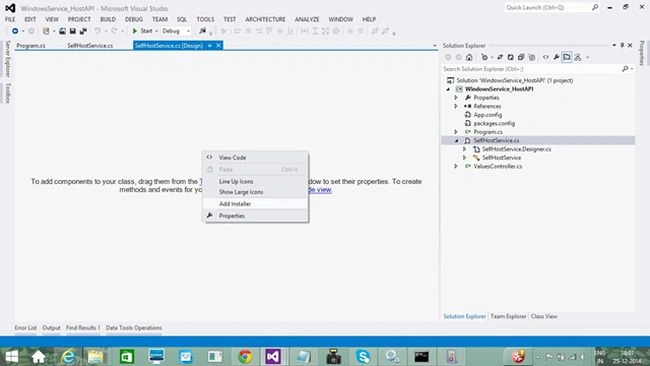
- Go to the properties of serviceInstaller1 and change the ServiceName property to WebAPISelfHosting. This will be name with which the service will be installed.
- Go to the properties of serviceProcessInstaller1 and change the Account property to LocalSystem.
To install the service, we need to use the installutil.exe from the location:
C:\Windows\Microsoft.NET\Framework\v4.0.30319
Or you can start the Visual Studio command prompt (as an administrator) and use the following command to refer to the preceding location of installutil.exe.
cd C:\Windows\Microsoft.NET\Framework\v4.0.30319
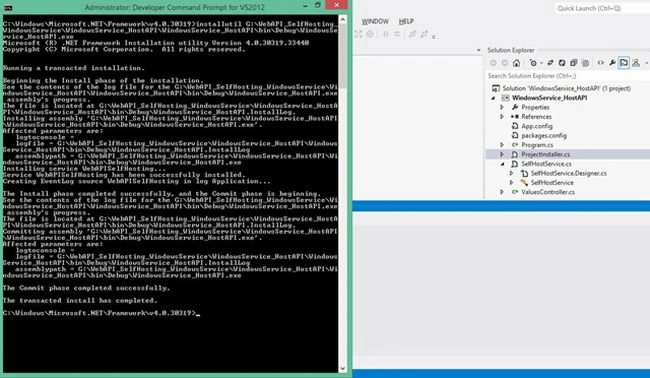
Execute the following command in the command prompt to install the service.
installutil...\WindowsService_HostAPI\WindowsService_HostAPI\bin\Debug\WindowsService_HostAPI.exe
I have used only a relative path for the example. Be sure that you use the complete path, from the root. This will install the service on the system.
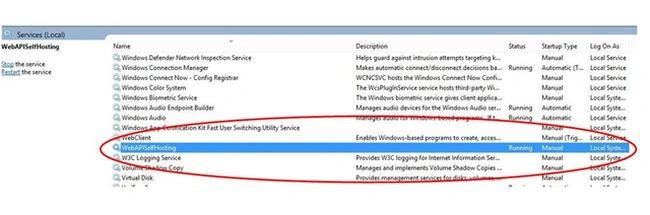
Go to the list of installed services, select the service named WebAPISelfHosting, right-click and start the service.
The Web API is now hosted and we can create a client to generate a request to the API. For this we create an HTML page that will make an ajax call to the API.

Run the client page and also start the network capture using F12. See the results, the Web API returns the results.
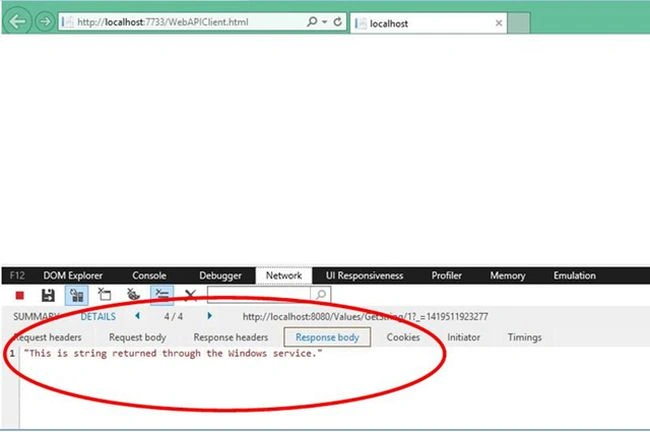
So this is how to host the Web API using a Windows Service. Also, you can uninstall the Windows Service using the following command.
installutil /u...\WebAPI_SelfHosting_WindowsService\WindowsService_HostAPI\WindowsService_HostAPI\bin\Debug\WindowsService_HostAPI.exe
Note the use of the /u otion. This is for the command to uninstall the Windows Service. Again, I have used the relative path to the exe of the Windows Service. You will be required to replace it with the path of your actual application location.
The sample code for the Windows Service is also attached here. Happy coding!
Durai KannanPosted Feb 1, 2025, 7:41 AM
Jasminder Singh Thanks! I have hosted this application and am able to access it. I have developed my own .NET profiler and am performing function-level IL instrumentation, trying to read the HttpContext.Request details. However, it is returning NULL. Why am I getting NULL for the HttpContext object in this web-based application?
Seshu RaoPosted Jan 21, 2020, 2:50 AM
Is there a way to secure this API
Himanshu GolePosted Nov 29, 2019, 7:06 AM
I use a project installer to install the service. but it is not working on client system.
Fk BeyPosted Oct 22, 2019, 6:27 PM
Thank u .it worked for me. it s amazing. i use a project installer to install the service. it works great.
nigel dewarPosted Jul 13, 2019, 10:31 PM
Not a very good article sorry mate. For a start your zip file is missing the CORS, which of course is very important, secondly, the html file is missing as well. Please put more effort into your articles and source code, to save people stuffing around so much. Other than that, your work is appreciated.
Keval PanchalPosted Feb 9, 2019, 8:43 AM
How i can enable cors in this type of service can any one explain me it would help full to me
Vishwas RastogiPosted Aug 24, 2018, 1:39 PM
Wonder full article I have run the code. its working properly. can u tell me how to use self hosting with HTTPS
John StevensPosted Aug 9, 2018, 2:04 PM
Hi in your example I only see the uses of HTTP Get do you have one using HTTP Post. Thanks.
Mickaël DevoldèrePosted Jul 10, 2018, 2:37 AM
Hi. Thank you for your usefull posts. We followed all these steps but when i start the service, it stops after windows message "The SelfHostApi service on Local Computer started and then stopped. Some services stop automaticaly if they are not used by other services or program". What did i do wrong ? Best regards.
ANINAT OthmanePosted Mar 13, 2018, 1:32 PM
Thank you for this useful article, we followed all these steps and we created a simple web application for calling this windows host Web API Service. but we got this message : No 'Access-Control-Allow-Origin' header is present on the requested resource error' . we added the system.web.cors library to enable cors , but the windows service doesn't start
siva kumarPosted Jan 19, 2018, 6:44 AM
Hi while installing through util configuration will return the error and roll back the installation
LavanKumarPosted Jan 2, 2018, 4:39 AM
Hello Jasminder after hosting my web api in windows service im facing issue like while calling from client "Message": "No HTTP resource was found that matches the request URI 'http://localhost:8081/EmployeeApi/GetAllEmployees'.", "MessageDetail": "No route data was found for this request." can u please help me to sort the issue.
Sampath KarnatiPosted Oct 28, 2017, 1:40 AM
Hi Jasminder, I ran application in system 1 and call web api method from system 2 using system 1's Ip address, but I cant be able to communicate with this api method, i got network error . Can I please have the solution ASAP. Thanks.!
ArtPosted Sep 18, 2017, 1:45 PM
Hello, can you please tell me how to make this service https?
Gregory RubinsteinPosted Sep 1, 2017, 7:30 AM
I am getting a message saying "The service started and then stopped. Some services stop automatically if they are not in use by other services or programs" when I attempt to start the service. What can be done about it?
Ankush BandPosted Aug 28, 2017, 9:12 AM
Greate article,but here I have one question: I run console application in system A and I call web api method from system B using system A Ip address but I am not possible to communicate with this api method i got network error . can it possible to communicate any solution for it.
ruguPosted Aug 4, 2017, 1:11 PM
Great article, what would you recommend to use in 2017 ?
Sri SriPosted Jul 7, 2017, 7:52 PM
Hello Jasminder, I took a Xamarin.forms project with Master detail page. let me explain my Goal: Xamarin application have to access SQL Express Server by using Windows Services and OWIN. How to do ? Can you please explain me to do? Thanks.
yang xiwenPosted Jun 23, 2017, 10:28 PM
Hi Jasminder, my question is how to run or open a html page in windows service itself.I have a html page contains javscript and object. need to open it every 10 minutes. after open, the javascript will be run onload. after it finished, then it will send result as api request to host. so how to open and run it? thanks
manoj maityPosted Jun 5, 2017, 6:30 AM
Hi jasminder, i am in bit of confusion whether to go with AspNetwebapiselfhost or Microsoft.AspNet.WebApi.OwinSelfHost. Because AspNetwebapiselfhost does not provide with throttling capabilities.
Olaf BeckmanPosted Jun 2, 2017, 5:13 AM
How about providing fullsize screenshots. The screenshots are almost impoosible to decipher.
Mohammad IsmailPosted Feb 9, 2017, 7:52 AM
The installation failed, and the rollback has been performed. how to solve the error plz help me
Former memberPosted Mar 7, 2016, 4:12 AM
web api url look like "htp://localhost:8080/api/Values/GetString/1" but why your url look like "htp://localhost:8080/Values/GetString/1" why you did not use api keyword ? let me know please. thanks
alok jainPosted Feb 12, 2016, 4:12 AM
please also upload your js script file
Hector ValdesPosted Nov 24, 2015, 11:11 AM
There is some configuration to set if I use Chrome or FireFox? Only works on IE. Thanks
Kishore BPosted Oct 13, 2015, 5:34 AM
Is there a way to browse list off all route when brosed for routePrefix. I mean when I browse for www.test.com/Employee, it should return all routes like GetEmployee, FindEmployee ,,etc?
Saqlain KhalidPosted Sep 7, 2015, 5:52 AM
No 'Access-Control-Allow-Origin' header is present on the requested resource. Origin 'http://localhost:61193' is therefore not allowed access. The response had HTTP status code 405. :/ on ajax call
Joginder BangerPosted Jun 25, 2015, 1:30 PM
Thanks for your valuable article.
Arweb AroshanzamirPosted May 18, 2015, 12:49 AM
The Best article ... thanks for share it...
Vithal WadjePosted Jan 4, 2015, 2:03 PM
nice
Mahesh ChandPosted Jan 4, 2015, 12:47 PM
Jasminder, you may want to fix your blog URL. It's giving an error: Personal Blog: https://dotnetfreakblog.wordpress.com & http://dotnetfreakblog.blogspot.in/
Gaurav Kumar AroraPosted Jan 4, 2015, 10:27 AM
Jasminder Singh Sir - its nice to see the descriptive contents with real code examples.
K P Singh ChundawatPosted Dec 29, 2014, 1:03 AM
Good Explanation Jasminder Singh sir....Keep it up
Manish Kumar ChoudharyPosted Dec 27, 2014, 11:35 PM
Nice article..