

Introduction
In this article, we are going to create a Web API with the help of node.js, Express, and MySQL. Web API is an application which serves HTTP based requests by different applications on different platforms, such as web, Windows, and mobile.
Requirements
- MySQL
- NodeJS
- Active Internet
- Postman Application
- Visual Studio Code
Step 1
Create a database in MySQL, named sampledb and use it.
- mysql> create database sampledb;
- mysql> use sampledb;
Step 2
Create a new table named employee.
- mysql> create table employee
- (
- id int primary key,
- name varchar(20),
- gender varchar(20),
- city varchar(20),
- salary int
- );
Step 3
Add some rows to the table.
- mysql> insert into employee values(1,'pankaj','male','delhi',15000);
- mysql> insert into employee values(2,'pooja','female','pune',25000);
Step 4
Open command prompt/cmd and navigate to the application folder, i.e., webapi.
C:\Users\Pankaj Singh\Desktop\webapi>
Step 5
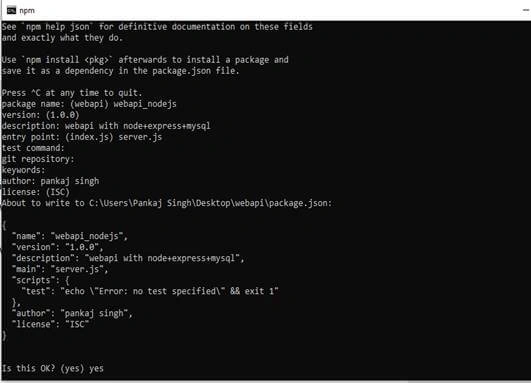
Initialize the app with npm init,
C:\Users\Pankaj Singh\Desktop\webapi>npm init
Step 6
Now, add some Node modules, as mentioned below.
C:\Users\Pankaj Singh\Desktop\webapi>npm install express
C:\Users\Pankaj Singh\Desktop\webapi>npm install mysql
C:\Users\Pankaj Singh\Desktop\webapi>npm install body-parser
Step 7
Add a server.js file to the application.
C:\Users\Pankaj Singh\Desktop\webapi>null>server.js
Step 8
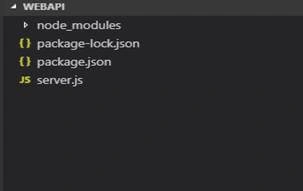
Open Visual Studio Code.
C:\Users\Pankaj Singh\Desktop\webapi>code .
Step 9
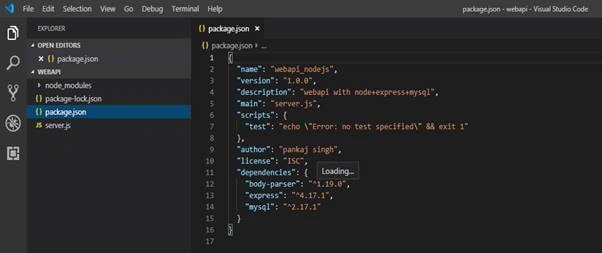
Our package.json file looks like this.
Step 10
Now, configure the server.js file. Basic Express app is as follows
- var express = require('express');
- var mysql = require('mysql');
- var bodyParser=require('body-parser');
- var urlencoderParser = bodyParser.urlencoded({extended:false});
- var app=express();
- var port = process.env.port||3000;
- //Api code here
- app.listen(port);
- console.log('Server is started on http://localhost:'+port);
Step 11
Add a connection to MySQL.
- //Mysql Connection
- var con = mysql.createConnection({
- host:'localhost',
- user:'root',
- password:'password0',
- database:'sampledb'
- });
Step 12
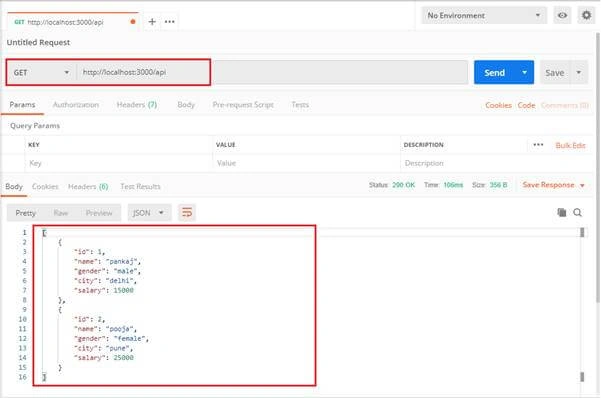
Now, add code for GET request on root “/api” . This route returns all the rows of employee table.
- //GET
- app.get('/api',function(req,res){
- var qry = "select * from employee";
- con.query(qry,function(err,rows){
- if(err)
- throw err;
- console.log(rows);
- res.json(rows);
- });
- });
Step 13
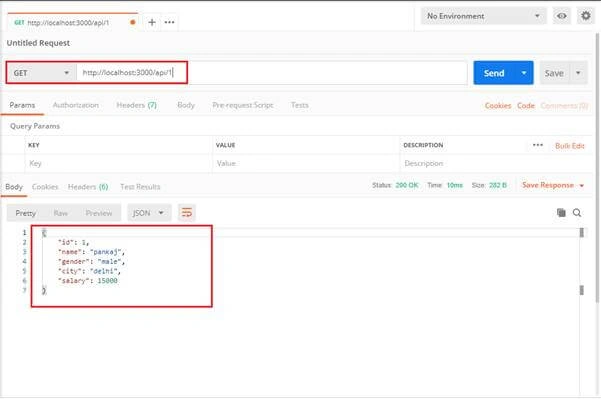
Add code for GET request with id on root “/api/<id>”. This route returns the row of employee table with the given id
- //GET with id
- app.get('/api/:id',function(req,res){
- var qry = "select * from employee where id="+req.params.id;
- con.query(qry,function(err,rows){
- if(err)
- throw err;
- console.log(rows[0]);
- res.json(rows[0]);
- });
- });
Step 14
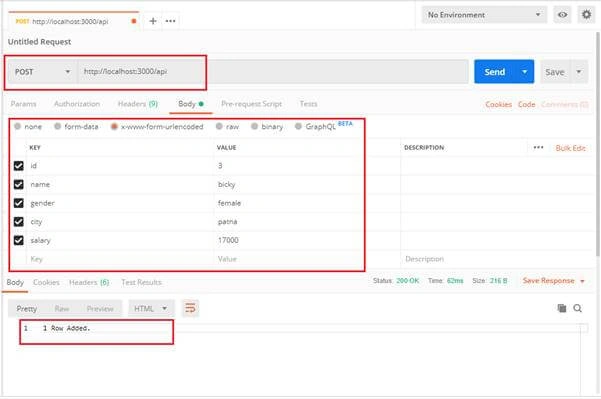
Now, add code for POST request. In this request, we use urlencoderParser to read the body content of the request.
- //POST
- app.post('/api',urlencoderParser,function(req,res){
- var qry = "insert into employee values("+parseInt(req.body.id)+",'"+req.body.name+"','"+req.body.gender+"','"+req.body.city+"',"+parseInt(req.body.salary)+")";
- con.query(qry,function(err,rows){
- if(err)
- throw err;
- console.log("1 Row Added.");
- res.send("1 Row Added.")
- });
- });
Step 15
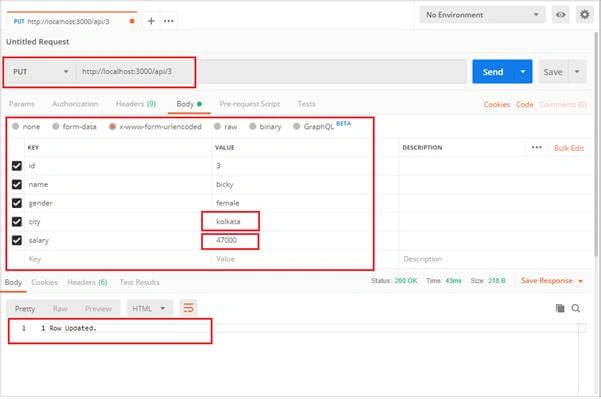
Now, add code for POST request. In this request, we use urlencoderParser to read the body content of the request.
- //PUT
- app.put('/api/:id',urlencoderParser,function(req,res){
- var qry = "update employee set name='"+req.body.name+"',gender='"+req.body.gender+"',city='"+req.body.city+"',salary="+parseInt(req.body.salary)+" where id="+parseInt(req.params.id);
- con.query(qry,function(err,rows){
- if(err)
- throw err;
- console.log("1 Row Updated.");
- res.send("1 Row Updated.")
- });
- });
Step 16
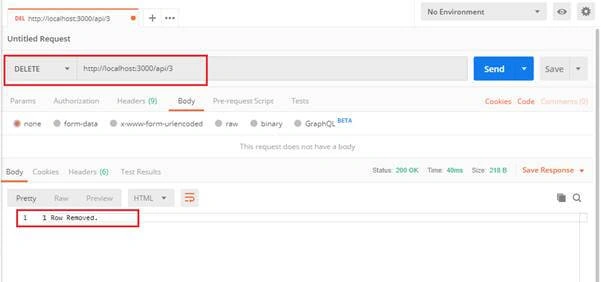
Add the code for DELETE Request.
- //DELETE
- app.delete('/api/:id',function(req,res){
- var qry = "delete from employee where id="+parseInt(req.params.id);
- con.query(qry,function(err,rows){
- if(err)
- throw err;
- console.log("1 Row Removed.");
- res.send("1 Row Removed.")
- });
- });
Step 17
The complete code is as follows.
- var express = require('express');
- var mysql = require('mysql');
- var bodyParser=require('body-parser');
- var urlencoderParser = bodyParser.urlencoded({extended:false});
- var app=express();
- var port = process.env.port||3000;
- //Api code here
- //Mysql Connection
- var con = mysql.createConnection({
- host:'localhost',
- user:'root',
- password:'password0',
- database:'sampledb'
- });
- //GET
- app.get('/api',function(req,res){
- var qry = "select * from employee";
- con.query(qry,function(err,rows){
- if(err)
- throw err;
- console.log(rows);
- res.json(rows);
- });
- });
- //GET with id
- app.get('/api/:id',function(req,res){
- var qry = "select * from employee where id="+req.params.id;
- con.query(qry,function(err,rows){
- if(err)
- throw err;
- console.log(rows[0]);
- res.json(rows[0]);
- });
- });
- //POST
- app.post('/api',urlencoderParser,function(req,res){
- var qry = "insert into employee values("+parseInt(req.body.id)+",'"+req.body.name+"','"+req.body.gender+"','"+req.body.city+"',"+parseInt(req.body.salary)+")";
- con.query(qry,function(err,rows){
- if(err)
- throw err;
- console.log("1 Row Added.");
- res.send("1 Row Added.")
- });
- });
- //PUT
- app.put('/api/:id',urlencoderParser,function(req,res){
- var qry = "update employee set name='"+req.body.name+"',gender='"+req.body.gender+"',city='"+req.body.city+"',salary="+parseInt(req.body.salary)+" where id="+parseInt(req.params.id);
- con.query(qry,function(err,rows){
- if(err)
- throw err;
- console.log("1 Row Updated.");
- res.send("1 Row Updated.")
- });
- });
- //DELETE
- app.delete('/api/:id',function(req,res){
- var qry = "delete from employee where id="+parseInt(req.params.id);
- con.query(qry,function(err,rows){
- if(err)
- throw err;
- console.log("1 Row Removed.");
- res.send("1 Row Removed.")
- });
- });
- app.listen(port);
- console.log('Server is started on http://localhost:'+port);
Step 18
Now, Run the API.
C:\Users\Pankaj Singh\Desktop\webapi>nodemon server.js
[nodemon] 1.19.1
[nodemon] to restart at any time, enter `rs`
[nodemon] watching: *.*
[nodemon] starting `node server.js`
Server is started on http://localhost:3000
Step 19
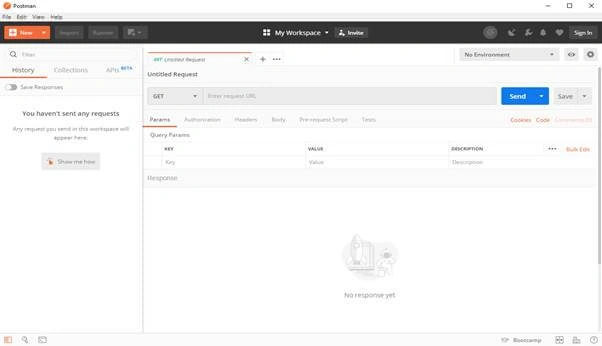
Open Postman to test the API.
Step 20
Sending GET Request to API. In response, we get all the rows of the employee table as JSON data.
Step 21
Sending GET Request with Id to API. In response, we get all the row of the employee table with given id as JSON data.
Step 22
Sending POST Request with the body to API.
Step 23
Sending put request with the body to API.
Step 24
Sending put request with the body to API.
Balwant LalPosted Aug 8, 2019, 4:43 AM
I like this node js study material