
In this article I am going to explain a new feature of .NET 4.0. It is Web.Config Transformtion. Just imagine that you have multiple environments that you deploy your application to. So you must keep separate config files for each environment.
Let's see how we can do that using web config transformation.
Step 1: We will take a new web application project and we will see that we have two default web.config files in the Root itself.
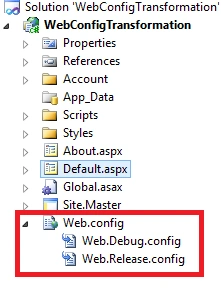
Now just assume that we have a total of four environments:
- Debug
- DEV
- STAGING
- PRODUCTION
Now we will add a separate web.config file for each environment.
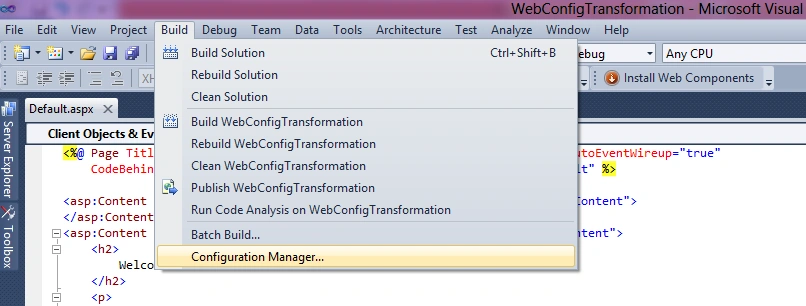
Step 2: Now we will open the Configuration Manager in the Build Menu:
Step 3: In the Configuration Manager:
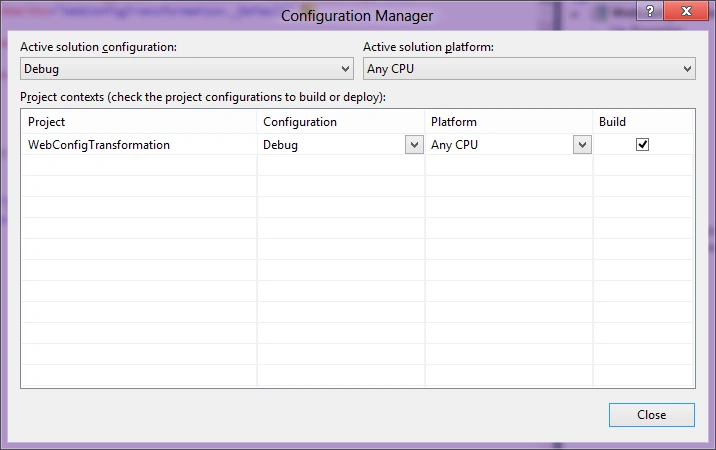
We will add a new configuration file:
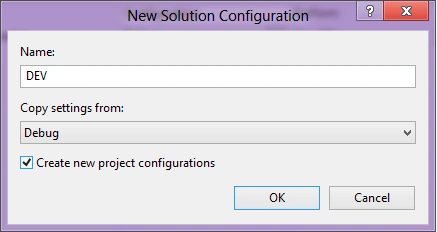
We will do it for each environment and for each file we will right-click on web.config file and Add Config Transforms.
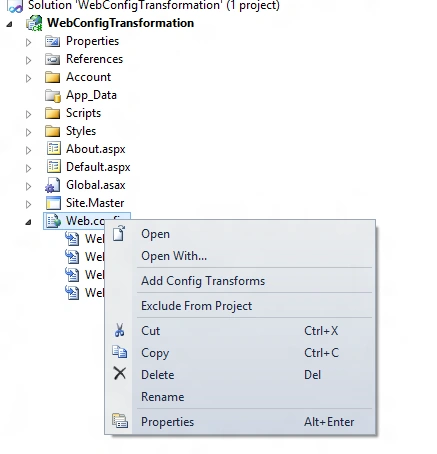
Now we have added four web.config files.
Step 4:
<connectionStrings>
<add name="MyDB"
connectionString="Data Source=ReleaseSQLServer;Initial Catalog=MyReleaseDB;Integrated Security=True"
xdt:Transform="SetAttributes" xdt:Locator="Match(name)"/>
</connectionStrings>
Step 5: Now we will pubish our application.
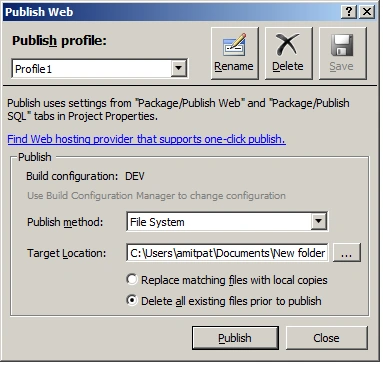
And we will open the publish folder web.config file:
<configuration>
<connectionStrings>
<add name="MyDB"
connectionString="Data Source=ReleaseSQLServer;Initial Catalog=MyReleaseDB;Integrated Security=True"
providerName="System.Data.SqlClient" />
</connectionStrings>
<configuration>
</configuration>
<system.web>
<compilation targetFramework="4.0" />
</system.web>
</configuration>
See, in the above web.config file now our Connection String is pointing to the Release Database.
There are many things we can do using:
xdt:Transform="SetAttributes" xdt:Locator="Match(name)"
Reference : http://msdn.microsoft.com/en-us/library/dd465326.aspx
Happy Coding..
SAMEER SAYANIPosted May 31, 2017, 8:41 AM
Hi Jolly, I am using CI in VS 2015. I have the artifacts with all published files and a config file. But the config file has settings of development environment. I need to push same build package to QA and UAT environment but config setting for both will be different. How will i transform the config file during release process so as when i select release for QA or UAT the config settings it changes dynamically for QA/UAT ? Thanks, Sameer
Vithal WadjePosted Jan 8, 2015, 2:21 AM
great
Guest UserPosted Aug 27, 2014, 8:14 AM
if you want to do this then you can have system.webserver created as blank one in your target file
Guest UserPosted Aug 27, 2014, 8:13 AM
Raghav difference in security & system.webserver is that system.webserver is section and not element like security
Raghav MehraPosted Aug 27, 2014, 7:55 AM
<security xdt:Transform="Insert"> this way. I am not able to find the exact way, I randomly reached to some post few months back and something this worked. Please suggest.! I know you can now get a proper workaround for this :)
Guest UserPosted Aug 27, 2014, 7:30 AM
I dont think you can add new section. You can changes values only
Raghav MehraPosted Aug 27, 2014, 4:46 AM
I have a question that, Can I insert/inject a new section into Web.config like adding new sub section of security into system.webServer using transforms?
Raghav MehraPosted Aug 27, 2014, 4:46 AM
Nice Shared sir!.
Guest UserPosted Aug 1, 2014, 10:42 PM
Guys, any feedback pls