Nowadays, it’s all about getting and utilizing data from different websites, by either using their WEB API or their Web Services. What if websites don’t provide you a way to access their data? The answer to that question is Web Scraping. Almost every website will have an API, but if there is no API, then we can scrape the data from that website. But how would we achieve that? You are in the right place, then, to learn how we are going to achieve our goal.
Abstract View
So, in this article, I am going to create a scraper that will scrape the data from Yellow Pages using HtmlAgilityPack and will extract the data after understanding the DOM of the web page. I am going to demonstrate it in a simple console application and you can use that accordingly.
Understanding the Document Object Model of Web Page
For web scraping, we first have to understand what the real DOM of that web page is. So, go to the Yellow Pages and search for anything you want to. I will be searching for Software in Sydney. Press enter and you will see the result just like below.
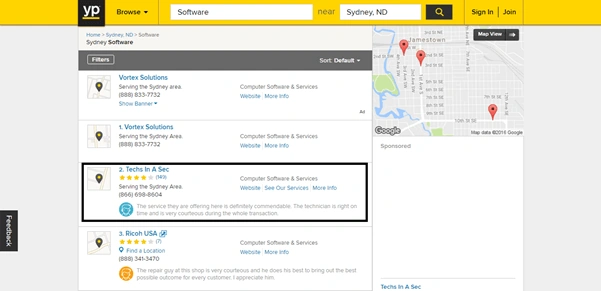
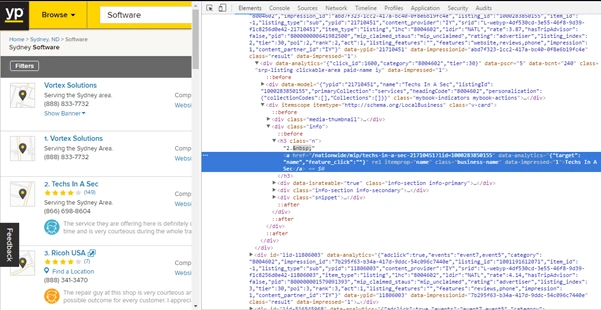
Now, what we are going to do is to understand the Document Object Model of this web page. For simplicity, let's say, we have to get the “Header Names” of all listed results. So take your cursor to the “Techs in a Sec” or any Header Name and right click on it. Then, click on “Inspect”. You will see a result similar to what is shown here. Note that the “Anchor” element is highlighted.
Now, we can see the hierarchies of the elements in here. The text we are looking for is in the “Anchor: <a>” and we have to take it out using our code. As it is the HTML that is rendered in the browser, so for all the HTML elements there is either an ID or CLASS that uniquely identifies that element. So, if you take a close look or inspect other elements too in a similar fashion, you will see that all the "Header Names" have exactly the same class. So, we can easily get all the Header Names in our code, by using the class name and, of course, the element name. So, note that down. Now we are going to open our Visual Studio and see the web scraping really happening.
So, go to your Visual Studio.
- Create a Console Application in C#.
- Go the Solution Explorer. Right click the References. Click Manage Nuget Packages and then browse for “HtmlAgilityPack” and install it.
Just a little bit more about HtmlAgilityPack. It is a wrapper in C# that provides us the ability to query the Document Object Model and extract any sort of data that we want to. We are going to see this in action further.
After the installation of your package, come back to the “Program.cs” file and follow the code below to get our web Scraper running.
Create an instance of “HtmlWeb” which will load the HTML of the given URL using HTTP.

Now, I believe that you have noted down the class of the anchor tag as discussed above. So, we are going to use that class in our code. Now, write the following code.

Note that we have used two “//” and then the name of the element that we have identified and also the name of the class that we have noted down from the Document Object Model and converted that to the List, we can also take advantage of the LINQ using HtmlAgilityPack, so it depends upon your needs of what you want to do.
Now, in the final step, simply loop through the list and call the “InnerText” property of each item in the list.
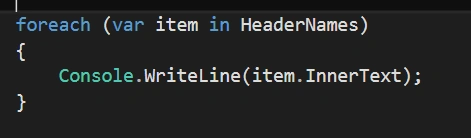
Run it and you will get all the Header Names we have identified on our Web page. See the result below.
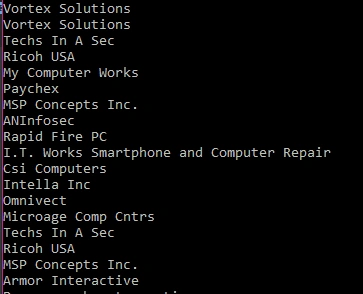
And there, you can see that we have successfully created a web Scraper in C# that takes out the data from the Yellow Pages depending upon our scenario.
What more?
Now, in a similar fashion let’s say you want to get the results that are on the next page of this website. So, always keep an eye on continuously changing the URL of the website. You will get a clue of what you really need. Take a look. For example, you want the results from the second page, so you will load the following URL in “HtmlWeb.Load()” method and will follow the same principle. See the page=2, that will take out the results from the second page of the search results.

Similarly, you can use it in desktop applications where you will just enter the name of the city and the search terms and will get the result. Just replace “software” with {0} and pass the value using string.format method to the URL. Then, send the request and you will get all the related results according to the input.
So that's it. We have just created our first web scraper in C# using HtmlAgilityPack.
Happy Coding!


George PadvoracPosted May 4, 2021, 11:33 PM
If you want to scrape more than a few yellowpages, you need to provide a rotating proxy but when I provide a proxy via htttpclient I get the: "The remote server returned an error: (400) Bad Request." problem. Have you successfuly scraped yellowpages using a proxy other than you pc's default IP?
Sam SengsavangPosted Dec 14, 2019, 2:15 AM
This works fine. However, I am trying to scrape https://www.lotteryinformation.us/state-lottery.php?state=TN&tb_state=&tb_links=&tb_country=US&tb_lang=0&adsurl=&tbsite=0000&d=google.com
Mahesh SinghPosted Nov 15, 2019, 12:09 AM
Nice example But this library does not work behind login page like if there is an application which requires session so it is not working
Rakesh SoniPosted Jun 29, 2019, 1:36 AM
HtmlAgilityPack not working for this : -https://www.justdial.com/Bhilwara/Hotels/nct-10255012 dll can't able to load page Please Help me.
Mary KerriganPosted Apr 10, 2019, 11:14 AM
Thank you for such a clear and useful example. I have searched all morning and found a lot of confusing articles until I came to yours. Thanks again!
Abdullah BayramPosted Jan 1, 2019, 9:35 AM
Thanks! Short and comprehensive explanation.
Jon ChakPosted Dec 26, 2018, 2:54 PM
Is there a way to scrape Google Trends Visualize and save the data each day for the top searched keywords?
Pradeep JaiswalPosted Dec 19, 2018, 10:46 PM
Actually, I need to create a GUI where I can open already saved HTML pages and get xpath of any user selected element as like we do in chrome's Inspect Element tool.
Pradeep JaiswalPosted Dec 19, 2018, 10:43 PM
What if i need to save the xpath selector in database on any element clicked in a web page.
Daanish SajidPosted Oct 1, 2018, 4:22 AM
How to save this data in database??
irfan fazalPosted May 3, 2018, 2:48 AM
Any one send me reference a comprehensive book on web Scraping using C#
wenkket sethalamPosted Jan 10, 2018, 11:50 AM
Where i can get the class name
MuhammadJunaid FarooqPosted Apr 15, 2017, 3:38 PM
Short but comprehensive well done
Guest UserPosted Nov 9, 2016, 7:52 PM
We could do this & it has advantages to avoid redundancy. But the challenge if target website changes structure or elements then your application will suffer as you're adding a dependency. And target website if no agreement with you so they can change it. Also, is there any legal implication of this? I don't know but we shall check that aspect too, isn't it?
Ammar ShaukatPosted Nov 5, 2016, 3:09 AM
It works awesome... I have tried it also...
Lakhtey HussnainPosted Nov 4, 2016, 2:36 AM
Worth Sharing Article on Web Scrapping
Ammar ShaukatPosted Nov 3, 2016, 9:22 AM
Good.
Prasanna MuraliPosted Nov 3, 2016, 7:23 AM
Nice post...
Thiruppathi RPosted Nov 3, 2016, 5:13 AM
Nice Work..