
The world of web services has taken applications by
storm. From an era where applications were tightly bound to one another, we have
reached a time wherein applications are delivered as a "service". This concept
of sharing application logic over the internet promotes a new kind of
application development wherein applications are built as "building blocks" with
each block capable of performing its work in isolation.
This new notion of programming is what is termed as web services, wherein a
piece of application logic is exposed as a programming element for others to
consume. The concept of web services is still evolving with Microsoft and a host
of other companies proposing various standards for managing security,
transactions etc.
What is interesting though is that web services need not mean "external"
communication. If you develop enterprise scale applications made of multiple
modules, you can leverage web services within your application itself to improve
reusability and data sharing.
Till date, the concept of web services has been centric around the usage of the
same with the .NET Framework. In this article, I will explain about how to
develop web services using the SOAP Toolkit 3.0 from Microsoft and to also
consume the same web service from a .NET application. I'm assuming that you are
familiar with the various terms associated with web services like SOAP, WSDL,
XML and also VB and VB.NET.
What is the SOAP Toolkit
The SOAP Toolkit is a component from Microsoft that enables you to
convert existing COM components into web services and to also communicate with
external service providers using the SOAP protocol. The SOAP Toolkit consists of
the following components:
- A client-side component that allows an application to invoke XML Web service operations described by a Web Services Description Language (WSDL) file. This WSDL file describes the service(s) and operations of the service offered by the server.
- A server-side component that maps invoked XML Web service operations to COM object method calls as described by the WSDL and Web Services Meta Language (WSML) files. The WSML file is necessary for the implementation of the Microsoft SOAP Toolkit.
- The components needed to construct, transmit, read, and process SOAP messages. These processes are collectively referred to as marshalling and un-marshalling.
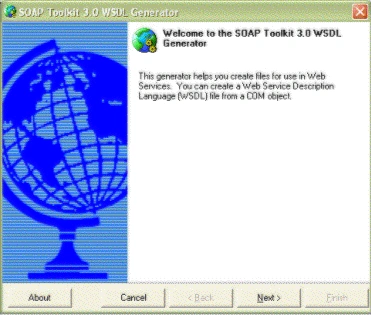
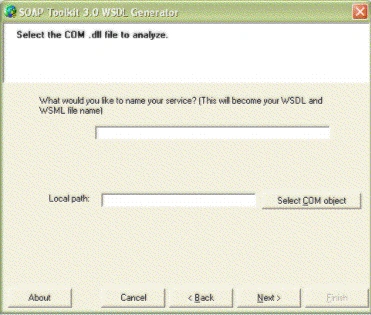
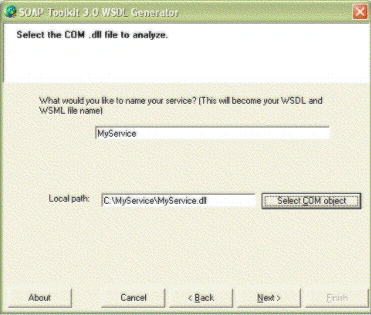
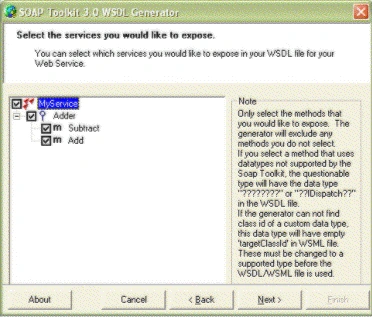
- In addition, the SOAP Toolkit provides a WSDL/WSML Generator tool that generates the WSDL and WSML files for you, relieving you of the tedious process of manually creating such files.
The SOAP Toolkit is available free of cost and can be
downloaded from the following site:
http://www.microsoft.com/downloads/details.aspx?FamilyID=c943c0dd-ceec-4088-9753-86f052ec8450&DisplayLang=en
Quick Introduction to WSDL
The Web Services Description Language (WSDL) is an XML-based language
for describing the network services offered by the server. You use WSDL to
create a file that identifies the services provided by the server and the set of
operations within each service that the server supports. For each of the
operations, the WSDL file also describes the message format that the client must
follow in requesting an operation.
Quick Introduction to WSML
In addition to creating a Web Services Description Language (WSDL) file
describing the services and operations on the server, you need to create a Web
Services Meta Language (WSML) file on the server. A WSML file provides
information that maps the operations of a service (as described in the WSDL
file) to specific methods in the COM object. The WSML file determines which COM
object to load in order to service the request for each operation. The use of a
WSML file is specific to the SOAP Toolkit.
Developing a Web Service
To develop a web service using the SOAP Toolkit that is to be consumed
by other applications, the following steps have to be followed:
- Develop a COM component that contains the necessary code that you want to be exposed as a web service.
- Generate a WSDL/WSML file for the COM component.
- Register a IIS virtual folder to point to the location where the WSDL/WSML and COM files are present.
- Access the web service to test out the operations.
And that's it!! You have a web service that anyone can
consume from any platform as long as they talk SOAP. In the following sections,
we will outline the details of each of the steps above and develop a simple web
service that can be consumed by any client.
Before we get down to the details of how to develop a web service, let's first
describe the service. The service that I'm going to show is a simple calculator
that has two operations called Add and Subtract. The Add operation adds two
numbers and the Subtract operation subtracts two numbers. Very obvious, but I've
stated it for completion :-).
Step - 1: Create a COM Component
The first step is to create a VB COM component that encapsulates the
above two operations. To do this, follow these steps:
- Open Visual Basic 6.0 and create an ActiveX DLL project.
- Change the project name to MyService and the class name to Adder.
- Type in the following code in the code editor.
Public Function Add(ByVal Number1 As Integer, ByVal Number2 As Integer) As Integer
Add = Number1 + Number2
End Function
Public Function Subtract(ByVal Number1 As Integer, ByVal Number2 As Integer) As Integer
Subtract = Number1 + Number2
End Function - Compile the code to a DLL and store it in a directory. Let's call this directory as MyService.
Rathrola Prem KumarPosted Dec 5, 2017, 10:01 PM
Can any one tell how to use web service in VB6 with out using Soap Tool kit ?