

This article has been
excerpted from book "A Programmer's Guide to ADO.NET in C#".
Web services provide a way to run a service on the Web and access its methods
using standard protocols, including Simple Object Access Protocols (SOAP),
Extensible Markup Language (XML), Web Service Description Language (WSDL), and
Hypertext Transfer Protocol (HTTP). Technically, a web service is nothing more
than an application that exposes its interface to a client who wants to access
the service's abilities. The uses of a web service include validating credit
cards, searching for data in a database, inserting an order into a shopping
cart, and updating a guest list. The sky is the limit on what you can have your
web service do on your server. In the past, JavaBeans, ActiveX/Component Object
Model (COM) controls, and other nonstandard service components handled these
services, which required specialized formats to exchange data with the client.
But web services under .NET run by invoking methods in the service directly
through HTTP or SOAP, so someone wanting to run your web service from their
computer at home can simply send an HTTP call to your service, passing the
parameter in a standard Uniform Resource Locator (URL). I'll show you how to do
this later in the article.
Three attributes make up a Web service:
- Discovery: First, you need to locate the Web service. You locate Web service through the Discovery Service Protocol. The *.disco file stores the protocol in your Visual studio (VS) .NET project. This file contains reference to all the Web services under your Web site's virtual directory. VS can automatically generate this file for you. The discovery file (.vsdisco), an XML file, is used to identify searchable paths on the web server used by discovery process.
- Description: Once you have discovered your service, you need a way to tell the client what methods, classes, and so on the web service has and what wiring protocol (SOAP, HTTP, and so on) the services are using. You do this through WSDL, an XML format. VS provide tools for generating WSDL files automatically from your services.
- Wiring Protocol: Web services under .NET use two main protocols, HTTP-post /HTTP-get and SOAP. HTTP-post and HTTP-get enable you to send and receive information via a URL by passing and receiving name value pair strings. Unfortunately, HTTP can only pass strings that represent different data types. SOAP allows you to pass a richer type of information, such as datasets.
Exploring Web
Services and the .NET Framework Library
The .Net framework class library provides four namespaces that contain web
service classes. These namespaces are
System.Web.Services,System.Web.Services.Description,
System.Web.Services.Discovery, and System.Web.Services.Protocol.
The System.Web.Services namespace provides classes that enable you to build and
use web services. It has four classes. The WebService class defines the optional
base class for Web services, which provides direct access to an ASP.NET
application. Server, Session, User, and Context are some of its properties.
WebMethodAttribute, WebServiceAttribute, and WebServiceBindingAttribute are
other classes of this namespaces.
The System.Web.Services.Description namespace provides classes that enable you
to describe a WSDL.
The System.Web.Services.Discovery namespace provides classes that enable Web
service consumers to locate a Web service through discovery.
The System.Web.Services.Protocols namespace provides classes that define the
protocols used to transmit data between a client and a Web service.
Creating a Web Service in VS .NET
To understand Web services better, I'll show you to build a simple Web service.
The Web service will receive an order ID and then query the Northwind database's
Orders table for the correct order. It'll then return the order in a DataSet.
The first step in creating the web service is to select File > New > Project and
choose the ASP.NET Web service template, as shown in Figure 8-1.
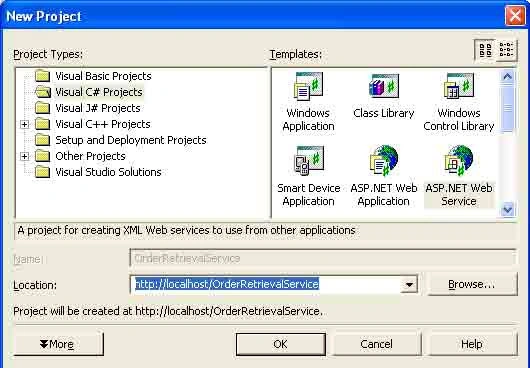
Figure 8-1 Creating a new Web service project
This creates a Web service project on the MCB server. By default, local-host is
available as a Web server on your development machine. After the server name,
you give it a project name. In this sample, the project name is
OrderRetrievalService. VS .NET creates a new folder with the project name on the
Web server and keeps all project files under that folder. Clicking the OK button
creates the project.
If you look at the solution explorer, you'll notice a list of files created
automatically for the project, as shown in Figure 8-2. You won't be able to see
some code and resources files by default; they are hidden. You need to click on
the show All Files button of the Solution Explorer to view all the files (see
Figure 8-2).
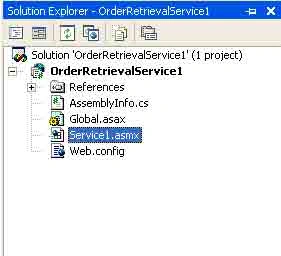
Figure 8-2 Files included in the web service project
First, the Web.config file is an XML file containing information on how to run
the service under ASP.NET. Second, the Global.asax and Global.asax.cs files
enable you to handle application-level events for the service. Theses event
handlers include event-handling pairs such as Application_Start-Application_End,
Session_start-Session_End, and Begin_Request-End_Request. You can view
Global.asax.cs by right clicking on the Global.asax file in the Solution
Explorer and choosing view code. Next, OrderRetrievalServices.vsdisco is an XML
file containing information for discovery of the service. You will actually need
to generate an OrderRetrievalService.disco file for your client to see the
service (more on this later).
Finally, the Service1.asmx file serves as the entry point into the service. The
code behind the service, Service1.asmx.cs is where you will place the method for
retrieving the order. Right-click on the Service1.asmx file in the Solution
Explorer and choose View Code from the pop-up menu, as shown in Figure 8-3.
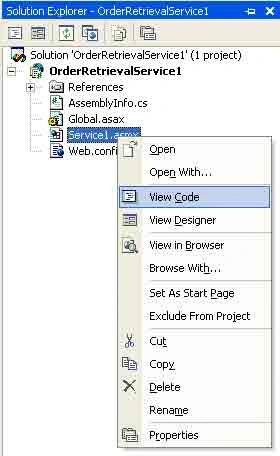
Figure 8-3 Viewing the code in the Web service
See Listing 8-1 for the Web service code. Note that it looks like any other C#
component; it has a constructor, an InitializeComponent method, and a Dispose
method.
Listing 8-1. Initial Web service code in OrderRetrievalService.asmx.cs
public
class Service1
: System.Web.Services.WebService
{
public Service1()
{
//CODEGEN: This call is
required by the Asp.Net Web Services Designer
InitializeComponent();
}
#region
Component Designer generate code
//Required by the Web
Services Designer
private IContainer component =
null;
///
<summary>
///
Required method for Designer support-do not modify
///
The contents of this method with the code editor.
///
</summary>
private void
InitializeComponent()
{
}
///
<summary>
///
Clean up any resources being used.
///
</summary>
protected override
void Dispose(bool
disposing)
{
if (disposing && component !=
null)
{
components.Dispose();
}
base.Dispose(disposing);
}
#endregion
// WEB SERVICE EXAMPLE
// The HelloWorld() example
service return the string Hello World
// To build, uncomment the
following lines then save and build the project
// To test this web service,
press F5
// [Webmethod]
// public string HelloWorld()
// {
// return "Hello World";
//
}
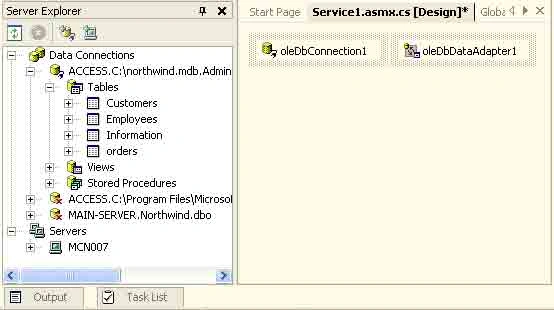
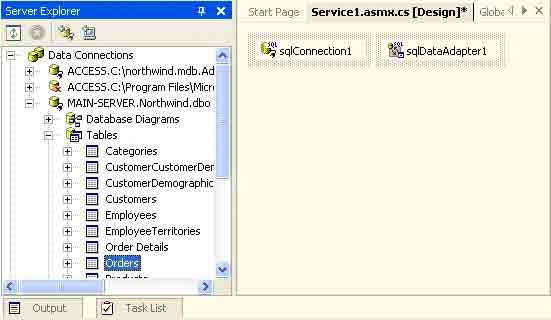
Now I'll add database support to the Web service. Actually adding database
support to a web service is quite easy using ADO.NET. You can add ADO.NET data
components to a web service by just dragging ADO.NET component from the
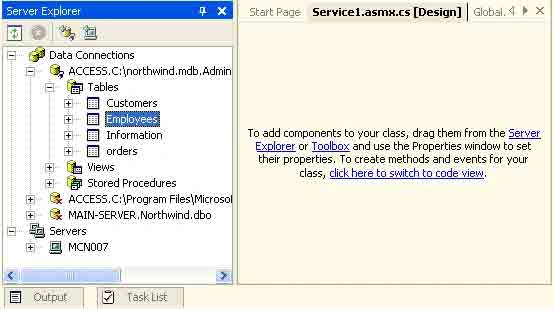
toolbox's Data tab to Web Forms. Similar to windows forms, you can also use the
Server Explorer to add database components to a Web service.

Join the conversation! Your thoughts help the community grow.