

WebBrowser Control
WebBrowser control allows developers to build Web browsing
capability within Windows Forms applications. In this article, I will
demonstrate how to use the WebBrowser control in a Windows Forms application
using C# and Visual Studio 2010.
In 2001, I published an article Web Browser in C# and VB.NET that showed how to use the WebBrowser ActiveX control in a Windows Forms 1.0/1.1 application. Well, things have changed since then.
This article is written using Visual Studio 2010 and Windows Forms 4. If you do not
have Visual Studio 2010, you may use Visual C# 2010 Express which is free to
download from the MSDN website.
Creating a WebBrowser
Create
a Windows Forms application using Visual Studio 2010 or Visual C# 2010 Express.
In
this application, I am going to add a ToolStrip and WebBrowser control to
the form. In my ToolStrip control, I add a Label, a TextBox, and a few Button
controls with a few separators.
By
the time we are done with the application, the final user interface will look
like Figure 1.
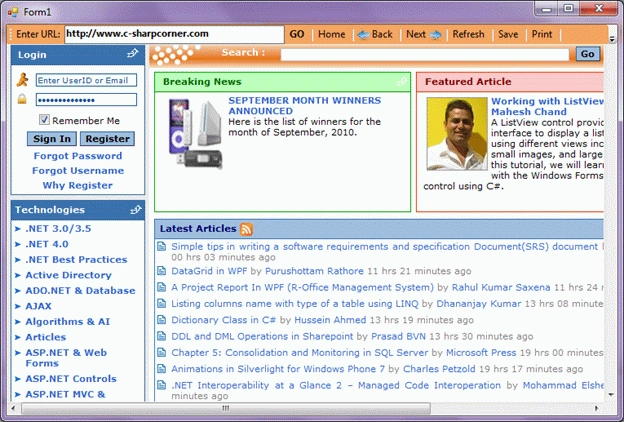
Figure 1
After
your Toolbar looks like Figure 1, drag a WebBrowser control from Toolbox to the
Form and resize and dock the control the way you like on the Form. I dock the
WebBrowser control at the bottom of the window.

Figure
2
In the next step, I am going to set default properties of the WebBrowser control.
To
do so, right-click on the WebBrowser control, and select Properties. This action
launches the Properties window. Feel free to set any properties you like. The Url
property represents the web page a WebBrowser displays. In Figure 3, I set http://www.c-sharpcorner.com as the default page to display in the
browser.

Figure
3
Navigation
The WebBrowser class in code behind is associated with the
WebBrowser control. So when you drag and drop a WebBrowser control to the Form,
a WebBrowser class instance is created in the code behind.
The Navigate method of the WebBrowser class is used to open a URL
in the WebBrowser.
- webBrowser1.Navigate(new Uri(url));
- // GO button click event handler.
- private void GoButton_Click(object sender, EventArgs e)
- {
- if (String.IsNullOrEmpty(UrlTextBox.Text) || UrlTextBox.Text.Equals("about:blank"))
- {
- MessageBox.Show("Enter a valid URL.");
- UrlTextBox.Focus();
- return;
- }
- OpenURLInBrowser(UrlTextBox.Text);
- }
- private void OpenURLInBrowser(string url)
- {
- if (!url.StartsWith("http://") && !url.StartsWith("https://"))
- {
- url = "http://" + url;
- }
- try
- {
- webBrowser1.Navigate(new Uri(url));
- }
- catch (System.UriFormatException)
- {
- return;
- }
- }
MahadevanPosted Dec 2, 2022, 12:13 PM
Is this can I use for Authentication purpose in Windows Form application like MS365 OAuth 2.0 requires to open the browser and authenticate the user and gets the secrete token ?
Akshay DoshiPosted Aug 2, 2021, 12:01 PM
This web browser control uses Internet explorer specific configurations(UI), are there any enhancements in web browser controls more specific to Edge/Chrome?
tarun prustyPosted Jul 22, 2021, 4:37 AM
Is This Control is supporting .Net 5.0?
vikas sangalPosted Sep 2, 2020, 4:28 AM
Sir i want to open web page through window.open, is it possible?
simma lakshmanaPosted Jun 19, 2020, 1:33 AM
I wanted to Know this webviewer which broswer to match like (IE,Crome.....)
Prashant /Technology/ABPLPosted Jul 16, 2019, 8:11 AM
When I run the project, facing scripts error. How to solve the scrip error.
Sourabh ChoubeyPosted Apr 1, 2017, 9:43 AM
Sir i want to click a button from web browser control but it does not responds to the click event.I dont know why it does not respond.Here is my code given below.neither this works. HtmlElement submit = doc.GetElementById("CphPageMiddle_btnSubmit"); submit.InvokeMember("click"); nor this works submit.InvokeMember("Click");
Amit PandeyPosted Mar 30, 2017, 5:42 AM
I have an anchor tag in the Webbrowser control. How can I open a image file from click of the anchor tag.
Chandu KumawatPosted Jan 2, 2016, 8:19 AM
nice
Ashish GuptaPosted Apr 1, 2015, 2:00 AM
can i read all html available in Web browser document instead of the reading HTML displayed on the current page??
arun tyagiPosted Mar 27, 2014, 8:48 AM
hi,webbrowser class is launching the Browser version 7, How i can make it ,it's launch latest Browser Version
Ashraf NazirPosted Jul 13, 2013, 2:45 AM
Nice work.....can any body tell me,how to retrieve url path from Address bar in webbrowser1?
Taraspreet Sing BrareditedPosted Feb 1, 2012, 2:16 AMEdited Feb 1, 2012, 2:19 AM
Once web page is opened through web browser how to edit that page? I mean i want insert one button on click of that button new window should open,,Please reply.... Thanks,
J RPosted Oct 6, 2011, 3:56 PM
If I use the webbrowser class to browse my local drive and select some random text file to open. It normally pops open in Notepad or something that it is mapped to. How do I intercept this call and do something simple like a MessageBox.Show("Don't open that file.") and return without the actual file being opened?
JoePosted Sep 14, 2011, 7:04 AM
I been looking for a sample to show me how to use the toolstrip progessbar1 and a web browser control. and the samples I did fine don't work. I wanted the tool strip progress bar to show the progress of the page being loaded. Can some one, any one make a sample for me and every one else would like that sample too.
Gary BlakePosted Mar 10, 2011, 12:47 PM
How would you use to view local files............file://// doesn't work
Sam HobbseditedPosted Mar 9, 2011, 7:02 PMEdited Mar 9, 2011, 7:06 PM
The WebBrowser.Navigate Method can also be used with a string containing the address without a Uri object. That is a very minor convenience. A major capability is to be able to put HTML into the control; the HTML can be obtained from wherever we might get it. How to do that is not totally obvious. Since the document object is created asynchronously, we must wait until the document has been created before putting HTML into it. The common way to do that is in the DocumentComplete event; for an example see my http://www.c-sharpcorner.com/UploadFile/SamTomato/227/?ArticleID=39601c1c-a660-48a0-a3b0-9645db32fe2a