

Introduction
You must have tried a lot of ways to develop reusable components or widgets. But what about the components like "video", "audio" or "select" components (tags) of HTML(5)? Did you ever investigate how these components work without exposing its style, script or local DOM structure? Web applications are being developed in various ways depending on the requirements but hardly fulfill the reusability aspect across projects or modules.
About Web Components
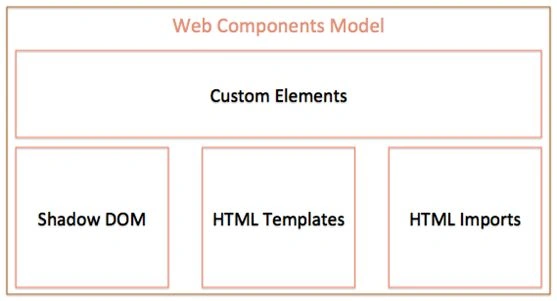
- HTML Templates- This contains markups that are consistent across web pages with the ability to inject dynamic content using JavaScript.
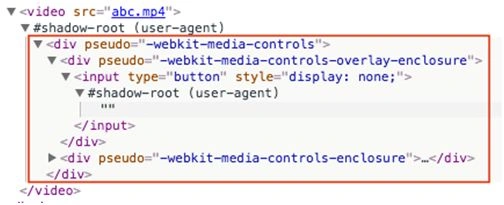
- Shadow DOM- This is designed to encapsulate DOM and CSS by hiding all child elements behind a shadow root. It defines functional boundaries between the DOM tree and the subtrees hide behind the shadow root. The following screenshot depicts the DOM structure of the “video” tag.
- Custom Elements- This allows us to create our own custom elements with tailored DOM structure and the ability to style and add behavior logic in our own way.
- HTML Imports- This allows us to import one HTML file in another HTML file. Using HTML Imports we can import and reuse HTML Templates for Web Components. The following is an example of how to use HTML Import to import HTML files-
- <link rel="import" href="bower_components/paper-button/paper-button.html">
About Polymer
- <google-map lat="37.790" long="-122.390"></google-map>
- <custom-gallery></custom-gallery>
- Allowing us to create Custom Elements with user-defined naming schemes. These custom elements can then be distributed across the network and used by others with HTML Imports.
- Allowing each custom element to have its own template accompanied by styles and behavior required to use that element.
- Providing a suite of ready-made UI and non-UI elements to use and extend in your project.
Installing Polymer
Bower is a package manager that manages dependencies for your project. If you are not familiar with Node.js and Bower, then it is recommended to read the instructions provided in the respective URLs mentioned above to learn how to install and get started with it. It is not necessary to learn everything about Node.js and Bower but knowledge about installation and getting started with would be enough to install and work with PolymerJS.
Run this command from your project root folder using the terminal-
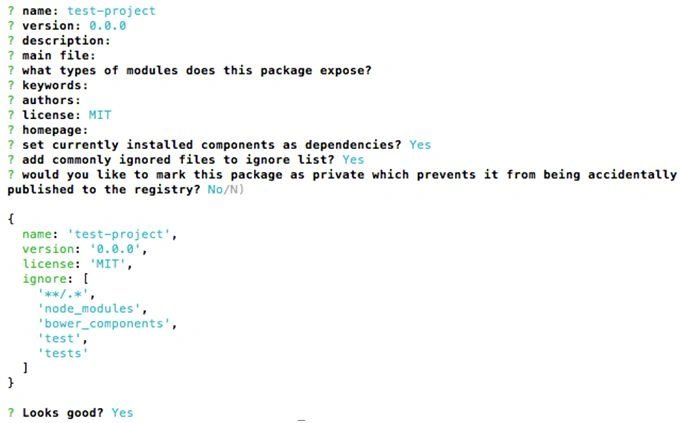
This command creates a bower.json file in the root folder of your project. The easiest way to create a bower.json file is to press “enter” continuously for all the prompts after the above command.
Installing with Bower
bower init
bower.json looks like-
- {
- "name": "test-project",
- "version": "0.0.0",
- "license": "MIT",
- "ignore": ["**/.*", "node_modules", "bower_components", "test", "tests"]
- }
- "dependencies": {
- "polymer": "Polymer/polymer#^1.2.0"
- }
Using Polymer’s Custom Elements
Step 1
Download the paper-button Custom Element package via Bower.
- "dependencies": {
- "paper-button": "PolymerElements/paper-button#~1.0.8",
- "polymer": "Polymer/polymer#^1.2.0"
- }
Step 2
Import Polymer’s “webcomponents.js” and “polymer.html”.
- <script src="bower_components/webcomponentsjs/webcomponents.js"></script>
- <link rel="import" href="bower_components/polymer/polymer.html">
Step 3
Import the corresponding .html file in your document.
- <link rel="import" href="bower_components/paper-button/paper-button.html">
Step 4
Use the custom element markup anywhere in your document.
Developing a New Custom Element using Polymer
- It can be instantiated using the constructor of a custom element or document.createElement or adding markup in the document.
- It can be styled with default styles of external CSS.
- It can have custom behavior logics that can be defined using JavaScript.
- Support custom events handling on changing the attributes of the markup or any update in the values of the properties.
- Support data-binding
Register a custom element
- It is necessary that the custom element has a property in the prototype
- There should be an id attribute in the <dom-module> tag.
- And the value of id is and name of the custom element file must have the same value to work the custom element properly.
- And this value must contain a dash (-). In this case, it is the hello-world.
Example
- <dom-module id="hello-world">
- <template>
- <style>
- /* CSS classes */
- </style>
- <!-- Local DOM structure starts here -->
- <div>
- <h1>{{proName}}</h1>
- <!-- Data binding -->
- </div>
- <!-- Local DOM structure ends here -->
- </template>
- <!-- JavaScript goes here -->
- <script>
- var MyElement = Polymer(
- {
- is: "hello-world",
- properties:
- {
- propName:
- {
- type: String,
- value: "Hello World!"
- }
- }
- })
- </script>
- </dom-module>
- var el = new MyElement();
- document.body.appendChild(el);
LifeCycle callbacks
- Created
- Ready
- AttributeChanged
- actoryImpl
- attached
- detached
The sequence of the callbacks as it is listed above.
facotyImpl method will only be invoked if the element is instantiated using Constructor (see below for instantiation options).
attributeChangedmethod will be invoked whenever any attribute is changed. It gets called after ready if there are any default properties set using the “properties” object or “hostAttributes” object of the Polymer prototype. It also gets called if any attribute gets changed dynamically.
Instances of Custom element can be done in multiple ways-
Instantiation of Custom Element
- Using document.createElement
- var el = document.createElement('hello-world');
- document.body.appendChild(el1);
- Using tags in HTML,
- <hello-world></hello-world>
- Using append of jQuery,
- $("body").append("<hello-world></hello-world>");
- Using Constructor,
- var el = new MyElement();
- document.body.appendChild(el);
Properties Declaration
- var MyElement = Polymer(
- {
- is: "hello-world",
- /* public properties should be defined here */
- properties:
- {
- firstName: String,
- lastName: String,
- age: Number,
- userName: "abcd",
- details:
- {
- propName1:
- {
- type: String,
- value: "Hello"
- },
- propName2:
- {
- type: String,
- value: "World"
- }
- }
- }
- })
- Type- type of the property i.e. String, Number, Boolean, Date, Array or Object etc.
- Value- Default value can be set here
- Notify- Type: boolean. If `true`, the property is available for two-way data binding. In addition, an event, propertyName-changed is fired whenever the property changes.
- Observer: Value is provided in the form of String and interpreted as methods that fire on change of the value of the property.
How to change value of properties from outside the component:
Value of properties can be changed by using query selector and .propertyName. For example-
- $("#myElement").propertyName = "xyz";
Data-binding
- <dom-module id="hello-world">
- <template>
- <style>
- </style>
- <div>
- <h1>Hello <span>{{firstName}}</span><span>{{lastName}}</span>!</h1>
- <!-- Data binding -->
- </div>
- </template>
- <script>
- var MyElement = Polymer(
- {
- is: "hello-world",
- properties:
- {
- firstName: String,
- lastName: String
- }
- })
- </script>
- </dom-module>
Data-binding in Polymer is not very similar to Angular. There is a significant difference in the way how Polymer handles data-binding and how Angular handles data-binding. For example, unlike AngularJS, each bound property needs to be wrapped with an element (span in the above example). Two properties can not be declared in one dom element.
References
That’s all! For further reading on Web Components and Polymer, I would suggest referring-
- Introduction to Web Components - W3C
- Polymer Official Website
- An Introduction to Web Components and Polymer (Tutorial)
- Using Polymer to Create Web Components
Summary
In this article, we learned about Web Components And PolymerJS.
Prasanna MuraliPosted May 20, 2016, 11:23 AM
Nice one....
Bhuvanesh MohankumarPosted Apr 30, 2016, 3:11 PM
Good one...
Kumaresh RajalingamPosted Mar 6, 2016, 8:32 PM
good one
Kumaresh RajalingamPosted Mar 6, 2016, 8:32 PM
Nice explanation
Asfend YarPosted Feb 29, 2016, 1:59 PM
good
Sr KarthigaPosted Feb 8, 2016, 8:56 AM
Nice one sir
Santhakumar MunuswamyPosted Jan 5, 2016, 11:06 PM
Thanks for nice article
Kumaresh RajalingamPosted Jan 5, 2016, 10:52 AM
Nice one sir
Akhil MittalPosted Jan 5, 2016, 9:04 AM
Very nice
Bharat NarangPosted Jan 5, 2016, 9:00 AM
Good one..
Gowtham RajamanickamPosted Jan 5, 2016, 7:22 AM
Good article
Debasis SahaPosted Jan 5, 2016, 4:58 AM
Good one..
Kapil KumarPosted Jan 5, 2016, 4:28 AM
Great write up!! (Y)
Karthikeyan KPosted Jan 5, 2016, 2:46 AM
Good one...
Arul RPosted Jan 5, 2016, 2:35 AM
Nice share