

Introduction
In the previous article, we saw how to host Websocket service as windows service.
This time, we will learn the use of the low-level HttpListener class (System.Net.HttpListener), to start a self-hosted service. And the client we will be using is ClientWebSocket (System.Net.WebSockets).
Environment : VS Professional 2012 RC, Windows 8 Server
I will break down this article into the following 2 simple steps:
- Server - HttpListener
- Client - ClientWebSocket
A. Server - HttpListener
- Create a new Project; Windows -> Console Application
Solution Name : WebsocketHttpListener
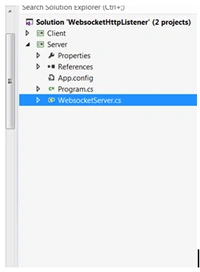
Project Name: Server - Add a new class (WebsocketServer.cs) to the Server project
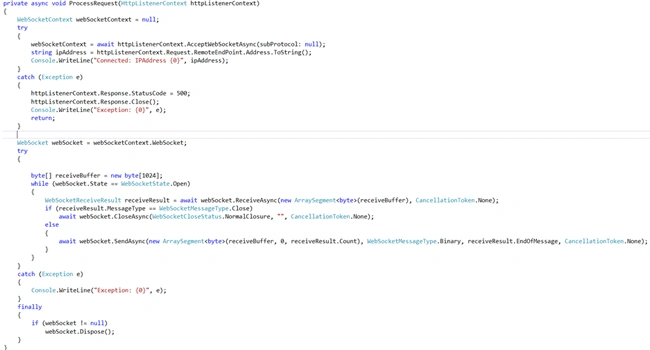
- Start the HttpListener, and continually process the requests received

- Process received request
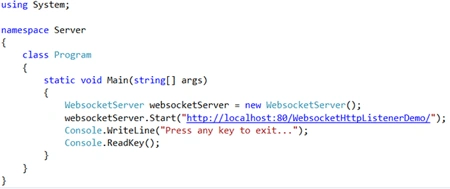
- Invoke Start, from the Main program thread
B. Client- ClientWebSocket
- Add new Project (Windows -> Console Application) Client to the solution.
- Connect to the listener at the same endpoint to which its listening; the only difference is the protocol over which you are connecting (i.e. WS).
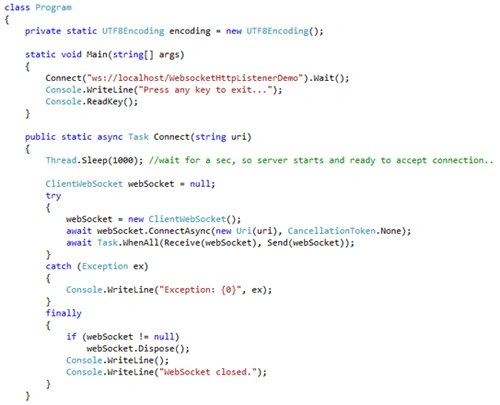
- Once connected, write Send and Receive async Tasks.
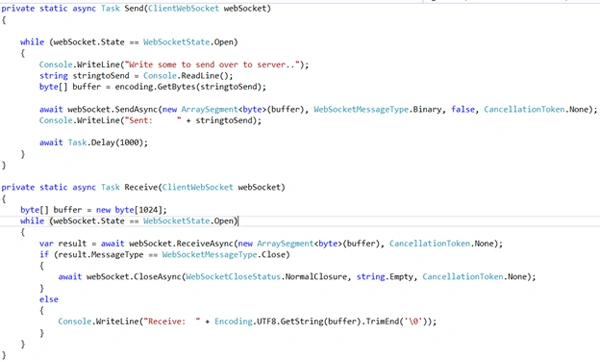
Build the solution.
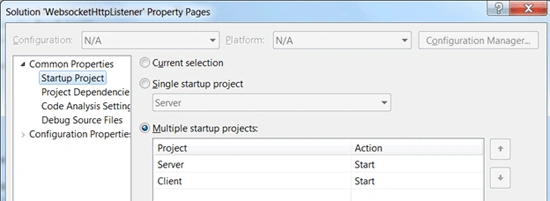
Update the solution properties, so that it runs both applications (Server first and then Client).
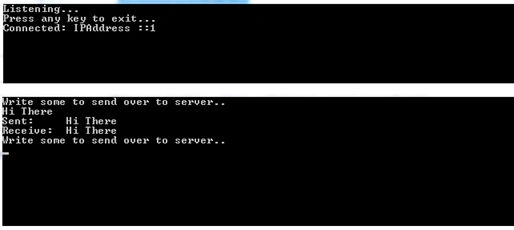
Run to test. (Make sure that you are running Visual Studio under Administrative rights.)
Bill PothenPosted Mar 17, 2019, 6:13 AM
Thank you for taking the time to post this. I have been trying to get websockets in .net working for a couple of weeks. The connection always ended on the second send saying I had multiple sockets. I could not figure out how to use the returned task. Your instruction: await Task.WhenAll(Receive(webSocket), Send(webSocket)); got me up and working. Thank you very much, Bill
Kavitha SukasiPosted Dec 27, 2018, 4:22 AM
How to connect websocket in VS Professional 2012 RC, Windows 7 using c# code?
patrickPosted Dec 21, 2016, 5:56 AM
It's saying "there is alreay one outstanding "sendAsync" call for this webSocket instance. The Stacktrace says the Exception happens on the "CloseAsync"
patrickPosted Dec 21, 2016, 5:55 AM
Hello, i'm getting a "System.InvalidOperationException" on the second message i try to send.
rasoul khalifehPosted Jul 20, 2016, 8:10 AM
Hi thank you for your work. I just want to see what If I want to receive data and send it to another client how can I do that ...
Masoud MMPosted May 29, 2016, 8:27 AM
Thanks a lot, when server and client run in a same client everything is OK, but when run client in a different system the "httpListenerContext.Request.IsWebSocketRequest" return false value, I change IP address in code and check every connection, can you help me plz?
Masoud MMPosted May 29, 2016, 8:25 AM
Hi Bhushan,
Karthik VadlaPosted Nov 7, 2012, 12:54 PM
Hi Bhushan, Thanks a lot for providing useful information. I'm really thankful to you, If you could provide a sample using Windows 8 application as client and WCF service as server. I'll explain you once my scenario. I have developed Windows 8 application which is not going to be on store anyway. Here I want to push notifications to my Win8 from my WCF service which gets notifications from other service. As my App app is not on Windows Store so, no thoughts to use WNS Service to push notifications. All here I want to do is, While launching my app I'll send a request to my WCF service to open communication channel(+Some unique user alias is attached to identify each app) between my app and my WCF service. I'll store the same channel URI+user alias at my WCF service for future use. Once my WCF service receives notifications from other publisher..it should redirect the notifications to each app user based on channel uri. Is it feasible to use Websockets for this?? Can you please help me out on this. Thanks Karthik Vadla