

Mono for Android 1.0 is a framework for third-party developers to build native Android applications in C#. It brings the full Mono VM to Android. We use a library profile that is better suited for mobile devices, so features that are not necessary (like the entire System.Configuration stack, just like Silverlight does) have been removed.
Following are the features of Mono for Android:
- C# and .NET on Android phones and tablets
- Enterprise deployable platform
- .NET Bindings to Native APIs
- Visual Studio 2010 Integration feature
Let's create a new Android Project using Mono:
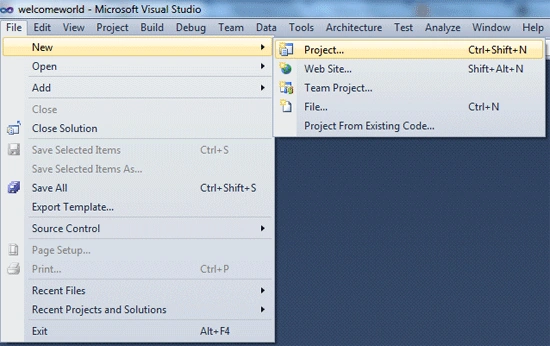
- Step 1: Open Visual Studio, select File / New / Project.
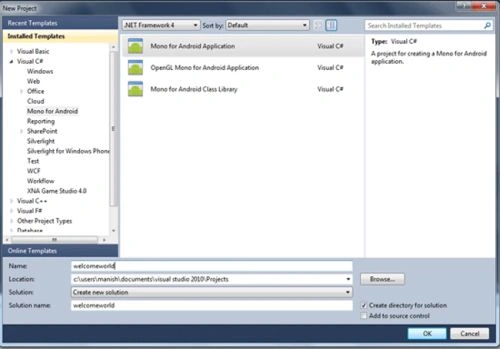
- Step 2: After installing the Android plug-in for Visual Studio the dialog for Android should be in Visual C# / Mono for Android category choose that and select "Mono for Android Application". Give the name for your application like "welcomeworld" and click on OK.
Now your project is ready. By default it contains a single Activity file named Activity1.cs, it is simply a class and used as the basis for an application. The Activity1.cs file will look like this: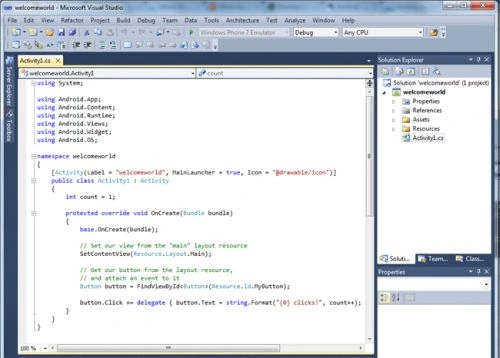
- Step 3: Just run the application to check that everything is working correctly.
Click "Start emulator image" and choose MonoDroid and click OK.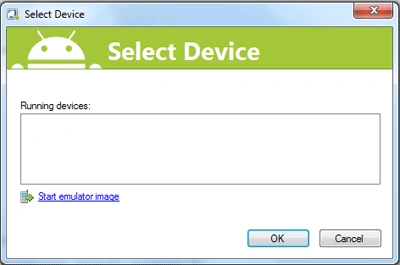
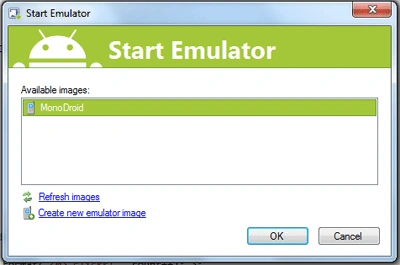
Now it will ask to choose the emulator. So, select the emulator and click ok.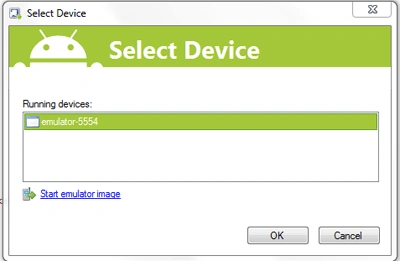
- Step 4: The output window will look like this:
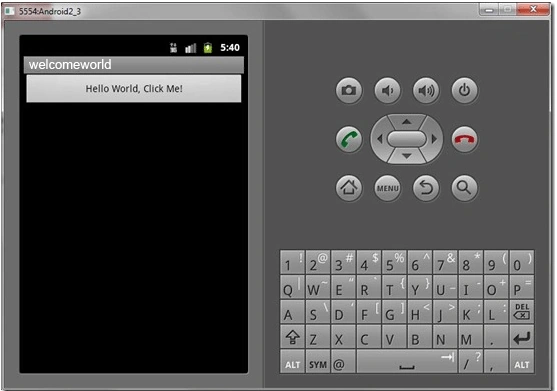
Happy Learning
Vedhaa LeePosted Mar 28, 2018, 12:44 AM
Hello Brothers This is Vedhavan I try to develop android application in VS 2010 though the mono for windows is installed but it not shown in vs 2010 please tell me how to develop apk in vs 2010
Saber ShaikhPosted Oct 11, 2014, 2:48 AM
thank you
Manish TewatiaPosted Mar 11, 2013, 2:11 AM
shatender: It's an basic hello world application. If you search on thousands websites the step to create a first hello world application remains same.
shaitender singhPosted Feb 8, 2013, 2:54 AM
http://brutaldev.com/post/2011/01/15/Android-applications-in-C-using-Visual-Studio.. Try something orginal
Manish TewatiaPosted Nov 21, 2012, 5:11 AM
Hi, Karthik, this application is created using Mono for Android and its free version and by free one you can't transfer app to your phone... You can only transfer the app to your phone only when it is created using Eclipse.... Thank you
karthik DPosted Nov 19, 2012, 5:19 AM
i finding error in my android phone...two android apk in my bin...and i transfer the apk in to my mobile..not installing properly
karthik DPosted Nov 19, 2012, 5:17 AM
i want to transfer this application apk in to my android phone....is it works
poorni poorniPosted Mar 21, 2012, 6:02 AM
hi sir, i have installed vs2010 and monodroid, but while running program i got error as " unhandled exception in Button_On_Click:Task".How to resolve this exception
mahesh kumar B MPosted Oct 11, 2011, 9:12 AM
hey manish, can u plz post the procedure on how to deploy the built monoandroid app to any android mobile phone.. thanks in advance
Ivan WongPosted Jul 11, 2011, 1:55 PM
thanks for posting this article for beginner. I have a question. i would like to know can i use VS 2008 instead of VS2010 in ur example?
ErelPosted Jun 16, 2011, 2:28 AM
Visual Basic developers may want to try Basic4android. It is an IDE similar to Visual Studio and the programming language is similar to Visual Basic (somewhere between VB6 and VB.Net)