Introduction
Microsoft Copilots are AI-powered assistants that help businesses improve their productivity, security, and analytics. It also helps their existing employees to bring better results multifold without removing or rearranging the organization structure. Copilots work by using a large language model (LLM) to understand the content and help in tasks such as.
- Writing emails, documents, and presentations
- Creating code
- Summarizing text/speech contents
- Answering questions through bots
- Generating ideas or plan
The various Copilots that are offered by Microsoft, combined with the existing range of products like Microsoft 365 suites, Web browsers, Sales, Analytics, Coding platforms, and so on, are listed below.
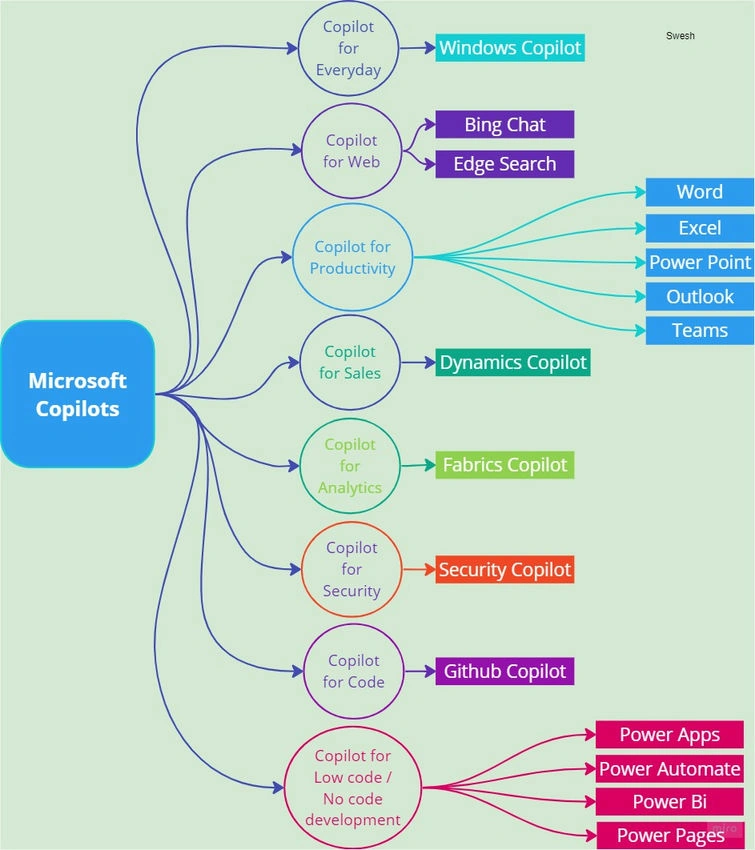
Copilot for Everyday: Windows Copilot
Windows Copilot will function as an application that offers personalized responses to user queries in natural language, like how ChatGPT and Bing Chat work today. It is designed to be aware of the applications currently in use by a user, providing context that enhances the relevance of its responses. Also, this Copilot delivers responses resembling those provided by ChatGPT within the context of a conversation.
Copilot for Web: Content Search Copilot
Bing Chat is a feature or service that is part of Microsoft’s Bing search engine, but it will be like a virtual assistant or a chatbot that anyone can converse with natural language and get the answers expected.
Edge Search can be curated to give information on a wide range of topics, like news, weather, and sports, and more personalized based on the previous searches and interests registered for the logged-in user.
Copilot for productivity: M365 Copilot
- Word can help anyone write emails, documents, and presentations. It can suggest words, phrases, and sentences, and it can even generate entire paragraphs.
- Excel can help to analyze data and create charts and graphs. It can also help to write formulas and macros.
- PowerPoint can help to create stunning presentations. It can suggest slides, layouts, and animations.
- Outlook can help to manage email and calendars. It can also help to write emails and respond to messages.
- Teams can help to collaborate with others. It can suggest ideas and help to write documents together.
Copilot for Sales: Dynamics Copilot
Microsoft Sales Copilot is primarily designed to assist sellers in working in the way they would like to present the data without switching the context unnecessarily or any manual data entry.
Copilot for Analytics: Fabrics Copilot
Copilot for Fabrics combines advanced generative AI with the data to help the business uncover and share insights much quicker. The insights that are required to find or ask a question from the data, and Copilot will analyze and pull the right data into a fabulous report which in turn the data into actionable insights instantly.
Copilot for Security: Security Copilot
Focuses on 3 main features for security.
- Incident response: How to identify an ongoing attack to assess its scale and get instructions to begin remediation based on proven tactics from real-world security incidents.
- Threat hunting: To discover whether any organization is susceptible to known vulnerabilities and exploitation. To check the environment of the asset at a time for evidence of a breach.
- Security reporting: To finalize any event, incident, or threat within a few minutes and prepare the information that is ready to be shared.
Copilot for Code: GitHub Copilot
GitHub Copilot is an AI pair programmer that offers autocomplete / suggestions for code. One can get suggestions from GitHub Copilot either by starting to write the code or by writing a natural language comment describing the code that is required.
Copilot for Low code / No code Development: Power Platform Copilot
- Power Apps with Copilot the citizen developers can build an app, including the data behind it, just by describing what is required through multiple steps of conversation.
- Power BI acts as an intelligent assistant and helps anyone to navigate through a complex set of data, interpret the patterns from the past, and generate insights and reports for actionable items.
- Power Automate Copilot relies on the flow studio and helps with every flow that's being built or changed. It allows anyone to create automation that helps streamline their workflow through quick and easy natural language expressions.
- Power Pages in Copilot revolutionizing the website building process. Makers can take the assistance of Copilot to build parts of the website through natural language instructions and combine them to publish a full-fledged site.
Limitations
Though we have seen plenty of advantages with Copilot, one must keep in mind that.
- It is still under development, so it can be error-prone.
- It can sometimes generate incorrect responses.
- It is not always able to understand the intents passed.
Conclusion
Overall, Microsoft Copilots are a promising new AI-powered tool that has the potential to help organizations and businesses be more productive. However, it is important to be aware of its limitations and draw a boundary for the usage.


Mahesh ChandPosted Sep 4, 2023, 10:49 AM
Nice. It looks like the CoPilot is taking over the Microsoft world.