

Introduction

Also, when it comes to big data processing, some of the big data analytics could be run using public cloud resources, which are highly scalable, and sensitive data can be kept behind your firewall. And finally, some organizations have legal limitations as to where they can store their data or have concerns about security, compliance or data portability, so hybrid cloud computing can offer a solution to these issues. However, hybrid cloud computing solutions are much more complex to set up than purely private or public solutions, which is where Azure Stack comes in.
Azure Stack Overview
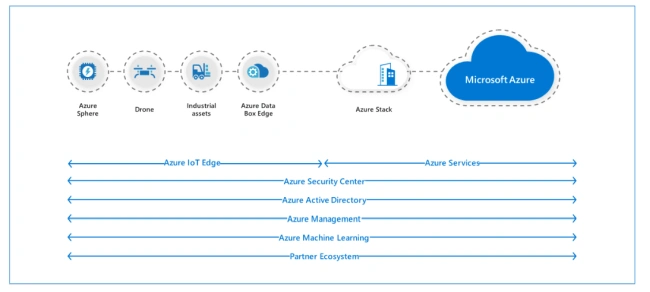
Azure Resource Manager
How does Azure Stack work?
Azure Stack is delivered as an integrated system with software installed by Microsoft’s hardware partners on pre-qualified hardware. Azure Stack is not a DIY virtualization platform or something you run on your own hardware. Instead, it’s an integrated system that the hardware partner integrates into your existing environment, which is then ready to deploy workloads on to.
Underlying Azure Stack is an Active Directory domain, running on virtual machines (VMs). Storage is provided through Storage Spaces Direct (S2D), combining local storage (HDD, SSD, NVMe) in each node for high performance and resilient VM storage. Azure Stack only uses three-way mirroring, storing three copies of each data slab on three different nodes. This means that you can lose up to two nodes in a cluster and still be able to keep running.
Because Azure Stack is an integrated system, there are limitations on what you can do to it.
For examples, it’s not possible to run agents for anti-malware, backup or monitoring on the hosts. Also, you’ll have very limited access to the built-in AD which underlies Azure Stack. But it’s not a system that you just set up and ignore either. You’ll have to carry out the updates regularly in order to continue being supported. These updates, other than bug and security fixes, also help keep Stack in sync with Azure’s public cloud.
Platform as a Service (PaaS)
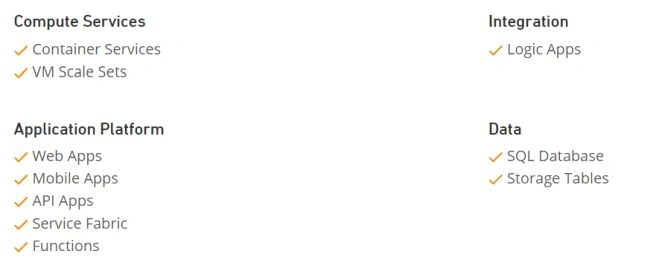
These PaaS services include App Service (which includes Azure Web Apps, Mobile Apps, API Apps, and Functions), Key Vault, SQL, and MySQL, to name a few. Azure Stack also offers the following PaaS features: Azure Functions for Serverless Computing, Azure Container Service supporting Docker Swarm, Kubernetes and Mesosphere and Cloud Foundry.
Infrastructure as a Service (IaaS)
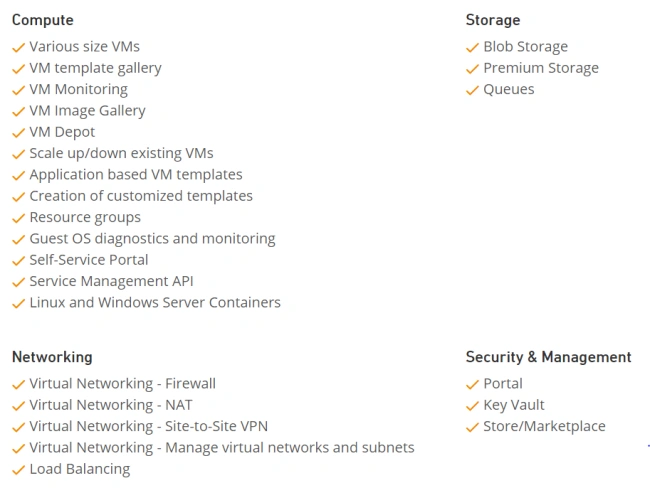
High level differences between Azure and Azure Stack
In an IaaS model, a cloud provider hosts the infrastructure components which were traditionally present in an on-premises data center, such as servers, storage, and networking hardware, as well as the virtualization or hypervisor layer. The resources and services are accessed through a wide area network (WAN). Azure Stack’s IaaS features and functionalities include deployment of various sized VMs, Linux and Windows Containers, Virtual Networking, VPN Gateways, various forms of storage and Key Vault for secure protection of application keys and secrets.
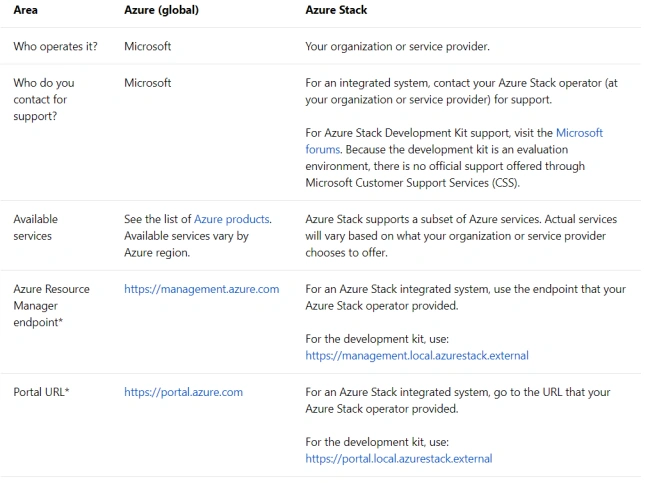
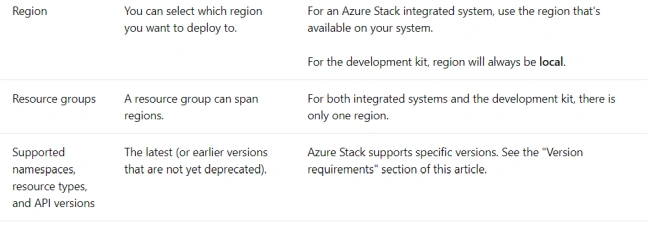
How to connect Azure Stack to Azure
By default, all virtual machines in Azure Stack will have connectivity to external networks via outbound NAT. Each of the virtual networks in Azure Stacks gets a public IP address assigned to it. Outbound access is via outbound NAT using the VIP of the virtual network. This is only for communication coming from the VM and going to an external network and cannot be for communications going in the opposite direction.
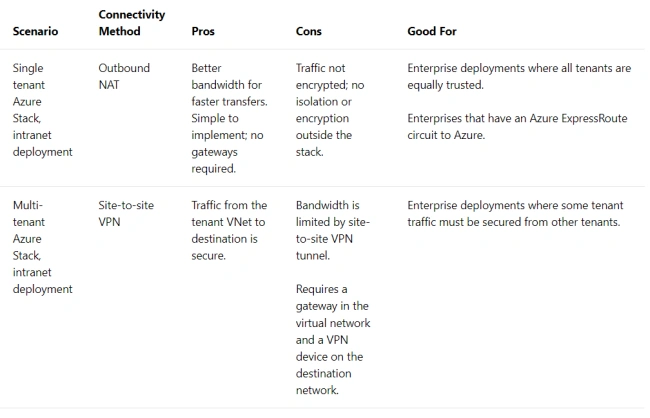
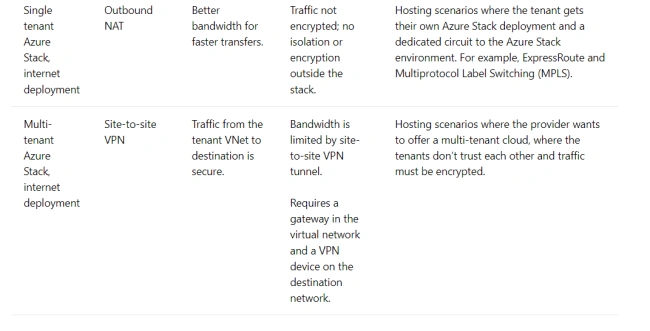
The option for hybrid connectivity depends on what kind of deployment your organization wants to offer and where it will be deployed. Do you need to isolate network traffic for each tenant? Will you have an intranet or internet deployment?
You can have a single-tenant Azure Stack. There can be many different tenant subscriptions, but it’s a single-tenant stack from a networking perspective as all the traffic travels over the same network and doesn’t need to be isolated via an encrypted tunnel. A multi-tenant Azure Stack is also possible. This is where each tenant’s subscription traffic that’s traveling to external networks must be isolated from other tenants’ network traffic.
An intranet deployment is when Azure stack sits on a corporate intranet and behind firewalls while an internet deployment means that the Azure Stack is connected to the public internet and uses internet-routable public IP addresses. The pros, cons and use cases of each type of deployment are summarised below.
Azure Stack hardware requirements
Finally, here are the minimum requirements to run Azure Stack as of late 2018:
- CPU: Dual-Socket: 12 physical cores
- Memory: 96GB RAM
- BIOS: Hyper-V Enabled (with SLAT support)
- Disk (OS): 1 OS disk with a minimum of 200GB available (SSD or HDD)
- Disk (General Azure Stack POC Data): 4 disks, each with a minimum 140GB (SSD or HDD)
Join the conversation! Your thoughts help the community grow.