

Introduction
As Power Platform solutions grow in complexity, developers often need a secure, reusable, and maintainable way to expose business logic within Dataverse.
For years, developers relied on:
Real-time workflows
Custom workflow activities
Dataverse Actions
Plug-ins
Power Automate flows
While these options solved many business requirements, they also introduced challenges around discoverability, maintainability, API exposure, and application lifecycle management.
To address these challenges, Microsoft introduced Dataverse Custom APIs, a modern approach for exposing business logic as first-class operations within Dataverse.
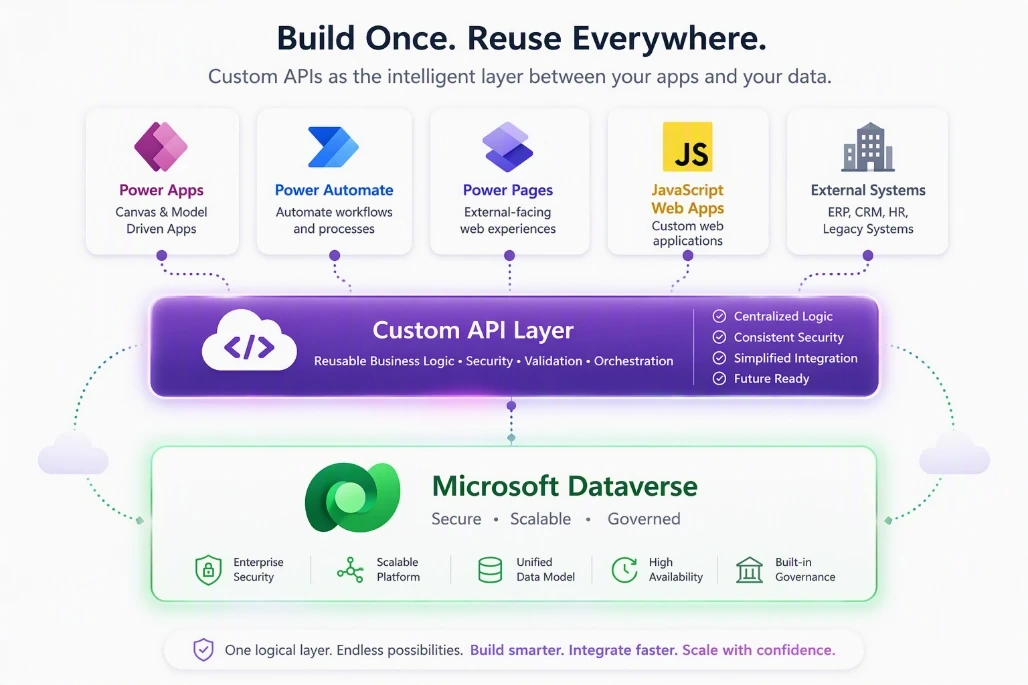
Custom APIs provide a clean way to encapsulate business logic and make it available to:
Model-driven apps
Power Automate
Canvas apps
Power Pages
JavaScript
External applications
Azure integrations
Think of a Custom API as a business service endpoint living directly inside Dataverse.
What is a Dataverse Custom API?
A Dataverse Custom API is a developer-defined operation that extends the Dataverse Web API.
It enables developers to:
Accept input parameters
Execute custom business logic
Return output parameters
Expose functionality through Dataverse endpoints
Unlike traditional plug-ins that execute only when platform events occur, Custom APIs can be explicitly invoked on demand.
For example:
CalculateCustomerRisk
Input:
Customer ID
Output:
Risk Score
Risk Category
When called, Dataverse executes the associated plug-in logic and returns the result to the caller.
Why Did Microsoft Introduce Custom APIs?
Before Custom APIs, developers commonly created custom Actions in Dataverse.
Although Actions worked well, they had several limitations:
Difficult to manage in complex environments
Originally designed for process-driven scenarios
Less control over metadata exposure
Limited developer-focused governance
Custom APIs were designed specifically for professional developers who need:
Explicit API contracts
Better ALM support
Improved discoverability
Strong solution management
Better control over security exposure
Future-proof extensibility
As enterprise Power Platform adoption increases, having clearly defined service endpoints becomes increasingly important.
Real-World Example
Imagine a banking solution built in Dataverse.
Whenever a loan officer submits an application, the system must:
Validate customer information
Check credit history
Calculate risk score
Determine approval status
Return recommendations
Without a Custom API, this logic could be spread across:
Multiple flows
Client-side scripts
Several plug-ins
A cleaner design would be:
Loan Application -> Custom API (CalculateLoanRisk) -> Plugin Logic -> Response.
Input:
{
  "CustomerId": "12345",
  "LoanAmount": 50000
}
Output:
{
  "RiskScore": 82,
  "RiskCategory": "Medium",
  "Recommendation": "Approve"
}
The consuming application only knows about one endpoint, while the business logic remains centralized.
How Custom APIs Work
At a high level, the execution flow looks like this:
Caller -> Dataverse Web API -> Custom API -> Plugin Execution -> Business Logic -> Response
The caller can be:
JavaScript
Power Automate
Power Pages
Canvas App
External REST client
Azure Function
The same business logic can serve multiple applications.
Custom API Components
A Custom API consists of several building blocks.
1. Custom API Record
Defines:
Name
Unique Name
Binding Type
Processing Type
Example:
new_CalculateCustomerRisk
2. Request Parameters
Inputs sent to the API.
Examples:
CustomerId
LoanAmount
ApplicationType
Region
3. Response Parameters
Values returned by the API.
Examples:
RiskScore
RiskCategory
Decision
Benefits of Custom APIs
Reusability
Write business logic once and consume it everywhere.
Power Automate
JavaScript
Power Pages
External Apps
Maintainability
Business logic remains centralized.
Instead of updating logic across multiple flows and scripts, developers update a single implementation.
Security
Custom APIs run within Dataverse's security framework.
Benefits include:
Role-based access
Auditing support
Secure endpoint exposure
Better ALM
Custom APIs are solution-aware and move cleanly between:
DEV
TEST
UAT
PROD
Performance
Custom APIs often perform better than orchestrating the same logic through multiple flows and connectors.
This makes them ideal for:
Complex calculations
Validation engines
Real-time operations
Limitations of Custom APIs
Like any technology, Custom APIs are not suitable for every scenario.
Consider alternatives when:
Simple automation can be handled by Power Automate
No reusable service layer is required
Citizen developers need full ownership
Development resources are unavailable
Custom APIs generally require:
C# development skills
Plugin knowledge
ALM understanding
Solution architecture experience
Conclusion
Dataverse Custom APIs represent Microsoft's recommended approach for exposing reusable business logic within Dataverse. They provide a powerful, secure, and maintainable way to build service-oriented architectures that can be consumed by Power Automate, JavaScript, Power Pages, model-driven apps, and external systems.
For Power Platform developers, mastering Custom APIs is an important step toward building enterprise-grade solutions that scale across teams, applications, and environments.
Join the conversation! Your thoughts help the community grow.