

Encryption is the process of translating plain text data into something that appears to be random and meaningless. Decryption is the process of translating a random and meaningless data to plain text. Why do we need to use this encryption and decryption processes? In a Client -Server Application, security is a very important factor.
For example, when sending the confidential data such as password between the Client and Server, we need to make sure that the data is secured & protected.
By using this process, we can hide the original data and display some junk data. Based on this, we can provide some security for our data. For this, we are using the encryption and decryption techniques, which are done by using a technique called Cryptography.
Cryptography is the science of writing in the secret code and is an ancient art; the first document made use of cryptography in writing, which dates back to circa 1900 B.C.
Cryptography is necessary, when communicating over any an untrusted medium, which includes just about any network, particularly the Internet.
There are five primary functions of Cryptography which are:
- Privacy/confidentiality: Ensuring that no one can read the message, except the intended receiver.
- Authentication: The process of proving one's identity.
- Integrity: Assuring the receiver that the received message has not been altered in any way from the original.
- Non-repudiation: A mechanism to prove that the sender really sent this message.
- Key exchange: The method by which crypto keys are shared between the sender and receiver.
In Cryptography, we start with the unencrypted data, referred to as a plaintext. Plaintext is encrypted into cipher text, which will in turn (usually) be decrypted into a usable plaintext.
The encryption and decryption is based upon the type of Cryptography scheme, being employed and some form of key. For those who like formulas, this process is sometimes written as:
C = Ek(P)
P = Dk(C)
Where P = plaintext, C = cipher text, E = the encryption method, D = the decryption method, and
k = the key.
Now, I am showing you an example Windows Application, which Uses encryption and decryption.
When we input an encrypted password, we will get the decrypted one.
Step 1: Open Visual Studio 2008.

Step 2: Click "New Project" > "Windows" >"Windows Forms Application".
Step 3: Now, click Solution Explorer.
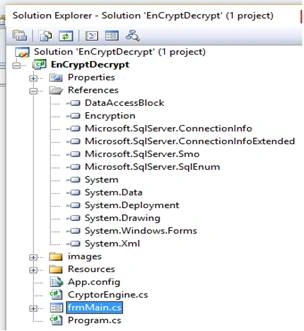
Step 4: frmMain.cs page will look like:

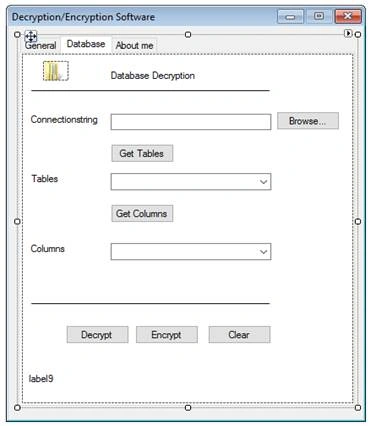
Step 5: Now, write the code, given below, in the frmMain.cs page.
- using System;
- using System.Collections.Generic;
- using System.ComponentModel;
- using System.Data;
- using System.Drawing;
- using System.Text;
- using System.Windows.Forms;
- using DataAccessBlock;
- using System.Security.Cryptography;
- using System.Configuration;
- using System.Data.SqlClient;
- using Microsoft.SqlServer.Management.Common;
- using Microsoft.SqlServer.Management.Smo;
- using System.IO;
- namespace EnCryptDecrypt
- {
- public partial class frmMain : Form
- {
- #region Variables for Encryption / Decryption
- private static string Key = "cs techno private ltd1.,";
- private static string sIV = "cstechno";
- private static Encryption.EncryptionAlgorithm EncryptionType = Encryption.EncryptionAlgorithm.TripleDes;
- #endregion
- public frmMain()
- {
- InitializeComponent();
- }
- private void btnEncrypt_Click(object sender, EventArgs e)
- {
- if (txtClearText.Text == "")
- {
- error.SetError(txtClearText, "Enter the text you want to encrypt");
- }
- else
- {
- error.Clear();
- string sPlainText = txtClearText.Text.Trim();
- string cipherText = Encrpyt(sPlainText);
- txtCipherText.Text = cipherText;
- btnDecrypt.Enabled = true;
- }
- }
- public static string Encrpyt(string sPlainText)
- {
- try
- {
- return DataAccessBlock.DataAccess.Encrpyt(sPlainText, Key, sIV, EncryptionType);
- }
- catch (Exception ex)
- {
- throw new Exception("BusinessGroup :: Encrypt ::Error occured.", ex);
- }
- }
- public static string Decrypt(string sCipherText)
- {
- try
- {
- return DataAccessBlock.DataAccess.Decrypt(sCipherText, Key, sIV, EncryptionType);
- }
- catch (Exception ex)
- {
- // throw new Exception("BusinessGroup :: Decrypt ::Error occured.", ex);
- MessageBox.Show("not an encrypted value");
- return "";
- }
- }
- private void btnDecrypt_Click(object sender, EventArgs e)
- {
- //txtClearText.Enabled = false;
- if (txtCipherText.Text == "")
- {
- error.SetError(txtCipherText, "Enter the text you want to encrypt");
- }
- else
- {
- lblPassword.Visible = true;
- string sCipherText = txtCipherText.Text.Trim();
- string decryptedText = Decrypt(sCipherText);
- txtClearText.Text = decryptedText;
- }
- }
- private void frmMain_Load(object sender, EventArgs e)
- {
- lblMsg.Visible = false;
- }
- private void btnDecrypt1_Click(object sender, EventArgs e)
- {
- if (txtConString.Text == "")
- {
- error.SetError(txtConString, "Enter the text you want to encrypt");
- }
- else
- {
- string connectionString = txtConString.Text;
- DataTable tables = new DataTable("Tables");
- using (SqlConnection connection = new SqlConnection(connectionString))
- {
- using (SqlCommand command = connection.CreateCommand())
- {
- command.CommandText = "select Password,UserID from Users";
- connection.Open();
- tables.Load(command.ExecuteReader(CommandBehavior.CloseConnection));
- }
- foreach (DataRow row in tables.Rows)
- {
- if (row[0] != null)
- {
- using (SqlConnection connection1 = new SqlConnection(connectionString))
- {
- for (int i = 0; i < tables.Rows.Count; i++)
- {
- string decryptedPwd = Decrypt(tables.Rows[i]["Password"].ToString());
- using (SqlCommand command = connection1.CreateCommand())
- {
- command.CommandText = "update users set password='" + decryptedPwd + "' where UserID= '" + tables.Rows[i]["UserID"].ToString() + "' ";
- connection1.Open();
- command.ExecuteNonQuery();
- lblMsg.Visible = true;
- lblMsg.Text = "Congratulations!You have Successfully Decrypted all fields";
- connection1.Close();
- }
- }
- }
- }
- }
- }
- }
- }
- private void btnEncrypt1_Click(object sender, EventArgs e)
- {
- if (txtConString.Text == "")
- {
- error.SetError(txtConString, "Enter the text you want to encrypt");
- }
- else
- {
- string connectionString = txtConString.Text;
- DataTable tables = new DataTable("Tables");
- using (SqlConnection connection = new SqlConnection(connectionString))
- {
- using (SqlCommand command = connection.CreateCommand())
- {
- command.CommandText = "select Password,UserID from Users";
- connection.Open();
- tables.Load(command.ExecuteReader(CommandBehavior.CloseConnection));
- }
- foreach (DataRow row in tables.Rows)
- {
- if (row[0] != null)
- {
- using (SqlConnection connection1 = new SqlConnection(connectionString))
- {
- for (int i = 0; i < tables.Rows.Count; i++)
- {
- string decryptedPwd = Encrpyt(tables.Rows[i]["Password"].ToString());
- using (SqlCommand command = connection1.CreateCommand())
- {
- command.CommandText = "update users set password='" + decryptedPwd + "' where UserID= '" + tables.Rows[i]["UserID"].ToString() + "' ";
- // command.CommandText = "update users set password='" + decryptedPwd + "' where UserID= '" + tables.Rows[i]["UserID"].ToString() + "' and password='" + Encrpyt(password) + "'";
- connection1.Open();
- command.ExecuteNonQuery();
- lblMsg.Visible = true;
- lblMsg.Text = "Congratulations!You have Successfully Encrpytted all fields";
- connection1.Close();
- }
- }
- }
- }
- }
- }
- }
- }
- private void btnClear_Click(object sender, EventArgs e)
- {
- error.Clear();
- txtClearText.Visible = true;
- lblPassword.Visible = true;
- txtCipherText.Text = "";
- txtClearText.Text = "";
- txtClearText.Enabled = true;
- }
- private void btnClear1_Click(object sender, EventArgs e)
- {
- error.Clear();
- txtConString.Text = "";
- cmbTables.Text = "";
- cmbTables.Items.Clear();
- cmbColumns.Text = "";
- lblMsg.Visible = false;
- cmbColumns.Items.Clear();
- }
- private void btnGetTables_Click(object sender, EventArgs e)
- {
- try
- {
- if (txtConString.Text == "")
- {
- error.SetError(txtConString, "Enter the Correct Connectionstring");
- }
- else
- {
- string connectionString = txtConString.Text;
- DataTable tables = new DataTable("Tables");
- using (SqlConnection connection = new SqlConnection(connectionString))
- {
- using (SqlCommand command = connection.CreateCommand())
- {
- command.CommandText = "select table_name as Name from INFORMATION_SCHEMA.Tables where TABLE_TYPE = 'BASE TABLE'";
- connection.Open();
- tables.Load(command.ExecuteReader(CommandBehavior.CloseConnection));
- }
- }
- foreach (DataRow row in tables.Rows)
- {
- cmbTables.Items.Add(row[0].ToString());
- }
- }
- }
- catch
- {
- error.SetError(txtConString, "Enter the Correct Connectionstring");
- }
- }
- private void btnGetColumns_Click(object sender, EventArgs e)
- {
- if (cmbTables.Text == "")
- {
- error.SetError(cmbTables, "Select the Correct Column");
- }
- else
- {
- string connectionString = txtConString.Text;
- DataTable tables = new DataTable("Tables");
- using (SqlConnection connection = new SqlConnection(connectionString))
- {
- using (SqlCommand command = connection.CreateCommand())
- {
- command.CommandText = "select column_name as Name from INFORMATION_SCHEMA.Columns where TABLE_NAME = 'Users'";
- connection.Open();
- tables.Load(command.ExecuteReader(CommandBehavior.CloseConnection));
- }
- }
- foreach (DataRow row in tables.Rows)
- {
- cmbColumns.Items.Add(row[0].ToString());
- }
- }
- }
- private void button1_Click(object sender, EventArgs e)
- {
- string[] strArConString;
- string strConnectionstring = string.Empty;
- if (openFileDialog1.ShowDialog() == System.Windows.Forms.DialogResult.OK)
- {
- string strFilevalue;
- strFilevalue= File.ReadAllText(openFileDialog1.FileName);
- strArConString = strFilevalue.Split('<','>');
- for (int i = 0; i < strArConString.Length; i++)
- {
- if (strArConString[i] == "ConnectionString")
- {
- strConnectionstring = strArConString[i + 1];
- break;
- }
- }
- txtConString.Text = strConnectionstring;
- }
- }
- private void txtClearText_TextChanged(object sender, EventArgs e)
- {
- }
- }
- }
- using System;
- using System.Collections.Generic;
- using System.Text;
- using System.Security.Cryptography;
- using System.Configuration;
- namespace EnCryptDecrypt
- {
- public class CryptorEngine
- {
- /// <summary>
- /// Encrypt a string using dual encryption method. Return a encrypted cipher Text
- /// </summary>
- /// <param name="toEncrypt">string to be encrypted</param>
- /// <param name="useHashing">use hashing? send to for extra secirity</param>
- /// <returns></returns>
- public static string Encrypt(string toEncrypt, bool useHashing)
- {
- byte[] keyArray;
- byte[] toEncryptArray = UTF8Encoding.UTF8.GetBytes(toEncrypt);
- System.Configuration.AppSettingsReader settingsReader = new AppSettingsReader();
- // Get the key from config file
- string key = (string)settingsReader.GetValue("SecurityKey", typeof(String));
- //System.Windows.Forms.MessageBox.Show(key);
- if (useHashing)
- {
- MD5CryptoServiceProvider hashmd5 = new MD5CryptoServiceProvider();
- keyArray = hashmd5.ComputeHash(UTF8Encoding.UTF8.GetBytes(key));
- hashmd5.Clear();
- }
- else
- keyArray = UTF8Encoding.UTF8.GetBytes(key);
- TripleDESCryptoServiceProvider tdes = new TripleDESCryptoServiceProvider();
- tdes.Key = keyArray;
- tdes.Mode = CipherMode.ECB;
- tdes.Padding = PaddingMode.PKCS7;
- ICryptoTransform cTransform = tdes.CreateEncryptor();
- byte[] resultArray = cTransform.TransformFinalBlock(toEncryptArray, 0, toEncryptArray.Length);
- tdes.Clear();
- return Convert.ToBase64String(resultArray, 0, resultArray.Length);
- }
- /// <summary>
- /// DeCrypt a string using dual encryption method. Return a DeCrypted clear string
- /// </summary>
- /// <param name="cipherString">encrypted string</param>
- /// <param name="useHashing">Did you use hashing to encrypt this data? pass true is yes</param>
- /// <returns></returns>
- public static string Decrypt(string cipherString, bool useHashing)
- {
- byte[] keyArray;
- byte[] toEncryptArray = Convert.FromBase64String(cipherString);
- System.Configuration.AppSettingsReader settingsReader = new AppSettingsReader();
- //Get your key from config file to open the lock!
- string key = (string)settingsReader.GetValue("SecurityKey", typeof(String));
- if (useHashing)
- {
- MD5CryptoServiceProvider hashmd5 = new MD5CryptoServiceProvider();
- keyArray = hashmd5.ComputeHash(UTF8Encoding.UTF8.GetBytes(key));
- hashmd5.Clear();
- }
- else
- keyArray = UTF8Encoding.UTF8.GetBytes(key);
- TripleDESCryptoServiceProvider tdes = new TripleDESCryptoServiceProvider();
- tdes.Key = keyArray;
- tdes.Mode = CipherMode.ECB;
- tdes.Padding = PaddingMode.PKCS7;
- ICryptoTransform cTransform = tdes.CreateDecryptor();
- byte[] resultArray = cTransform.TransformFinalBlock(toEncryptArray, 0, toEncryptArray.Length);
- tdes.Clear();
- return UTF8Encoding.UTF8.GetString(resultArray);
- }
- }
- }
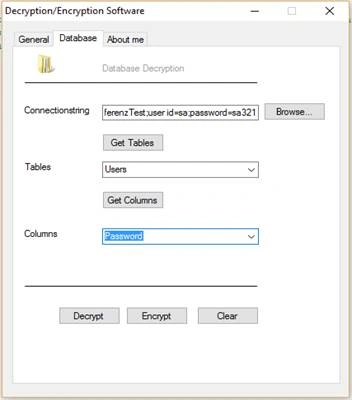
Output: Now, the output is:
Here, we enter an encrypted password “Rc3xvx8c7GM=” and click Decrypt button.
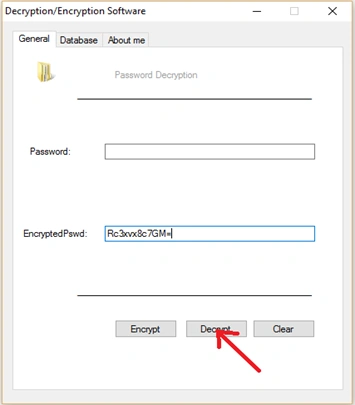
We will get the decrypted password as “a”.
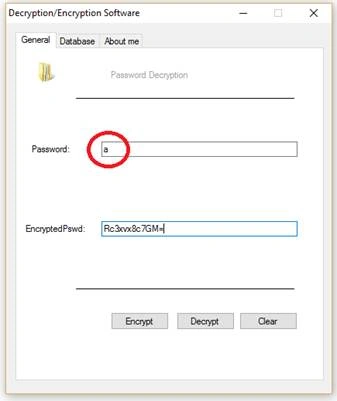
We can also decrypt/encrypt the column of a database for any given connection string.
Atif AhmedPosted Jun 10, 2020, 3:50 AM
Hows the security of this encryption from 1- 10 where 1 is lowest and 10 is highest
Frost BitePosted Jun 24, 2019, 7:10 AM
If so, how can we improve it?
Frost BitePosted Jun 24, 2019, 7:10 AM
Could there be any possible weakness in encryption and decryption?
keerthana SPosted Mar 30, 2019, 12:39 AM
I can't connect with the database..data's can't be inserted..how to connect with the database
keerthana SPosted Mar 27, 2019, 9:52 AM
Where to put the cryptorengine.cs file
Vignesh ManiPosted Aug 23, 2016, 9:11 AM
NIce
Prasanna MuraliPosted Aug 22, 2016, 10:16 AM
Nice one....
Sijo VincentPosted Aug 22, 2016, 8:18 AM
Thanks for your Valuable Comments.As a beginner it will be a great inspiration to me...
Sijo VincentPosted Aug 22, 2016, 8:05 AM
Thanks
Humayun Kabir MamunPosted Aug 22, 2016, 7:59 AM
Nice...
Ramesh PalaniappanPosted Aug 22, 2016, 1:44 AM
Good One
Sijo VincentPosted Aug 22, 2016, 12:00 AM
Thank you
RajaPosted Aug 21, 2016, 11:56 PM
Nice Share....