

Environment variables
Environment variables in Dataverse allow you to store the connection reference or keys needed to be used inside the environment. They are more like a global variable that can be accessed within the Power Platform Environment. We can use this to store the values and use it for Power Platform Customizations.
We can use the environment variables in Canvas Apps, Model Driven Apps, and Power Automate. These environment variables help avoid the hardcode values for configuration data that must be changed during the ALM operations. It allows you to modify the values while moving the solution to another environment.
From the Dataverse perspective, the Environment Variable has two tables: Environment Variable Definition and Environment Variable Values. The Environment Variable Definition table holds the definition, data type, name, and sometimes default values(if it has). The environment variable value table has the current values used inside the current environment. Environment Variable Definition has a 1:N relationship with the Environment Variable Value table.

Features of Environment Variables
Default value
- It is part of the environment variable definition table. It is not required if it has current values.
- If the value should be the same for all the environments, we may use default values because we can't be able to modify them in the target environment.
Current Value
- It is part of the environment variable value table. It will override the default value. It is used as a value even if the default value contains a value.
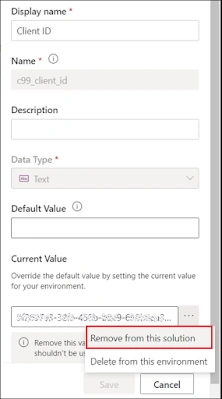
- Remove the current value from the solution if you don't want to use the value in the target environment.
- One Environment Variable can be used across multiple solution components.
- Six data types are supported by Environment Variable: Decimal Number, Text, JSON, Yes/No, Secret, and Data source.
- There are two types of values which are
- Default Value
- Current Value
Create a new Environment Variable
- Go to the solution where you want to create a new environment variable.
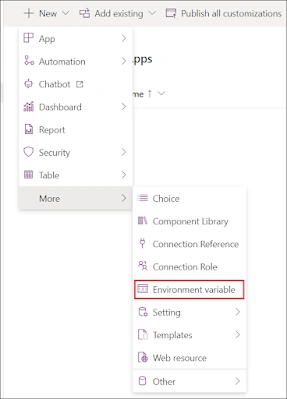
- Click on + New → More → Environment Variable. A quick create form pops from the right.
- Add Display Name, Name, Data Type, and Value
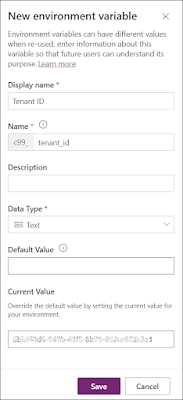
- Click on save and publish
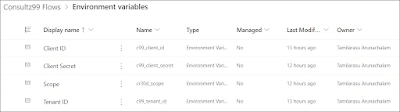
- I have created four environment variables: tenant id, client id, client secret, and scope. All are text data types.
Variable Name Variable Value tenant_id tenant id of your org client_id Client Id of your app client_secret Client Secret of your app scope https://graph.microsoft.com/.default
- I got the values from my Azure AD App and stored them in the Environment Variables inside the Power Platform.
- Note. You may use secret data type for client secret; for that, you must configure Azure Key Vault. As it is a learning purpose, I have used text data type.
Use Environment Variable in Power Automate Flow
- Create a new Power Automate Instant flow in a solution by navigating to +New → Automation → Cloud flow → Automated.
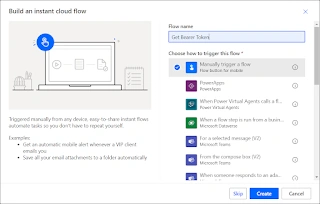
- Select Manually trigger a flow as a trigger and give a meaningful name to the flow.
- Click on Create, and it will move the flow editor.
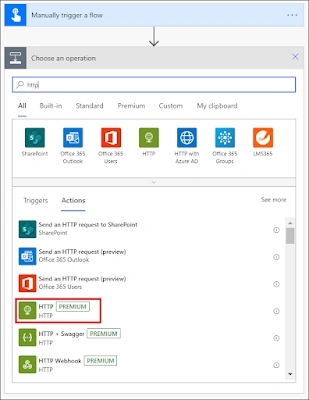
- Add a step below the trigger, search for HTTP, and select the HTTP(premium) Connector.
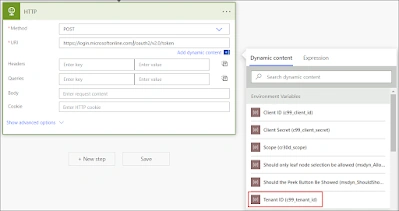
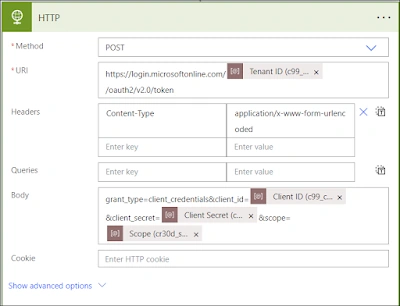
- In the HTTP Action, Set the http method as POST and enter the URI as https://login.microsoftonline.com/{tenant_id}/oauth2/v2.0/token, replace {tenant_id} in the URI with the environment variable(Tenant ID).
- In Headers, set Content-Type as key and application/x-www-form-urlencoded as value.
- In Body, enter grant_type=client_credentials&client_id={client_id}&client_secret={client_secret}&scope={scope}, replace client_id, client_secret and scope with the environment variables.
- The HTTP step should appear like the below screenshot.
- Save and Run the flow.
- It ran successfully with no errors.
ALM of Environment Variables
The environment variables from the solution can be exported and imported across environments. It is still editable if we export and import as unmanaged solutions. But in real-time scenarios, unmanaged solutions are not much preferred to get imported to the environment in terms of ALM.

To tackle this, we have to remove(not delete) the current value for all the environment variables and export the solution as managed. While importing the solution to the target environment, a prompt opens up and asks for the values for that environment variable.
Enter the values to the fields in the prompt and click import to import the solution. After importing, the flows will work on the new values entered in the prompt.
Limitations
If the flows use the environment variable values, but the value gets changed from the solution. But the flow still uses the previous value. The flow must be turned on and off to catch up with the modified value.
Make use of the most Environment Variables
- I prefer to use current values than default values. Currently, we can modify the values of the environment variables from the table or in Advanced Find, even if it is a managed solution.
- We can use the environment variables in Model Driven App using JavaScript or Plugin.
- Better avoid hardcoding of some configuration values and connection keys in the code or inflows. Instead, use Environment variables for those values.
Join the conversation! Your thoughts help the community grow.