
What is jQuery
jQuery is not a language but it is well written JavaScript code. As quoted on the official jQuery website "it is a fast and concise JavaScript Library that simplifies HTML document traversing, event handling, animating, and Ajax interactions for rapid web development."
In order to work with jQuery you should be aware of the basics of JavaScript, HTML and CSS.
It was released in January 2006 at BarCamp NYC by John Resig.
Licensing: It is free, open source software Dual-licensed under the MIT License and the GNU General Public License. Microsoft has integrated jQuery officially into its IDE Visual Studio 2010 and jQuery intellisense is available in Visual Studio 2010 now.
Why jQuery
jQuery is very compact and well written JavaScript code that increases the productivity of the developer by enabling them to achieve critical UI functionality by writing very less code.
It helps to
- Improve the performance of the application
- Develop most browser compatible web page
- Implement UI related critical functionality without writing hundreds of lines of codes
- Fast
- Extensible – jQuery can be extended to implement customized behavior
Other advantages of jQuery are
- No need to learn fresh new syntaxes to use jQuery, knowing simple JavaScript syntax is enough
- Simple and Cleaner code, no need to write several lines of code to achieve complex functionality.
Where to download jQuery from
jQuery javascript file can be downloaded from jQuery Official website http://www.jquery.com/
How to use jQuery
jQuery usually comes as a single JavaScript file containing everything; jQuery comes ready for use out of the box. It can be included within a web page using the following mark-up:
To load local jQuery file

Ideally this markup is kept under the <head></head> tag of your web page, however you are free to keep it anywhere you want.
Do I need to refer jQuery file both in Master page/base page/template page and content page
No, master page/base page/ template page basically helps to create consistent layout for the page in the application. In case you have referred the jQuery file in master page/base page/ template page that cause rendering the file in the browser, you do not need to refer jQuery file the content page again.
In summary, there should not be more than one <script> tag with jQuery file reference in the source code of the rendered web page in the browser.
What is the difference between jQuery-x.x.x.js and jQuery.x.x.x-min.js
In terms of functionality, there is no difference between the jQuery-x.x.x.js and jQuery-x.x.x-min.js (also called minified version). However this can play a vital role in the performance of the web page.
How it affects the performance?
jQuery-1.4.4.js file size is 178 KB as against its minified version jQuery-1.4.4-min.js that is only 76.7 KB in size. So when your page loads in the client's browser if you are not using minified version, it loads 178 KB file that takes more time to load than 76.7 KB.
Which version of jQuery file should be used
In most of the recent releases so far, the core functionality of jQuery remains same however some more cool and better features are added. Ideally you should use the latest jQuery files available on the jQuery.com website. By doing this you ensure that your earlier functionality will still work and you can use new features available as part of the new release.
Loading jQuery from CDN (Content Distribution Network)
What is CDN?
CDN Stands for Content Distribution Network or also called Content Delivery Network is a group of computers placed at various points connected with network containing copies of data files to maximize bandwidth in accessing the data. In CDN a client access a copy of data nearer to the client location rather than all clients accessing from the one particular server. This helps to achieve better performance of data retrieval by client.
There are two leading CDNs available that hosts jQuery files.
Microsoft - To load jQuery from Microsoft AJAX CDN
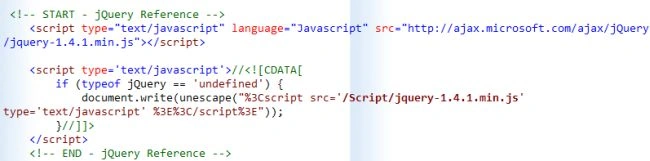
jQuery file can be loaded from Microsoft AJAX CDN. For more details, go to http://www.asp.net/ajaxlibrary/cdn.ashx. You will need to keep following tags in your page.

OR

Google - To load jQuery from Google Libraries API
jQuery file can be loaded from Google CDN for more details, go tohttp://code.google.com/apis/libraries/devguide.html. You will need to keep following tag in your page.

Join the conversation! Your thoughts help the community grow.