

Today, I want to share some cool new features of version 15 and update 4. There are lots of improvements in Visual Studio “15” Preview 4. Installation, updates and uninstallation are both brisk and more reckonable with Visual Studio Enterprise "15" Preview 4.
What are the system requirements for Visual Studio “15” ? You need appropriate supported operating systems, Hardware (Processor, Hard Disk Space, RAM etc.) and additional requirements such as Team Foundation Server, .NET Framework, Windows that it supports.
Thus, we can say it’s faster, probational, and key on the need of the developers. With this, you can quickly install the tools, what you want at the time of work in a convenient and faster way. Visual Studio continuously grows its functionality and power with each release. This update is one of them. At the starting of Visual Studio, you can get tools, SDKs, documents and Emulators. We can see following efforts-
- Lightweight and Fast Installation.
- Optimized for you - Layered on top of the core editor.
- Isolated and Low-Impact.
- Third-party SDKs and tools.
- Select and install features that you need.
- Track(footprint) Reducing.
- Customization.
This is a good starting point to help you get up and running quickly, and decide which you want to install, according to your need.
In Visual Studio Enterprise "15" Preview 4 at the starting of this, a few bundles are available to install: Universal Platform development, Web development, Linux development with C++, .NET desktop development, Python development and so on.
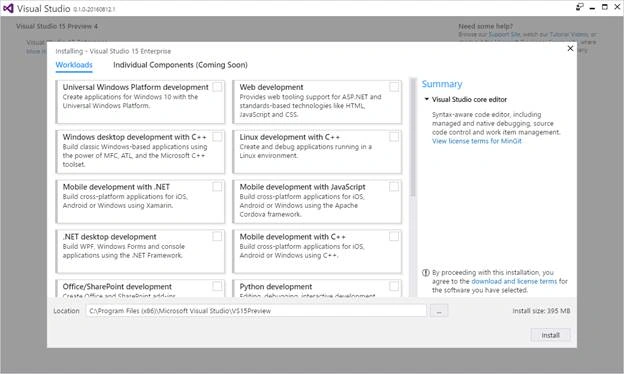
Thus, the new features in this update are-
- New Installation Experience.
- SQL Server Data Tools.
- Office Developer Tools for Visual Studio.
- Visual Studio Software Development Kit.
- Visual Studio Feedback.
- Visual Studio IDE.
- JavaScript and TypeScript.
- XAML Diagnostics.
- Visual Studio Tools for Apache Cordova.
- Visual Studio Tools for Universal Windows App Development.
- Xamarin.
- Developer Command Prompt.
- Debugging and Diagnostics.
- Visual C++.
- C# and Visual Basic.
- NuGet.
- Developer Analytics Tools.
- Team Explorer.
New Installation Experience
You noticed that in previous previews, Visual Studio offered a classic installer. Now, this is the new user installation experience. You can get new tools and functionality front of it. Developers can feel new coding experience for C#, Visual Basic and debugging, source code control and many more.
- Start Page with new open, recent Applications along with the latest developer news.
- Searchable templates available, along with recently used templates.
SQL Server Data Tools
In this update, Azure SQL Database and SQL Server are available, which is easy to maintain, deploying of the database.
Office Developer Tools for Visual Studio
- Improvements in Office tools such as Excel, Word, PowerPoint and Outlook.
- Add-in commands, Fabric UI, and a new version of Office.js.
- Support of SharePoint 2016.
- Wide look in Office Developer Tools.
Visual Studio Software Development Kit - Visual Studio "15" Preview 4 SDK, is available.
Visual Studio Feedback - Feedback functionality is available.
Visual Studio IDE - Feel a better environment.
- Start page with new open, recent Applications along with the latest developer news.
- User can create a new solution directly from the start page.
- Roaming Extension Manager – keeps track your development environments.
- Lightweight solution load functionality.
- Open folder, with the help of which, you can open the projects and solutions directly.
- Better debugging of Node.js and Python scripts.
JavaScript and TypeScript
With this release, TypeScript 2.0 Beta is available, where this offers non nullable types. JavaScript and TypeScript are available with new features.
- Edit & continue for XAML apps.
- JavaScript Language Service.
- Support of JSX syntax feature.
XAML Diagnostics
You can edit XAML while your Universal Windows App is in running mode. There are Visual Studio Tools for Apache Cordova. Here, the following improvements are available-
- Ionic 2 support with Visual Studio Ionic 2 templates (Beta 10).
- Development updates basic TypeScript Cordova app template.
Visual Studio Tools for Universal Windows App Development
Great updates in tools for Universal Windows App development.
- 5.1.0 Microsoft.NETCore.UniversalWindowsPlatform package.
- Updated.NET Native Toolchain.
- Windows 10 Anniversary Update SDK and Emulator.
Xamarin
Xamarin 4.1 is available in this release.
Developer Command Prompt
Command Prompt is a native tool, where the developers can get extra details.
Step 1 - Open Visual Studio.
Step 2 - Select Tools menu and choose External Tools
Step 3 - On the External Tools dialog box, choose Add button.
Step 4 - Enter a Title for your new menu item such as Command Prompt.
For details, call the common7\tools\vsdevcmd.bat – help for the details.
Debugging and Diagnostics – One can experience the new Exception Helper to view the detail of his exception.
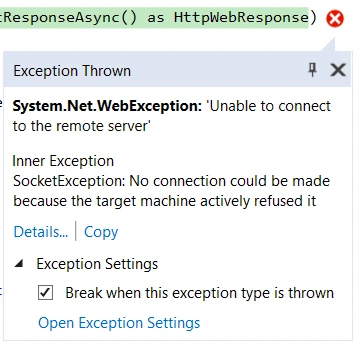
Visual C++ - In this, there are many updates of Visual C++ environment. C++ IDE is responsible for the database operations in a fastest mode.
- Windows Desktop Development with C++.
- Linux Development with C++.
- Game Development with C++.
- Mobile Development with C++ (Android and iOS).
- Universal Windows App.
- Bug Fixes.
- Updates of C++ Compiler.
- Implementation of C++ Libraries.
C# and Visual Basic - This release came with new improvements, when a user works on a large project, where the user comes across with several lines of code.
- Improvements in NuGet packages.
- Style of analyzing your coding experience along with customization.
- IntelliSense of checking the errors.
- Conversation of property to a method.
NuGet - This update realease NuGet 3.5 RC0.
- New Target Frameworks are available.
- Support for a new PackageType property.
Developer Analytics Tools - Developer Analytics Tools v8.1 is available in this release.
Team Explorer - Visual Studio Team System (VSTS) is available at the start of the page.
Anu VPosted Sep 20, 2016, 8:43 AM
Nice...
Humayun Kabir MamunPosted Sep 18, 2016, 1:35 AM
Thanks for sharing...
Vivek KumarPosted Sep 14, 2016, 7:25 AM
Nice share
Prasanna MuraliPosted Sep 5, 2016, 10:58 AM
Nice post......
Shamim UddinPosted Sep 3, 2016, 5:02 AM
Nice
Nikhil SanganiPosted Sep 3, 2016, 3:58 AM
Useful Information Share. Thanks
Bhuvan PandeyPosted Sep 3, 2016, 1:40 AM
Good one
RakeshPosted Sep 2, 2016, 1:56 AM
Good information share