

The preceding article is about the basic difference between String & StringBuffer.
Differences between String and StringBuffer

Here, the differences are listed below.
| No | String | StringBuffer |
| 1 | String class is immutable | StringBuffer class is mutable (modifiable) |
| 2 | Consumes more memory during concatenation | Consumes less memory during concatenation |
| 3 | Slow performance | Fast performance |
| 4 | Overrides equals() and hashcode() methods of the object class | Doesn't override the equals() and hashcode() methods of the object class |
Explanation of the preceding differences
Mutability: String is immutable (once created, it cannot be modified).
For example:
- String str = “Hello folks”;
- Str = “Smile”;
We can see that the value of str has been changed from “Hello folks” to “Smile” by which it looks like it is mutable. But the truth is that it is immutable, because in the first statement an object is created using the string literal “Hello folks” and in the second statement when we assigned the new string literal, in other words “Smile”, to the variable str. The object itself didn't change, instead a new object was created using the new string literal “Smile” and the reference to it is assigned to the variable str. So, both of the string literals or objects exist with different references.
StringBuffer is immutable (modifiable)
For example:
- StringBuffer str = new StringBuffer(“Good”);
- Str.append(“night”);
Here we can see that, in the first statement an object is created using the string literal “Good” and in the second statement the value of the object is changed from “Good” to “Goodnight” after concatenation. So here the object was modified instead of creating a new object like Strings.
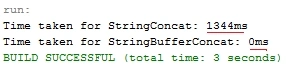
Performance: StringBuffer is preferred over String for doing concatenation of strings because it is faster. In the case of String, when you concatenate strings, you are actually creating a new object every time since it is immutable and that makes it slower than StringBuffer.
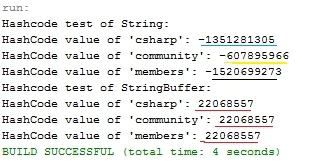
Overrides: The String class overrides the equals() and hashcode() methods of the object class. So you can compare the contents of two strings using the equals() method. Whereas StringBuffer doesn't override the equals() and hashcode() methods of the object class. So you cannot compare the contents of two strings.
String & StringBuffer Performance test
Here, in this example, we will the test performance of String & StringBuffer on the basis of concatenation of two strings.
Example
ANKUR SHARMAPosted Apr 2, 2020, 8:52 AM
Does C# has StringBuffer? https://stackoverflow.com/questions/11977819/what-is-the-net-equivalent-of-stringbuffer-in-java
Pratik SoniPosted Nov 14, 2017, 7:16 AM
Thank you for sharing this.
Khargesh RajputPosted Jun 2, 2015, 1:22 AM
nice
NitinPosted May 28, 2015, 1:18 PM
good one
Gopi ChandPosted May 27, 2015, 6:34 AM
Thanks a lot :)
Sibeesh VenuPosted May 27, 2015, 5:58 AM
Good one.
Santhakumar MunuswamyPosted May 26, 2015, 3:45 PM
Thanks for sharing