

Difference Between StringBuffer and StringBuilder Class

Figure 1 String
The following are the differences.
| No |
StringBuffer | StringBuilder |
| 1 | StringBuffer class is synchronized | StringBuilder class is not synchronized |
| 2 | It is thread-safe | It is not thread-safe |
| 3 | It is slower than StringBuilder | It is faster than StringBuffer |
| 4 | It is available from Java 1.0 | It is available from Java 5.0 |
Synchronization, thread safety & speed
Output
- StringBuffer is synchronized, that's why it is also thread-safe. In other words, two or more threads cannot call the methods of StringBuffer simultaneously.
In a synchronized environment, a single thread can perform a certain operation rather than disturbing any other thread that makes StringBuffer slower because it is synchronized. - StringBuilder is not synchronized and that's why it is not thread-safe. That means that two or more threads can call the methods of StringBuilder simultaneously. Since it is non-synchronized and not thread-safe, it can perform faster because there is no overhead of acquiring and releasing of locks associated with synchronized methods (StringBuffer).
Note: The only similarity between the two is that they both are mutable.
Preference
All the operations (excluding performance) are nearly similar in both classes. When we need to choose on the basis of thread safety and you want that operation should be thread-safe, then StringBuffer is a good option. Otherwise in all other cases, StringBuilder will be the best option since it gives better performance with all the functionality.
StringBuffer & StringBuilder performance test
- public class PerformanceTest
- {
- public static void main(String[] args)
- {
- long startTime = System.currentTimeMillis();
- StringBuffer strbuff = new StringBuffer("Dark");
- for (int i = 0; i < 10000; i++)
- {
- strbuff.append("Night");
- }
- System.out.println("Time taken by StringBuffer: " + (System.currentTimeMillis() - startTime) + "ms");
- startTime = System.currentTimeMillis();
- StringBuilder strbuild = new StringBuilder("Dark");
- for (int i = 0; i < 10000; i++) {
- strbuild.append("Night");
- }
- System.out.println("Time taken by StringBuilder: " + (System.currentTimeMillis() - startTime) + "ms");
- }
- }
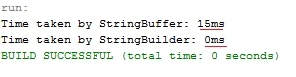
Figure 2 Output Performance Test
You can see that, StringBuilder is faster than StringBuffer since it is performed in 0ms whereas StringBuffer is performed in 15ms.
Conclusion
| Parameters | String | StringBuffer | StringBuilder |
| Modifiable | No(immutable) | Yes(mutable) | Yes(mutable) |
| Thread-safety | Yes | Yes | No |
| Storage area | Constant string pool | Heap | Heap |
| Synchronization | Yes | Yes | No |
| Performance | Slow | Fast | Very fast |
| Availability | Always | 1.0 | 5.0 |
| Overrides equals() and hashCode() method | Yes | No | No |
Thank you, keep learning and sharing.
Beartooth BronskyPosted Jun 16, 2016, 1:14 PM
The solution to this buffer problem is to use the alternate constructor StringBuilder sb = new StringBuilder(64000) or some number larger (a bit of fudge factor) than you expect your final .ToString() to return. If you are using the same StringBuilder/StringBuffer multiple times re-allocating it in each loop to clear it, allocate it before the loop and end each loop with sb.Clear(), which clears the original buffer for re-use. One allocation, as many .appends() as you want with no memory penalties, and one delete when it goes out of scope
Beartooth BronskyPosted Jun 16, 2016, 1:06 PM
An important note: StringBuffer() and StringBuilder() both have an internal string buffer that defaults to 16 bytes. Whenever an .append(...) would overrun the buffer, both of them must allocate a new, larger buffer, copy the ever-expanding contents of the current buffer into the new one, and delete the old one. I don't know if the methods internally mark the old buffer = null to let the gc collect it or if all of those shards of memory remain unusable until the StringBuffer() or StringBuilder() object goes out of scope.
NitinPosted May 28, 2015, 1:18 PM
nice
Shailesh UkePosted May 27, 2015, 10:26 AM
Nice Article
Sibeesh VenuPosted May 27, 2015, 5:58 AM
Good one.