

Introduction
XSLT (Extensible Stylesheet Language Transformations) is a language for transforming XML documents into other XML documents. Sometimes, the user wants some kind of XML structure instead of the whole XML. In that case, we can use XSLT transformation. This article will give us an idea about this.
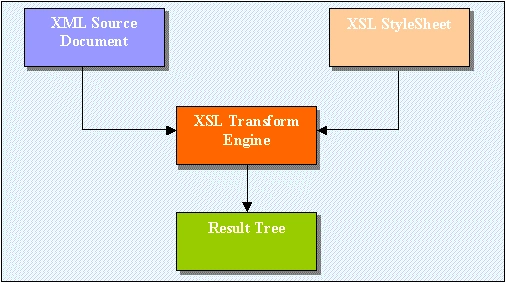
Please have a look at the below image of the high-level structure.
Let's create a sample console application to see how it works.
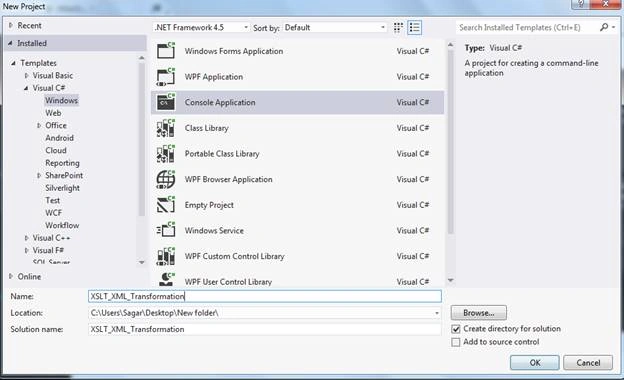
- Create a console application. Open Visual Studio - File - New Project - Console Application; give it a suitable name, such as - ‘XSLT_XML_Transformation’ and click OK.
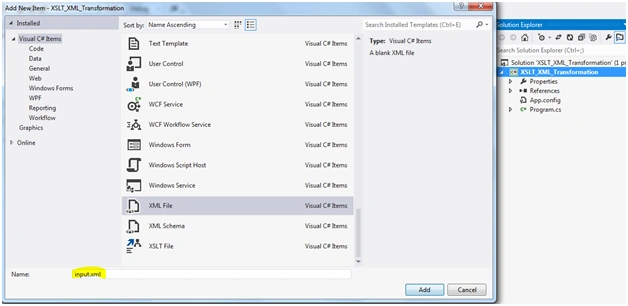
- Let's create a main XML, i.e., input.xml. Right click on ‘Solution Explorer’ - Add - New Item and select XML file; give it a name like input.xml.
I have created the below XML which contains a note that is the main element and under this, it contains other elements.
XML
- <?xml version="1.0" encoding="utf-8"?>
- <note>
- <from>[email protected]</from>
- <to>[email protected]</to>
- <cc>[email protected]</cc>
- <bcc>[email protected]</bcc>
- <heading1>Reminder</heading1>
- <heading2>Important</heading2>
- <body>Don't forget me this weekend!</body>
- </note>
Requirement
We have created atransform file that generally has only 3 elements and also applied concatenation functionality for headings, separated by commas.
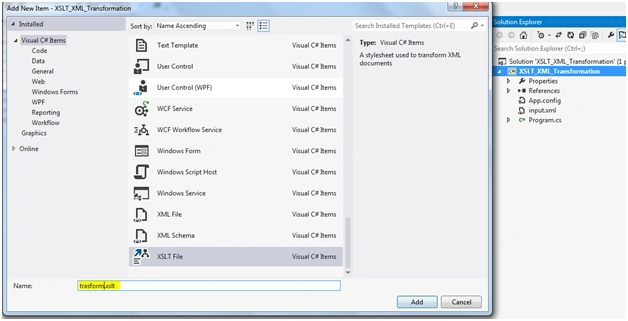
- Now, create an XSLT transform file to match the above requirement. Right-click on ‘Solution Explorer’ - Add - New Item and select XSLT File and give it a name like transform.xslt.
XSLT code
- <?xml version="1.0" encoding="utf-8"?>
- <xsl:stylesheet version="1.0" xmlns:xsl="http://www.w3.org/1999/XSL/Transform"
- xmlns:msxsl="urn:schemas-microsoft-com:xslt" exclude-result-prefixes="msxsl">
- <xsl:output method="xml" indent="yes"/>
- <xsl:template match="/">
- <Details>
- <From>
- <xsl:value-of select="note/from"/>
- </From>
- <To>
- <xsl:value-of select="note/to"/>
- </To>
- <Heading>
- <xsl:value-of select="concat(note/heading1,', ',note/heading2)" />
- </Heading>
- </Details>
- </xsl:template>
- </xsl:stylesheet>
Some summary of XSLT functions is as below.
- <xsl:value-of> – The <xsl:value-of> element is used to extract the value of a selected node.
- Concat – The fn:concat function requires at least two arguments (which can be the empty sequence), and accepts an unlimited number of additional arguments.
- <xsl:for-each> - The <xsl:for-each> element allows you to do looping in XSLT
- <xsl:if> - The <xsl:if> element is used to put a conditional test against the content of the XML file
- <xsl:choose> - The <xsl:choose> element is used in conjunction with <xsl:when> and <xsl:otherwise> to express multiple conditional tests
- format-number() - The format-number() function is used to convert a number into a string.
- Write the C# code to read the transform and XML files and generate the desired output XML.
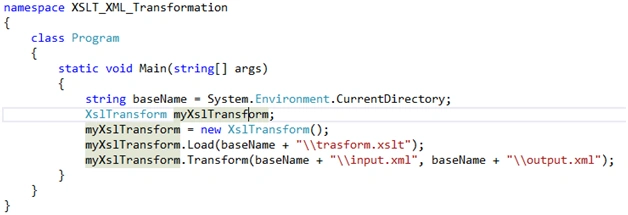
- Result
Please check the output result.
- <?xml version="1.0" encoding="utf-8"?>
- <Details>
- <From>[email protected]</From>
- <To>[email protected]</To>
- <Heading>Reminder, Important</Heading>
- </Details>
Conclusion
I hope that you got an idea of how to use XSLT.
Amit TyagiPosted Jul 24, 2020, 11:37 AM
Hi, Is it possible to upgrade XSLT version from 1.0 to 3.0 in Visual Studio 2019?
olivermodePosted Jan 10, 2019, 8:04 PM
Note that Xsltransform has been replaced by XslCompiledTransform, see https://docs.microsoft.com/en-us/dotnet/standard/data/xml/migrating-from-the-xsltransform-class
olivermodePosted Jan 10, 2019, 7:29 PM
Thanks!!!!!!!!!!!!!!!!!!!!!!!!
Arjun DhilodPosted Oct 8, 2018, 5:58 AM
Hi i am getting "c:\users\admin\documents\visual studio 2017\Projects\XSLT_XML_Transformation\XSLT_XML_Transformation\bin\Debug" is it correct.
Viknaraj ManogararajahPosted Jul 22, 2018, 1:53 AM
Nice article, thank you for sharing