

Introduction
ASP.NET is a server-side web application framework designed for web development to produce dynamic web pages. It was developed by Microsoft to allow programmers to build dynamic web pages, web applications and web services. The very first version of ASP.NET was published in January 2002. ASP.NET was built to provide a common platform that later became to be known as the Common Language Runtime (CLR), allowing programmers to write ASP.NET code using any supported .NET language.
Released Improvements:
- ASP.NET 5 Runtime updates
- ASP.NET Tooling features
ASP.NET Runtime Updates
After updates in Visual Studio 2013, some brilliant features were enhanced in this release of Visual Studio that supports the creation and development of ASP.NET 5 Preview applications. ASP.NET 5 Preview is clean and free of bugs and is a composable .NET stack for building modern web applications for both cloud and on-premises servers. Some new or updated features are given below.
- ASP.NET MVC and Web API have been unified into a single programming model in this release only.
- Environment-based configuration for a seamless transition to the cloud is a very advance feature.
- ASP.NET 5 runs on Windows with the .NET Framework or .NET Core.
- ASP.NET Core is a new cloud optimized runtime that supports true side-by-side versioning.
- Run in IIS, or self-hosted in your own process.
- Dependency injection out-of-the-box.
- NuGet everything, even the runtime itself.
- Environment-based configuration for a seamless transition to the cloud is one of the brilliant features.
ASP.NET Tooling Updates
Tools are something that play an indispensable part in project development and optimizes them as well. Tools provide programmers a more productive coding experience. Some wonderful features released are:
- Templates
- Projects and Builds
- IntelliSense and Error list
- NuGet Package Manager
- JSON Editor Improvements
- HTML Editor Improvements
- CSS/LESS/Sass Editor Improvements
Templates
In the older version likewise 2013 the "ASP.NET 5 Empty" and "ASP.NET 5 Starter Web" templates did not exist.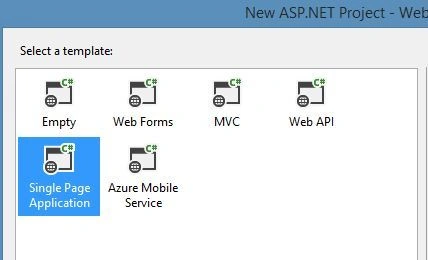
Now the newer release of Visual Studio 2015 contains the "ASP.NET 5 Empty" and "ASP.NET 5 Starter Web" templates that were added to the "New ASP.NET Project" dialog for C#.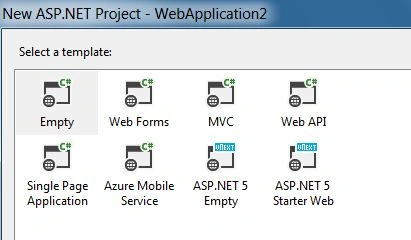
The "ASP.NET 5 Class Library" and "ASP.NET 5 Console Application" templates are added to the "New Project" dialog under "Visual C#"/Web.
Older Version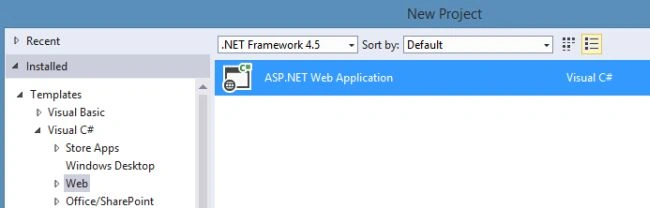
Newer Version
A console and class library are also included in ASP.NET 5. 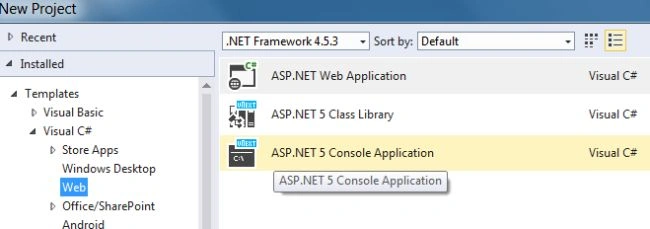
Projects and Builds
The project file no longer includes a project directory items and references.
In the latest release of updates to project files ASP.NET 5 projects uses the "projectName".kproj file as Visual Studio's project file. The .kproj file doesn't include any type of files from the recent directory or sub-directories, since Visual Studio automatically includes and monitors the ASP.NET 5 project directory files.
Project.json file is used to define project information
Since the enhancement done to Visual Studio it is now possible to use the project.json file for reference and package dependencies, version definitions, framework configurations, compile options, build events, package creation meta-data and run commands, as well as other details that also become reliable. This way, the project can be edited and can be run in Linux and on MacOS machines that do not have Visual Studio. That is far better than previous versions.
Dependencies node for Bower and NPM dependencies
NPM is the default package manager in the node.js. This release of Solution Explorer for ASP.NET 5 Web Applications now contains a Dependencies node showing Bower and NPM dependencies. The Bower dependencies are from bower.json in the project folder. The NPM dependencies are from package.json in the project folder. In the Dependencies node, under the Bower and NPM's package nodes, you can uninstall a package using the context menu command at any time, that will automatically remove the package from the corresponding JSON file and it seems more reliable and interesting as well.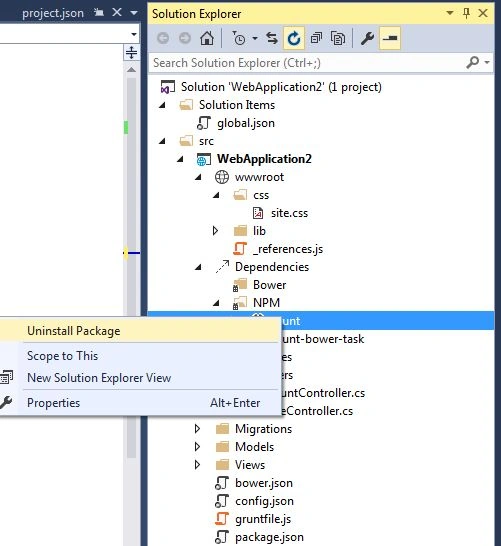
Fast build time with Visual Studio
The build time is enhanced in this release such that in previous versions we saw that a project takes so much time to Build. Visual Studio uses the Roslyn engine to compile ASP.NET 5 projects at design time. Therefore, the project has already been compiled when you issue a "build" request. In Visual Studio 2015 Preview, Visual Studio simply es the design time compiler output to the build request. This avoids another build and improves performance when you build, run, or debug ASP.NET 5 projects. This feature reduces the time for making a build request.
NuGet package manager enhancement
The NuGet Package Manager manages all the packages in the Visual Studio that might be rewritten by Microsoft in a new release using the tool window style and can be viewed per project and solution. Now each project can open a NuGet Package Manager window at the same time. This change applies to all type of projects that uses the NuGet Package Manager.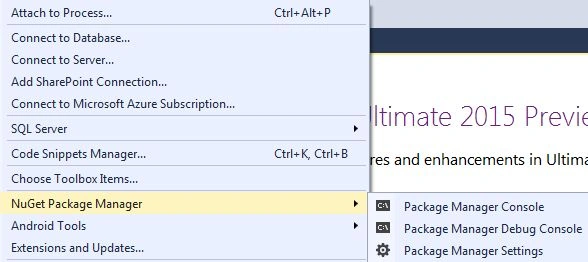
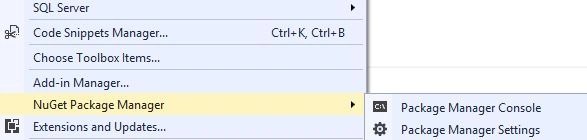
older version of NuGet
IntelliSense and Error list
IntelliSense is the process in which suggestions are shown and errors pointed during the coding of the project in the editor and that reduces the time for coding the project. An IntelliSense item that exists in one framework, but not in another will be listed in the IntelliSense with a warning sign. The IntelliSense tooltip indicates which framework supports it and which framework doesn't.
Build errors shows from which framework the error arises. So, if you have an error in the code that is recognized by two targeting frameworks at a time, then it will show in two places, in the error and output error list, with the same description and file location, but with different project names that includes the framework name.
JSON Editor Improvement
Certain improvements have been made to the JavaScript Object Notation (JSON) editor, including performance and other improvements, such as loading the JSON schema asynchronously, caching of the child schemas and better IntelliSense. Additionally, there are the following new features:
Guest UserPosted Nov 28, 2014, 7:33 PM
I cant see Asp.net 5 template in VS community 2013 edition with updates 4 in my Azure machine? can you help
Guest UserPosted Nov 28, 2014, 7:32 PM
nice one Gaurav!
Manish Kumar ChoudharyPosted Nov 26, 2014, 6:49 AM
Very Good one sir..
Rajeev RanjanPosted Nov 26, 2014, 6:47 AM
you have mentioned all the new things very well. great work @gaurav
Jeetendra GundPosted Nov 24, 2014, 6:16 AM
Nice Article..
Manish Kumar ChoudharyPosted Nov 24, 2014, 6:01 AM
Nice Features ..
Nimit JoshiPosted Nov 23, 2014, 11:10 PM
Its very good to know. Thanks for the article...