

The primary goal of the Model-View-Controller (MVC) pattern is to separate as neatly as possible the code that generates the graphical interface displayed to users from the code that manages any user actions. The controller is a component that deals with the performance of any business-related tasks triggered within the page. A controller is invoked in response to some user action and likely needs some input data to do its job. In this article, we are exploring the new controller features provided in ASP.Net MVC 3.
What is controller?
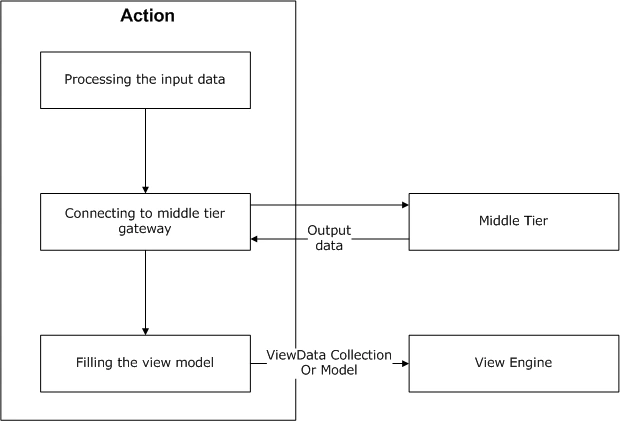
The controller is a sort of mediator between the user interface and the application's middle tier. The typical behavior of a controller can be summarized in four main steps:
- Getting input data.
- Executing the request-related action method.
- Preparing data for the view.
- Triggering the refresh of the view.
New features
The following are the new features that we will see in details:
- Child Output Caching
- ViewBag / ViewData
- New ActionResults
- Request Validation - AllowHTML
- Global Action Filters
Child Output Caching
The Output Cache can now be applied to child actions. A child action is an action that is invoked by using Html.RenderAction or Html.Action helper from inside of a view. Prior to MVC 3 we would either cache the full view or nothing can be cached. In MVC 3, we can cache a block of information within a view.
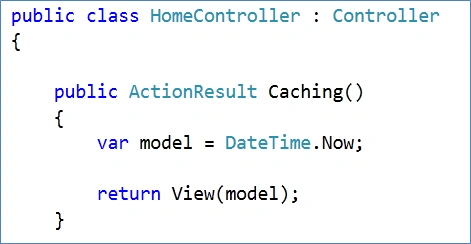
Step 1: In home controller, create action that passes current time to View.
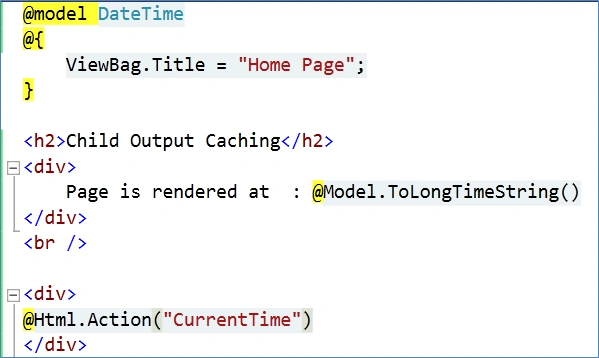
Step 2: In Caching.cshtml, display the current time and create a new action CurrentTime.
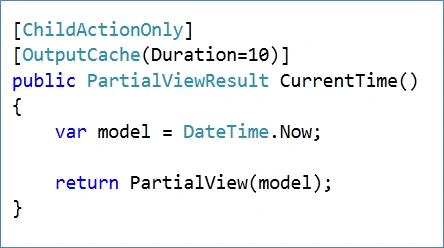
Step 3: In the home controller, create an action for CurrentTime which passes current time to partial View. Here decorate the action with the OutputCache attribute so that a partial view is cached for 10 seconds. Also add the ChildActionOnly attribute to make sure that an action is called only as a child action.
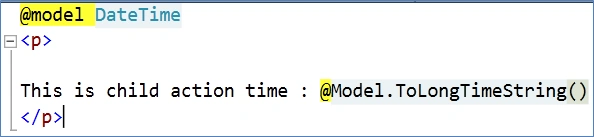
Step 4: In partial view CurrentTime.cshtml and display the current time.
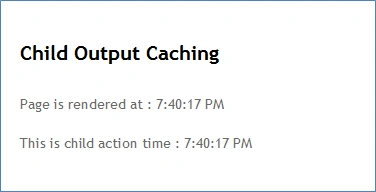
Step 5: Run the application. Initially the actual time is rendered from the server.
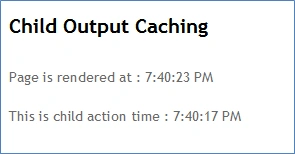
Step 6: Refresh the page. We can see that child time is cached.
Conclusion: In this article, we have explored the Child Output Caching feature of ASP.Net MVC 3. In the forthcoming article, we will explore other features like ViewBag, ActionResults, Request Validation - AllowHTML and Global Action Filters.
Dinesh BeniwalPosted May 25, 2011, 2:46 AM
Good Beginning on ASP.NET MVC3.