

If you’ve been building AI applications over the last few years, you’ve likely experienced the "LangChain Hangover." We started by chaining a few prompts together, calling it an agent, and pushing it to production. But as enterprise requirements have matured in 2026, the limitations of simple pipelines have become glaringly obvious.
The most common question I get from engineering teams today is: "Do I just use LangChain (LCEL), or do I need to pull in LangGraph?"
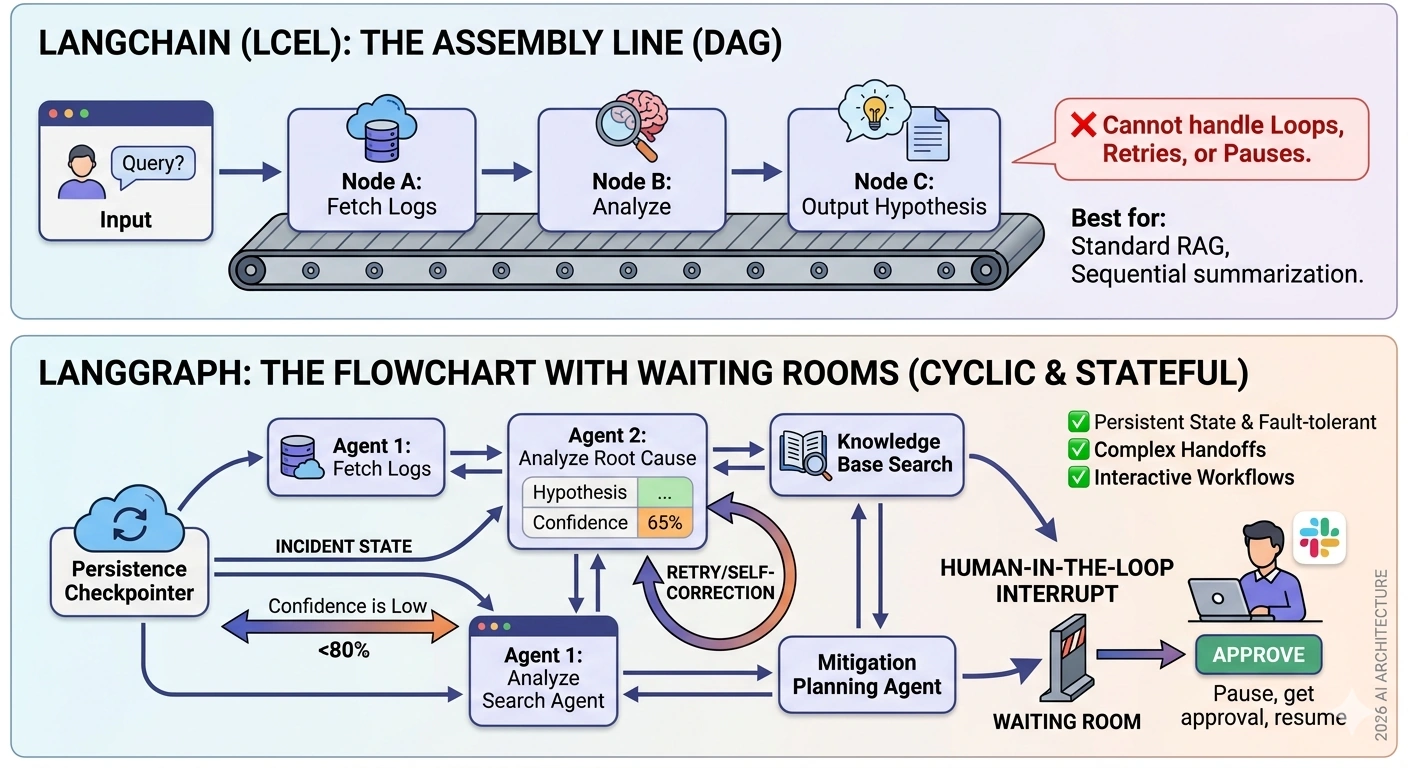
The short answer: LangChain is an assembly line; LangGraph is a flowchart with waiting rooms and feedback loops.
In this article, we’ll break down the exact decision matrix for choosing between the two, and walk through an end-to-end, real-world use case where a simple LangChain pipeline completely fails, but LangGraph shines.
The Core Difference: DAGs vs. Cyclic Graphs
To make the right architectural choice, you have to understand the underlying topology of your workflow.
LangChain (LCEL): The Directed Acyclic Graph (DAG)
LangChain’s Expression Language (LCEL) is designed for sequential, stateless, or simply routed workflows. Data flows in one direction: from Input →→ Node A →→ Node B →→ Output.
Best for: Standard RAG pipelines, simple tool-calling, data extraction, and sequential summarization.
The Limitation: It cannot handle loops. If Node B fails and you need to retry, or if you need an LLM to "think, critique, and revise" its own output, LCEL forces you into hacky workarounds.
LangGraph: The Cyclic, Stateful Graph
LangGraph treats your workflow as a graph of Nodes (functions/agents) and Edges (transitions). Its superpowers are Cycles (loops) and Persistent State.
Best for: Autonomous agents, multi-agent collaboration, complex retry logic, and Human-in-the-Loop (HITL) workflows.
The Superpower: State management. LangGraph uses "Checkpointers" to save the state of your graph at every step. If a human needs to approve an action three days later, or an API times out and you need to retry, the graph resumes exactly where it left off without losing context.
The Decision Matrix
Before writing a single line of code, ask yourself these four questions:
| Requirement | Choose LangChain (LCEL) | Choose LangGraph |
|---|---|---|
| Workflow Topology | Linear (Step A →→ Step B) | Cyclic (Loops, retries, self-correction) |
| State Management | Stateless, or simple in-memory passing | Complex state, persistent across time/retries |
| Human-in-the-Loop | Not required (or simple CLI input) | Required (Pause, wait for approval, resume) |
| Multi-Agent Routing | Simple Router Chain (1-to-many) | Complex collaboration (Agents talking to agents) |
The Golden Rule: If your workflow requires a while loop or a pause for human input, use LangGraph. If it’s just a for loop or a straight line, use LangChain.
Real-World Use Case: The Autonomous SRE Incident Response Agent
Let’s look at a scenario where LangChain falls apart.
The Scenario: You are building an AI agent for a DevOps team. When a PagerDuty alert fires (e.g., "Database CPU at 99%"), the agent needs to:
Fetch the recent application logs.
Analyze the logs to hypothesize a root cause.
Loop: If the AI's confidence in the root cause is below 80%, it must search the internal Confluence knowledge base for past incidents, and re-analyze.
Draft a mitigation plan (e.g., "Restart pod X", "Scale up DB").
Human-in-the-Loop: Pause and wait for a Senior SRE to approve the mitigation plan via Slack.
Execute the approved command.
Why LangChain Fails Here
In a LangChain pipeline, Step 3 (the confidence loop) is a nightmare. You would have to wrap your chain in a Python while loop, manually managing the context window so it doesn't overflow, and manually handling the state. Furthermore, Step 5 (waiting for a human) is impossible in a standard LCEL chain because the HTTP request would time out while waiting for the SRE to click "Approve" in Slack.
The LangGraph Solution
LangGraph handles this natively. We define a State, create nodes for each step, use Conditional Edges for the confidence loop, and use Interrupts for the human approval.
Step 1: Define the State
The state is the "memory" of the graph. Every node reads from and writes to this state.
from typing import TypedDict, Annotated
from langgraph.graph import StateGraph, START, END
from langgraph.checkpoint.memory import MemorySaver
import operator

class IncidentState(TypedDict):
    alert_details: str
    logs: str
    hypothesis: str
    confidence_score: float
    kb_context: Annotated[list, operator.add] # Reducer to append KB results
    mitigation_plan: str
    human_approved: bool
Step 2: Define the Nodes (The Actions)
Nodes are just Python functions that take the state, do work (call an LLM, query a DB), and return an update to the state.
from langchain_openai import ChatOpenAI

llm = ChatOpenAI(model="gpt-4o")

def fetch_logs_node(state: IncidentState):
    # Simulate fetching logs from Datadog/Splunk
    logs = "ERROR: Connection pool exhausted at 14:02..."
    return {"logs": logs}

def analyze_root_cause_node(state: IncidentState):
    # LLM analyzes logs and outputs hypothesis + confidence
    prompt = f"Analyze these logs: {state['logs']}. Context: {state.get('kb_context', [])}"
    response = llm.invoke(prompt + " Return JSON with 'hypothesis' and 'confidence_score' (0.0 to 1.0).")
    # ... parse JSON ...
    return {"hypothesis": "DB Connection leak", "confidence_score": 0.65}

def search_knowledge_base_node(state: IncidentState):
    # Simulate vector search in Confluence
    kb_data = ["Past Incident #402: Connection pool leak caused by uncommitted transactions."]
    return {"kb_context": kb_data}

def draft_mitigation_node(state: IncidentState):
    plan = "1. Restart application pods. 2. Patch transaction manager."
    return {"mitigation_plan": plan}
Step 3: Define the Routing Logic (The Cycles)
This is where LangGraph earns its keep. We define a function that looks at the state and decides where the graph goes next.
def route_by_confidence(state: IncidentState):
    if state["confidence_score"] < 0.80:
        return "search_kb" # Loop back to get more context
    return "draft_plan"    # Move forward
Step 4: Assemble the Graph
Now we wire it all together. Notice the interrupt_before parameter—this is LangGraph's magic for Human-in-the-Loop.
# Initialize the graph
workflow = StateGraph(IncidentState)

# Add Nodes
workflow.add_node("fetch_logs", fetch_logs_node)
workflow.add_node("analyze", analyze_root_cause_node)
workflow.add_node("search_kb", search_knowledge_base_node)
workflow.add_node("draft_plan", draft_mitigation_node)

# Add Edges
workflow.add_edge(START, "fetch_logs")
workflow.add_edge("fetch_logs", "analyze")

# The Cycle: Conditional Edge based on confidence
workflow.add_conditional_edges(
    "analyze",
    route_by_confidence,
    {
        "search_kb": "search_kb",
        "draft_plan": "draft_plan"
    }
)

# The Loop: Search KB goes back to Analyze
workflow.add_edge("search_kb", "analyze")

workflow.add_edge("draft_plan", END)

# Compile with a Checkpointer (Crucial for HITL and persistence)
# In production, use PostgresSaver or SqliteSaver
memory = MemorySaver()
app = workflow.compile(
    checkpointer=memory,
    interrupt_before=["draft_plan"] # PAUSE the graph here for human review
)
Step 5: Execution and Human Approval
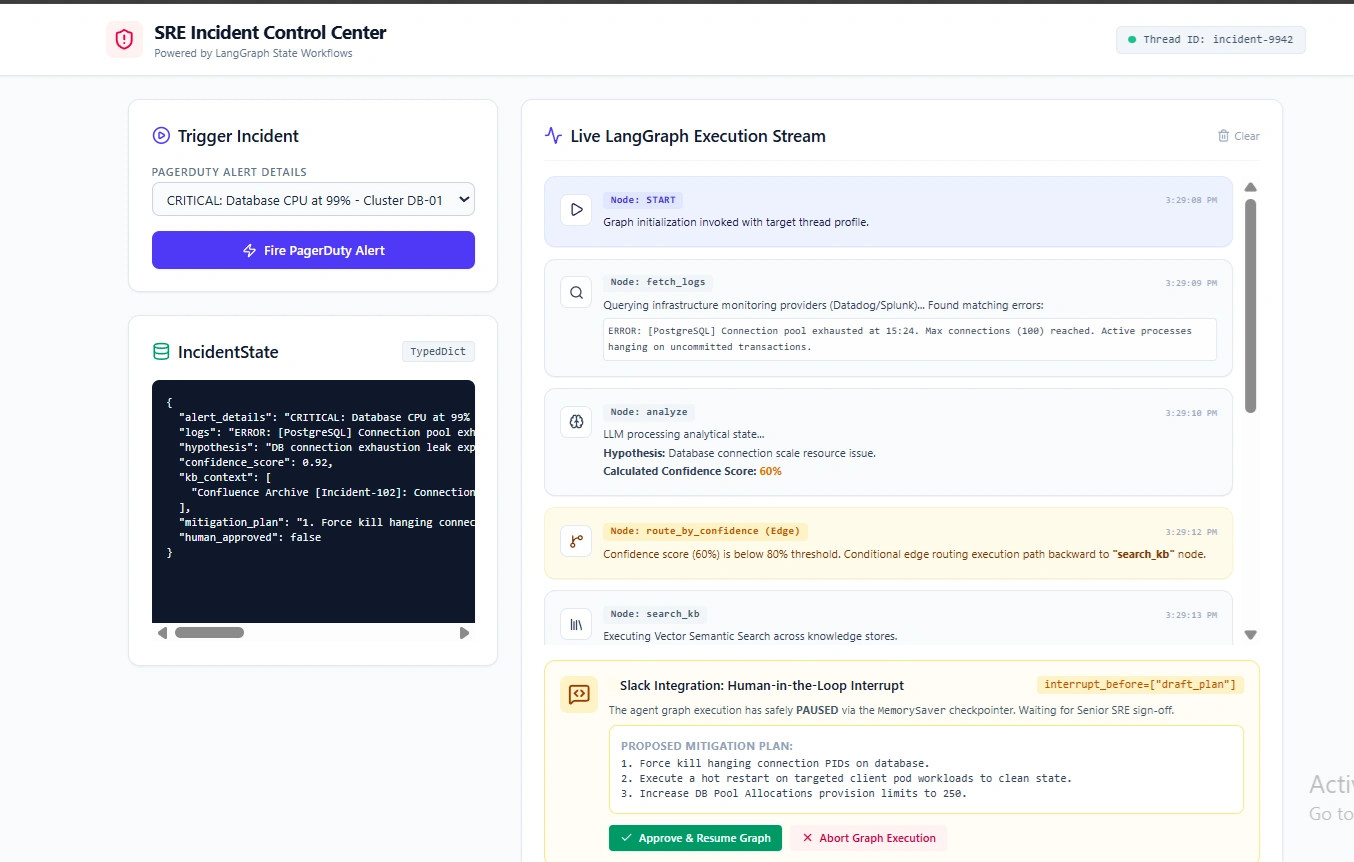
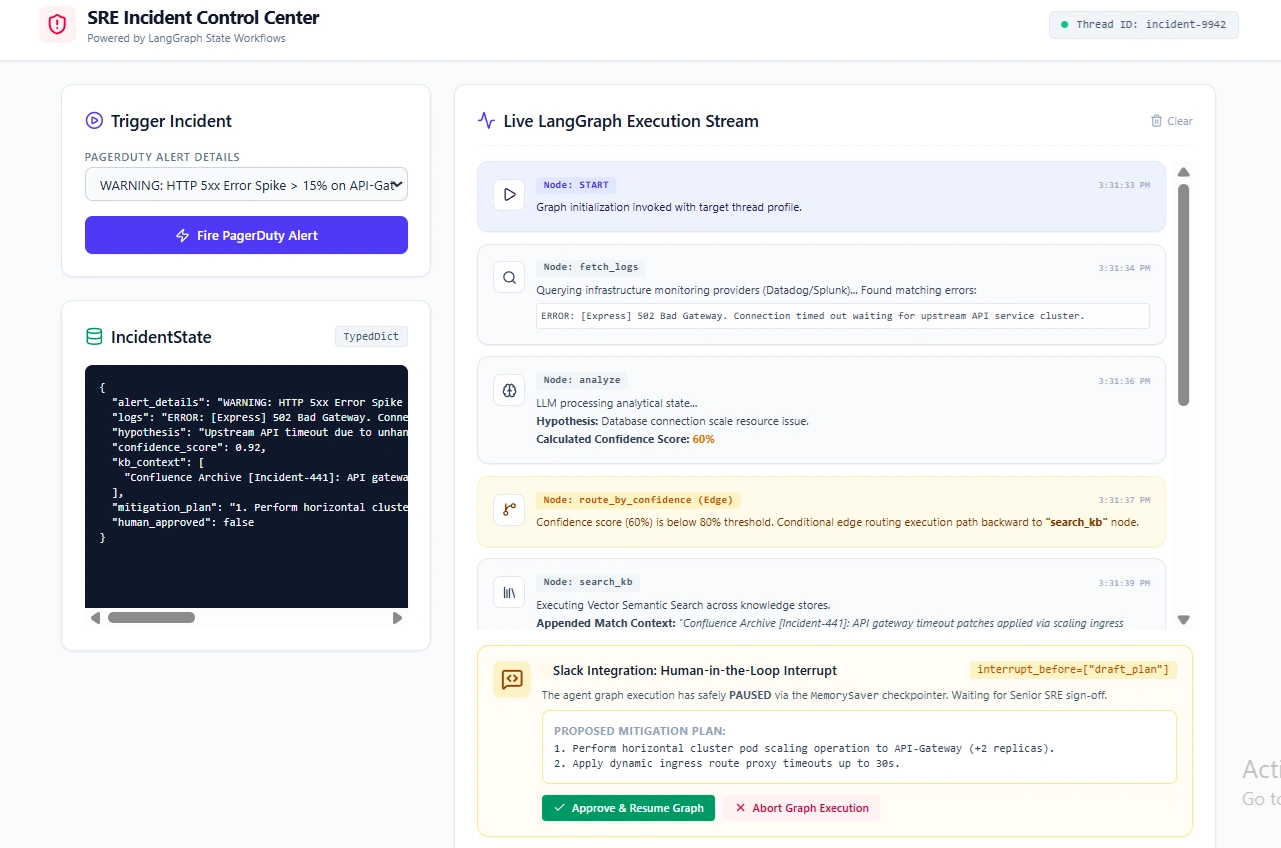
When you run this graph, it will execute fetch_logs →→ analyze →→ search_kb →→ analyze (looping until confidence > 0.8) →→ and then pause at draft_plan.
config = {"configurable": {"thread_id": "incident-9942"}}

# 1. Run until it hits the human interrupt
for event in app.stream({"alert_details": "DB CPU 99%"}, config):
    print(event)

# The graph is now PAUSED. The state is saved in the Checkpointer.
# You can send the mitigation_plan to Slack via a webhook.

# 2. Hours later, the SRE clicks "Approve" in Slack.
# Your webhook triggers this code to resume the graph:
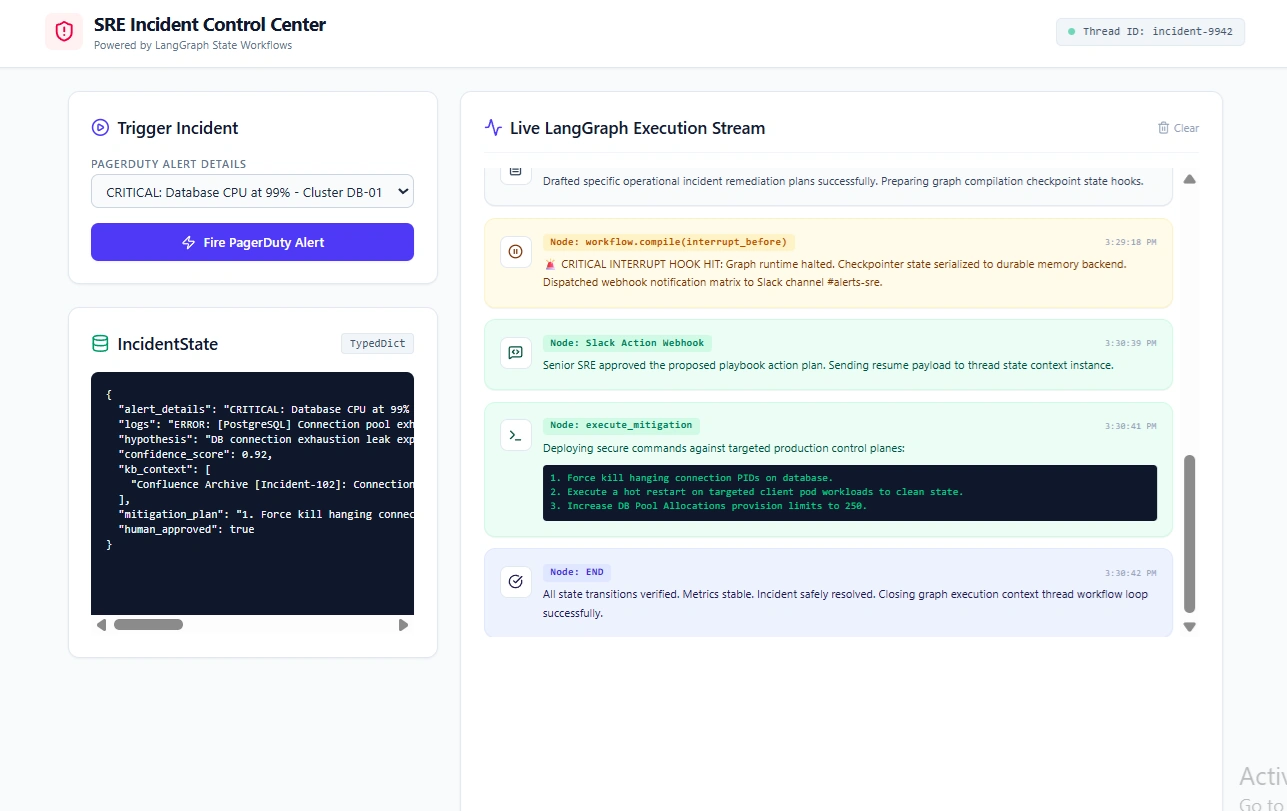
app.invoke(None, config) # Resumes from the interrupt point
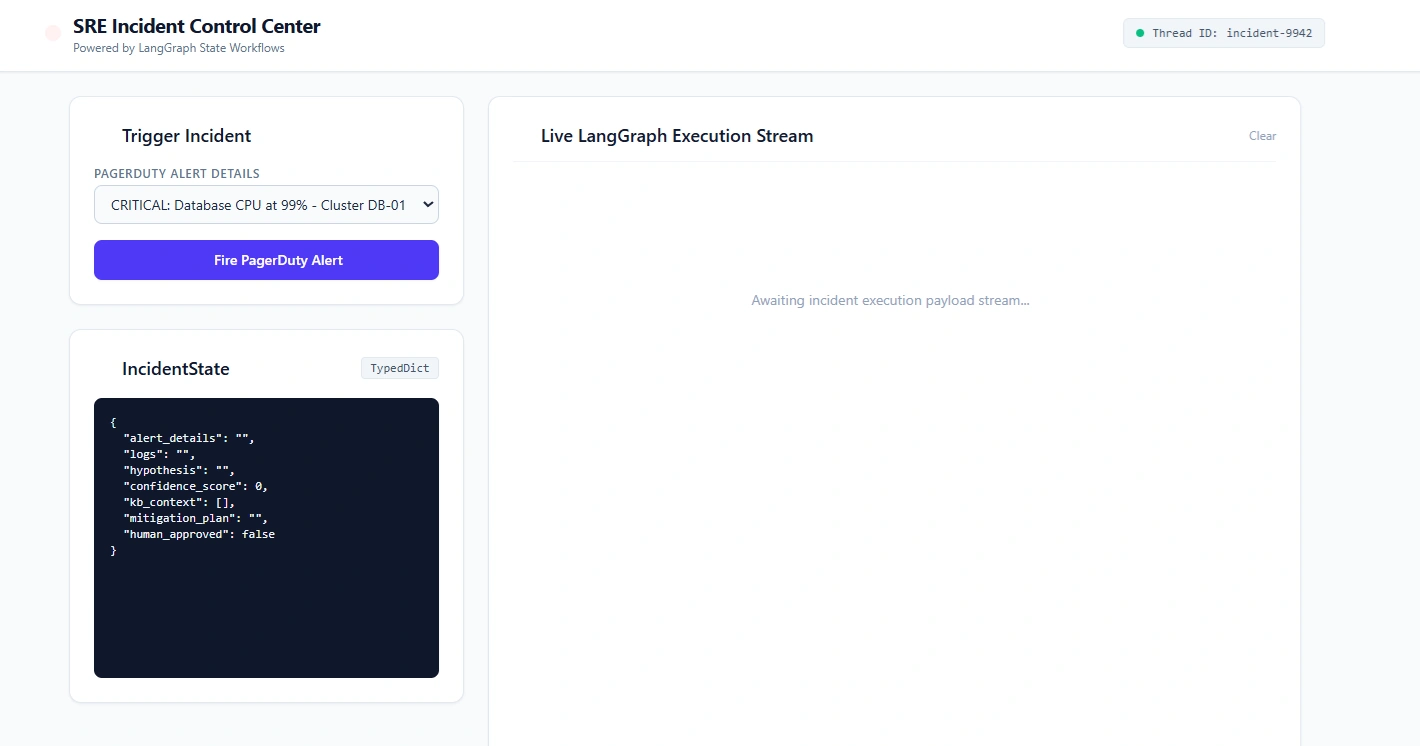
Output
Key Takeaways for 2026 Architecture
Don't over-engineer simple RAG: If you are just building a chatbot that queries a PDF, stick to LangChain LCEL. LangGraph adds boilerplate that you don't need for linear tasks.
Embrace the Checkpointer: The true value of LangGraph isn't just the visual graph; it's the
Checkpointer. By saving state to a database at every node, you make your agents fault-tolerant. If an LLM API goes down, or a human takes a weekend to approve an action, the graph doesn't crash—it waits.Multi-Agent is just Graph Routing: If you are building a system where a "Researcher Agent" hands off to a "Writer Agent" who hands off to a "Critic Agent," you are building a LangGraph. Treat agents as nodes, and the handoffs as edges.
The era of the "monolithic prompt" is over. As we build systems that interact with the real world—executing code, querying live databases, and requiring human oversight—LangGraph provides the necessary scaffolding to turn fragile AI demos into resilient, production-grade software.
Join the conversation! Your thoughts help the community grow.