
An asynchronous method is not automatically an efficient method. You can use async and await correctly, get the expected output, and still waste several seconds because of the way you organize independent operations.
I wanted to measure the difference between two approaches: waiting for each operation to finish before starting another, and allowing independent operations to overlap.
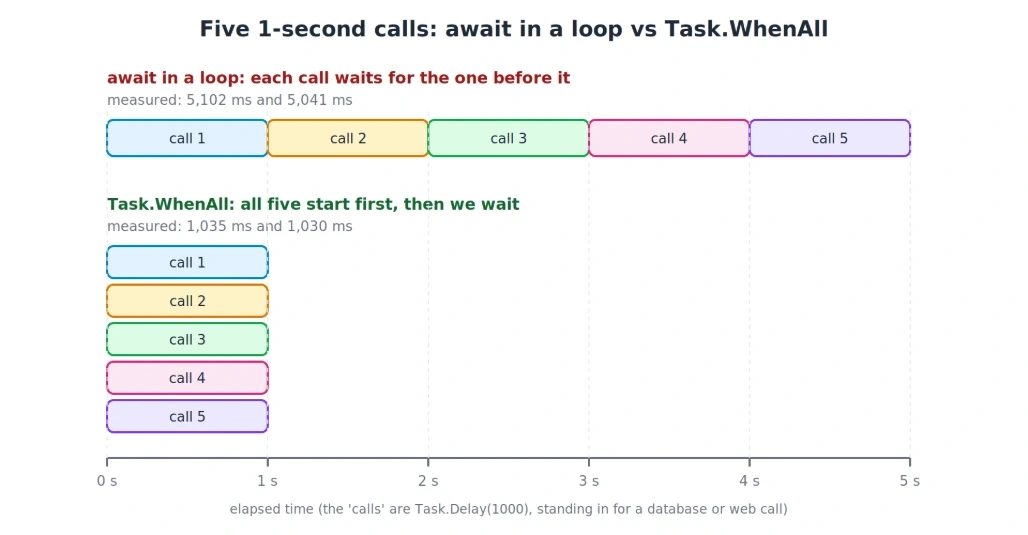
Using five simulated one-second operations, the difference was clear. The sequential implementation took approximately five seconds, while the concurrent version completed in about one second.
The interesting part is not just the speed difference. It is understanding why it happens, when the optimization is safe, and what can go wrong when concurrency is introduced without considering the resources involved.
1. Building a Small Benchmark
I used Task.Delay to represent the waiting time of an external operation. This keeps the experiment simple because it avoids database setup, network variability, and other dependencies.
The following example compares sequential execution with Task.WhenAll and then increases the workload to 100 asynchronous waits.
using System.Diagnostics;
using System.Linq;

async Task<int> SimulateRequestAsync(int requestId)
{
    await Task.Delay(1000);
    return requestId;
}

var timer = Stopwatch.StartNew();

for (int id = 1; id <= 5; id++)
{
    await SimulateRequestAsync(id);
}

Console.WriteLine(
    $"Sequential execution: {timer.ElapsedMilliseconds} ms");

timer.Restart();

var pendingRequests = Enumerable.Range(1, 5)
    .Select(SimulateRequestAsync);

int[] responses = await Task.WhenAll(pendingRequests);

Console.WriteLine(
    $"Concurrent execution: {timer.ElapsedMilliseconds} ms");

timer.Restart();

await Task.WhenAll(
    Enumerable.Range(1, 100)
        .Select(_ => Task.Delay(1000)));

Console.WriteLine(
    $"100 overlapping waits: {timer.ElapsedMilliseconds} ms");
The method returns the request ID to make the example resemble a real operation that produces a result. The benchmark measures elapsed time, not the time spent executing CPU instructions.
2. Comparing the Measurements
I executed the benchmark twice using a Release build on .NET 8.
Workload | First run | Second run |
|---|---|---|
Five sequential operations | 5,102 ms | 5,041 ms |
Five concurrent operations | 1,035 ms | 1,030 ms |
100 overlapping one-second waits | 1,016 ms | 1,002 ms |
In this experiment, concurrent execution was approximately 4.9 times faster for the five operations.
The 100-wait test also finished in roughly one second. Increasing the number of waiting operations did not increase the elapsed time proportionally because their waiting periods overlapped.
These results demonstrate the behavior of the simulated workload. They should not be treated as a prediction that every production API or database workload will achieve the same speed-up. Only two runs were recorded, and the experiment did not measure resource consumption.
3. The Difference Is When the Work Starts
Consider the following loop:
for (int id = 1; id <= 5; id++)
{
    await SimulateRequestAsync(id);
}
Although the method is asynchronous, the loop imposes an order: each iteration awaits its operation before the next one begins, so the next operation cannot start until the current one completes.
If each operation takes approximately one second, the elapsed waiting time accumulates across the five iterations.
Now consider this version:
var pendingRequests = Enumerable.Range(1, 5)
    .Select(SimulateRequestAsync);

int[] responses = await Task.WhenAll(pendingRequests);
Here, the task-producing sequence is supplied to Task.WhenAll. As the sequence is enumerated, the operations are invoked and their tasks are collected. The caller then waits for the combined task to complete.
The difference is that the operations can make progress during overlapping periods instead of being forced into a sequence.
This does not mean that Task.WhenAll makes every operation execute simultaneously at the CPU level. It coordinates completion of multiple tasks; the underlying operations determine how their work progresses.
4. Why Increasing the Number of Waits Does Not Multiply the Time
The 100-operation test illustrates an important property of asynchronous I/O.
When an operation reaches an incomplete await, its method can yield instead of keeping a thread occupied for the entire wait. Execution can resume when the awaited operation completes.
This allows applications to have many outstanding network or database operations without dedicating one thread to each waiting operation.
That is useful in ASP.NET applications, where requests often spend significant time waiting for external services.
However, the experiment only measured wall-clock duration. It did not measure thread counts, allocations, CPU usage, or memory consumption. Those measurements would be needed to make claims about the full resource cost of the two approaches.
I also did not execute a sequential version of the 100-wait test. Its theoretical waiting time would be approximately 100 seconds, but that is an estimate based on the individual delays, not a measured result.
5. Four Risks Hidden Behind Faster Execution
Reducing elapsed time is useful only when the application continues to behave correctly. Running more operations concurrently introduces several practical concerns.
Risk 1: The external service may not accept the workload
An application can initiate many requests, but the receiving API or database has its own capacity limits.
A large burst of requests can trigger rate limits, increase response times, or consume available database connections. The fact that the client can create hundreds of tasks does not mean the server can process them efficiently.
One way to control the workload is to use SemaphoreSlim:
var semaphore = new SemaphoreSlim(10);

async Task<int> ExecuteLimitedAsync(int id)
{
    await semaphore.WaitAsync();

    try
    {
        return await SimulateRequestAsync(id);
    }
    finally
    {
        semaphore.Release();
    }
}

int[] responses = await Task.WhenAll(
    Enumerable.Range(1, 100).Select(ExecuteLimitedAsync));
This restricts the number of operations that have passed the semaphore to ten at a time. The finally block ensures that the semaphore slot is released when an operation completes or throws an exception.
For collection-based workloads, .NET 6 and later also provide Parallel.ForEachAsync with a configurable degree of parallelism.
With 100 one-second operations and a concurrency limit of ten, approximately ten seconds is the idealized waiting-time estimate. I have not benchmarked that version here.
Risk 2: Multiple failures require deliberate handling
Suppose several requests fail during one call to Task.WhenAll.
Awaiting the combined task propagates an exception, but inspecting only the caught exception may not reveal all the failures. The combined task can retain the aggregate exception information.
Task<int[]> combined = Task.WhenAll(tasks);

try
{
    int[] responses = await combined;
}
catch
{
    if (combined.Exception is not null)
    {
        foreach (var error in combined.Exception.InnerExceptions)
        {
            Console.WriteLine(error.Message);
        }
    }
}
The tasks variable represents a collection of tasks created earlier.
This approach is useful for logging multiple task failures. Production code should also decide how cancellation, partial results, retries, and error reporting will work.
Risk 3: Concurrent database operations need proper isolation
A database call is not automatically safe to execute concurrently just because it is asynchronous.
A shared connection may not support simultaneous commands, depending on the database provider and its capabilities. Concurrent operations should use appropriately managed connections, typically through connection pooling, and transactions where required by the business operation.
There is another issue: separate connections do not eliminate data conflicts. Two operations can update the same record and still produce lost updates or inconsistent business results if concurrency is not handled correctly.
Faster execution must not come at the cost of data integrity.
Risk 4: Dependencies cannot be removed by changing the syntax
Consider a workflow that creates an employee and then uses the generated employee ID to save payroll information.
var employee = await CreateEmployeeAsync();

await SavePayrollAsync(employee.Id);
The second operation needs information returned by the first. Starting both operations independently would break the workflow.
In such cases, sequential execution is necessary. The optimization applies only when the operations can proceed independently and safely.
6. What Happens to the Result Order?
Concurrent operations do not necessarily finish in the order in which they start. Nevertheless, Task.WhenAll preserves the input task order when returning a result array.
For example:
int[] responses = await Task.WhenAll(
    Enumerable.Range(1, 5).Select(SimulateRequestAsync));
The first array element corresponds to the first task supplied, the second element to the second task, and so on.
This makes it possible to collect results from independent operations without arranging them by completion time.
7. Asynchronous I/O and CPU-Bound Work Are Different
The benchmark uses waiting operations. Its results should not be generalized to computational workloads.
For I/O-bound work, asynchronous execution can allow multiple operations to remain in progress while they wait for external resources.
For CPU-bound work, such as complex calculations, async and await alone do not distribute computation across multiple cores. Parallel execution may help, but it also introduces scheduling and coordination costs.
The correct approach depends on where the application spends its time. Measure the actual workload rather than assuming that asynchronous or parallel code must be faster.
8. Choosing the Appropriate Approach
Workload | Approach |
|---|---|
Each operation needs the preceding result | Sequential |
A small number of independent I/O operations |
|
A large number of independent I/O operations |
|
Concurrent database updates | Appropriate connections, transactions, and concurrency controls |
CPU-intensive computation | Benchmark sequential and parallel implementations |
9. Finding Opportunities in Existing Applications
Look for await statements inside for and foreach loops, particularly in code that calls external APIs or executes database operations.
For every occurrence, check whether the current iteration needs the previous result. If it does, preserve the sequential flow.
If the operations are independent, test whether they can safely overlap. Compare elapsed time before and after the change in Release mode, repeat the measurements, and use realistic workloads when evaluating production services.
Also examine failure behavior and resource usage. A shorter execution time alone does not prove that the revised implementation is suitable for production.
Takeaway
An await inside a loop runs independent calls one after another, so the waits add up. Starting the calls first and awaiting them together with Task.WhenAll made five one-second calls take about one second instead of about five.
The speed-up comes with conditions: limit how many calls run at once, inspect the combined task when multiple operations fail, manage database connections correctly, and keep dependent calls in order.
The goal isn't to make everything concurrent. It is to avoid waiting unnecessarily when independent operations can safely overlap.
Join the conversation! Your thoughts help the community grow.