

It used to be that when we wanted to create a workflow in SharePoint, we relied on simple workflows, SharePoint Designer workflow or third party tools. However, there is a new kid on the block we need to pay attention to -- Microsoft flow. In this article, I will discuss the differences between SharePoint Designer workflow & Microsoft flow as well as the three components of Microsoft flow.
So let’s get started.
Nowadays, every modern business starts with three factors:
- Measure
How the business is going to calculate business growth. (Power BI). For more information click here. - Act
Once business growth is calculated, how the individual will act in the process. (Power Apps) - Automate
After acting on the process you want to make the whole process faster. (Microsoft flow)
Fig-1-Illustrates different Power users & Developers to make use of products, based on factors like measure, act & automate data using connectors & gateways.
Difference between SharePoint Designer Workflow & Microsoft Flow
Since Microsoft introduced the Workflow Manager in SharePoint 2013, there has not been any additional enhancements to their workflow engine. Compounded by the fact that SharePoint 2016 did not include an updated version of SharePoint 2016 it would make sense to assume that Flow is the replacement for SharePoint Workflows.
- Interface Compatibility with Applications
In SharePoint Designer Workflow, the user needs to learn the syntax, and spend hours debugging and tweaking the code. It does not allow for easy interface with the applications.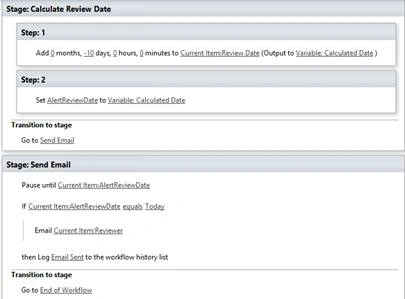
Fig-2 Illustrates a SharePoint Designer Workflow
“Microsoft flow” on the other hand helps non-developers to work smarter by automating workflows across various apps & services like Mail Chimp, DropBox, Twitter, SharePoint, and One Drive.
For example,
- Get Notification
Every time a new file added to SharePoint you will get an email notification. - Copy Files
Suppose you uploaded one file in one drive then set up a flow so that the file will be copied to SharePoint & will be used by your team. - Collect Data
Set a flow to collect tweets /feedbacks. - Automate Approvals
Set up a flow to approve vacations by manager request.
- Microsoft Flow is connected to more than 200 connectors & it uses custom connectors to connect to any custom REST endpoint. Connect to on-premises data using gateways.
- It provides a graphical user interface to build workflows.
 Fig-3 Illustrates Microsoft Flow
So, SharePoint Designer workflow is only confined to SharePoint while Microsoft Flow has the ability to interface with other applications.
- Templates
As compared to the set of predefined templates offered in SharePoint Designer, Flow not only offers more out-of-the-box options, it also allows users to create their own custom templates that can be shared with the community.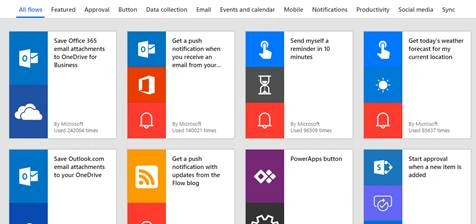 Fig-4 Illustrates templates in Microsoft flow
- Licensing
Finally, from a licensing perspective, Microsoft Flow is a pay by the use kind of service (technically pay by the Flow run). There’s a bit of math but essentially you are allocated an allotment of Flow runs per user in your Office 365 tenant based on your plan. Be sure to check out Microsoft’s Flow Pricing page for up to the minute guidance. Whereas, with SharePoint Workflows, it’s essentially as many workflow runs as your infrastructure can support.
- Implementation Level
SharePoint workflows are enterprise-focused solutions while Microsoft Flow is targeted towards the individual. SharePoint workflows are associated with SharePoint lists and libraries or to the site itself. SharePoint workflows are targeted to perform actions on objects within the SharePoint environment for all users accessing the system.
- Use of Conditions
Flow still uses conditions and actions in the setup process, however, the options used in formulating those conditions have been reduced from what is available in SharePoint Designer. Instead of an “And/Or” logic appearing when multiple conditions are involved, Flow requires an action to be defined between conditions. This can be subverted by creating in Advanced Mode, however, that requires learning a new syntax and it also does not allow the user to revert out of Advanced Mode.
So, Microsoft flow can be accessed via browser from any custom list or modern document library through flow tile in the office app launcher or by going to this URL-https://flow.microsoft.com. Also, flow can be access and manage through the mobile app.
Three Components of Microsoft Flow
The three building block components of Microsoft Flow are as follows,
- Triggers
- Actions &
- Conditions
Triggers
Triggers can be defined as a component which starts the workflow. It can be a manual trigger or automatic trigger. In the automatic trigger, the flow will start automatically from within another application whereas manual trigger is initiated by the user.
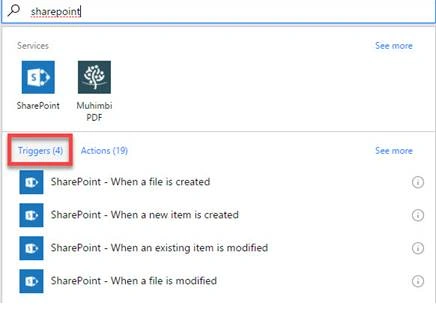
Fig-5:-Illustrates a trigger
Actions
An action is like copying a file, sending an email, creating a task in a planner, starting an approval, updating an item which occurs as a result of the workflow.
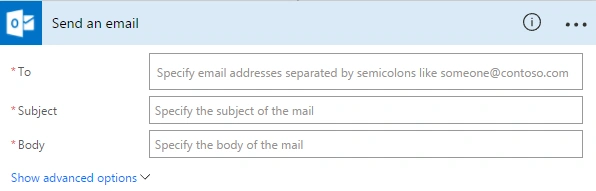
Fig-6-Illustrates an action
Conditions
A condition is something like “IF” statement. If this happens – do this, if that happens – do something else. For example, if the user approves an item or a document – send an email with approval, if a user rejects – send an email with rejection.
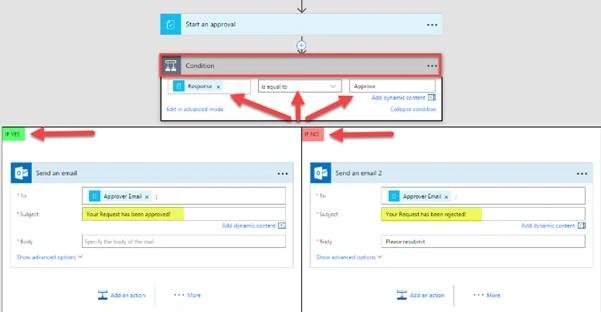
Fig-6-Illustrates a Condition
So, getting back to the original question – is Microsoft Flow the direct replacement for SharePoint Workflows? In my opinion – No. Microsoft Flow is the evolution of business process management allowing you to build elegant solutions which have the ability to orchestrate data across the various line of business applications leveraging “clicks” and not code. Combined with PowerApps as your mobile/responsive front-end the barrier to creating enterprise applications has absolutely been lowered to where you no longer need a team of developers to create basic applications.
Hope this helps & happy Flowing.
Join the conversation! Your thoughts help the community grow.