
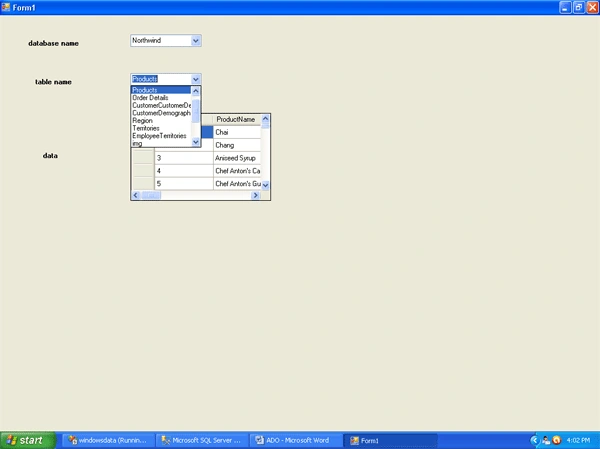
This example deals with displaying databases installed on the current computer, the tables of the selected database, and the data of the selected table.
For these 2 comboboxes and one datagridview has been taken in a windows application.
The queries that have been used are as follows.
- select name from sysdatabases - It displays databases installed on the current server.
- select table_name from information_schema.tables where table_type='base table' and table_catalog=@a"
It displays tables of the selected database.
The tables displayed are user-defined, but for the system-defined databases, some system-defined tables are also displayed.
- To display the data of the selected tables, the appropriate query has been written.
Code of Form1.cs file
- using System;
- using System.Collections.Generic;
- using System.ComponentModel;
- using System.Data;
- using System.Drawing;
- using System.Linq;
- using System.Text;
- using System.Windows.Forms;
- using System.Data.SqlClient;
- namespace windowsdata {
- public partial class Form1: Form {
- SqlConnection cn;
- SqlCommand cmd;
- public Form1() {
- InitializeComponent();
- }
- private void Form1_Load(object sender, EventArgs e) {
- //all the databases on the server
- cn = new SqlConnection("server=.;uid=sa;pwd=1234;database=master");
- cmd = new SqlCommand("select name from sysdatabases", cn);
- cn.Open();
- SqlDataReader dr = cmd.ExecuteReader();
- while (dr.Read() == true) {
- comboBox1.Items.Add(dr[0].ToString());
- }
- dr.Close();
- cn.Close();
- }
- private void comboBox1_SelectedIndexChanged(object sender, EventArgs e) {
- //tables of the selected database
- comboBox2.Text = "";
- //clear the combobox of earlier data
- if (comboBox2.Items.Count != 0) {
- comboBox2.Items.Clear();
- }
- //clear the datagridview of earlier data
- dataGridView1.DataSource = null;
- string s = comboBox1.SelectedItem.ToString();
- cn = new SqlConnection("server=.;uid=sa;pwd=1234;database=" + s);
- cmd = new SqlCommand("select table_name from information_schema.tables where table_type='base table' and table_catalog=@a", cn);
- cmd.Parameters.AddWithValue("@a", s);
- cn.Open();
- SqlDataReader dr = cmd.ExecuteReader();
- while (dr.Read() == true) {
- comboBox2.Items.Add(dr[0].ToString());
- }
- dr.Close();
- cn.Close();
- }
- private void comboBox2_SelectedIndexChanged(object sender, EventArgs e) {
- //data of the selected table
- string s = comboBox2.SelectedItem.ToString();
- SqlDataAdapter da = new SqlDataAdapter("select * from" + " " + s, cn);
- DataTable dt = new DataTable();
- da.Fill(dt);
- dataGridView1.DataSource = dt;
- }
- }
- }
The snapshot of the application is as follows.
All the best.
Sharath PPosted Jan 25, 2012, 11:33 AM
simple and easy to learn...thanks