

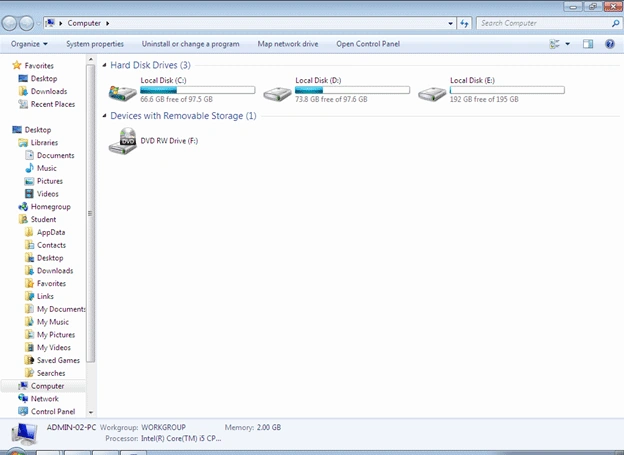
For creating a Windows Explorer type of application we need to design our form in the following manner. Follow the following steps.
- Open Visual Studio - > Click on File menu then click on New Project.
- Select the language as C# and select Window Application from the New Project Template.
- Specify the name for your application as WindowsExplorer and Click OK.
- Now you'll get your form open.
- Now design the form in the following manner.
a. 1st take a Panel control and set the dock property to top of the panel control.
b. Add one more Panel to the Panel and set the Dock property to left.
c. Add a Label control and a TextBox control to the right side of the 1st panel.
d. 2nd take a split container control and set the Dock property to Dock in Parent Container by clicking the smart tag of your split container control.
e. As you added split container by default it has 2 panels in it.
f. In 1st panel add a TreeView control and set the Dock property to dock in parent container.
g. In 2nd panel add a listview control and set the Dock property to dock in parent container.
h. For getting the images we need to add an imagelist control with some images in it (images such as mycomputer, mydocuments, files, folders, cdrom, drives icon image).
I. Now your form should look like this.
Now we'll start with the coding part of our project.
The first thing is to determine that a particular computer has how many drives so instead of determining it manually we can always make use of DriveInfo class which is there in System.IO namespace it can help you to get all the drives which are currently present in one PC. So there is no need to create a separate program for every PC.
Before doing this we need to create some Treenodes at the class level for Desktop, My Documents and My Computer.
The Code for the following is:
TreeNode root = new TreeNode("Desktop");
TreeNode doc = new TreeNode("My Documents");
TreeNode comp = new TreeNode("My Computer ");
TreeNode drivenode;
TreeNode filenode;
DirectoryInfo dir;
string path = "";
On the form load event we need to write code for adding these nodes to the TreeView and for getting the drives which are present in one PC.
private void Form1_Load(object sender, EventArgs e)
{
listView1.LabelEdit = true;
listView1.FullRowSelect = true;
listView1.Sorting = SortOrder.Ascending;
treeView1.Nodes.Add(root);
doc.ImageIndex = 5;
comp.ImageIndex = 4;
treeView1.Nodes.Add(doc);
treeView1.Nodes.Add(comp);
GetDrives();
}
The GetDrives function is being called in the form load event; declare the function as:
private void GetDrives()
{
DriveInfo[] drive = DriveInfo.GetDrives();
foreach (DriveInfo d in drive)
{
drivenode = new TreeNode(d.Name);
dir = d.RootDirectory;
comp.Nodes.Add(drivenode);
switch (d.DriveType)
{
case DriveType.CDRom:
drivenode.ImageIndex = 8;
break;
case DriveType.Fixed:
drivenode.ImageIndex = 1;
break;
case DriveType.Removable:
drivenode.ImageIndex = 1;
break;
case DriveType.NoRootDirectory:
drivenode.ImageIndex = 5;
break;
case DriveType.Network:
drivenode.ImageIndex = 1;
break;
case DriveType.Unknown:
drivenode.ImageIndex = 2;
break;
}
getFilesAndDir(drivenode, dir);
}
}
The above code will create all drives which are present in the current computer and it will add it under the comp nodes which has been created at the class level. In every case the getFilesAndDir() function will be called in which we are ing the drivenode and directory info.
The coding logic for get all the files and dir under one folder is:
private void getFilesAndDir(TreeNode node, DirectoryInfo dirname)
{
try
{
foreach (FileInfo fi in dirname.GetFiles())
{
filenode = new TreeNode(fi.Name);
filenode.Name = fi.FullName;
getFileExtension(filenode.Name);
node.Nodes.Add(filenode);
}
try
{
foreach (DirectoryInfo di in dirname.GetDirectories())
{
TreeNode dirnode = new TreeNode(di.Name);
dirnode.ImageIndex = 2;
dirnode.Name = di.FullName;
node.Nodes.Add(dirnode);
getFilesAndDir(dirnode, di); //Recursive Functioning
}
}
catch (Exception e1)
{
}
}
catch (Exception e1)
{
}
}
Hamed RezayatPosted Aug 27, 2015, 6:31 PM
Some fixes needed:1. treeView1.ImageList = imageList1; 2. listView1.ImageList = imageList1; 3. Creating the whole treeView1 using recursive function takes a lot time, at least 10 mins on my computer, you may like to do it using Asyncronous programming or maybe you make nodes only when they are needed.
pr bPosted Sep 15, 2014, 11:43 AM
how to copy the the file showing in listview to desktop.....plz help
pr bPosted Sep 15, 2014, 11:43 AM
how to copy the the file showing in listview to desktop
Pavan KumarPosted Jun 23, 2014, 12:29 AM
How to make explorer like image & video Viewer in C#. Like this Imgs "https://najkew.dm2301.livefilestore.com/y2pCs9wLnPZBpPskhtLj4gYxt2Xf-IEAAp2YFEAUWIH5MuqMEdk86aYs3Wk6kkDqCctVITcXgByf6lntJgKC3c0detsrlQMMjDEQ9wT5qMUXrY/Image%20List.png?psid=1" and "https://nakvng.dm2301.livefilestore.com/y2pGeiT1HfMy9Xs9fKeVOv9x8a2dpWRtf1wjjU26IX8RyCntDWCpMZ4F1oKkkyNjwX1k-aH6ay62c8y3iu282POV4Q2iP8_66HgInDFiRRRfL0/picture.png?psid=1"
mohit bansalPosted Jul 24, 2011, 2:23 AM
nice work ........help me lot
Vishal GilbilePosted Jul 7, 2011, 7:26 AM
Thanks
Dinesh BeniwalPosted Jul 7, 2011, 5:33 AM
Good work Vishal
Divya P IPosted Jun 13, 2011, 8:31 AM
nice article....good interface