

Before reading this article, I highly recommend reading my previous articles:
- Windows Phone development for Beginner - Part 1
- Windows Phone development for Beginner - Part 2
- Windows Phone Development for Beginner - Part 3
In this part, I will explain how to write an application and access a TextBox value in Windows Phone.
Let's start to write the application.
Write first Application
Select New project from the File menu and select Windows Phone applicaton. Add three TextBoxes to the grid panel and add one button and two textboxes for entering values and a third TextBox for the result.
MainPage.xaml
- <!--LayoutRoot is the root grid where all page content is placed-->
- <Grid x:Name="LayoutRoot" Background="Transparent">
- <Grid.RowDefinitions>
- <RowDefinition Height="Auto"/>
- <RowDefinition Height="*"/>
- </Grid.RowDefinitions>
- <!--TitlePanel contains the name of the application and page title-->
- <StackPanel x:Name="TitlePanel" Grid.Row="0" Margin="12,17,0,28">
- <TextBlock x:Name="ApplicationTitle" Text="MY APPLICATION" Style="{StaticResource PhoneTextNormalStyle}"/>
- <TextBlock x:Name="PageTitle" Text="1st Application" Margin="9,-7,0,0" Style="{StaticResource PhoneTextTitle1Style}"/>
- </StackPanel>
- <!--ContentPanel - place additional content here-->
- <Grid x:Name="ContentPanel" Grid.Row="1" Margin="12,0,12,0">
- <TextBlock x:Name="lblfirst" Text="Enter 1st Number" Margin="25,38,241,527"></TextBlock>
- <TextBlock x:Name="lblsecond" Text="Enter 2nd Number" Margin="25,98,241,467"></TextBlock>
- <TextBlock x:Name="lblresult" Text="Result" Margin="25,161,241,404"></TextBlock>
- <TextBox x:Name="txtfirst" Margin="225,24,6,508"></TextBox>
- <TextBox x:Name="txtsecond" Margin="225,84,6,450"></TextBox>
- <TextBox x:Name="txtresult" Margin="225,147,6,381"></TextBox>
- <Button x:Name="btnadd" Height="95" Content="Addition" Margin="0,232,0,280" Click="btnadd_Click"></Button>
- </Grid>
- </Grid

Figure 1
Let's write the code for the button click event. The first and second TextBoxes accept the user input data and the third TextBox shows the addition of the two numbers.
MainPage.xaml.cs
- using System;
- using System.Collections.Generic;
- using System.Linq;
- using System.Net;
- using System.Windows;
- using System.Windows.Controls;
- using System.Windows.Documents;
- using System.Windows.Input;
- using System.Windows.Media;
- using System.Windows.Media.Animation;
- using System.Windows.Shapes;
- using Microsoft.Phone.Controls;
- namespace WriteFirstApplication
- {
- public partial class MainPage : PhoneApplicationPage
- {
- // Constructor
- public MainPage()
- {
- InitializeComponent();
- }
- private void btnadd_Click(object sender, RoutedEventArgs e)
- {
- int result = Convert.ToInt32(txtfirst.Text)+Convert.ToInt32(txtsecond.Text);
- txtresult.Text = result.ToString();
- }
- }
- }
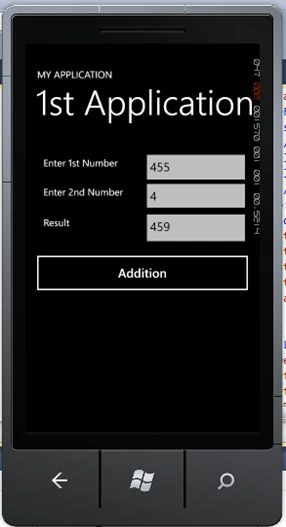
Figure 2
Now write one more code for showing the result in the messagebox. You can add only one line for the message box.
MessageBox.Show(“YourContent”)
MainPage.xaml.cs
- using System;
- using System.Collections.Generic;
- using System.Linq;
- using System.Net;
- using System.Windows;
- using System.Windows.Controls;
- using System.Windows.Documents;
- using System.Windows.Input;
- using System.Windows.Media;
- using System.Windows.Media.Animation;
- using System.Windows.Shapes;
- using Microsoft.Phone.Controls;
- namespace WriteFirstApplication
- {
- public partial class MainPage : PhoneApplicationPage
- {
- // Constructor
- public MainPage()
- {
- InitializeComponent();
- }
- private void btnadd_Click(object sender, RoutedEventArgs e)
- {
- int result = Convert.ToInt32(txtfirst.Text)+Convert.ToInt32(txtsecond.Text);
- MessageBox.Show("Addition of "+ txtfirst.Text +"&"+ txtsecond.Text +"=" +result.ToString());
- }
- }
- }
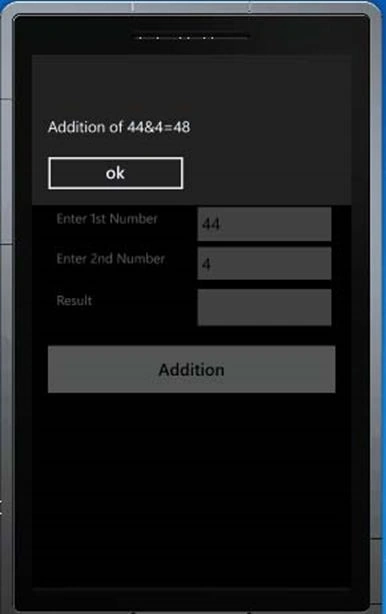
Figure 3
Ibrahim ErsoyPosted Mar 3, 2016, 3:11 AM
Nice one Nipesh :) Keep writing
sreenivasa kPosted Aug 17, 2015, 6:22 PM
nice
Pankaj Kumar ChoudharyPosted Aug 17, 2015, 9:49 AM
Good content
Pankaj Kumar ChoudharyPosted Aug 17, 2015, 9:46 AM
Good content
Sibeesh VenuPosted Aug 17, 2015, 8:49 AM
Nice Share
Karthikeyan KPosted Aug 17, 2015, 5:58 AM
Thanks for nice article...
Vaikesh K PPosted Aug 17, 2015, 4:47 AM
Nice article :)
Mohammed IbrahimPosted Aug 17, 2015, 4:36 AM
great..
Rajeesh MenothPosted Aug 17, 2015, 4:33 AM
Good One
Nilesh JadavPosted Aug 17, 2015, 4:26 AM
Great Tutorial sir
Harpreet SinghPosted Jul 25, 2015, 5:25 AM
perfect for beginners
Sibeesh VenuPosted Jul 24, 2015, 4:13 AM
Nice Share. Thank you
Nipesh JanghelPosted Jul 24, 2015, 3:27 AM
Thanks @sharad
SharadPosted Jul 24, 2015, 3:17 AM
nice....
Santhakumar MunuswamyPosted Jul 23, 2015, 2:44 PM
Thanks for nice article:)
Gopi ChandPosted Jul 23, 2015, 11:23 AM
Great work
RakeshPosted Jul 23, 2015, 9:40 AM
Nice one sir
Vipul MalhotraPosted Jul 23, 2015, 6:32 AM
Nice Article
Sibeesh VenuPosted Jul 23, 2015, 5:25 AM
Nice Share.
Nilesh JadavPosted Jul 23, 2015, 5:11 AM
Nice one sir