

Introduction
Welcome again! Today, I'm going to talk about handling data in JavaScript Object Notation (JSON) format and we'll be using the Windows Phone “Hub App” template. It's going to be fun to work with this awesome template and I hope after exploring the “Hub App” and “JSON Data”, you'll be able to do your own stuff and write a great Windows Phone App. If you have followed my previous articles, as a great Windows Phone developer your journey starts here. We'll create an awesome app called “Letters of John Keats”. JK is one of my favorite poets and we're going to make this app that will have the letters to his girlfriend “Fanny Brawne”. So let's get cracking on “Hub App” working with “JSON”.
Creating a New Project
First of all create a new project and select the “Hub App” template. Provide it the name “HubApp”.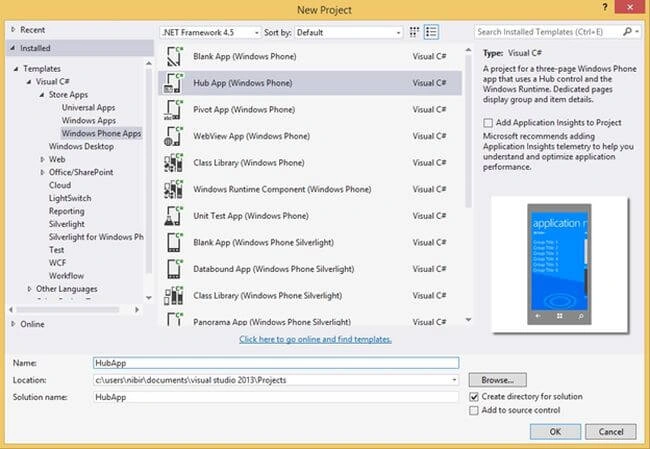
Figure 1
You now have all the following files in your Solution Explorer.
Figure 2
Working with JSON Data
So, first is first, we'll replace the “SampleData.json” with our own file. The simple way to do that is to erase all the data in the existing file and paste your data there. We will replace it with our own data here.
- {"Groups":[
- {
- "Title": "Letters of John Keats",
- "Subtitle": "Selected Love Letters to Fanny Brawne",
- "Items": [
- {
- "Title": "July 3, 1819",
- "Subtitle": "Shanklin, Isle of Wight, Thursday",
- "Content": "My dearest Lady - I am glad I had ... please so."
- }
- ]
- }
- ]
- }
Here is sample data for our application. We've used the JSON format. JSON is a lightweight data interchange format. If you notice, you can realize that “JSON” is nothing but an “Array” object. Here, the “Items” has two items and the items are surrounded by square brackets (“[]”), the last item doesn't have a comma at the end in line number 15. Mainly every last element doesn't need a comma at the end. You can declare as many items as you need. You can also have many group items. This is the basic format of “JSON”. You can learn the basics of JSON at: Introducing JSON.
Retrieving the JSON Data
So, our app local data is set, now we need to modify the class “SampleDataSouce.cs” like this.
- // Sample Data Item Class
- public class SampleDataItem
- {
- public SampleDataItem(String title, String subtitle, String content)
- {
- this.Title = title;
- this.Subtitle = subtitle;
- this.Content = content;
- }
- public string Title { get; private set; }
- public string Subtitle { get; private set; }
- public string Content { get; private set; }
- public override string ToString()
- {
- return this.Title;
- }
- }
- // Sample Data Group Class
- public class SampleDataGroup
- {
- public SampleDataGroup(String title, String subtitle)
- {
- this.Title = title;
- this.Subtitle = subtitle;
- this.Items = new ObservableCollection<SampleDataItem>();
- }
- public string Title { get; private set; }
- public string Subtitle { get; private set; }
- public ObservableCollection<SampleDataItem> Items { get; private set; }
- public override string ToString()
- {
- return this.Title;
- }
- }
- public sealed class SampleDataSource
- {
- private static SampleDataSource _sampleDataSource = new SampleDataSource();
- private ObservableCollection<SampleDataGroup> _groups = new ObservableCollection<SampleDataGroup>();
- public ObservableCollection<SampleDataGroup> Groups
- {
- get { return this._groups; }
- }
- public static async Task<IEnumerable<SampleDataGroup>> GetGroupsAsync()
- {
- await _sampleDataSource.GetSampleDataAsync();
- return _sampleDataSource.Groups;
- }
- public static async Task<SampleDataGroup> GetGroupAsync(string uniqueId)
- {
- await _sampleDataSource.GetSampleDataAsync();
- // Simple linear search is acceptable for small data sets
- var matches = _sampleDataSource.Groups.Where((group) => group.Title.Equals(uniqueId));
- if (matches.Count() == 1) return matches.First();
- return null;
- }
- public static async Task<SampleDataItem> GetItemAsync(string uniqueId)
- {
- await _sampleDataSource.GetSampleDataAsync();
- // Simple linear search is acceptable for small data sets
- var matches = _sampleDataSource.Groups.SelectMany(group => group.Items).Where((item) => item.Title.Equals(uniqueId));
- if (matches.Count() == 1) return matches.First();
- return null;
- }
- private async Task GetSampleDataAsync()
- {
- if (this._groups.Count != 0)
- return;
- Uri dataUri = new Uri("ms-appx:///DataModel/SampleData.json");
- StorageFile file = await StorageFile.GetFileFromApplicationUriAsync(dataUri);
- string jsonText = await FileIO.ReadTextAsync(file);
- JsonObject jsonObject = JsonObject.Parse(jsonText);
- JsonArray jsonArray = jsonObject["Groups"].GetArray();
- foreach (JsonValue groupValue in jsonArray)
- {
- JsonObject groupObject = groupValue.GetObject();
- SampleDataGroup group = new SampleDataGroup(groupObject["Title"].GetString(),
- groupObject["Subtitle"].GetString());
- foreach (JsonValue itemValue in groupObject["Items"].GetArray())
- {
- JsonObject itemObject = itemValue.GetObject();
- group.Items.Add(new SampleDataItem(itemObject["Title"].GetString(),
- itemObject["Subtitle"].GetString(),
- itemObject["Content"].GetString()));
- }
- this.Groups.Add(group);
- }
- }
- }
Another approach of “JSON” you can have is given below.
- {"Groups":[
- {
- "Title": "Letters of John Keats",
- "Subtitle": "Selected Love Letters to Fanny Brawne",
- "Items": [
- {
- "Title": "July 3, 1819",
- "Subtitle": "Shanklin, Isle of Wight, Thursday",
- "Content":
- [
- "My dearest Lady - I am glad I had ... little mad.",
- ...
- "Present my Compliments to your mother, ... so."
- ]
- }
- ]
- }
- ]
- }

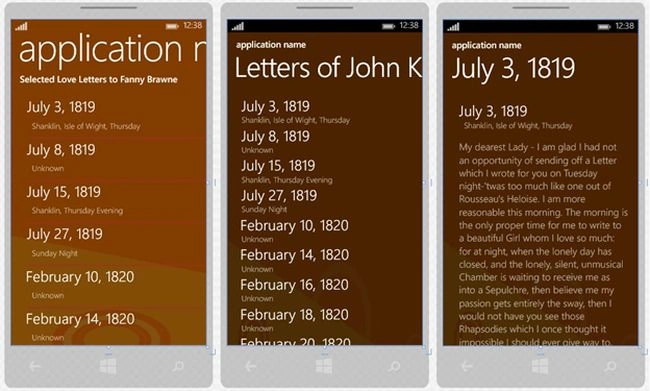
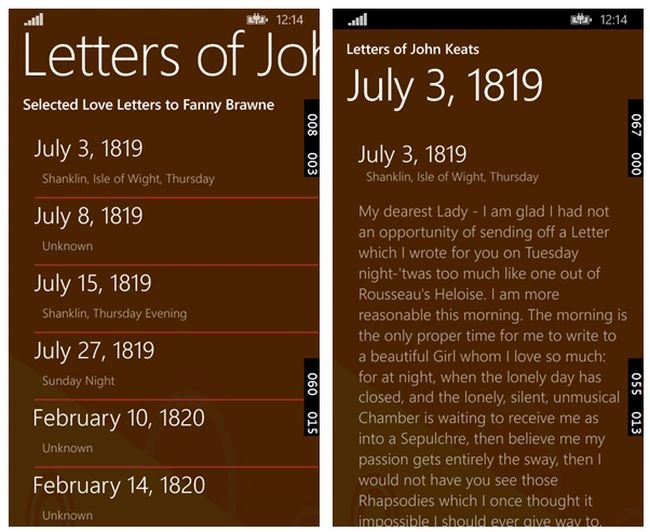 Figure 6
Sumit JoshiPosted Aug 13, 2015, 9:27 AM
Thanks for Sharing.
Malvik BhavsarPosted Aug 6, 2015, 12:36 PM
Nice one...:)
Maurilio FilhoPosted Nov 3, 2014, 6:49 AM
How would this example to work with external JSON data could give some example?