

Introduction
You may work in any Mobile Application Development; Web Browser Integration is an important feature to access a webpage.
We are concerned with Windows Phone Development only.
There is a Web Browser Control available in the Toolbox.
Background
Microsoft has kept it simple for developers. So, let's implement it on the Project File.
Procedures
Step 1: First, create a UI that looks like: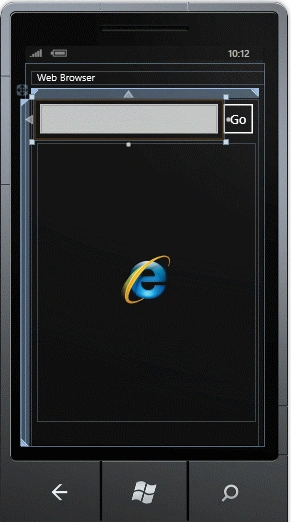
Here we have a TextBox, a Web Browser Control (Big Box) and a Button (Go).
Step 2: We will now code the Click event of the Go Button.
Here, webBrowser1 is name of the WebBrowser's control and Source is the Property.
And this property accepts only a URI type data.
Step 3: When you run this project you will get: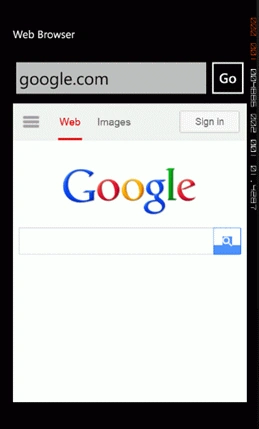
We have now discovered how a Web Browser Control works.
Let's add some Chrome to it.
Like a Progress Bar!
Step 1: Before doing anything, add "using Microsoft.Phone.Shell;"
Step 2: Create an Object as in the following:
ProgressIndicator prog = new ProgressIndicator();
Step 3: We need to add a few codes as in the following: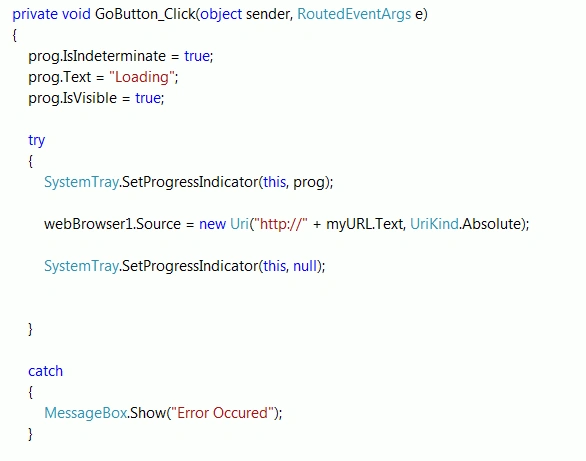
The first three lines are self-explanatory.
In the try {} block, I have enabled the System Tray Progress Bar and ed two arguments. The first is the self-page (this) and the second is the object of the Progress Bar.
When the Browser Control is executed successfully it terminates the Progress Bar (null).
Conclusion
Whenever you are in a situation to open a URL link or HTML page then you have two options to handle such a situation. First is right here and the second is the Web Browser Launcher that will be described in a future article.
Join the conversation! Your thoughts help the community grow.