

How to develop WPF application?
A WPF application can be developed using either of the programming languages in .Net framework - C# or Visual Basic. Two programming methods should be used to develop the application.
- Markup Programming - Markup programming is generally used to design the user interface for the WPF application. It contains various components like pages, dialog boxes, buttons and other types of controls. Each element defined in the markup programming will have one WPF class.
- Code Behind Programming - it's generally used to provide the functionality for the various elements available in the user interface. Generally event handlers play a vital role in implementing the functionality for each element.
- Desktop Applications - desktop applications are also called standalone applications which will be installed in your desktop.
- Web Applications - web applications developed here is also called a XAML a browser application which runs in web browser.
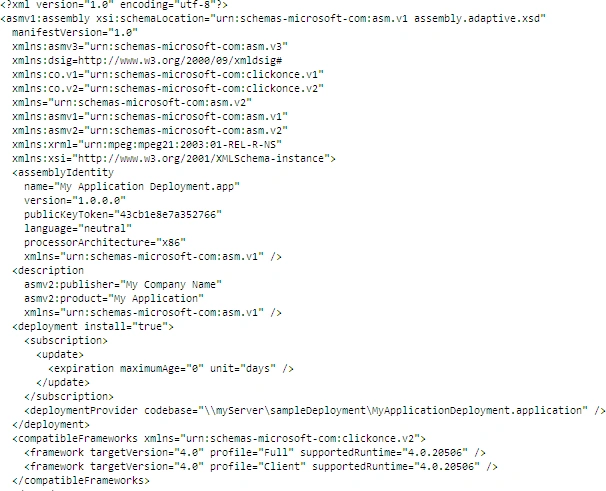
- Deployment manifest - Its just an XML file which references the click once application deployment which shows the current version and the other deployment settings. The following picture shows an example of Deployment Manifest XML file.
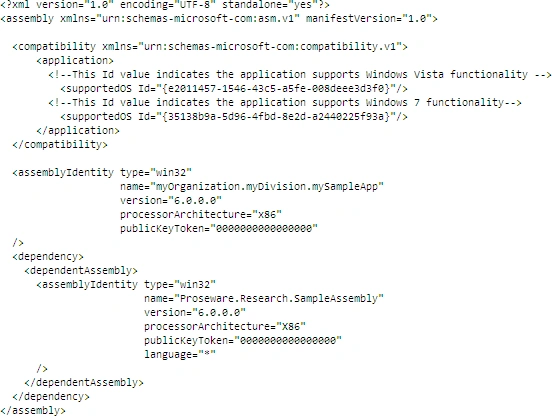
- Application manifest - it's just another XML file which identifies the shared and private side by side assemblies that an application should bind at run time. The following picture shows an example of Application Manifest XML file
- Executable code
Why WPF and Why Not default Windows Application
- Data binding is better in WPF when compared with windows application
- Easier and require simple steps to develop
- Rich internet application through WPF
- Graphical and Interactive User Interface
- 2D and 3D graphics can be done through minimal code
- Business applications are much easier to develop using WPF with all functionalities
Join the conversation! Your thoughts help the community grow.