

Introduction
Are you bored with the default skin of the Windows Phone 8 Emulator? You can change the look of your Windows Phone 8 emulator using the WP8 Emulator Skin Switcher to make it look like a Nokia Lumia 920, HTC 8X or Samsung Ativ S.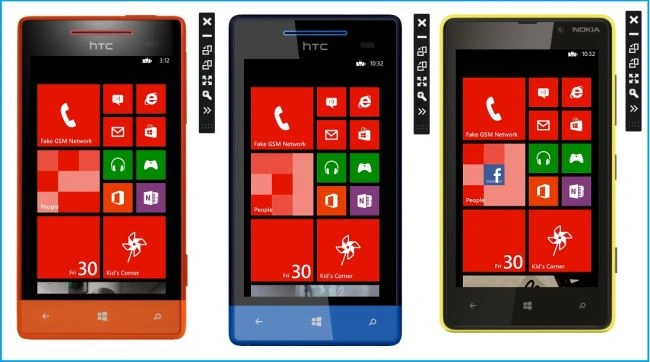
If you want to change the border of the Windows Phone 7 emulator default skin you may visit Windows Phone 7 Emulator Skin Switcher.
Description
In the Windows Phone 8 Emulator Skin Switcher you can choose among 17 skins from all the currently available Windows Phone 8 devices.
WVGA
- WP8 Default
- HTC 8S Blue
- HTC 8S Orange
- Nokia Lumia 820 Black
- Nokia Lumia 820 Cyan
- Nokia Lumia 820 Red
- Nokia Lumia 820 White
- Nokia Lumia 820 Yellow
WXGA
- WP8 Default
- Nokia Lumia 920 Black
- Nokia Lumia 920 Grey
- Nokia Lumia 920 Red
- Nokia Lumia 920 White
- Nokia Lumia 920 Yellow
720p
- WP8 Default
- HTC 8X Black
- HTC 8X Blue
- HTC 8X Neon
- HTC 8X Red
- Samsung Ativ S
Note: The Windows Phone 7 emulator skin switcher currently has 25 skins.
Using the emulator skin switcher is easy. Download the latest release, install it and launch the application, let's follow a few steps to use a skin switcher.
1. Download and Instal
Download the WP8 Emulator Skin Switcher from CodePlex. Then unzip to a folder. You will then find a WP8 Emulator Skin Switcher.exe file. To install it double-click on it.
And do two more steps displayed in the wizards. Click install then after some time the installation wizard will be closed and will ask to finish, then our WP8 Emulator Skin Switcher is as in the following:
2. Launch WP8 Emulator Skin Switcher
We can launch the Skin Switcher in either of the following two ways:
- From Start Screen, search for "WP8 Emulator Skin Switcher" and tap on it.
- Otherwise go to "C:\Program Files (x86)\Geert van der Cruijsen\WP8 Emulator Skin Switcher" and double-click on the "wp8skinswitcher.exe" file.
So from any one of the preceding steps you can launch it. Just start the skin switcher, select a skin and restart your emulator. You can select up to 3 skins at the same time. 1 for each emulator resolution. However now, I selected the following emulator (WVGA:HTC 8s Orange):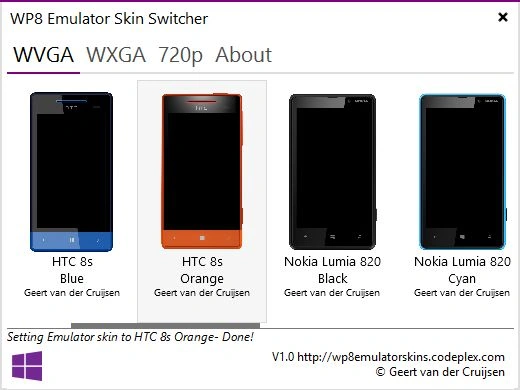
3. How to test my app with new skinned emulator
Open "VS Express for Windows Phone" and create a new project (for example, WP8EmulatorSkinTest).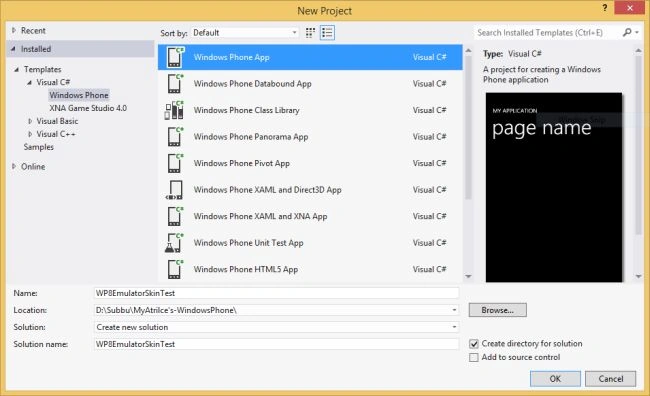
Choose the emulator "Emulator WVGA 512 MB".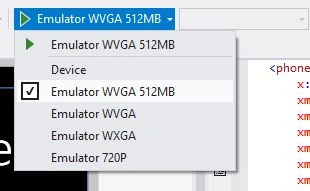
Press "F5" to run the app. Now our newly selected skin switcher emulator will be launched as in the following: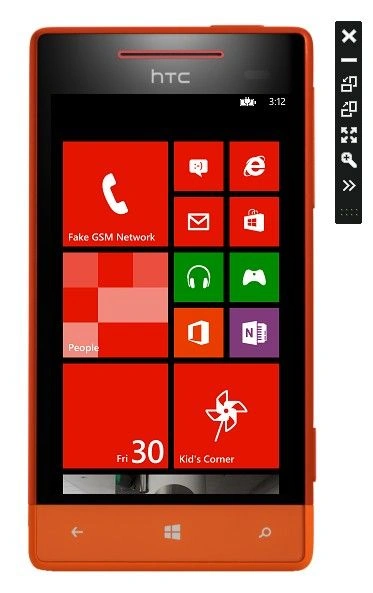
Summary
In this article, we learned how to change the default Emulator skin border with the WP8 Emulator Skin Switcher.
This article is also available at my original blog.
Gowtham RajamanickamPosted Apr 18, 2015, 3:58 AM
good one...